
1. Увод
The TP-Link RE455 AC1750 WiFi Range Extender is designed to expand your existing WiFi coverage, eliminating dead zones and providing a high-speed, reliable wireless connection throughout your home. This device supports dual-band WiFi (2.4 GHz and 5 GHz) with speeds up to 1750 Mbps (450 Mbps on 2.4 GHz and 1300 Mbps on 5 GHz) and includes a Gigabit Ethernet port for wired connections. It is compatible with all standard internet routers and gateways.
2. Безбедносне информације
- Увек се придржавајте основних мера безбедности како бисте смањили ризик од пожара, струјног удара и повреда особа.
- Не излажите овај уређај води, ватри, влази или врућим срединама.
- Користите само адаптер за напајање који сте добили уз уређај.
- Уверите се да је уређај постављен у добро проветреном простору.
- Avoid placing the range extender near strong signal obstructions such as thick walls (brick, marble, concrete, armored glass) or metal objects, as these can significantly degrade WiFi performance.
- Keep the device away from sources of interference like Bluetooth devices, microwave ovens, and refrigerators.
- For optimal performance, place your main router and the range extender in elevated positions, avoiding enclosed spaces like cupboards.
3. Садржај пакета
Пакет треба да садржи следеће ставке:
- TP-Link RE455 AC1750 WiFi Range Extender Unit
- Водич за брзу инсталацију
4. Физички претекview
The TP-Link RE455 features a compact design with integrated power plug and three external antennas for enhanced signal coverage. It includes a Gigabit Ethernet port for wired connections and various indicators and buttons for easy management.
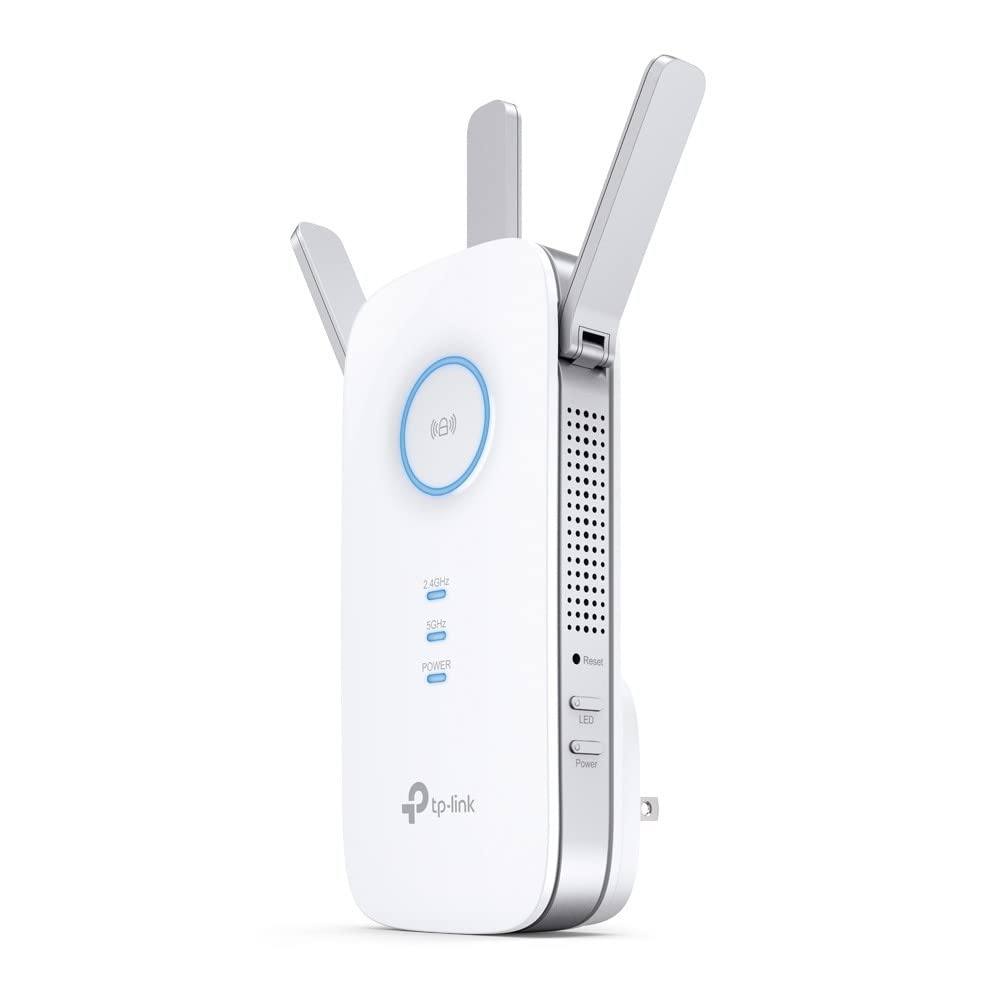
Image: TP-Link RE455 AC1750 WiFi Range Extender showing its front, side, and back with dimensions (Height: 16.3cm, Width: 7.64cm, Depth: 6.65cm). The device has three adjustable external antennas, ventilation holes, a power plug, and a Gigabit Ethernet port.
Кључне компоненте:
- Спољне антене: Three adjustable antennas to optimize WiFi signal direction and strength.
- Утикач: Integrated for direct wall outlet connection.
- Гигабитни Етхернет порт (РЈ45): For connecting wired devices like PCs, gaming consoles, or smart TVs, or for use in Access Point mode.
- ВПС дугме: For quick and easy setup with a WPS-enabled router.
- Дугме за ресетовање: To restore the device to factory default settings.
- Дугме за напајање: Да бисте укључили или искључили уређај.
- Signal Indicator LED: Provides visual feedback on the signal strength received from the main router, helping to determine the optimal placement for the extender.
5. Подешавање
The RE455 can be set up using two primary methods: via the WPS button or through the TP-Link Tether app/web претраживач.
Метод 1: Коришћење WPS дугмета (препоручује се за брзо подешавање)
- Укључите RE455 у електричну утичницу близу главног рутера.
- Притисните WPS дугме на главном рутеру.
- Within two minutes, press the WPS button on the RE455. The RE LED on the extender will start blinking.
- Once the connection is established, the RE LED will turn solid, indicating a successful connection. The extender will create a new WiFi network with the same name as your main network, appended with "_EXT" (e.g., MyHomeWiFi_EXT). The password will be the same as your main WiFi network.
Метод 2: Коришћење апликације TP-Link Tether или Web Бровсер
- Укључите RE455 у електричну утичницу.
- Download the TP-Link Tether app from your mobile device's app store, or open a web browser on a computer and navigate to the default setup address (usually тплинкрепеатер.нет).
- Connect your mobile device or computer to the RE455's default WiFi network (e.g., "TP-Link_Extender" or "TP-Link_RE455"). The default password can be found on the device label.
- Follow the on-screen instructions in the Tether app or web interface to select your main WiFi network and enter its password.
- The RE455 will connect to your main router and extend its network.
For detailed video tutorials on setup, search for "Tplink Repeater Installation" on YouTube.
6. Радни режими
The RE455 supports two main operating modes:
6.1. Range Extender Mode (Default)
In this mode, the RE455 wirelessly connects to your existing router's WiFi network and extends its coverage to areas with weak or no signal. This is the most common mode for expanding your home WiFi.
- Connects wirelessly to your main router.
- Extends the WiFi signal to eliminate dead zones.
- The Gigabit Ethernet port can be used to connect a wired device (e.g., PC, game console) to the extended network.
6.2. Режим приступне тачке (АП)
In AP mode, the RE455 transforms your existing wired network into a wireless one. This is useful if you have an Ethernet connection in an area but no WiFi, or if you want to create a new WiFi network.
- Connects to your router via an Ethernet cable through its Gigabit Ethernet port.
- Creates a new WiFi network, providing wireless access to the wired connection.
- This mode can replace the WiFi functionality of a less performant router.
7. Optimal Placement Guidelines
Proper placement of your RE455 is crucial for maximizing WiFi coverage and performance.
- Midway Point: Place the range extender roughly halfway between your router and the area where you need improved WiFi coverage. It should be within the range of your main router's WiFi signal.
- Индикатор сигнала: Utilize the Signal Indicator LED on the RE455 to find the best location. A solid blue light typically indicates a good connection to the router.
- Избегавајте препреке: Walls made of brick, marble, concrete, or armored glass, as well as large metal objects, can significantly block WiFi signals. Position the extender to minimize such obstructions.
- повишена позиција: Placing the extender in a higher position, such as on a shelf, can help signals travel further and avoid ground-level interference.
- Смањите сметње: Keep the extender away from other electronic devices that emit radio frequencies, such as cordless phones, Bluetooth devices, microwave ovens, and large appliances like refrigerators.
8. Одржавање
- Чишћење: Нежно обришите уређај меком, сувом крпом. Не користите течна или аеросолна средства за чишћење.
- Ажурирања фирмвера: Периодично проверавајте ТП-Линк webсајт или апликацију Tether за ажурирања фирмвера како бисте осигурали оптималне перформансе и безбедност.
- Поновно покретање: If you experience connectivity issues, try restarting the device by unplugging it from the power outlet for a few seconds and then plugging it back in.
КСНУМКС. Решавање проблема
- Нема приступа интернету:
- Уверите се да ваш главни рутер има активну интернет везу.
- Verify the RE455 is properly connected to your main router (check the Signal Indicator LED).
- Try repositioning the RE455 closer to your main router.
- Weak Signal or Slow Speed:
- Relocate the RE455 to a position indicated by a strong signal (blue LED).
- Minimize physical obstructions and interference sources between the extender and your devices.
- Ensure your main router is also optimally placed.
- Cannot Connect to the Extender's WiFi:
- Confirm you are using the correct WiFi password for the extended network.
- If you changed the network name or password, ensure your devices are updated.
- Try restarting both the extender and your device.
- Фацтори Ресет: If issues persist, you can perform a factory reset by pressing and holding the Reset button for approximately 5-10 seconds until the LEDs flash. After a reset, you will need to reconfigure the extender.
10. Спецификације
| Број модела | РЕ455 |
| Вирелесс Стандардс | IEEE 802.11ac/n/a (5 GHz), IEEE 802.11n/g/b (2.4 GHz) |
| Брзина преноса података | Up to 1750 Mbps (1300 Mbps at 5 GHz, 450 Mbps at 2.4 GHz) |
| Фрекуенци Бандс | Двопојасни опсег (2.4 GHz и 5 GHz) |
| Антене | 3 спољне антене |
| Етхернет порт | 1 x 10/100/1000 Mbps Gigabit Ethernet Port (RJ45) |
| Оперативни режими | Проширивач домета/приступна тачка |
| Димензије (Ш к Д к В) | 7.64 cm x 6.65 cm x 16.3 cm (approximate, based on image) |
| Тежина | 7.41 унце (приближно 210 грама) |
| Боја | Бела |
| Област покривености | Up to 200 square meters (2150 sq ft) |
| Компатибилни уређаји | Routers, Wireless Access Points |
11. Гаранција и подршка
The TP-Link RE455 AC1750 WiFi Range Extender comes with a Двогодишња гаранција произвођача.
For technical support, warranty claims, and more detailed product information, please visit the official TP-Link website or contact their customer support. Keep your purchase receipt for warranty purposes.