
1. Увод
Thank you for choosing the FeinTech LED Desk Lamp LTL00600. This high-quality desk lamp is designed to provide optimal lighting for your workspace while offering convenient features such as a USB charging port, adjustable brightness, and customizable color temperature. Please read this manual thoroughly before use to ensure proper operation and to maximize the lifespan of your product.
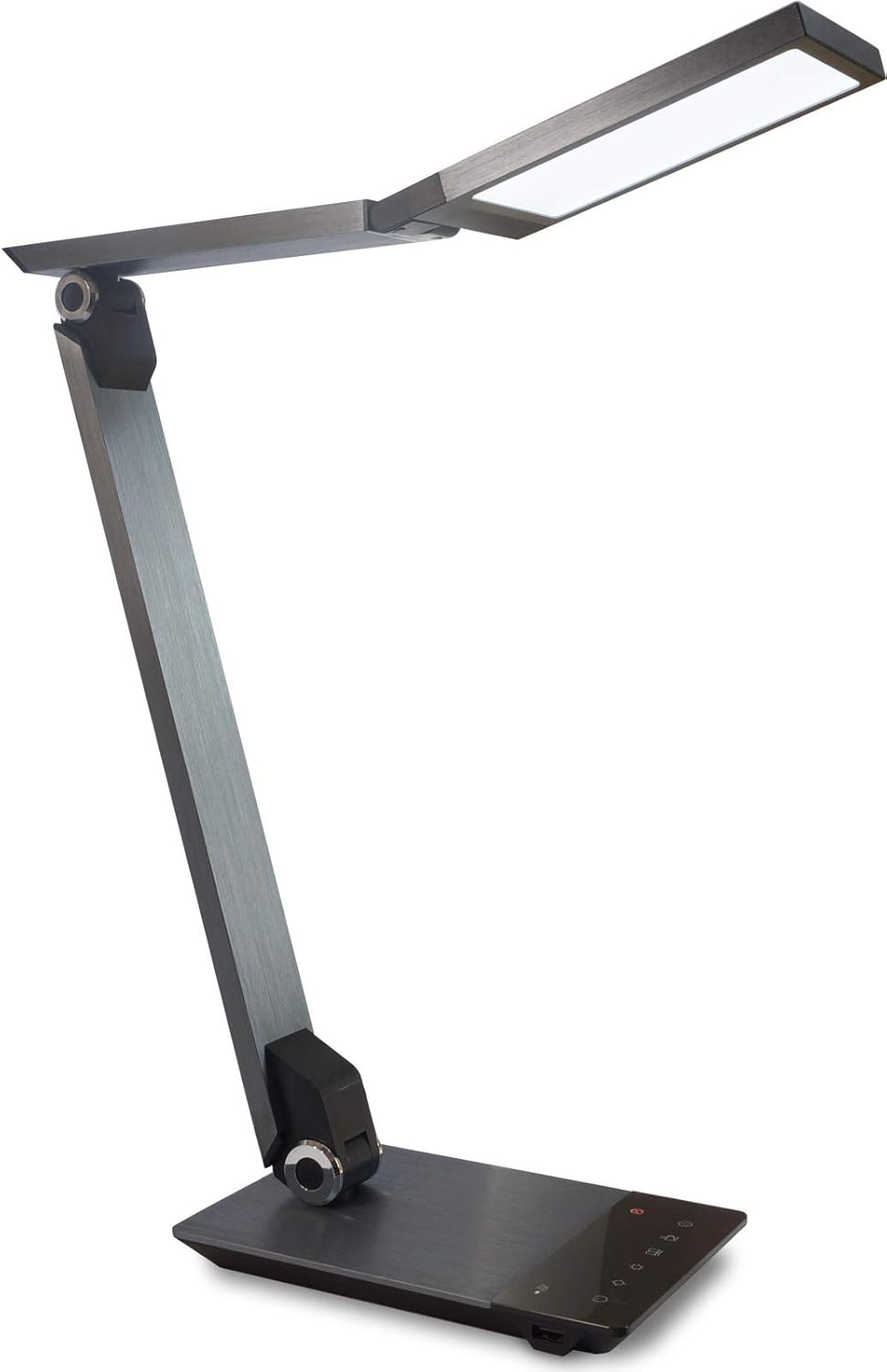
Image 1.1: FeinTech LED Desk Lamp LTL00600. This image displays the lamp in its upright position, showcasing its brushed aluminum finish and sleek design.
2. Безбедносна упутства
To prevent damage or injury, please observe the following safety precautions:
- Уверите се да је адаптер за напајање повезан са одговарајућом утичницом.
- Не излажите лamp води или прекомерној влажности.
- Avoid disassembling or modifying the lampПоправке треба да обавља само квалификовано особље.
- Задржи лamp даље од извора топлоте и директне сунчеве светлости.
- Очистите лamp only with a soft, dry cloth. Do not use abrasive cleaners or solvents.
- Не гледајте директно у ЛЕД извор светлости дуже време.
3. Садржај пакета
Молимо вас да проверите да ли су све ставке присутне у пакету:
- ФеинТек ЛЕД сто Лamp (Model: LTL00600)
- Адаптер за напајање (12В/2А)
4. Производ је готовview
Familiarize yourself with the components of your FeinTech LED Desk Lamp:
- Lamp глава: Contains the LED light source.
- Подесиве руке: Multiple joints for flexible positioning.
- база: Provides stability and houses the control panel and USB port.
- Контролна табла: Touch-sensitive buttons for power, brightness, color temperature, and timer.
- УСБ пуњач: Located on the side of the base for device charging.

Слика 4.1: Одозго надоле view од лamp's base and control panel. This image highlights the touch-sensitive buttons for various functions.

Слика 4.2: Бочна страна view од лamp's base, showing the integrated USB charging port. This port allows for convenient charging of compatible devices.
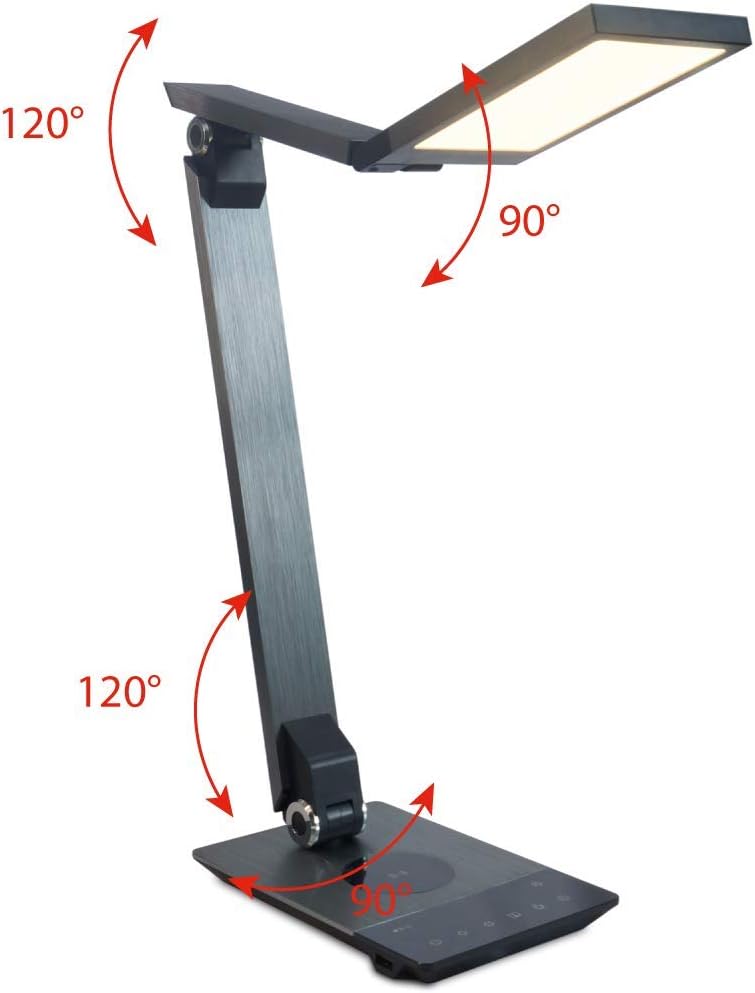
Image 4.3: Diagram illustrating the articulation angles of the lamp's joints. The lamp head can rotate 90 degrees, the upper arm 120 degrees, and the lower arm 120 degrees, allowing for flexible positioning.
5. Подешавање
Пратите ове кораке за почетно подешавање:
- Raspakujte: Пажљиво уклоните све компоненте из паковања.
- Пласман: Ставите лamp base on a stable, flat surface. Ensure there is enough space for the lamp to be adjusted without obstruction.
- Прикључите напајање: Insert the power adapter cable into the DC input port on the back of the lamp база. Укључите адаптер за напајање у стандардну електричну утичницу.
6. Упутство за употребу
The FeinTech LED Desk Lamp features intuitive touch controls on its base.
6.1 Укључивање/искључивање
- Додирните Дугме за напајање on the control panel (refer to Image 4.1) to turn the lamp укључено или искључено.
6.2 Brightness Adjustment (Dimming)
- Са лamp on, touch and hold the Бригхтнесс Уп or Бригхтнесс Довн buttons (refer to Image 4.1) to steplessly adjust the light intensity.
- Тхе лamp base will vibrate slightly when the minimum or maximum brightness level is reached.
6.3 Подешавање температуре боје
- Са лamp on, touch and hold the Color Temperature Up or Color Temperature Down buttons (refer to Image 4.1) to steplessly adjust the light color from warm white (2700K) to cool white (6500K).
- Тхе лamp base will vibrate slightly when the minimum or maximum color temperature is reached.
6.4 Favorite Settings
- Тхе лamp allows you to store and recall 3 favorite light settings (brightness and color temperature).
- To save a setting: Adjust the brightness and color temperature to your desired level. Then, touch and hold one of the Омиљена дугмад (refer to Image 4.1) until the lamp flashes briefly, indicating the setting is saved.
- To recall a setting: Simply touch the corresponding Омиљено дугме.
- The last used brightness and color temperature settings are automatically saved even after the lamp је искључен.
6.5 Функција УСБ пуњења
- Connect your smartphone or other compatible device to the USB charging port on the side of the lamp base (refer to Image 4.2) using a suitable USB cable.
- The intelligent USB port delivers up to 2.4A for fast charging.
- An LED indicator will signal ongoing and completed charging status.
6.6 Функција тајмера
- Додирните Дугме тајмера (refer to Image 4.1) to activate the timer function.
- The first touch activates a 3-minute timer.
- A second touch activates a 1-hour timer.
- Тхе лamp will automatically turn off after the selected time period.
7. Одржавање
За одржавање вашег лamp's appearance and functionality:
- Увек искључите лamp из напајања пре чишћења.
- Обришите лamp меком, сувом крпом која не оставља длачице.
- Do not use liquid or aerosol cleaners, as they may damage the finish or internal components.
- Avoid scratching the brushed aluminum surface.
КСНУМКС. Решавање проблема
Ако наиђете на проблеме са вашим лamp, погледајте следеће уобичајене проблеме и решења:
| Проблем | Могући узрок | Решење |
|---|---|---|
| Lamp се не укључује. | Нема напајања. | Check if the power adapter is securely connected to the lamp and the electrical outlet. Test the outlet with another device. |
| Пуњење преко USB-а не ради. | Уређај није компатибилан или је кабл неисправан. | Ensure your device is compatible with USB charging. Try a different USB cable. Verify the lamp је укључен. |
| Контроле на додир не реагују. | Привремени проблем са софтвером или напајањем. | Disconnect the power adapter for 30 seconds, then reconnect it. Ensure your fingers are clean and dry when operating the touch controls. |
9. Спецификације
| Број модела | ЛТЛ00600 |
| Димензије (Д к Ш к В) | 36 x 13.5 x 44 цм (приближно 14.2 x 5.3 x 17.3 инча) |
| Тежина | 1.84 кг (приближно 4.06 лбс) |
| Материјал | брушени алуминијум |
| Извор светлости | ЛЕД |
| Max. Light Output | 500 lumens (1000 lux at 40 cm distance) |
| Температура боје (ЦЦТ) | 2700 K (Warm White) to 6500 K (Cool White) |
| Power Consumption (Lamp само) | Макс. 10 В |
| Power Consumption (Lamp & Charging) | Макс. 22 В |
| УСБ излаз | До 2.4 А |
| Улазни волtagе (адаптер) | 12 В / 2 А |
| Тип прекидача | Додирните |

Image 9.1: Diagram showing the dimensions of the FeinTech LED Desk Lamp. Тхе лamp measures approximately 36 cm in length, 13.5 cm in width, and 44 cm in height.
10. Гаранција и подршка
FeinTech products are designed for reliability and performance. For warranty information or technical support, please refer to the warranty card included with your purchase or visit the official FeinTech webсајт. Молимо вас да сачувате доказ о куповини за потребе гаранције.