
1. Увод
Хвала вам на куповиниasing the ICON 12-inch Bluetooth Speaker. This manual provides detailed instructions for the safe and efficient operation of your new speaker. Please read this manual thoroughly before use and retain it for future reference.
2. Садржај пакета
- ICON 12-inch Bluetooth Speaker
- Повер Цабле
- Бежични микрофон
- Ремоте Цонтрол
- Упутство за употребу

Image: The ICON Bluetooth speaker shown with its included wireless microphone and remote control, highlighting the complete package contents.
3. Производ је готовview
The ICON 12-inch Bluetooth Speaker is a versatile audio system designed for various applications, offering powerful sound output and multiple connectivity options. It features a built-in rechargeable battery for portability and integrated wheels and a retractable handle for easy transport.

Слика: Фронт view of the ICON 12-inch Bluetooth Speaker, showcasing its robust design and blue illuminated woofer.

Слика: Позади view of the ICON 12-inch Bluetooth Speaker, displaying the main control panel and retractable handle.
Кључне карактеристике:
- Powerful 6000W PMPO Output
- Bluetooth Connectivity for Wireless Streaming
- USB and SD Card Playback
- 3.5 mm AUX ulaz
- Уграђени ФМ радио
- Улази за микрофон и гитару
- Rechargeable Battery for Extended Playtime
- Integrated Equalizer for Sound Customization
- TWS (True Wireless Stereo) Functionality for connecting multiple speakers
- ЛЕД светлосни ефекти

Image: Visual representation of the ICON Bluetooth Speaker's key features, including excellent sound quality, Bluetooth compatibility, AUX input, rechargeable battery, FM radio, and equalizer.
4. Подешавање
4.1 Почетно пуњење
Before first use, fully charge the speaker's internal battery. Connect the power cable to the AC INPUT port on the rear panel and plug it into a standard wall outlet. The charging indicator will illuminate. Charging time may vary.
4.2 Контролна табла прекоview
Familiarize yourself with the control panel located on the rear of the speaker.
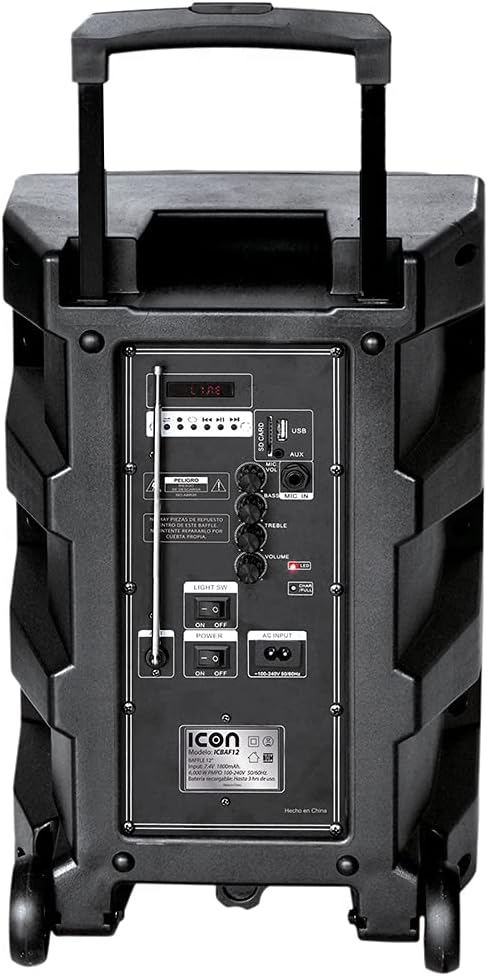
Слика: Детаљна view of the ICON speaker's rear control panel, showing various inputs, volume, treble, and bass controls.
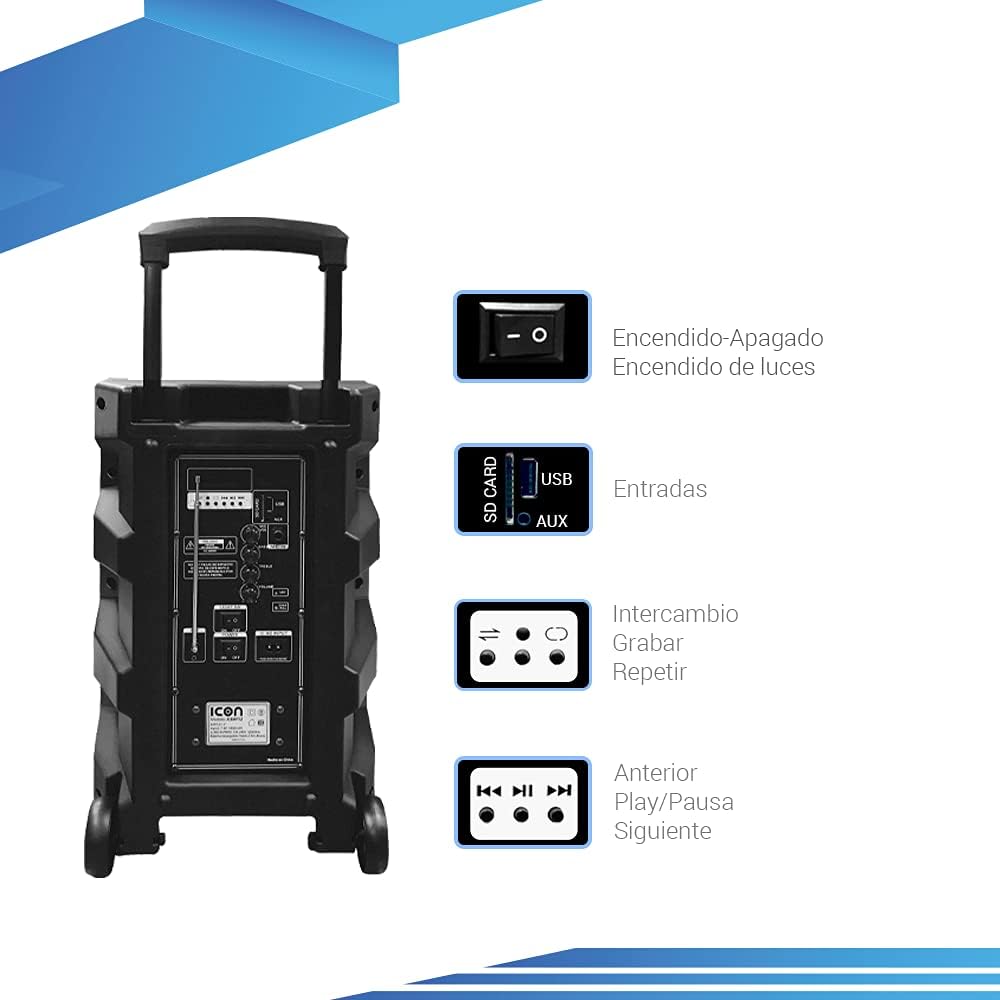
Image: Diagram illustrating key controls on the ICON speaker, including the power switch, light switch, input ports (SD Card, USB, AUX), and playback control buttons (Mode Switch, Record, Repeat, Previous, Play/Pause, Next).
- Прекидач: Turns the speaker On or Off.
- СВЕТЛО ЈЗ: Toggles the LED light effects On or Off.
- SD CARD / USB / AUX Inputs: For connecting external media or devices.
- Прекидач МОДЕ: Cycles through input modes (Bluetooth, USB, SD, AUX, FM).
- Дугме РЕЦОРД: Initiates recording (e.g., microphone input to USB/SD).
- Dugme REPEAT: Repeats the current track or playlist.
- PREVIOUS / PLAY/PAUSE / NEXT Buttons: Стандардне контроле за репродукцију медија.
- Дугме ВОЛУМЕ: Подешава главну јачину звука.
- TREBLE / BASS Knobs: Adjusts high and low frequencies.
- MIC INPUT / GUITAR INPUT: For connecting microphones and guitars.
5. Упутство за употребу
5.1 Укључивање/искључивање
To turn the speaker ON, flip the ПОВЕР switch to the 'ON' position. To turn it OFF, flip the switch to 'OFF'.
5.2 Блуетоотх упаривање
- Turn on the speaker. It will automatically enter Bluetooth pairing mode, indicated by a flashing Bluetooth icon on the display.
- На свом мобилном уређају (паметном телефону, таблету, лаптопу) омогућите Блутут и потражите доступне уређаје.
- Select "ICON Speaker" (or similar name) from the list of devices.
- Once paired, the speaker will emit a confirmation sound, and the Bluetooth icon will stop flashing. You can now play audio wirelessly from your device.
5.3 Репродукција са USB/SD картице
- Insert a USB flash drive or SD card (with MP3 audio fileс) у одговарајући порт.
- The speaker will automatically switch to USB/SD mode and begin playing the first compatible track. If not, press the МОДЕ button to select USB/SD mode.
- Користите ПРЕТХОДНА, ПЛАИ/ПАУСЕ, и НЕКСТ дугмад за контролу репродукције.
5.4 АУКС улаз
Повежите екстерни аудио уређај (нпр. MP3 плејер, рачунар) са АУКС input using a 3.5mm audio cable. Press the МОДЕ дугме док се не изабере AUX режим.
Рад са 5.5 FM радиом
- Притисните тастер МОДЕ дугме за пребацивање у режим ФМ радија.
- Притисните и држите ПЛАИ/ПАУСЕ дугме за аутоматско скенирање и чување доступних ФМ станица.
- Користите ПРЕТХОДНА и НЕКСТ дугмад за навигацију између сачуваних станица.
5.6 Microphone and Guitar Usage
Plug your microphone or guitar into the respective МИЦ ИНПУТ or ГУИТАР ИНПУТ jacks. Adjust the volume using the main ВОЛУМЕ knob and any dedicated microphone/guitar volume controls if present.
5.7 TWS (Прави бежични стерео) функција
The TWS function allows you to connect two ICON speakers wirelessly for a true stereo sound experience.
- Уверите се да су оба звучника укључена и да нису повезана ни са једним Bluetooth уређајем.
- On one speaker (this will be the master), press and hold the TWS button (if available, or a combination of buttons as per specific model instructions, often the 'Mode' button or a dedicated TWS button).
- The speaker will search for another TWS-compatible speaker. Once connected, you will hear a confirmation sound.
- Now, connect your mobile device to the master speaker via Bluetooth as described in section 5.2. Audio will play through both speakers in stereo.
6. Одржавање
6.1 Чишћење
Обришите спољашњост звучника меком, сувом крпом. Не користите абразивна средства за чишћење, воскове или раствараче. Уверите се да течности не уђу у отворе звучника.
6.2 Одржавање батерије
- Да бисте продужили век трајања батерије, избегавајте често потпуно пражњење батерије.
- Recharge the battery regularly, even if the speaker is not in use for extended periods (e.g., every 3 months).
- Чувајте звучник на хладном и сувом месту када се не користи.
6.3 Складиштење
When storing the speaker for a long time, ensure it is turned off and disconnected from the power source. Store it in a clean, dry environment away from extreme temperatures and direct sunlight.
КСНУМКС. Решавање проблема
| Проблем | Могући узрок | Решење |
|---|---|---|
| Звучник се не укључује. | Battery is depleted; Power cable not connected; Power switch is OFF. | Charge the speaker; Ensure power cable is securely connected; Flip POWER switch to ON. |
| Нема звука. | Јачина звука је прениска; изабран је погрешан режим уноса; уређај није правилно повезан. | Increase volume; Press MODE button to select correct input; Reconnect device/re-pair Bluetooth. |
| Блуетоотх веза не успева. | Звучник није у режиму упаривања; Уређај је предалеко; Сметње. | Ensure speaker is in pairing mode; Move device closer; Turn off other Bluetooth devices. |
| Изобличен звук. | Јачина звука је превисока; квалитет аудио извора је лош. | Смањите јачину звука; покушајте са другим извором звука. |
| Микрофон не ради. | Microphone not plugged in correctly; Microphone volume too low; Microphone batteries dead (if wireless). | Ensure microphone is fully inserted; Adjust microphone volume; Replace microphone batteries. |
8. Спецификације
| Феатуре | Спецификација |
|---|---|
| Број модела | US-ICBAF12 |
| Излазна снага | 6000 вати ПМПО |
| Величина звучника | 12 инча |
| Технологија повезивања | Bluetooth, USB, AUX, SD Card |
| Компатибилни уређаји | Лаптоп, паметни телефон |
| Извор напајања | Rechargeable Battery, AC Input |
| Димензије производа (Д к Ш к В) | 38 к 36.5 к 54 цм |
| Тежина производа | 7.62 кг |
| Посебне карактеристике | Bluetooth, FM Radio, Microphone Input, Guitar Input, TWS Function, LED Lights |

Image: Packaging of the ICON Bluetooth Speaker, displaying key features and product dimensions (37.5 cm x 36 cm x 54 cm).
9. Гаранција и подршка
This product is covered by a limited warranty. Please refer to the warranty card included in your package for specific terms and conditions. For technical support, troubleshooting assistance, or warranty claims, please contact your retailer or the manufacturer's customer service department. Keep your purchase receipt as proof of purchase.
For more information, visit the official ICON store on Amazon: ICON Store