

Увод
Thank you for choosing the XO B24 Foldable Bluetooth Headphones. This manual provides essential information for the safe and efficient use of your device. Please read it carefully before use and retain it for future reference.
The XO B24 headphones are designed for comfort and portability, featuring high-quality materials and a secure fit for an optimal audio experience.
Производ је завршенview
The XO B24 headphones offer both wired and wireless connectivity, a built-in microphone for calls, and a foldable design for easy storage and transport.
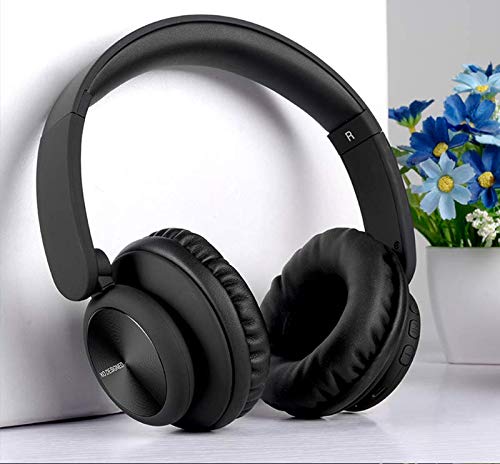
Image: XO B24 Foldable Bluetooth Headphones, showcasing their over-ear design and black color.
Спецификације
| Феатуре | Опис |
|---|---|
| Бранд Наме | XO |
| Назив модела | Б24 |
| Број модела | XO-B24 |
| Боја | Црно |
| Фактор облика слушалица | Он-Еар |
| Технологија повезивања | Жично, бежично (Блутут) |
| Прикључак за слушалице | 3.5 мм прикључак |
| Бежична комуникациона технологија | Блуетоотх |
| Посебне карактеристике | Includes Microphone, Foldable Design |
| Микрофон | Да |
| Поништавање буке | бр |
| Тип контроле | Контрола јачине звука, контрола додиром |
| Компатибилни уређаји | Мулти-девице |
| Баттери Рекуиред | Да |
Сетуп
1. Пуњење слушалица
- Повежите приложени УСБ кабл за пуњење са портом за пуњење на слушалицама.
- Укључите други крај USB кабла у компатибилан USB извор напајања (нпр. рачунар, зидни адаптер).
- The LED indicator will illuminate during charging and turn off or change color once fully charged.
2. Блуетоотх упаривање
- Уверите се да су слушалице потпуно напуњене.
- Press and hold the Power button on the headphones until the LED indicator flashes rapidly, indicating pairing mode.
- На свом уређају (паметном телефону, таблету, рачунару) омогућите Блутут и потражите доступне уређаје.
- Select "XO B24" from the list of found devices.
- Once paired, the LED indicator will stop flashing and may show a solid light or flash slowly.
3. Жична веза (опционо)
- Insert one end of the 3.5mm audio cable into the headphone jack on the XO B24.
- Plug the other end of the 3.5mm audio cable into the audio output jack of your device.
- The headphones will operate in wired mode, conserving battery life.
Упутство за употребу
Укључивање/искључивање
- Укључено: Притисните и држите дугме за напајање око 3 секунде док се ЛЕД индикатор не упали.
- Искључивање: Press and hold the Power button for approximately 3-5 seconds until the LED indicator turns off.
Репродукција музике
- Пусти/паузирај: Press the Multi-function button (often the Power button) once.
- Следећа нумера: Press and hold the Volume Up button or a dedicated 'Next' button.
- Претходни запис: Press and hold the Volume Down button or a dedicated 'Previous' button.
Контрола јачине звука
- Повећајте јачину звука: Притисните дугме за појачавање јачине звука.
- Смањи јачину звука: Притисните дугме за смањивање јачине звука.
Управљање позивима
- Одговори/заврши позив: Притисните вишенаменско дугме једном.
- Одбиј позив: Притисните и држите вишефункционално дугме око 2 секунде.
Фолдинг Мецханисм
- To fold the headphones for storage, gently rotate the earcups inwards towards the headband until they are compact.
- To unfold, reverse the process, ensuring the earcups click securely into place.
Одржавање
- Чишћење: Користите меку, суву крпу за чишћење слушалица. Не користите абразивна средства за чишћење или раствараче.
- Складиштење: When not in use, store the headphones in a cool, dry place, away from direct sunlight and extreme temperatures. Utilize the foldable design for compact storage.
- Одржавање батерије: Да бисте продужили век трајања батерије, избегавајте често потпуно пражњење слушалица. Редовно их пуните, чак и ако их не користите стално.
- Избегавајте влагу: Држите слушалице даље од воде и прекомерне влаге.
Решавање проблема
| Проблем | Решење |
|---|---|
| Слушалице се не укључују. | Уверите се да су слушалице потпуно напуњене. Прикључите их на извор напајања и покушајте поново. |
| Није могуће упаривање преко Bluetooth-а. | Make sure the headphones are in pairing mode (LED flashing rapidly). Disable and re-enable Bluetooth on your device. Move closer to the headphones. |
| Нема звука или је јачина звука ниска. | Check the volume levels on both the headphones and your connected device. Ensure the headphones are properly paired or the 3.5mm cable is securely connected. |
| Квалитет звука је лош. | Ensure there are no obstructions between the headphones and your device. Try moving closer to your device. Disconnect and reconnect the Bluetooth connection. |
| Микрофон не ради. | Ensure the headphones are properly connected and selected as the audio input device on your system. Check if the microphone is muted on your device. |
Гаранција и подршка
The XO B24 Foldable Bluetooth Headphones come with a standard manufacturer's warranty. Please refer to the warranty card included in your product packaging for specific terms and conditions.
For technical support, troubleshooting assistance, or warranty claims, please contact your retailer or the official XO customer service. Contact information can typically be found on the product packaging or the manufacturer's webсајту.


