
Увод
The EVOLVEO EASYPHONE FM is a user-friendly mobile phone designed for straightforward communication. It features large, separated keys, a clear display, and essential functions to ensure ease of use. This manual provides instructions for setting up, operating, and maintaining your device.
1. Садржај пакета
Молимо вас да проверите пакет за следеће ставке:
- EVOLVEO EASYPHONE FM Mobile Phone
- Доцк за пуњење
- АЦ адаптер
- Li-ion 1000 mAh Battery
- Упутство за употребу
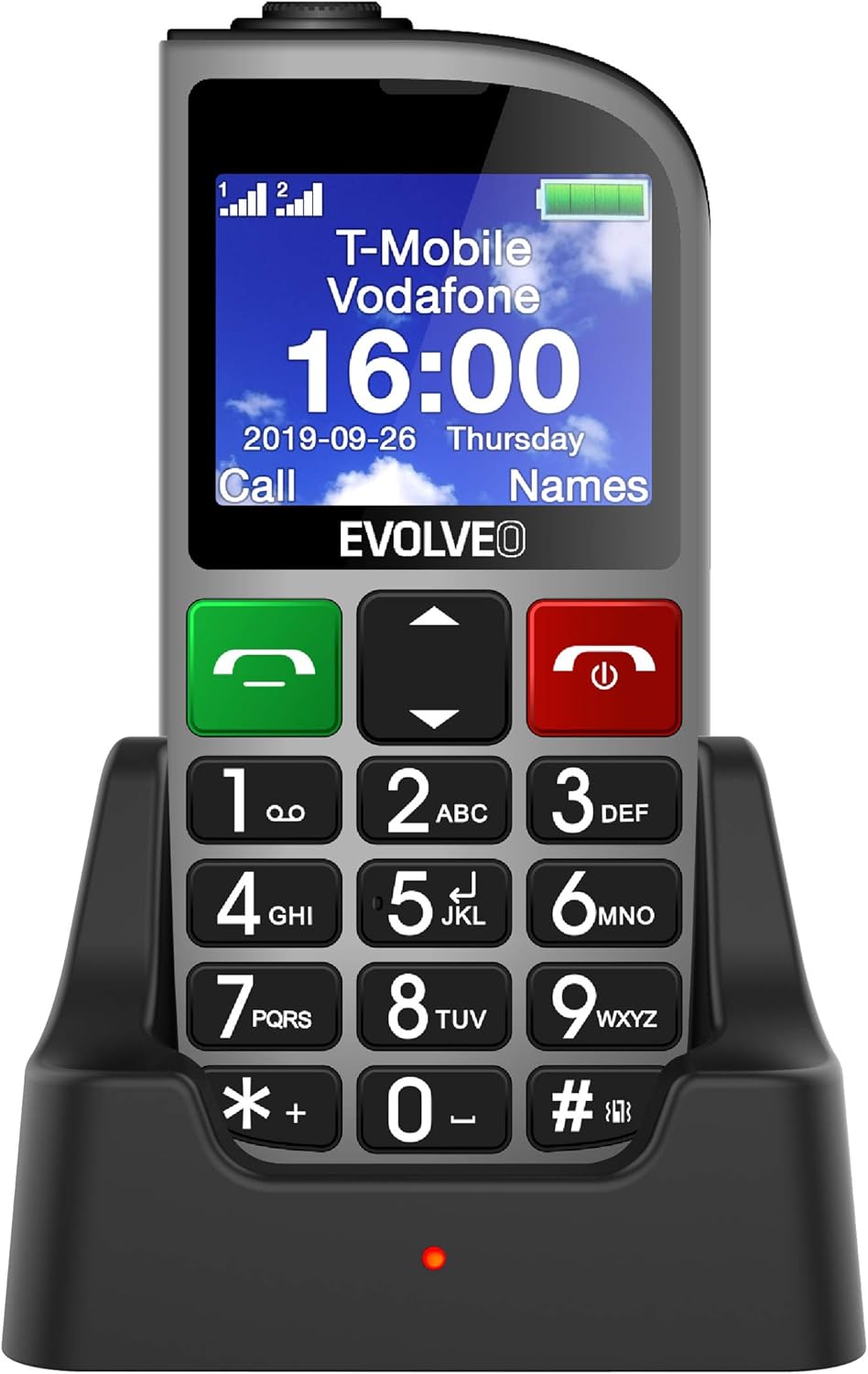
Слика 1.1: EVOLVEO EASYPHONE FM placed in its charging dock. The phone features a large display showing time and network information, with prominent green call and red end call buttons, and a numeric keypad below.
2. Подешавање
2.1. Инсталација и пуњење батерије
- Уклоните задњу маску телефона.
- Insert the Li-ion 1000 mAh battery, ensuring the contacts align correctly.
- Вратите задњи поклопац.
- Connect the AC adapter to the charging dock.
- Place the phone into the charging dock. The charging indicator light will illuminate.
- Дозволите телефону да се потпуно напуни пре прве употребе.
2.2. Уметање SIM картице(а)
The phone supports two SIM cards (Dual SIM) for GSM/GPRS 850/900/1800/1900 MHz networks.
- Уверите се да је телефон искључен.
- Уклоните задњи поклопац и батерију.
- Пронађите слотове за СИМ картице.
- Insert your SIM card(s) into the designated slots, ensuring correct orientation.
- Вратите батерију и задњи поклопац.
2.3. Inserting a MicroSDHC Card
You can expand the phone's storage for music, photos, and other files by inserting a MicroSDHC card.
- Уверите се да је телефон искључен.
- Уклоните задњи поклопац и батерију.
- Locate the MicroSDHC card slot.
- Gently insert the MicroSDHC card until it clicks into place.
- Вратите батерију и задњи поклопац.
3. Упутство за употребу
3.1. Укључивање/искључивање
- Да бисте укључили: Притисните и држите Red End Call/Power дугме док екран не засветли.
- Да бисте искључили напајање: Притисните и држите Red End Call/Power button until the power off options appear, then confirm.

Слика 3.1: Фронт view of the EVOLVEO EASYPHONE FM, highlighting the large display, call buttons, and numeric keypad for easy dialing.
3.2. Упућивање и примање позива
- Позивање: Dial the number using the numeric keypad and press the Зелени позив дугме.
- Брзо бирање: The phone supports quick access to 8 popular contacts. Assign numbers to keys 2-9 for speed dialing. Press and hold the assigned key to dial.
- Пријем позива: Притисните тастер Зелени позив дугме да одговорите на долазни позив.
- Завршавање позива: Притисните тастер Red End Call/Power button to end an active call.
3.3. Слање и примање СМС порука
The separated keyboard keys facilitate easy writing of SMS messages.
- Navigate to the Messaging menu.
- Select "Write Message" to compose a new SMS.
- Унесите број примаоца или га изаберите из контаката.
- Унесите своју поруку помоћу тастатуре.
- Press "Send" to transmit the message.
3.4. Контрола јачине звука
Adjust the call and ringtone volume using the dedicated volume control button located on the left side of the phone.

Слика 3.2: Left side of the phone, showing the volume control buttons and the FM radio activation button.
3.5. СОС дугме за хитне случајеве
The SOS button, located on the back of the device, allows for quick emergency calls and messages.
- Before use, configure up to five emergency contact numbers in the phone settings.
- In an emergency, press and hold the СОС дугме.
- The phone will automatically dial the predefined emergency numbers sequentially and send an emergency message to these contacts.

Слика 3.3: Позади view of the EVOLVEO EASYPHONE FM, showing the prominent red SOS emergency button and the camera lens.
3.6. ФМ радио
The phone includes an FM radio with a dedicated activation button.
- To turn on the FM radio, press the independent FM button on the side of the device.
- The radio can play in the background, allowing you to use other phone functions.
- During an incoming or outgoing call, the radio will automatically mute and resume playback after the call ends.
3.7. Лампица
A powerful flashlight is integrated into the phone, activated by a dedicated button.
- Press the dedicated flashlight button on the side of the phone to turn the flashlight on or off.

Слика 3.4: Right side of the phone, showing the dedicated flashlight button.
3.8. Остале карактеристике
- камера: The phone includes a VGA camera for basic photo capture.
- Музички плејер: Пусти музику files stored on your MicroSDHC card.
- Digital Recorder (Dictaphone): Record voice notes.
- Календар: Пратите важне датуме и догађаје.
- Будилник: Подесите аларме за подсетнике.
- Калкулатор: Извршите основне прорачуне.
- лупа: Utilize the screen as a magnifying glass.
4. Одржавање
4.1. Чишћење уређаја
- Use a soft, dry cloth to clean the phone's surface and screen.
- Avoid using liquid cleaners or abrasive materials, as they may damage the device.
- Ensure no moisture enters the charging port or other openings.
4.2. Брига о батерији
- Да бисте продужили век трајања батерије, избегавајте излагање телефона екстремним температурама.
- Charge the battery regularly, but avoid overcharging or letting it completely drain for extended periods.
- If the phone will not be used for a long time, charge the battery to about 50% before storing it.
КСНУМКС. Решавање проблема
If you encounter issues with your EVOLVEO EASYPHONE FM, refer to the following common problems and solutions:
5.1. Phone Does Not Turn On
- Уверите се да је батерија правилно инсталирана и напуњена.
- Connect the phone to the charger and wait a few minutes before attempting to power it on again.
- Проверите да ли су контакти батерије чисти.
5.2. Не могу да упућујем или примам позиве
- Check if the SIM card(s) are correctly inserted and activated.
- Уверите се да имате мрежну покривеност.
- Verify that the phone is not in airplane mode (if applicable).
- Check your account balance or subscription status with your service provider.
5.3. FM Radio Not Working
- Ensure you are in an area with good FM signal reception.
- Check if the FM radio is properly activated using its dedicated button.
5.4. Проблеми са приказом
- If the display is dim, check the brightness settings.
- If the screen is unresponsive, try restarting the phone.
6. Спецификације
| Бранд | Еволвео |
| Модел | EASYPHONE FM |
| Величина екрана | 1.8 инча |
| Резолуција екрана | 320 к 240 пк |
| Целлулар Тецхнологи | 2G (GSM/GPRS 850/900/1800/1900 MHz) |
| СИМ подршка | Дуал СИМ |
| Повезивање | Блутут, 3.5 мм прикључак |
| Батерија | Ли-ион 1000 мАх |
| Димензије | 130 × 61 × 16.5 мм |
| Тежина | 105 г (са батеријом) |
| Камера | ВГА |
| Проширење складиштења | Утор за МицроСДХЦ картицу |
Напомена: Спецификације су подложне променама без претходне најаве.
7. Гаранција и подршка
For warranty information and technical support, please refer to the warranty card included in your package or visit the official Evolveo webсајт. Сачувајте доказ о куповини за потребе гаранције.