
Увод
Welcome to the user manual for the BUFFALO BS-GU2105 5-Port Gigabit Unmanaged Switch. This document provides essential information for the proper installation, operation, and maintenance of your device. Please read this manual thoroughly before using the product to ensure safe and efficient operation.
Производ је завршенview
The BUFFALO BS-GU2105 is a Layer2 unmanaged switch designed for business environments, offering reliable high-speed network connectivity. It features five Gigabit-compatible ports and a robust metal housing with an integrated power supply.
Кључне карактеристике:
- 5 Gigabit Ethernet Ports (10/100/1000 BaseT(X))
- Metal Housing with Built-in Power Supply
- Loop Prevention Function (ON/OFF switchable)
- EEE (Energy Efficient Ethernet, 802.3az) Function (ON/OFF switchable)
- Опсег радне температуре: 0°Ц до 50°Ц (32°Ф до 122°Ф)
- Equipped with Anti-Theft Security Slots
- Flexible Installation: Horizontal or Wall-Mountable
Садржај пакета
Please verify that all items are present in your package. If any items are missing or damaged, contact your vendor or BUFFALO support.
- BUFFALO BS-GU2105 5-Port Gigabit Unmanaged Switch
- Магнет за монтажу
- AC Cable Prevention Band
- Power Cord (integrated power supply)
Подешавање и инсталација
1. Физичко смештање
The BS-GU2105 switch can be placed horizontally on a flat surface or mounted on a wall. Ensure adequate ventilation around the device to prevent overheating. Avoid placing the switch near heat sources or in direct sunlight.

Слика: Фронт view of the BUFFALO BS-GU2105 switch, displaying its indicators and switches.
For enhanced security, the switch is equipped with anti-theft security slots. A compatible security cable (not included) can be used to secure the device to a fixed object, preventing unauthorized removal.
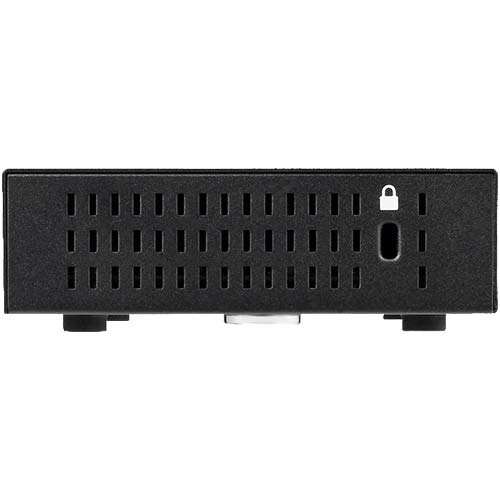
Слика: Са стране view of the BUFFALO BS-GU2105 switch, highlighting the security slot.

Image: BUFFALO BS-GU2105 switch with an optional security cable lock installed.
2. Connecting Network Cables
Connect your network devices (computers, servers, network printers, or other switches) to the RJ-45 ports (1-5) on the rear of the switch using standard Ethernet cables. The switch automatically detects the speed and duplex mode of the connected devices.

Слика: Позади view of the BUFFALO BS-GU2105 switch, showing the five RJ-45 ports and AC power input.
3. Прикључак за напајање
Connect the power cord to the AC-IN port on the rear of the switch and then to a standard power outlet. The switch has a built-in power supply. Use the included AC cable prevention band to secure the power cord, preventing accidental disconnection.
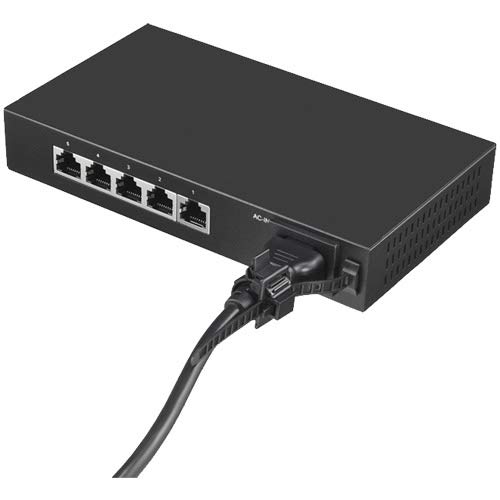
Image: Power cord connected to the BUFFALO BS-GU2105 switch, secured with the AC cable prevention band.
Управљање прекидачем
ЛЕД индикатори
Предња плоча прекидача има неколико ЛЕД индикатора који пружају информације о статусу:
- ПОВЕР ЛЕД: Светли када је прекидач укључен.
- ЛЕД диоде LINK/ACT (1-5): For each port, this LED indicates network activity and connection status.
- Стално зелено: A device is connected and operating at 1000 Mbps (Gigabit).
- Трепери зелено: Data is being transmitted or received at 1000 Mbps.
- Чврсти ћилибар: A device is connected and operating at 10/100 Mbps.
- Трепери жуто: Data is being transmitted or received at 10/100 Mbps.
- Искључено: No device is connected or the connected device is powered off.
Loop Prevention Function
The BS-GU2105 includes a loop prevention function to avoid network loops that can cause broadcast storms and network instability. This function can be enabled or disabled using the "LOOP PREVENTION" ON/OFF switch on the front panel.
- НА: Loop prevention is active. If a network loop is detected, the affected port will be temporarily disabled to prevent network disruption.
- ВАН: Loop prevention is inactive.
EEE (Energy Efficient Ethernet) Function
The Energy Efficient Ethernet (EEE) function (IEEE 802.3az) allows the switch to reduce power consumption during periods of low data activity. This function can be enabled or disabled using the "EEE" ON/OFF switch on the front panel.
- НА: EEE is active, reducing power consumption when network traffic is low.
- ВАН: EEE is inactive.
Одржавање
To ensure optimal performance and longevity of your BUFFALO BS-GU2105 switch, follow these maintenance guidelines:
- Keep the device in a clean, dust-free environment.
- Ensure proper ventilation and do not block the air vents.
- Clean the exterior of the switch with a soft, dry cloth. Do not use liquid or aerosol cleaners.
- Периодично проверавајте кабловске везе како бисте били сигурни да су безбедно причвршћене.
Решавање проблема
If you encounter issues with your BS-GU2105 switch, refer to the following common troubleshooting steps:
- Нема напајања: Ensure the power cord is securely connected to both the switch and a working power outlet. Check if the power outlet is functional.
- ЛЕД индикатор без везе/активности: Verify that the Ethernet cable is properly connected to both the switch port and the network device. Ensure the connected device is powered on and functioning correctly. Try a different cable or port.
- Мала брзина мреже: Check the LINK/ACT LED color. Green indicates Gigabit speed, while amber indicates 10/100 Mbps. Ensure all connected devices and cables support Gigabit Ethernet for optimal performance.
- Network Instability (if Loop Prevention is OFF): If you experience network instability or broadcast storms, ensure the "LOOP PREVENTION" switch is set to ON.
If problems persist after attempting these steps, please contact technical support.
Спецификације
| Феатуре | Опис |
|---|---|
| Бранд | БИВОЛИ |
| Модел | BS-GU2105 |
| Број портова | 5 x 10/100/1000 BaseT(X) RJ-45 |
| Тип прекидача | Unmanaged, Layer2 |
| Становање | Метал |
| Повер Суппли | Уграђени |
| Радна температура | 0°C - 50°C (32°F - 122°F) |
| Димензије (Д к Ш к В) | 10.04 к 5.71 к 2.76 инча (25.5 к 14.5 к 7.0 цм) |
| Тежина | 0.8 килограма (1.76 лбс) |
| Посебне карактеристике | Loop Prevention, EEE (802.3az), Anti-theft Security Slot, Magnet for mounting, AC Cable Prevention Band |
Информације о гаранцији
The BUFFALO BS-GU2105 switch comes with a 5-year limited warranty. This includes a standard 3-year warranty, which can be extended by an additional 2 years upon user registration on the official BUFFALO website. Please retain your proof of purchase for warranty claims and refer to the official BUFFALO warranty policy for full terms and conditions.
Техничка подршка
For technical assistance, troubleshooting, or further inquiries regarding your BUFFALO BS-GU2105 switch, please visit the official BUFFALO support website or contact their customer service department. Up-to-date contact information and resources can typically be found on the BUFFALO brand's official channels.
BUFFALO Store: Visit the BUFFALO Store on Amazon