
Јахитек YA-202002210101
Yaheetech Mobile TV Stand User Manual
Модел: YA-202002210101
1. Увод
Thank you for choosing the Yaheetech Mobile TV Stand. This universal rolling TV cart is designed to provide a flexible and stable solution for displaying your television in various environments, from homes to offices and events. It accommodates flat-screen TVs from 32 to 75 inches, with a maximum VESA compatibility of 600x400mm and a weight capacity of up to 50 kg (110 lbs). The stand features three integrated shelves for media devices, adjustable height, tilt functionality, and lockable wheels for easy mobility and secure positioning. Please read this manual carefully before assembly and use to ensure proper installation and safe operation.
2. Безбедносне информације
- Капацитет тежине: Do not exceed the maximum weight capacity of 50 kg (110 lbs) for the TV mount and 10 kg (22 lbs) for each lower shelf. The top tray supports up to 1.6 kg (3.5 lbs). Overloading can cause instability and damage.
- ТВ величина: Ensure your TV falls within the recommended size range of 32 to 75 inches.
- ВЕСА компатибилност: Verify your TV's VESA mounting pattern is compatible (100x100mm to 600x400mm) before assembly.
- Скупштина: Assemble the stand on a soft, clean surface to prevent scratches. It is recommended to have two people for assembly, especially when mounting the TV.
- Стабилност: Always ensure all screws and bolts are securely tightened before placing a TV on the stand. Use the locking wheels to secure the stand in place when not moving it.
- Управљање кабловима: Utilize the integrated cable management system to prevent tripping hazards and protect cables from damage.
- Деца и кућни љубимци: Keep children and pets away from the stand during assembly and ensure the TV is securely mounted to prevent tipping.
3. Списак делова
Before beginning assembly, please check that all parts are present and undamaged. Refer to your product's included assembly diagram for specific part numbers and quantities.
- Main Base with Wheels
- Вертикални носећи стубови (2)
- TV Mounting Bracket Assembly
- Adjustable Shelves (3: Top, Middle, Bottom)
- Hardware Kit (Screws, Washers, Spacers, Nuts, Allen Keys, Wrench)
- Копче/везице за управљање кабловима
4. Подешавање и монтажа
Follow these steps carefully for proper assembly. It is recommended to have a second person assist with TV mounting.
- Причврстите точкове на базу: Securely attach the four lockable wheels to the main base. Ensure they are tightened to prevent wobbling.
- Assemble Vertical Columns: Connect the two vertical support columns to the main base. Ensure they are aligned and securely fastened with the provided hardware.
- Инсталирајте полице: Attach the three shelves to the vertical columns at your desired heights. The shelves are designed to be adjustable. Ensure they are level and firmly secured.
- Prepare TV Mounting Bracket: Attach the vertical TV mounting arms to the back of your television using the appropriate VESA screws and spacers from the hardware kit. Refer to the VESA compatibility chart for correct screw selection.
- Mount TV to Stand: With assistance, carefully lift the television and hook the TV mounting arms onto the horizontal bracket on the stand. Secure the TV in place using the locking mechanisms on the mounting bracket.
- Управљање кабловима: Route all necessary cables (power, HDMI, etc.) through the hollow vertical columns or use the provided cable management clips to keep them tidy and out of the way.
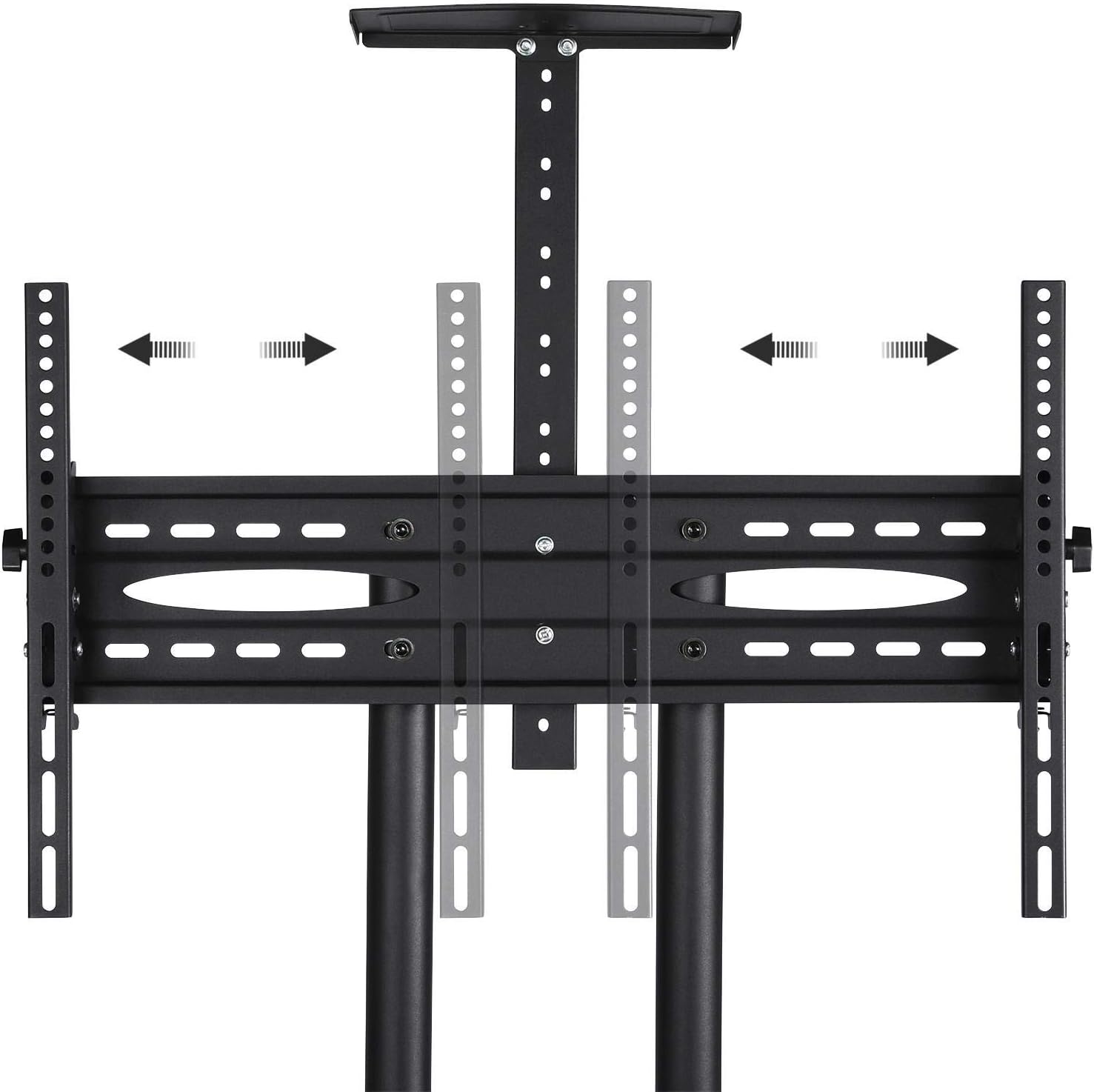
Image: VESA patterns and screw types for TV mounting. This image illustrates various VESA mounting patterns (W x H) from 100x100mm to 600x400mm, along with different screw sizes (M5, M6, M8) and spacers for proper TV attachment.
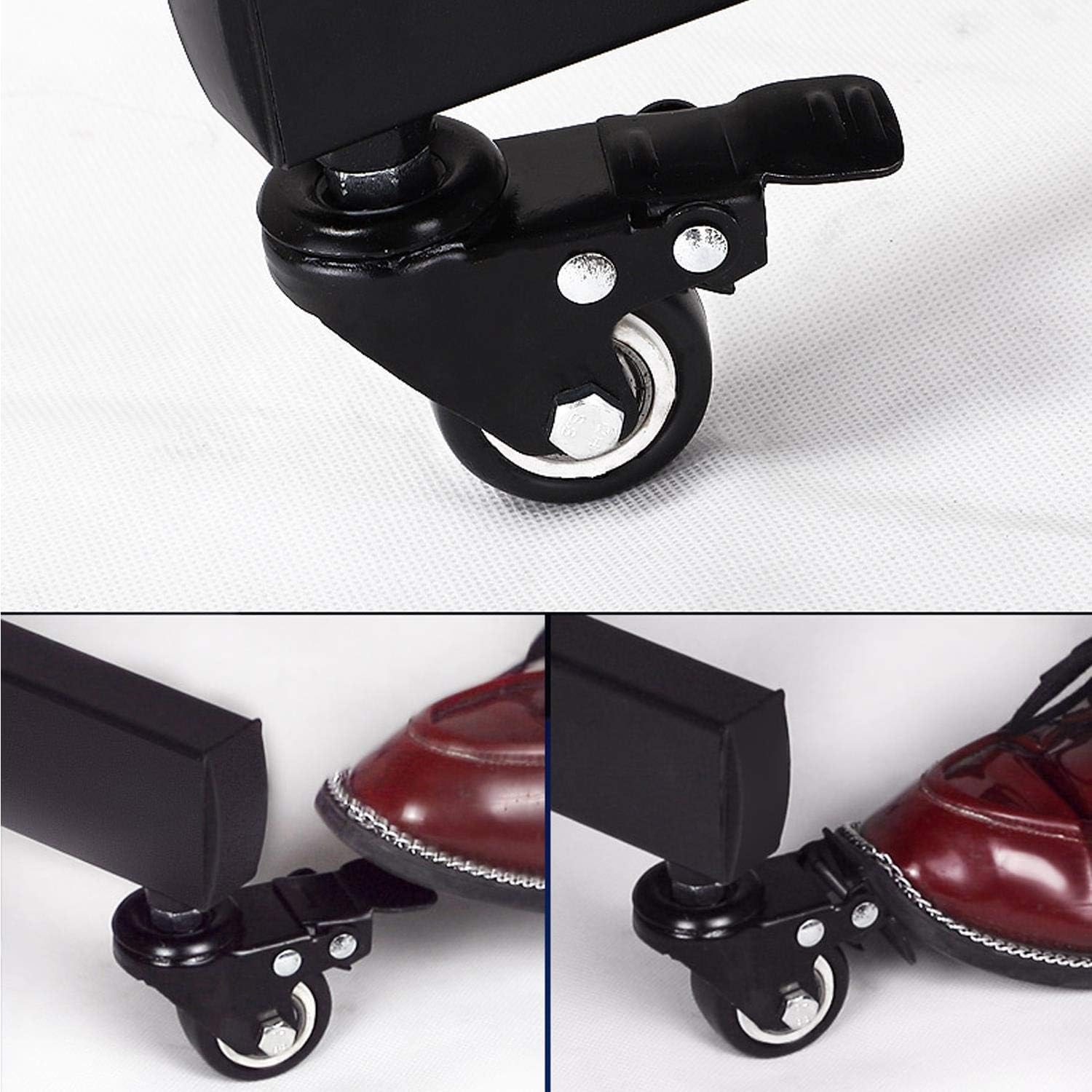
Image: Close-up of VESA mount adjustment. This image shows the adjustable nature of the TV mounting bracket, allowing for horizontal movement to accommodate different TV widths and VESA patterns.

Image: Cable management feature. This image highlights the hollow design of the vertical columns, allowing cables to be routed internally for a clean and organized appearance.
5. Упутство за употребу
- Померање постоља: To move the TV stand, unlock all four wheels by pressing down on the locking levers. Carefully push the stand to your desired location.
- Осигуравање постоља: Once the stand is in position, lock all four wheels by pushing down on the locking levers until they click into place. This prevents accidental movement.

Image: Lockable wheels mechanism. This image demonstrates how to engage and disengage the wheel locks by pressing down on the lever with your foot.
- Подешавање висине телевизора: The TV mounting bracket can be adjusted vertically along the columns. Loosen the securing bolts, adjust to the desired height, and re-tighten firmly.
- Adjusting TV Tilt: The TV mount allows for a tilt adjustment of +/- 13 degrees. Loosen the tilt adjustment knobs on the side of the bracket, set the desired angle, and re-tighten the knobs securely.

Image: Adjustable height and tilt features. This diagram illustrates the vertical height adjustment range and the +/- 13-degree tilt capability of the TV mount, along with 360-degree rotation of the stand on its wheels.
- Using Shelves: The three shelves provide space for media players, gaming consoles, laptops, or other accessories. Ensure items placed on shelves do not exceed their individual weight capacities.
6. Одржавање
- Чишћење: Обришите постоље меком крпомamp крпом. Избегавајте употребу абразивних средстава за чишћење или растварача који би могли оштетити завршну обраду.
- Редовне провере: Periodically check all screws and bolts to ensure they remain tight, especially after moving the stand or adjusting the TV.
- Одржавање точкова: Држите точкове чистим од остатака како бисте осигурали глатко кретање.
КСНУМКС. Решавање проблема
| Проблем | Могући узрок | Решење |
|---|---|---|
| Stand is wobbly/unstable | Loose screws; uneven floor; overloaded. | Check and tighten all assembly screws. Move to a level surface. Ensure TV and shelf weights do not exceed limits. |
| Wheels do not lock/unlock | Mechanism jammed; debris in wheel. | Clear any debris from the wheel and locking mechanism. Apply light lubricant if necessary. |
| TV cannot be tilted/adjusted | Дугмад за подешавање су превише затегнута. | Loosen the tilt adjustment knobs before attempting to adjust the angle. Re-tighten firmly after adjustment. |
| Cables are messy/tangled | Cable management not utilized. | Route cables through the hollow columns or use cable ties/clips to organize them. |
8. Спецификације
| Феатуре | Детаљ |
|---|---|
| Бранд | Иахеетецх |
| Број модела | ИА-202002210101 |
| Боја | Црно |
| Компатибилне величине телевизора | 32 до 75 инча |
| Максимална тежина телевизора | 50 кг (110 лбс) |
| ВЕСА компатибилност | 100к100мм до 600к400мм |
| Број полица | 3 |
| Носивост доње полице | 10 кг (22 лбс) сваки |
| Top Tray Weight Capacity | 1.6 кг (3.5 лбс) |
| Подешавање нагиба | +/- 13 степени |
| Мобилност | 4 точка са могућношћу закључавања |
| Цабле Манагемент | Integrated hollow columns |

Image: Product dimensions and weight capacities. This diagram provides detailed measurements of the TV stand, including height, width, depth, and the maximum weight capacities for the TV mount and shelves.
9. Гаранција и подршка
For warranty information or technical support, please contact Yaheetech customer service through the retailer's platform or the official Yaheetech webсајт. Молимо вас да припремите број модела (YA-202002210101) и детаље о куповини када контактирате подршку.
Ask a question about this manual
Ask about setup, troubleshooting, compatibility, parts, safety, or missing instructions. Manuals+ will review the question and use this page’s manual context to help answer it.