
Увод
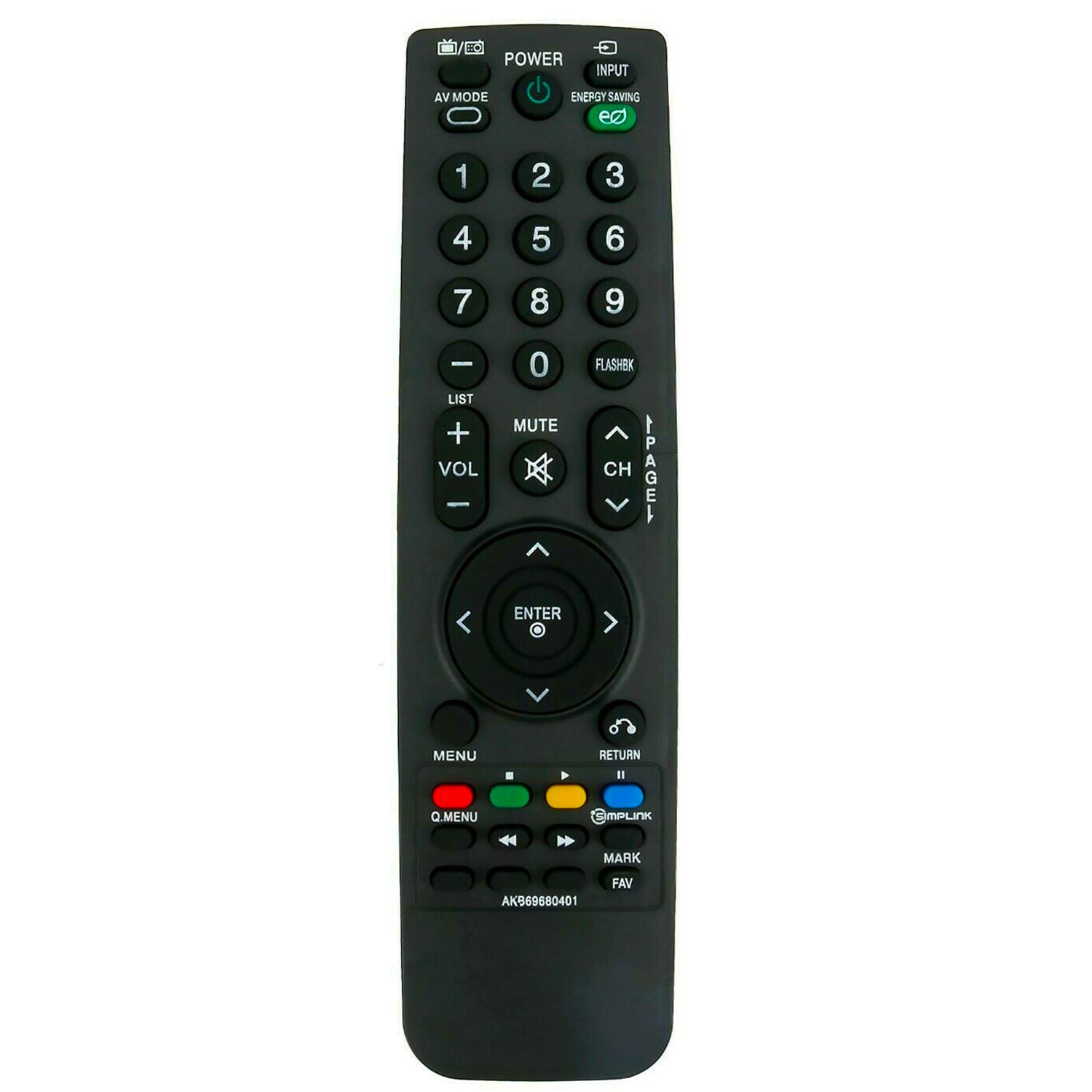
This manual provides instructions for the ALLIMITY AKB69680401 Replacement Remote Control, designed for use with various LG LCD TV models. This remote control functions as a direct replacement and requires no programming. Simply insert batteries to begin operation.
Сетуп
Инсталација батерије
The remote control requires two AAA batteries for operation. Follow these steps to install the batteries:
- Пронађите одељак за батерије на полеђини даљинског управљача.
- Померите поклопац одељка за батерије надоле и подигните га.
- Уметните две нове ААА батерије, водећи рачуна да позитивни (+) и негативни (-) терминали буду правилно поравнати са ознакама унутар одељка.
- Вратите поклопац одељка за батерију тако што ћете га вратити на место док не кликне чврсто.

Once batteries are installed, the remote control is ready for use without any additional programming.
Упутство за употребу
To operate your LG LCD TV with the ALLIMITY AKB69680401 remote control:
- Aiming the Remote: Point the remote control directly towards the infrared (IR) sensor on your television. Ensure there are no obstacles between the remote and the TV sensor that could block the signal.
- Функције дугмета: The remote features standard buttons for power, input selection, volume control, channel navigation, menu access, and numerical input. Press the corresponding button for the desired function.
- Инфрацрвена технологија: This remote uses infrared technology, which requires a clear line of sight to the TV's sensor.
Компатибилност
This replacement remote control is compatible with the following LG LCD TV models:
- 19LH20, 22LH20, 26LH20, 32LH20, 37LH20, 42LH20
- 19LU55, 22LU55, 26LU55
- 32LF11, 37LF11, 42LF11, 47LF11
- 32LH30, 37LH30, 42LH30, 47LH30
- 47LF21, 32CL20
- 22LH200C
- 19LH20-UA, 22LH20-UA, 26LH20-UA, 32LH20-UA, 37LH20-UA, 42LH20-UA
- 19LU55-UA, 22LU55-UA, 26LU55-UA
- 32LF11-UA, 37LF11-UA, 42LF11-UA, 47LF11-UA
- 32LH30-UA, 37LH30-UA, 42LH30-UA, 47LH30-UA
- 47LF21-UA, 32CL20-UA
- 22LH200C-UA
If your specific model is not listed, please contact ALLIMITY customer support for assistance in verifying compatibility.
Спецификације
| Број модела | АКБ69680401 |
| Бранд | АЛЛИМИТИ |
| Материјал | Пластика |
| Технологија повезивања | Инфрацрвени (ИР) |
| Извор напајања | 2 к ААА батерије (нису укључене) |
| Максимални домет | 10 метара |
| Боја | Црно |
| Тип контролера | Контрола дугмета |
| Количина дугмета | 20 |
| Тежина артикла | 0.07 килограма |
Решавање проблема
- Даљински не реагује:
- Ensure new batteries are correctly installed with proper polarity.
- Проверите да ли су батерије истрошене и замените их ако је потребно.
- Verify there are no obstructions between the remote control and the TV's infrared sensor.
- Confirm that the remote is pointed directly at the TV's sensor.
- Делимична функционалност: If some buttons work but others do not, ensure the remote is compatible with your specific TV model. Refer to the Compatibility section.
If issues persist after following these steps, please contact ALLIMITY customer support for further assistance.
Одржавање
Да бисте осигурали дуготрајност и правилно функционисање вашег даљинског управљача:
- Чишћење: Wipe the remote control with a soft, dry cloth. Do not use abrasive cleaners, solvents, or harsh chemicals.
- Складиштење: Даљински управљач чувајте на сувом месту, даље од директне сунчеве светлости и екстремних температура.
- Одржавање батерије: Извадите батерије ако даљински управљач неће бити коришћен дуже време како бисте спречили цурење.
- Избегавајте капи: Заштитите даљински управљач од физичких удара, јер падови могу оштетити унутрашње компоненте.
Подршка
For any questions, compatibility inquiries, or technical support regarding your ALLIMITY AKB69680401 Replacement Remote Control, please contact the seller or ALLIMITY customer service via email. Provide your product model number and a detailed description of your issue for prompt assistance.