
1. Производ је готовview
The ProCase Wireless Keyboard (Model PC-08362168) is a compact and portable Bluetooth keyboard designed for multi-device compatibility. It offers a comfortable typing experience with low-profile, quiet keys and an ergonomic design, suitable for use with iOS, Android, and Windows operating systems.

Image: The ProCase Wireless Keyboard, a slim black keyboard with a standard QWERTY layout, designed for portability and multi-device use.
2. Садржај пакета
- ProCase Wireless Keyboard (Model PC-08362168)
- Кориснички приручник (овај документ)
Напомена: За рад су потребне 2x AAA батерије и нису укључене у пакет.
3. Водич за подешавање
3.1. Инсталација батерије
- Locate the battery compartment on the back of the keyboard.
- Отворите поклопац одељка за батерије.
- Уметните две (2) ААА батерије, водећи рачуна о исправном поларитету (+/-).
- Добро затворите поклопац одељка за батерије.

Image: Underside of the keyboard showing the ON/OFF switch, Connect button, and the battery compartment for two AAA batteries.
3.2. Укључивање/искључивање
Slide the ON/OFF switch, located on the back of the keyboard, to the "ON" position to power on the device. Slide it to "OFF" when not in use to conserve battery life.
3.3. Блуетоотх упаривање
- Уверите се да је тастатура укључена.
- Press the "Connect" button on the back of the keyboard. The Bluetooth indicator light (usually blue) on the keyboard will start blinking, indicating it is in pairing mode.
- On your device (tablet, smartphone, computer), navigate to its Bluetooth settings.
- Омогућите Блуетоотх и потражите доступне уређаје.
- Select "ProCase Keyboard" (or similar name) from the list of found devices.
- Follow any on-screen prompts to complete the pairing process. A successful connection will be indicated by the Bluetooth light on the keyboard turning solid or turning off, depending on the model.

Image: Diagram illustrating wide compatibility with Android, Windows, and iOS devices, including iPads, Android tablets, Microsoft Surface, and smartphones. It also notes that a USB drive is not included and only Bluetooth connection is supported.
4. Упутство за употребу
4.1. Основно куцање
The keyboard features a standard QWERTY layout. Simply begin typing after successful pairing with your device.
4.2. Function Keys (F1-F12) and Hot Keys
The top row of keys serves dual functions: standard F-keys (F1-F12) and special hot keys for media control, volume, and other system functions. To use the F-keys (F1, F2, etc.), you must hold down the Fn key simultaneously with the desired F-key. Pressing the key without holding Fn will activate its associated hot key function.
- Фн + Ф1: Хоме
- Фн + Ф2: Претрага
- Фн + Ф3: Select All
- Фн + Ф4: Цопи
- Фн + Ф5: Пасте
- Фн + Ф6: Cut
- Фн + Ф7: Претходна нумера
- Фн + Ф8: Пусти/пауза
- Фн + Ф9: Нект Трацк
- Фн + Ф10: Муте
- Фн + Ф11: Utišavanje zvuka
- Фн + Ф12: Појачавање звука

Слика: Крупни план view of a keyboard key, illustrating the scissor-cross mechanism for comfortable and responsive keystrokes.

Image: A person typing on the ProCase Wireless Keyboard, positioned next to a tablet, highlighting the comfortable and quiet typing experience.
5. Одржавање
5.1. Чишћење
To clean the keyboard, gently wipe the surface with a soft, dry, lint-free cloth. For stubborn dirt, slightly dampen the cloth with water or a mild cleaning solution. Avoid excessive moisture and do not spray cleaners directly onto the keyboard.
5.2. Складиштење
When not in use for extended periods, power off the keyboard to conserve battery life. Store it in a cool, dry place away from direct sunlight and extreme temperatures.
КСНУМКС. Решавање проблема
- Тастатура се не повезује:
- Ensure the keyboard is powered on and has fresh batteries.
- Press the "Connect" button on the back of the keyboard to enter pairing mode.
- Verify Bluetooth is enabled on your device and try re-pairing.
- Приближите тастатуру свом уређају.
- Restart both the keyboard (power off/on) and your device.
- Тастери не реагују:
- Проверите ниво батерије и замените ако је потребно.
- Уверите се да је тастатура правилно повезана путем Блутут-а.
- Очистите све остатке око тастера.
- Function (F) keys not working as expected:
- Remember that to activate F1-F12 functions, you must hold down the Fn key simultaneously. Without holding Fn, the keys will activate their assigned hot key functions (e.g., media control). This behavior cannot be changed.
- Kratko trajanje baterije:
- Ensure the keyboard is powered off when not in use.
- The keyboard features a sleep mode to conserve power during inactivity.
- Користите висококвалитетне ААА батерије.
7. Спецификације
| Феатуре | Детаљ |
|---|---|
| Број модела | ПЦ-КСНУМКС |
| Димензије (Д к Ш к В) | 11.5 к 4.7 к 0.29 инча (29.2 к 11.9 к 0.74 цм) |
| Тежина | 10 унце (283.5 грама) |
| Повезивање | Блуетоотх бежични |
| Извор напајања | 2 к ААА батерије (нису укључене) |
| Материјал | акрилонитрил бутадиен стирен (АБС) |
| Боја | Црно |
| Компатибилни оперативни системи | iOS, Android, Windows (Note: Does not support Windows 8 Mobile) |
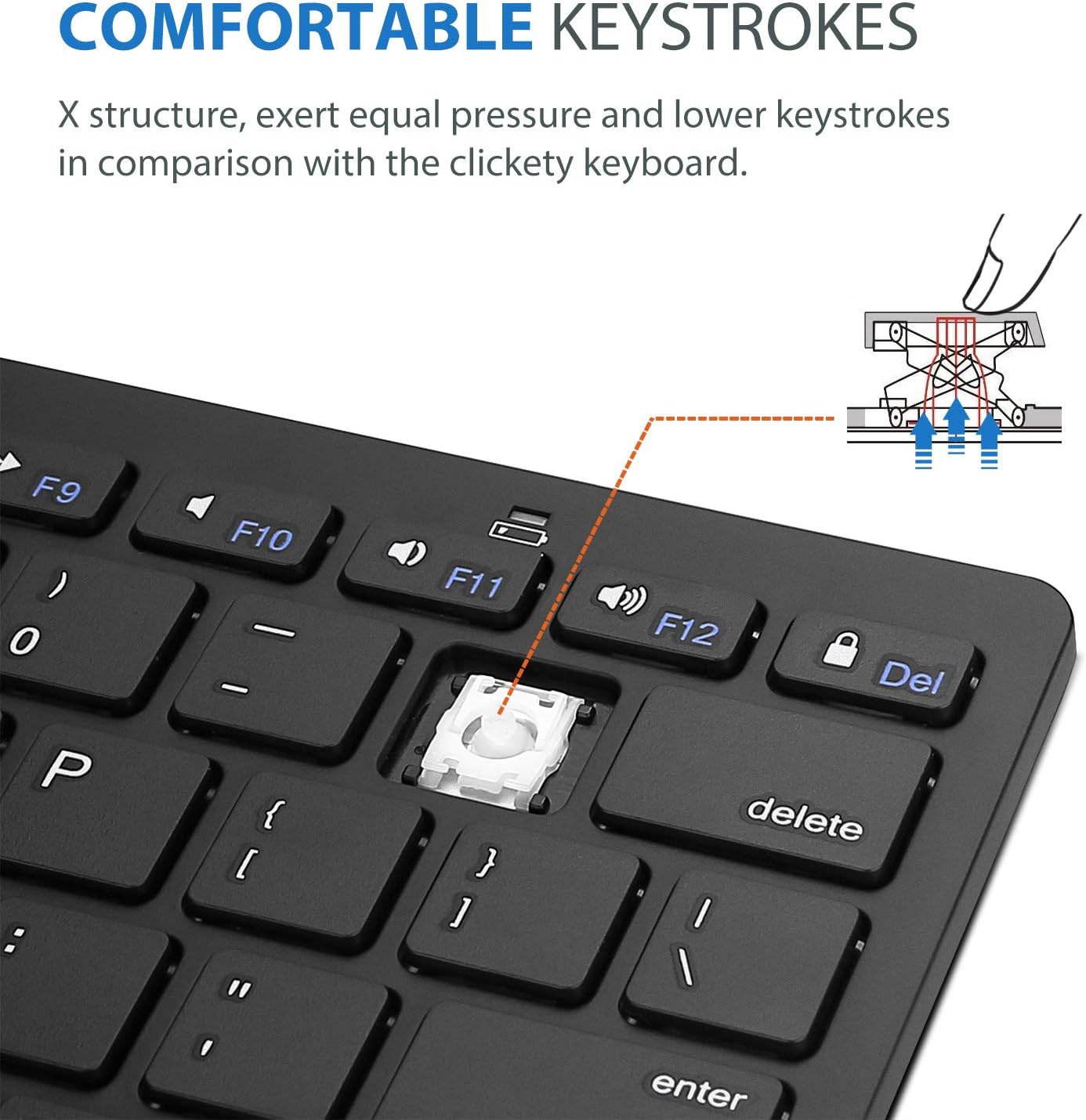
Image: Diagram showing the ultra-slim design and dimensions of the ProCase Wireless Keyboard, measuring 11.2 inches in length, 4.7 inches in width, and 0.19 inches in thickness.
8. Гаранција и подршка
8.1. Информације о гаранцији
ProCase products are designed for reliability and performance. For specific warranty details regarding your ProCase Wireless Keyboard, please refer to the warranty card included with your purchase or visit the official ProCase webсајт. Сачувајте доказ о куповини за потребе гаранције.
8.2. Корисничка подршка
If you encounter any issues or have questions not covered in this manual, please contact ProCase customer support. You can find contact information on the official ProCase webсајту или путем ваше платформе за куповину.
За више информација посетите ProCase Store on Amazon.