
EOTECH 512.A65
EOTECH 512 Holographic Weapon Sight 512.A65 User Manual
Модел: 512.А65
Увод
This manual provides detailed instructions for the proper setup, operation, and maintenance of your EOTECH 512 Holographic Weapon Sight. The Model 512 is designed for fast target acquisition, reliability, and durability, making it a popular choice for various applications.
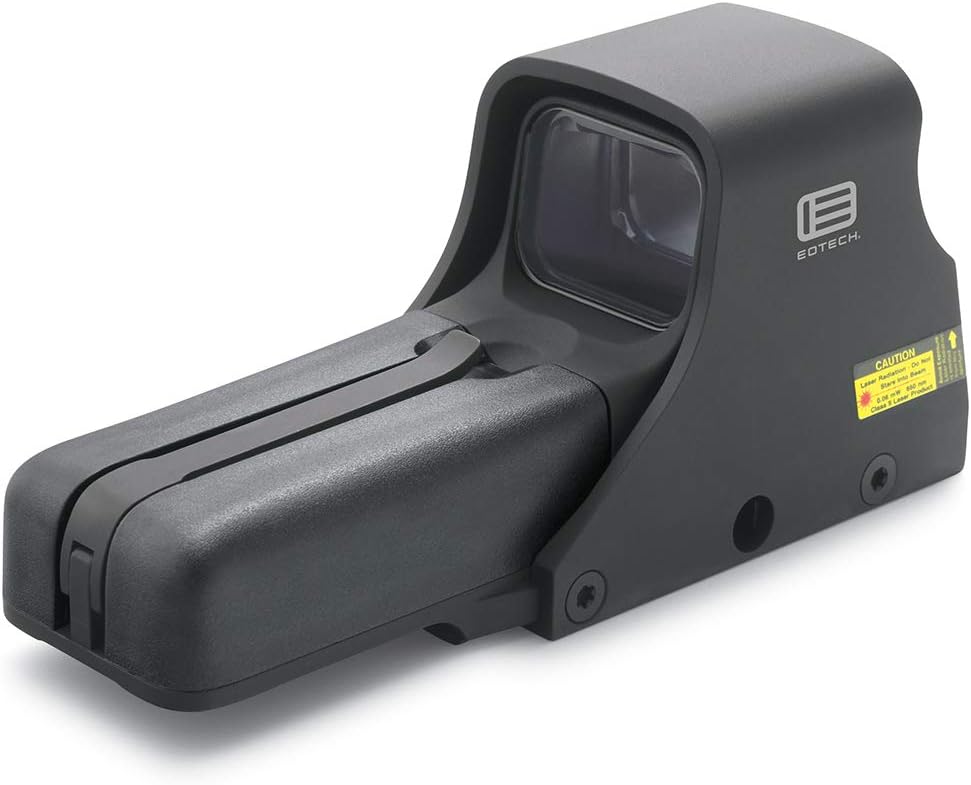
Figure 1: EOTECH 512 Holographic Weapon Sight (Model 512.A65)
The EOTECH 512.A65 Holographic Weapon Sight is a robust optical device featuring a black finish and a distinctive 68 MOA ring with a 1 MOA dot reticle. It is engineered for quick target acquisition and reliable performance in various lighting conditions.
Безбедносне информације
Always handle firearms and optical devices responsibly. Read and understand all safety warnings before using this product. Failure to follow these instructions may result in injury or damage to the device.
- Ensure the firearm is unloaded and safe before mounting or adjusting the sight.
- Do not look directly into the laser aperture. This device contains a Class 1 laser product.
- Држите батерије ван домашаја деце.
- Батерије одложите на одговарајући начин у складу са локалним прописима.
Садржај пакета
Проверите да ли су све ставке присутне у пакету:
- EOTECH 512.A65 Holographic Weapon Sight
- Кориснички приручник (овај документ)
- 2 x AA Batteries (may be included or sold separately)
Сетуп
Инсталација батерије
The EOTECH 512.A65 operates on two (2) AA batteries. For optimal performance and battery life, lithium batteries are recommended.
- Locate the removable battery compartment on the front of the sight.
- Lift the battery cap latch to open the compartment.
- Insert two AA batteries according to the polarity indicators inside the compartment.
- Close the battery compartment securely, ensuring the latch clicks into place.

Figure 2: Key components of the EOTECH 512.A65, including the removable battery compartment and the 1" Weaver or MIL-STD-1913 rail mount.
This image highlights the battery cap latch, aluminum hood, removable battery compartment, and the compatible 1" Weaver or MIL-STD-1913 rail for mounting. Proper battery installation is crucial for the sight's functionality.
Монтажа нишана
The EOTECH 512.A65 is designed to fit both 1" Weaver and MIL-STD-1913 (Picatinny) rails.
- Уверите се да је ватрено оружје празно и усмерено у безбедном правцу.
- Loosen the mounting bolt(s) on the sight's base.
- Align the sight's base with the rail on your firearm.
- Slide the sight onto the rail until it is in the desired position.
- Tighten the mounting bolt(s) securely. Do not overtighten.
Упутство за употребу
Укључивање/искључивање
- To turn on: Press either the UP or ДОВН arrow button located on the rear of the sight.
- To turn off: Press both the UP и ДОВН arrow buttons simultaneously. The sight will also automatically shut off after 8 hours if no buttons are pressed.
Подешавање осветљености
The EOTECH 512.A65 features 20 brightness settings to accommodate various lighting conditions.
- To increase brightness: Press the UP дугме са стрелицом.
- To decrease brightness: Press the ДОВН дугме са стрелицом.

Слика 3: Одозго надоле view of the EOTECH 512.A65, illustrating the location of the UP and DOWN arrow buttons for power and brightness control.
Ова слика пружа јасан view of the sight's top, highlighting the control buttons used for powering the unit on/off and adjusting the reticle's brightness. The windage and elevation adjustment knobs are also visible.
Ретицле Информатион
The 512.A65 features a 68 MOA ring with a 1 MOA dot reticle. This design allows for rapid target acquisition while providing a precise aiming point.

Figure 4: EOTECH 68 MOA Ring and 1 MOA Dot Reticle Diagram.
This diagram illustrates the precise dimensions of the 68 MOA outer ring and the central 1 MOA dot, which together form the sight's aiming pattern.

Слика 5: кончаница view through the EOTECH 512.A65 sight.
This image demonstrates how the 68 MOA ring and 1 MOA dot reticle appear when viewed through the holographic sight, providing a clear aiming point against a background.
Подешавање нишана (по вертикали и елевацији)
To achieve accuracy, the sight must be zeroed to your firearm. This involves adjusting the reticle's point of impact to match the bullet's point of impact.
- Locate the windage (horizontal) and elevation (vertical) adjustment knobs on the side of the sight (refer to Figure 3).
- Using a small flat-head screwdriver or a coin, turn the adjustment knobs. Each click typically represents a specific change in point of impact at a given distance (e.g., 1/2 MOA per click).
- Подешавање висине: Turning the knob clockwise moves the point of impact ДОВН. Turning counter-clockwise moves it UP.
- Подешавање ветра: Turning the knob clockwise moves the point of impact ДЕСНО. Turning counter-clockwise moves it ЛЕВО.
- Perform adjustments incrementally and test fire to confirm changes until the sight is zeroed.
Одржавање
Чишћење
Regular cleaning will ensure optimal performance and longevity of your sight.
- Користите меку крпу која не оставља влакна да обришете спољашње површине.
- For lenses, use a lens cleaning pen or a soft brush to remove dust, then gently wipe with a microfiber lens cloth and a small amount of lens cleaning solution if necessary.
- Avoid using abrasive materials or harsh chemicals, as they may damage the coatings.
Замена батерије
Replace batteries when the reticle begins to dim or flicker, or if the sight fails to power on. Refer to the "Battery Installation" section under Setup for detailed steps.
- Always use fresh, high-quality AA batteries.
- Remove old batteries promptly to prevent corrosion.
Решавање проблема
| Проблем | Могући узрок | Решење |
|---|---|---|
| Sight does not power on. | Празне или неправилно постављене батерије. | Замените батерије новим, водећи рачуна о исправном поларитету. |
| Reticle is dim or flickers. | Ниска снага батерије. | Замените батерије. |
| Reticle appears blurry or distorted. | Astigmatism (user's vision), dirty lens, or incorrect brightness setting. | Adjust brightness. Clean lenses. If issue persists, consult an optometrist as holographic sights can appear blurry to individuals with astigmatism. |
| Тачка удара се помера. | Sight not securely mounted, or zeroing is off. | Check mounting bolts and re-tighten if necessary. Re-zero the sight. |
Спецификације
Detailed technical specifications for the EOTECH 512.A65 Holographic Weapon Sight:
- Димензије: 5.6 cm (D) x 2.0 cm (Š) x 2.5 cm (V)
- Тежина: 11.5 oz (309 Grams)
- Отпорност на воду: 10 стопа (3 м)
- Боја: Црно
- Монтирај: Fits both 1" Weaver and MIL-STD-1913 Rail
- Подешавања осветљености: 20
- Извор напајања: 2 к АА батерије
- Трајање батерије: Up to 2500 continuous hours (lithium) or 2200 continuous hours (alkaline) at nominal setting 12
- конца: 68 MOA ring with 1 MOA dot
- Night Vision Compatible: бр
- Материјал: Алуминијум
- Увећање: 1x (Fixed)
- Поље оф View: 28 метара

Figure 6: EOTECH Holographic Weapon Sight Model Comparison.
This table provides a comparative overview of key features across different EOTECH HWS models, including the 512, 518, 552, and 558, highlighting differences in night vision capability, button operation, weight, water resistance, and mounting options.
Гаранција и подршка
EOTECH stands behind its products with a comprehensive warranty.
- гаранција: The EOTECH 512.A65 comes with a 10-year limited warranty. For full details and terms, please refer to the official EOTECH website or the warranty information provided with your product.
- Упутство за употребу (PDF): Дигиталну верзију упутства за употребу можете пронаћи овде.
- Корисничка подршка: For technical assistance, service, or warranty claims, please contact EOTECH customer support directly. Visit the official EOTECH webсајт за контакт информације.
Ask a question about this manual
Ask about setup, troubleshooting, compatibility, parts, safety, or missing instructions. Manuals+ will review the question and use this page’s manual context to help answer it.