
1. Производ је готовview
The Alecto WS-1560 is a wireless weather station designed to provide accurate indoor and outdoor environmental data. Featuring a clear color display and a remote outdoor sensor, it offers comprehensive weather information and additional useful functions for your home.
Кључне карактеристике:
- Measures indoor and outdoor temperature and humidity.
- Long-range wireless outdoor sensor (up to 100 meters).
- 5.7-inch well-lit color display with animated weather forecast icons.
- Temperature and ice alarm functions.
- Будилник са функцијом одлагања.
- Memory function for latest and highest readings.
- Moon phase indicator, date, day, and time display.
- Battery-operated main unit and outdoor sensor with backup batteries.

Figure 1.1: Alecto WS-1560 Main Unit and Wireless Outdoor Sensor.
2. Садржај пакета
Уверите се да су све компоненте присутне и у добром стању приликом распакивања:
- Alecto WS-1560 Main Unit (Indoor Display)
- Бежични отворни сензор
- Упутство за употребу
- (Power adapter and batteries may be included depending on package)
Video 2.1: Illustrative video showing typical weather station components and basic setup. (Note: This video is for a related product and may not show the exact Alecto WS-1560 model.)
3. Подешавање и инсталација
3.1. Инсталација батерије
Both the main unit and the outdoor sensor require batteries for operation. Ensure you use the correct type and polarity.
- Спољни сензор:
- Отворите одељак за батерије на задњој страни бежичног спољног сензора.
- Insert 2x AA batteries (not included) according to the polarity markings (+/-).
- Добро затворите одељак за батерије.
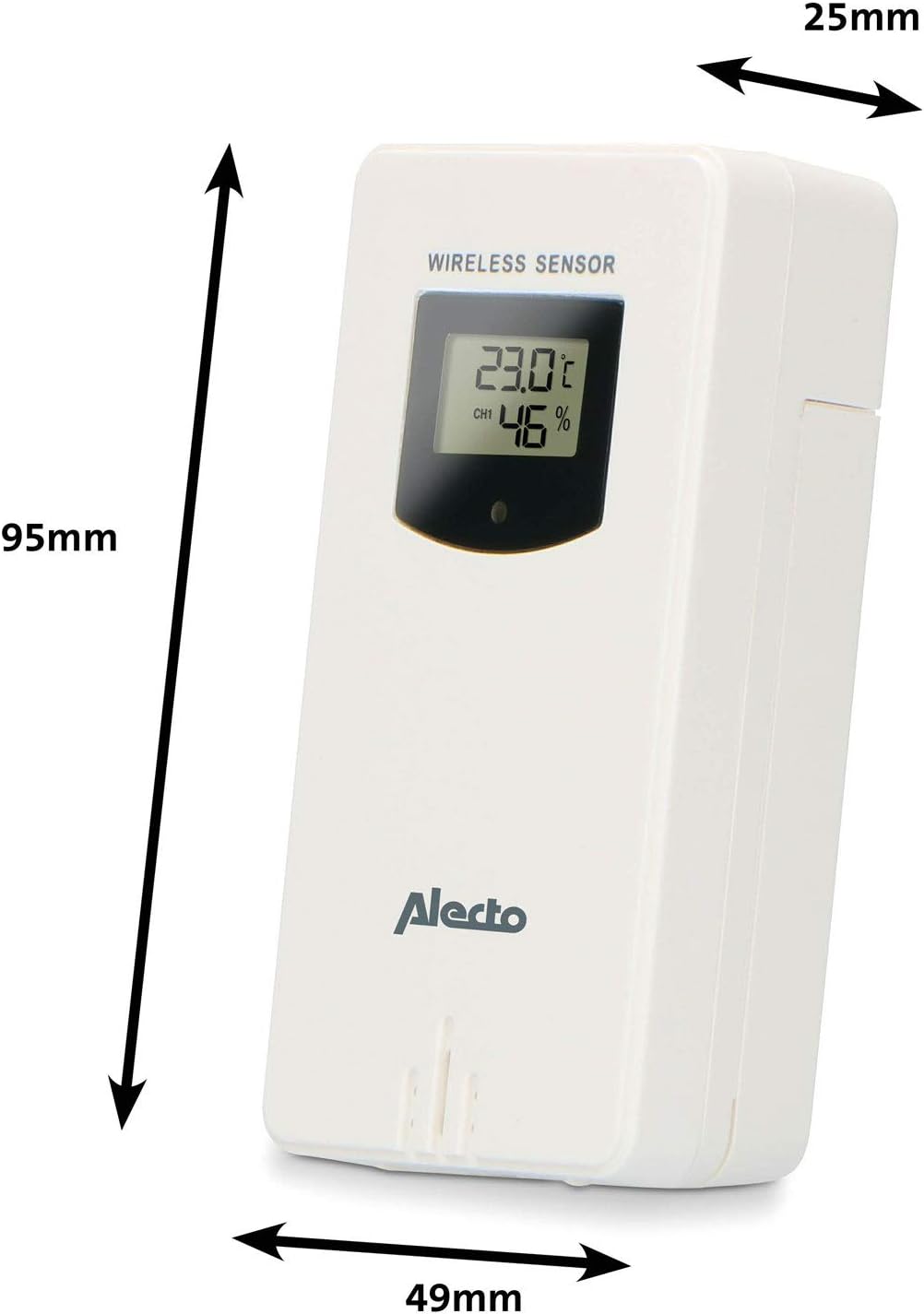
Figure 3.1: Wireless Outdoor Sensor dimensions and battery compartment location.
- Главна јединица:
- Отворите одељак за батерије на задњој страни главне јединице.
- Insert 2x AA batteries (not included) according to the polarity markings (+/-). These serve as backup batteries.
- Добро затворите одељак за батерије.
- Connect the main unit to a power outlet using the provided power adapter (if included).

Figure 3.2: Main Unit dimensions and power input.
3.2. Постављање сензора
For accurate outdoor readings, proper placement of the wireless sensor is crucial:
- Place the sensor in a shaded area, away from direct sunlight, to prevent inaccurate temperature readings.
- Ensure good air circulation around the sensor.
- Mount the sensor vertically, approximately 1.5 to 2.5 meters (5 to 8 feet) above the ground.
- Avoid placing the sensor near heat sources (e.g., vents, windows) or moisture sources.
- The maximum transmission range is 100 meters (328 feet) in open air. Walls and other obstacles will reduce this range.

Слика 3.3: Прample of outdoor sensor placement on a wall.
3.3. Упаривање сензора са главном јединицом
The main unit and sensor should automatically pair once both are powered on. If pairing does not occur:
- Ensure both units have fresh batteries and are within range.
- Press the "TX" button inside the outdoor sensor's battery compartment to manually send a signal.
- On the main unit, you may need to initiate a search for the outdoor sensor (refer to the "Operation" section for specific button functions).
4. Операција
4.1. Изглед приказа
The 5.7-inch color display provides a clear overview of all measured data. Key areas include:
- Спољна температура и влажност: Displays current outdoor conditions.
- Температура и влажност у затвореном простору: Displays current indoor conditions.
- Animated Weather Forecast: Icons predict upcoming weather (sunny, partly cloudy, cloudy, rainy, snowy).
- Време и датум: Current time, day, and date.
- Притисак на барометру: Current atmospheric pressure.
- Месечева фаза: Graphical representation of the current moon phase.
- Temperature/Ice Alarm Indicators: Alerts for specific temperature thresholds or potential ice conditions.

Слика 4.1: Детаљно view of the main unit's color display.
4.2. Функције дугмета
The main unit features several buttons for setting and adjusting functions. Common buttons include:
- КОМПЛЕТ: Улази у режим подешавања за време, датум и друга подешавања.
- НАЧИН: Switches between display modes or confirms settings.
- UP/DOWN (or +/-): Adjusts values during setup or cycles through channels.
- АЛАРМНИ: Подешава или активира функцију аларма.
- МЕМ: Displays maximum/minimum temperature and humidity records. Long press to clear records.
- ОДЛОГ/СВЕТЛО: Activates snooze during an alarm or adjusts backlight brightness.
Video 4.2: Illustrative video demonstrating various features and settings of a weather station. (Note: This video is for a related product and may not show the exact Alecto WS-1560 model.)
4.3. Подешавање времена и датума
- Притисните и држите дугме „SET“ док приказ времена не почне да трепери.
- Use the "UP" or "DOWN" buttons to adjust the hour, then press "SET" to confirm and move to minutes.
- Поновите за минуте, годину, месец и дан.
- Press "SET" again to exit the setting mode.
4.4. Подешавања аларма
- Press the "ALARM" button once to view vreme alarma.
- Press and hold the "ALARM" button until the alarm time starts flashing.
- Use the "UP" or "DOWN" buttons to set the desired alarm hour and minute.
- Press "ALARM" to confirm.
- To activate/deactivate the alarm, press the "ALARM" button briefly when the alarm time is displayed. An alarm icon will appear/disappear.
4.5. Max/Min Records
The weather station automatically records the maximum and minimum temperature and humidity values over a 24-hour period.
- Press the "MEM" button briefly to view the maximum recorded values.
- Press "MEM" again to view the minimum recorded values.
- Press "MEM" a third time to return to current readings.
- To clear the records, press and hold the "MEM" button for a few seconds.
5. Одржавање
- Чишћење: Обришите површине екрана и уређаја меком,amp тканина. Немојте користити абразивна средства за чишћење или раствараче.
- Замена батерије: Replace batteries in both the main unit and the outdoor sensor when the low battery indicator appears on the display. Always replace all batteries at the same time with new ones of the same type.
- Брига о сензорима: Periodically check the outdoor sensor for debris or obstructions that might affect its readings. Ensure it remains in a shaded, well-ventilated area.
КСНУМКС. Решавање проблема
| Проблем | Могући узрок | Решење |
|---|---|---|
| No outdoor temperature/humidity reading (or "---" displayed) |
|
|
| Нетачна очитавања температуре/влажности |
|
|
| Екран је затамњен или празан |
|
|
7. Спецификације
| Број модела | ВС-1560 |
| Бранд | Алецто |
| Извор напајања (главна јединица) | Power Adapter (if included) + 2x AA batteries (backup) |
| Извор напајања (спољни сензор) | 2к АА батерије |
| Димензије производа (главна јединица) | 5.1 к 16.5 к 12.3 цм |
| Тежина производа | 440 г |
| Домет бежичног сензора | До 100 метара (на отвореном простору) |
| Величина екрана | 5.7 инча / 14.5 цм |
| Порекло | Кина |
8. Гаранција и подршка
For warranty information, technical support, or service inquiries, please refer to the warranty card included with your product or visit the official Alecto webсајт. Сачувајте рачун као доказ о куповини.
Алецто Webсајт: ввв.алецто.нл (General Alecto website, specific support page may vary)