
1. Увод и крајview
The ESX INFOTAINMENT VN1015-MA-DAB-4G is an advanced Android-based naviceiver designed for vehicle integration, offering a comprehensive multimedia and navigation experience. This unit features a 10.1-inch anti-glare multi-angle touchscreen, Android operating system, 4G/LTE connectivity, DAB+ digital radio, and Google Maps navigation. It supports Bluetooth hands-free calling and audio streaming, USB and MicroSD media playback, and includes inputs for rearview cameras and auxiliary devices.
Кључне карактеристике укључују:
- 10.1-inch high-resolution, anti-glare multi-angle touchscreen.
- Android Operating System for versatile app usage.
- Integrated 4G/LTE dongle for mobile internet (requires optional SIM card).
- DAB+ digital radio reception with station logos and AM/FM radio with RDS.
- Google Maps navigation (online and offline capabilities).
- Bluetooth hands-free system with audio streaming.
- Multiple connectivity options: 2x USB ports, 1x MicroSD slot, 1x camera input, 2x video outputs, 1x AUX/video input, 1x AUX/audio input.
- Support for steering wheel controls (optional adapter may be required).
2. Подешавање и инсталација
Proper installation is crucial for the optimal performance of your ESX VN1015-MA-DAB-4G naviceiver. It is highly recommended that installation be performed by a qualified professional to ensure correct wiring and vehicle compatibility.
2.1. Идентификација компоненте
Familiarize yourself with the various ports and connections on the rear of the unit before installation.
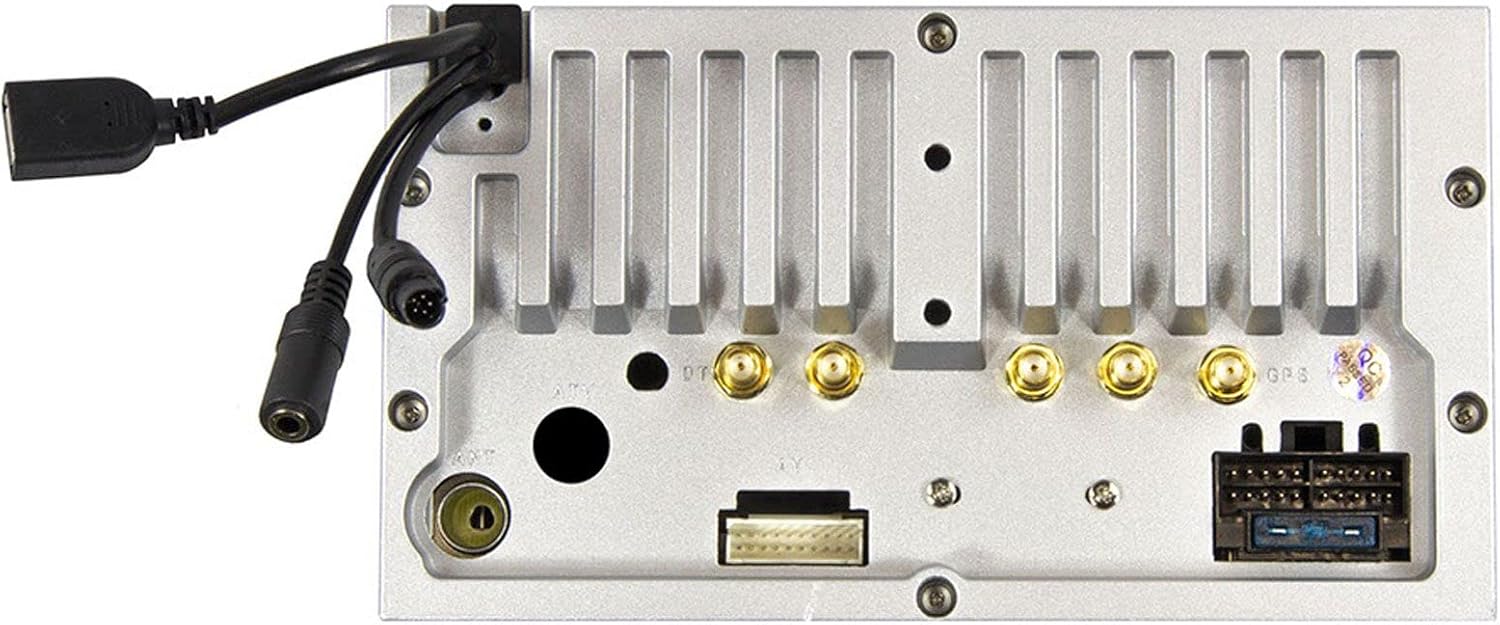
Слика 2.1: Позади view of the ESX VN1015-MA-DAB-4G unit, illustrating the power harness, antenna inputs, USB ports, and auxiliary connections.
2.2. Ожичење
- Напајање: Connect the main power harness to your vehicle's electrical system, ensuring correct positive, negative, and accessory (ACC) connections.
- Излази за звучнике: Connect your vehicle's speakers to the corresponding outputs on the naviceiver.
- Антенске везе: Connect the FM/AM antenna. For DAB+ digital radio, connect the included DAB+ antenna to the designated port.
- ГПС антена: Повежите ГПС антену и монтирајте је на место са јасним view неба за оптималан пријем сигнала.
- УСБ портови: Connect external USB devices for media playback or smartphone connectivity.
- микрофон: Connect the external microphone (VNA-MIC-AND, optional) for improved hands-free call quality.
- Позадиview камера: Повежите задњи деоview camera to the dedicated camera input. Ensure the reverse trigger wire is correctly connected for automatic display switching.
- Видео излази: Utilize the two video outputs for connecting external monitors.
- AUX улази: Connect external audio/video sources to the AUX/video and AUX/audio inputs.
- 4G/LTE Dongle: If using mobile internet via 4G/LTE, insert a compatible SIM card into the optional 4G/LTE dongle and connect it to a USB port.
- Контрола на волану: If your vehicle supports steering wheel controls, an optional adapter may be required to integrate this functionality.
2.3. Почетно укључивање
After all connections are secure, turn on your vehicle's ignition. The naviceiver should power on. Follow any on-screen prompts for initial setup, such as language selection and time zone.
3. Упутство за употребу
This section details the primary functions and operations of your ESX VN1015-MA-DAB-4G naviceiver.
3.1. Основне контроле и интерфејс
The unit features a responsive touchscreen and physical buttons for common functions.

Слика 3.1: The main screen showing the radio interface with frequency display and control buttons.
- Дугме за напајање: Press and hold to turn the unit on/off. A short press may mute audio or put the unit into standby.
- Контрола јачине звука: Подесите ниво аудио излаза.
- Хоме дугме: Враћа се на главни почетни екран Андроида.
- Дугме за назад: Navigates back one step in menus or applications.
- Дугме за камеру: Direct access to the camera input display (e.g., rearview камера).
3.2. Андроид оперативни систем
The naviceiver runs on an Android operating system, allowing access to various applications and customization options.
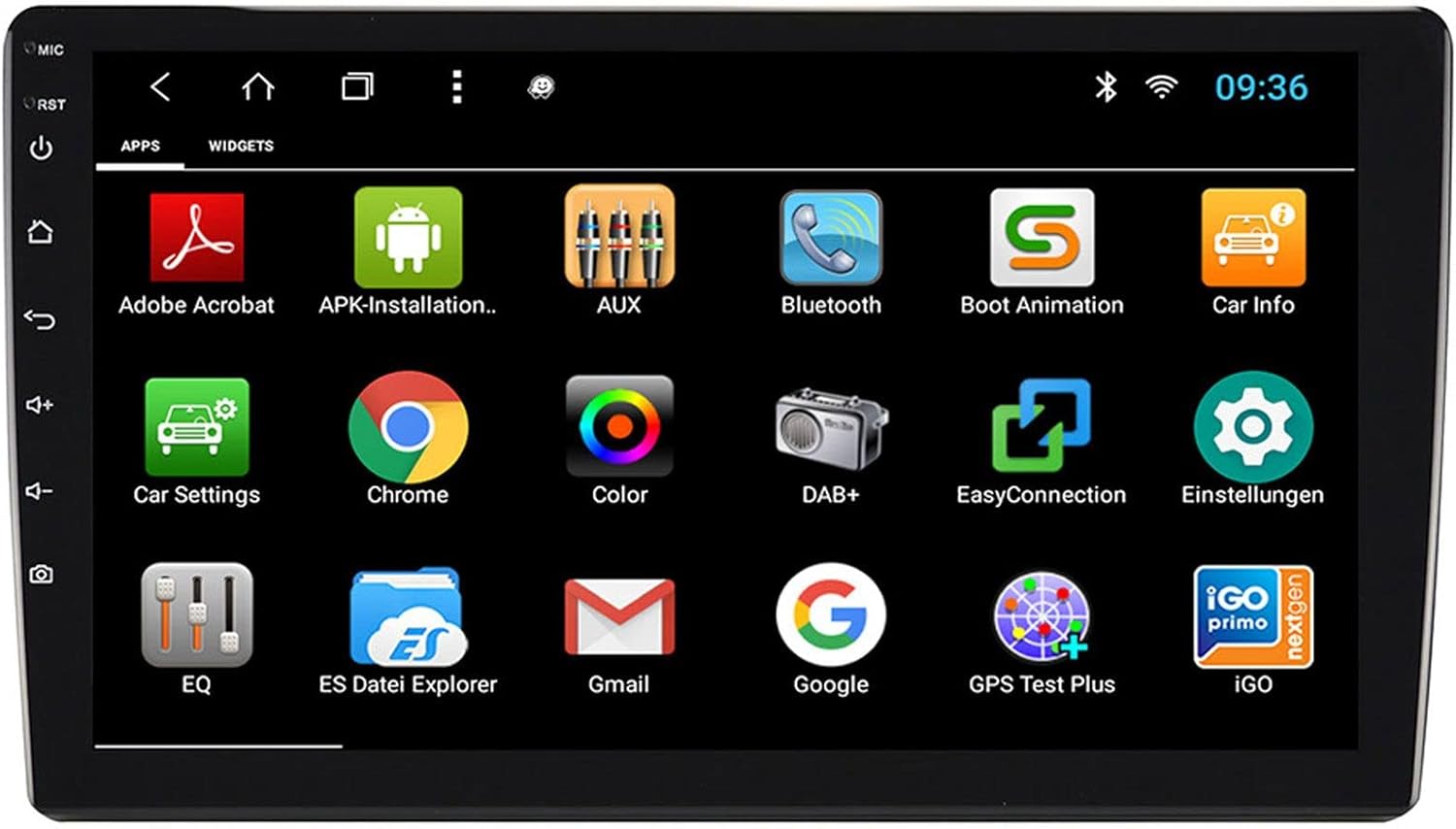
Слика 3.2: The applications screen, displaying various pre-installed and user-installed Android apps.
- Покретач апликација: Access all installed applications from the app drawer.
- Додаци: Customize your home screen with widgets for quick access to information or functions.
- Подешавања: Adjust system settings, network connections, display, audio, and more.
- Интернет конекција: Connect to the internet via a WiFi hotspot (from a compatible smartphone) or by inserting a SIM card into the 4G/LTE dongle.
3.3. Radio Functions (AM/FM/DAB+)
The unit supports both analog and digital radio broadcasts.
- Избор опсега: Switch between AM, FM, and DAB+ bands.
- подешавање: Manually tune or use the auto-scan function to find available stations.
- Пресетс: Сачувајте своје омиљене станице за брз приступ.
- RDS (FM): Radio Data System displays station information (e.g., station name, song title).
- DAB+ Features: Enjoy higher quality digital audio and view station logos where available.
3.4. Блуетоотх повезивање
Pair your smartphone for hands-free communication and audio streaming.
- Упаривање: Enable Bluetooth on your smartphone and search for the naviceiver. Select the unit and confirm the pairing code.
- Хандс-фрее позивање: Make and receive calls directly from the naviceiver screen.
- Аудио стреаминг: Play music from your smartphone wirelessly through the naviceiver.
3.5. Navigation (Google Maps)
Utilize Google Maps for turn-by-turn navigation.

Слика 3.3: The navigation interface showing a map with a selected destination.
- Онлајн навигација: Requires an active internet connection (WiFi hotspot or 4G/LTE).
- Офлајн мапе: Download maps for specific regions to use navigation without an internet connection.
- Унос одредишта: Enter addresses or points of interest using the touchscreen keyboard.
3.6. Репродукција медија
Репродукујте аудио и видео fileс из разних извора.
- УСБ: Connect USB drives containing media files.
- МицроСД: Insert a MicroSD card into the dedicated slot for media or navigation data.
- Подржани формати: The unit supports a wide range of audio and video formats. Refer to the system settings for a complete list.
3.7. Улаз камере
The naviceiver automatically displays the rearview camera feed when the vehicle is in reverse, or manually via the camera button.

Слика 3.4: Позадиview camera display with dynamic parking guidelines.
- Аутоматско активирање: When connected correctly, the rearview camera image appears automatically when shifting into reverse.
- Смернице за паркирање: Adjustable parking lines assist with maneuvering.
4. Одржавање
Regular maintenance ensures the longevity and optimal performance of your naviceiver.
- Чишћење екрана: Користите меку крпу која не оставља влакна да нежно обришете екран осетљив на додир. За тврдокорне мрље, благо обришитеampОбришите крпу водом или средством за чишћење екрана. Избегавајте јаке хемикалије или абразивне материјале.
- Ажурирања софтвера: Периодично проверавајте доступна ажурирања софтвера путем системских подешавања или произвођачевих website. Updates can improve performance, add features, and fix bugs.
- Општа нега: Avoid exposing the unit to extreme temperatures, direct sunlight for prolonged periods, or excessive moisture. Ensure all connections remain secure.
КСНУМКС. Решавање проблема
This section addresses common issues you might encounter with your ESX VN1015-MA-DAB-4G naviceiver.
| Проблем | Могући узрок | Решење |
|---|---|---|
| Јединица се не укључује. | Нема напајања; Прегорели осигурач; Неправилно ожичење. | Check vehicle's fuse box and the unit's power connections. Ensure ACC wire is receiving power. |
| Нема звука. | Volume too low; Mute activated; Incorrect speaker wiring; Audio source issue. | Increase volume. Check if mute is active. Verify speaker connections. Try a different audio source. |
| GPS signal loss or inaccurate navigation. | GPS antenna obstructed or disconnected; Outdated maps. | Уверите се да GPS антена има чист view of the sky and is securely connected. Update maps if necessary. |
| Проблеми са Bluetooth везом. | Device not in pairing mode; Interference; Unit not discoverable. | Ensure both devices are in pairing mode. Restart both devices. Check Bluetooth settings on the naviceiver. |
| Екран на додир не реагује. | System freeze; Software error. | Perform a soft reset (refer to the unit's specific reset procedure, often a small reset button). If persistent, a factory reset might be needed (data loss may occur). |
| DAB+ radio not receiving stations. | DAB+ antenna not connected or faulty; Poor signal area. | Check DAB+ antenna connection. Ensure the antenna is correctly installed. Try rescanning for stations in a different location. |
If you encounter issues not listed here or if the suggested solutions do not resolve the problem, please contact ESX customer support or your authorized dealer.
6. Спецификације
Below are the technical specifications for the ESX VN1015-MA-DAB-4G Naviceiver:
| Феатуре | Детаљ |
|---|---|
| Бранд | ЕСКС |
| Модел | VN1015-MA-DAB-4G |
| Величина екрана | 10.1 инча (25.6 цм) |
| Дисплаи Типе | High-resolution, anti-glare multi-angle touchscreen |
| Оперативни систем | Андроид |
| РАМ | 4 ГБ |
| Фласх меморија | 64 ГБ |
| Повезивање | Bluetooth, USB, 4G/LTE (via dongle), WiFi (via hotspot) |
| Радио тјунер | AM/FM with RDS, DAB+ Digital Radio |
| Навигација | Google Maps (online/offline) |
| Инпутс | 1x Camera Input, 1x AUX/Video Input, 1x AUX/Audio Input, 2x USB Ports, 1x MicroSD Slot |
| Излази | 2x Video Outputs, Pre-amplified outputs (Front/Rear/Subwoofer) |
| Контролни метод | Тоуцхсцреен |
| Компатибилни уређаји | Смартпхоне |
7. Гаранција и подршка
Your ESX VN1015-MA-DAB-4G naviceiver comes with a Certificate of Authenticity. For specific warranty terms and conditions, please refer to the documentation provided with your purchase or contact your authorized ESX dealer.
For technical support, troubleshooting assistance beyond this manual, or inquiries regarding parts and service, please contact your point of purchase or visit the official ESX webсајт за контакт информације за корисничку подршку.