
memzuoix WM-697
memzuoix 2.4G Portable Wireless Mouse (Model WM-697) User Manual
Свеобухватна упутства за подешавање, рад и одржавање.
1. Увод
This manual provides detailed instructions for the memzuoix 2.4G Portable Wireless Mouse, Model WM-697. Please read this manual carefully before using the product to ensure proper operation and to maximize its lifespan.
Садржај пакета
- 1 x memzuoix 2.4G Portable Wireless Mouse (Model WM-697)
- 1 к УСБ нано пријемник
- 1 x Упутство за употребу (овај документ)

Image 1.1: The memzuoix wireless mouse and its USB nano receiver.
2. Спецификације
| Феатуре | Детаљ |
|---|---|
| Модел | ВМ-КСНУМКС |
| Повезивање | 2.4 GHz бежични (USB пријемник) |
| ДПИ | 1400 ДПИ |
| Дугмад | 5 (Left, Right, Scroll Wheel, Forward, Backward) |
| Откривање покрета | Оптицал |
| Оперативни опсег | До 43 стопе (13 метара) |
| Извор напајања | 2 к ААА батерије (нису укључене) |
| Слееп Моде | Automatic after 7 minutes of inactivity |
| Димензије (Д к Ш к В) | 4.19 к 2.63 к 1.50 инча |
| Тежина | 2.22 унци |
| Компатибилност | Windows 7/8/10/XP, Vista 7/8, Mac OS, Linux |

Image 2.1: Physical dimensions of the mouse.
3. Водич за подешавање
3.1 Инсталација батерије
- Пронађите поклопац одељка за батерију на доњој страни миша.
- Пажљиво отворите поклопац.
- Insert two AAA batteries (not included) into the compartment, ensuring correct polarity (+/-).
- Затворите поклопац одељка за батерију док не кликне чврсто на своје место.
3.2 Повезивање USB пријемника
- Locate the USB nano receiver, which is typically stored in a slot within the battery compartment for safekeeping during transport.
- Извадите УСБ пријемник из његовог слота за складиштење.
- Plug the USB nano receiver into an available USB port on your computer (laptop, PC, desktop, MacBook, etc.).
- Turn on the mouse using the ON/OFF switch located on the underside.
- Your computer should automatically detect and install the necessary drivers. No manual driver installation is required.

Image 3.1: Underside of the mouse, illustrating battery compartment, USB receiver slot, and power switch.

Image 3.2: Wireless connection setup with a laptop.
4. Упутство за употребу
4.1 Основне функције
- Леви клик: Примарни избор и активација.
- Десни клик: Приступа контекстуалним менијима.
- Точак за померање: Помера садржај вертикално. Такође се може кликнути за функционалност средњег клика (зависи од апликације).
4.2 Advanced Functions (5-Button Mouse)
- Дугме за напред: Навигација напред у web претраживачи или file explorers. (Located on the side of the mouse)
- Дугме за назад: Навигација уназад web претраживачи или file explorers. (Located on the side of the mouse)
Напомена: The side buttons (Forward/Backward) are not available for Mac OS. Other functions operate normally.
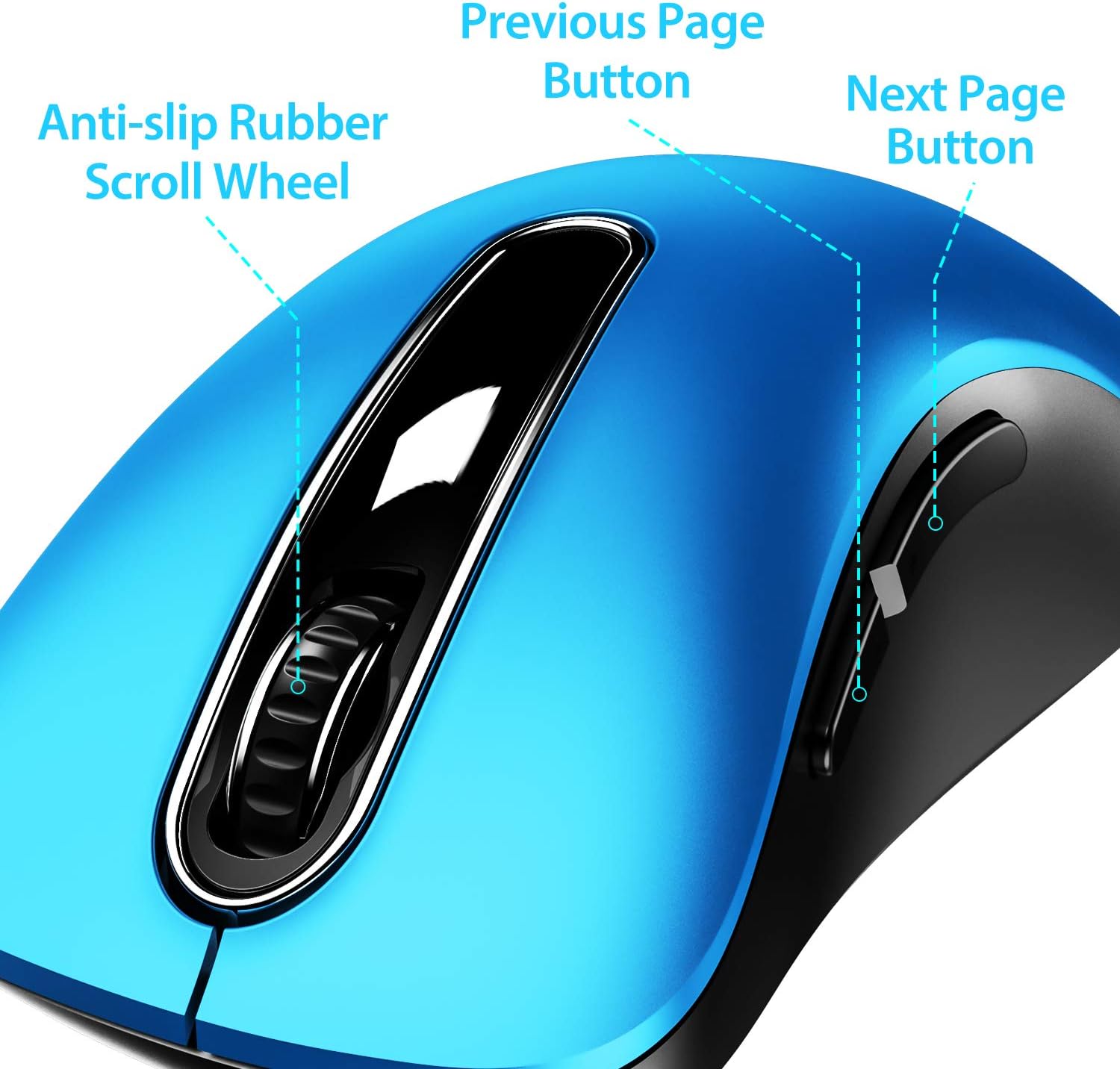
Слика 4.1: Готовоview of mouse buttons, including the scroll wheel and side navigation buttons.
4.3 Режим уштеде енергије
The mouse features an automatic power-saving sleep mode. If inactive for 7 minutes, the mouse will enter sleep mode to conserve battery life. To reactivate the mouse, simply click any button.
5. Одржавање и њега
- Чишћење: Користите меку, суву крпу за чишћење миша. За тврдокорну прљавштину, благо дamp Може се користити крпа, али водите рачуна да влага не уђе у унутрашње компоненте.
- Замена батерије: Replace batteries when the mouse performance degrades or stops responding. Always use fresh AAA batteries.
- Складиштење: When not in use for extended periods, turn off the mouse using the ON/OFF switch and store the USB receiver in its dedicated slot on the mouse's underside to prevent loss.
- Избегавајте екстремне услове: Do not expose the mouse to extreme temperatures, direct sunlight, or excessive moisture.
КСНУМКС. Решавање проблема
| Проблем | Могуће решење |
|---|---|
| Миш не реагује |
|
| Покрет курсора је неправилан или спор |
|
| Side buttons not working on Mac OS | This is a known compatibility limitation. The side buttons are not supported on Mac OS. Other mouse functions should work normally. |
| Миш пребрзо улази у режим спавања | The mouse is designed to enter sleep mode after 7 minutes of inactivity to conserve power. This is normal operation. Click any button to wake it up. |
7. Гаранција и подршка
The memzuoix 2.4G Portable Wireless Mouse (Model WM-697) comes with a 365-day worry-free warranty from the date of purchase. This warranty covers manufacturing defects and malfunctions under normal use.
For warranty claims, technical support, or any inquiries, please contact memzuoix customer service through the retailer where the product was purchased or visit the official memzuoix webсајт за контакт информације.
Молимо вас да сачувате доказ о куповини ради потврде гаранције.
Ask a question about this manual
Ask about setup, troubleshooting, compatibility, parts, safety, or missing instructions. Manuals+ will review the question and use this page’s manual context to help answer it.