
1. Увод
Хвала вам на куповиниasing the Nedis RDIN2500WT Internet Radio. This manual provides essential information for the safe and efficient operation of your device. Please read these instructions carefully before use and retain them for future reference.
2. Безбедносна упутства
- Не излажите уређај киши, влази или екстремним температурама.
- Обезбедите одговарајућу вентилацију око уређаја. Не блокирајте вентилационе отворе.
- Use only the provided power adapter. Using an unauthorized adapter may damage the device and void the warranty.
- Не покушавајте да растављате или модификујете уређај. Сва сервисирања препустите квалификованом особљу.
- Држите уређај даље од јаких магнетних поља.
- Чистите уређај само меком, сувом крпом. Не користите течна средства за чишћење или аеросоле.
3. Садржај пакета
Проверите да ли су све ставке присутне у пакету:
- Nedis RDIN2500WT Internet Radio Unit
- Ремоте Цонтрол
- Адаптер за напајање (ДЦ 12В)
- 3.5 мм аудио кабл
- Кориснички приручник (овај документ)

Figure 3.1: Nedis RDIN2500WT Internet Radio with included accessories: radio unit, remote control, power adapter, and 3.5mm audio cable.
4. Производ је готовview
4.1 Front and Top Panel Controls

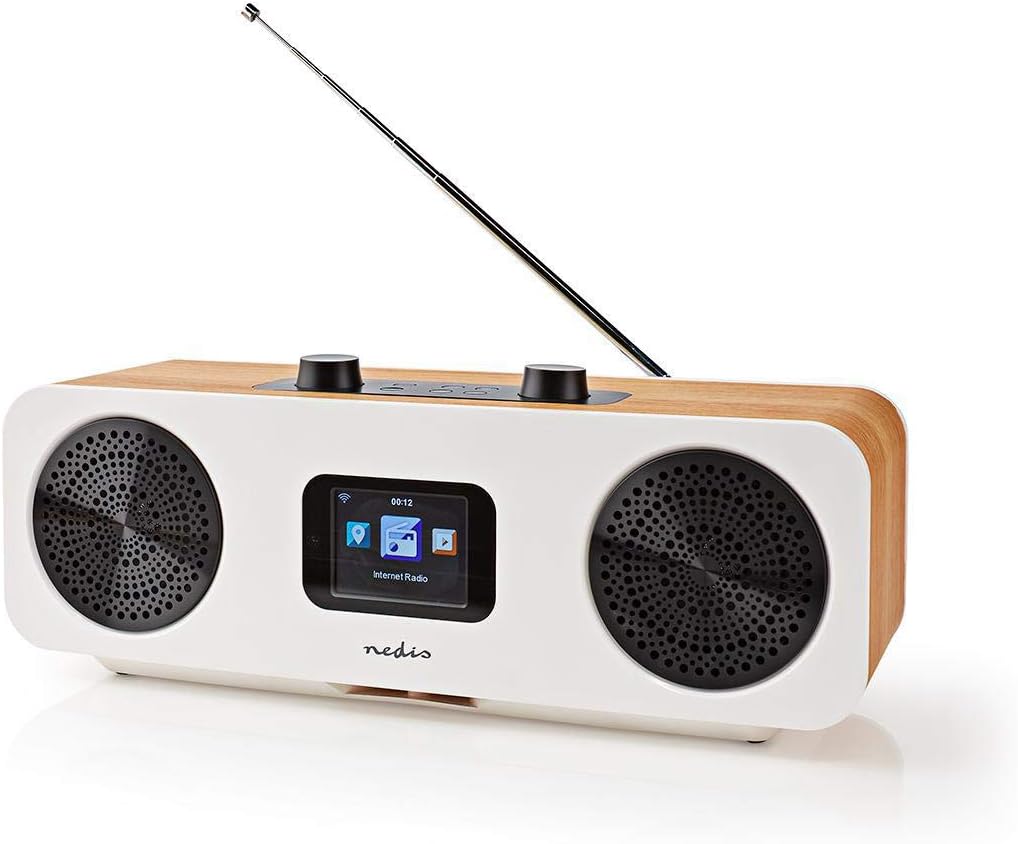
Слика 4.1: Предња страна view of the radio with display.
The front of the radio features a 2.4-inch color LCD display and two speaker grilles. The top panel includes the main control buttons and knobs.
Слика 4.2: Горња контролна табла.
- Volume - / +: Подешава јачину звука.
- Искључи звук: Искључује или укључује звук.
- Standby (Power button): Turns the radio on or off, or puts it into standby mode.
- Мени: Accesses the main menu or goes back to the previous screen.
- Режим: Switches between different operating modes (Internet Radio, DAB+, FM, Bluetooth, AUX).
- Унапред подешено: Accesses or saves preset stations.
- Left / Right (Navigation buttons): Navigates through menus or tunes stations.
- Унесите: Потврђује изборе.
- Skip (Forward / Backward): Skips tracks in Bluetooth mode or navigates through lists.
4.2 Прикључци задње плоче

Слика 4.3: Прикључци на задњој плочи.
- Телескопска антена: For DAB+ and FM reception. Extend fully for best signal.
- ДЦ 12В Улаз: Овде прикључите приложени адаптер за напајање.
- УСБ порт: For firmware updates or charging external devices (check manual for specific functionality).
- АУКС улаз: Connect external audio devices using the 3.5mm audio cable.
4.3 Даљински управљач

Figure 4.4: Remote control layout.
The remote control provides convenient access to all radio functions. Ensure batteries are inserted correctly (not included, typically 2x AAA).
5. Подешавање
5.1 Прикључак за напајање
- Connect the provided power adapter to the DC 12V input on the rear of the radio.
- Укључите адаптер за напајање у одговарајућу зидну утичницу.
5.2 Подешавање антене
For optimal DAB+ and FM reception, fully extend the telescopic antenna located on the rear of the unit.
5.3 Initial Setup and Wi-Fi Connection
Upon first power-on, the radio will guide you through an initial setup wizard:
- Избор језика: Use the navigation buttons to select your preferred language and press Ентер.
- Време/Датум: Set the current time and date. The radio can synchronize this automatically via network or DAB+ signal.
- Мрежна конфигурација: Радио ће скенирати доступне Wi-Fi мреже.
- Изаберите своју Ви-Фи мрежу са листе.
- Enter your Wi-Fi password using the navigation buttons and Ентер to confirm each character. Press Ентер again to connect.
- Када се повеже, радио ће потврдити статус мреже.
6. Управљање радиом
6.1 Пребацивање режима
Притисните тастер Режим button on the radio or remote control to cycle through the available modes:
- Интернет Радио
- ДАБ+ Радио
- ФМ Радио
- Блуетоотх
- АУКС улаз
6.2 Интернет радио
In Internet Radio mode, you can access thousands of stations worldwide.
- Select "Internet Radio" from the mode menu.
- Navigate through categories (e.g., Location, Genre, Popular Stations) using the Лево/Десно дугмад и потврдите са Ентер.
- Select a station to begin playback.
6.3 DAB+ радио
In DAB+ mode, the radio will automatically scan for available digital stations.
- Select "DAB+ Radio" from the mode menu.
- The radio will perform a scan and list available stations.
- Користите Лево/Десно to select a station and Ентер слушати.
6.4 ФМ Радио
In FM mode, you can tune into analog radio stations.
- Select "FM Radio" from the mode menu.
- Користите Лево/Десно to manually tune the frequency, or press and hold Лево/Десно да аутоматски скенирате следећу доступну станицу.
6.5 Блуетоотх упаривање
Connect your smartphone or tablet via Bluetooth to stream audio.
- Select "Bluetooth" from the mode menu. The radio will enter pairing mode.
- On your mobile device, enable Bluetooth and search for "RDIN2500WT".
- Select the radio from the list to pair. Once connected, you can play audio from your device.
6.6 АУКС улаз
Connect external audio sources like MP3 players using the 3.5mm audio cable.
- Connect one end of the 3.5mm audio cable to the AUX input on the radio's rear panel.
- Повежите други крај са прикључком за слушалице или аудио излазом вашег екстерног уређаја.
- Select "AUX Input" from the mode menu.
6.7 Пресетс
Сачувајте своје омиљене станице за брз приступ.
- Подесите жељену станицу.
- Притисните и држите Пресет button until the "Save to Preset" menu appears.
- Користите Лево/Десно да бисте изабрали број предефинисане поставке (1-10) и притисните Ентер да спасе.
- To recall a preset, press the Пресет button briefly, then use Лево/Десно да бисте изабрали жељену предефинисану поставку и притисните Ентер.
6.8 Alarm and Sleep Functions
The radio includes an integrated alarm clock and sleep timer.
- Аларм: Притисните тастер Аларм button on the remote control or navigate through the main menu to set up alarms (time, source, volume).
- спавање: Притисните тастер Спавај button on the remote control or navigate through the main menu to set a sleep timer, which will turn off the radio after a set duration.
6.9 App Control (AirMusic)
Control your radio using the AirMusic app on your smartphone or tablet.
- Download the "AirMusic" app from your device's app store.
- Ensure your smartphone/tablet and the radio are connected to the same Wi-Fi network.
- Open the AirMusic app; it should automatically detect your radio.
- You can now control the radio, browse stations, and manage presets from the app.
7. Одржавање
7.1 Чишћење
To clean the radio, gently wipe the surfaces with a soft, dry, lint-free cloth. Do not use abrasive cleaners, waxes, or solvents as they may damage the finish.
7.2 Складиштење
If storing the radio for an extended period, disconnect it from the power outlet and store it in a cool, dry place, away from direct sunlight and extreme temperatures.
КСНУМКС. Решавање проблема
If you encounter issues with your radio, refer to the following table for common problems and solutions.
| Проблем | Могући узрок | Решење |
|---|---|---|
| Нема струје | Адаптер за напајање није повезан или је утичница неисправна. | Ensure the power adapter is securely connected to the radio and a working power outlet. |
| Нема звука | Volume too low, muted, or incorrect input mode. | Increase volume, check if muted, ensure correct mode (e.g., Internet Radio, DAB+). |
| Internet Radio not connecting | Incorrect Wi-Fi password, weak signal, or network issue. | Re-enter Wi-Fi password, move radio closer to router, restart router, check network settings. |
| Слаб DAB+/FM пријем | Антена није испружена, слаб сигнал или сметње. | Fully extend the telescopic antenna. Try repositioning the radio. |
| Блуетоотх упаривање није успело | Радио није у режиму упаривања, уређај је предалеко или је већ упарен са другим уређајем. | Ensure radio is in Bluetooth mode. Place devices closer. Disconnect from other Bluetooth devices. |
| Даљински управљач не ради | Празне батерије или препрека. | Replace batteries. Ensure no obstruction between remote and radio. |
9. Спецификације
| Феатуре | Спецификација |
|---|---|
| Бранд | НЕДИС |
| Број модела | РДИН2500ВТ |
| Боја | Wood / White |
| Технологија повезивања | Блуетоотх, Ви-Фи |
| Технологија подешавања | ДАБ+ |
| Подржани радио опсези | ФМ, ДАБ+, Интернет радио |
| Посебне карактеристике | Integrated Clock, Alarm Clock |
| Димензије производа (Д к Ш к В) | 15.1 к 16 к 42.1 цм |
| Извор напајања | AC Power Adapter (DC 12V) |
| Дисплаи Типе | LCD (2.4" Color Screen) |
| Max FM Frequency | 108 МХз |
10. Гаранција и подршка
This product is covered by the standard manufacturer's warranty. For detailed warranty terms and conditions, please refer to the warranty card included with your purchase or visit the official Nedis webсајту.
For technical support, troubleshooting assistance, or service inquiries, please contact Nedis customer support through their official channels. Contact information can typically be found on the Nedis webсајту или у паковању производа.