
Увод
This user manual provides detailed instructions for the installation, operation, maintenance, and troubleshooting of the Aruba AP-555 Wireless Access Point. Please read this manual thoroughly before using the device to ensure proper setup and optimal performance.
Производ је завршенview
The Aruba AP-555 is an advanced 802.11ax (Wi-Fi 6) wireless access point designed for high-density environments. It supports aggregate peak data rates of up to 5.95 Gbit/s across 2.4 GHz and 5 GHz bands, leveraging MIMO and Beamforming technologies for enhanced performance. This access point is ideal for accommodating a large number of mobile and IoT devices, ensuring robust and efficient wireless connectivity.
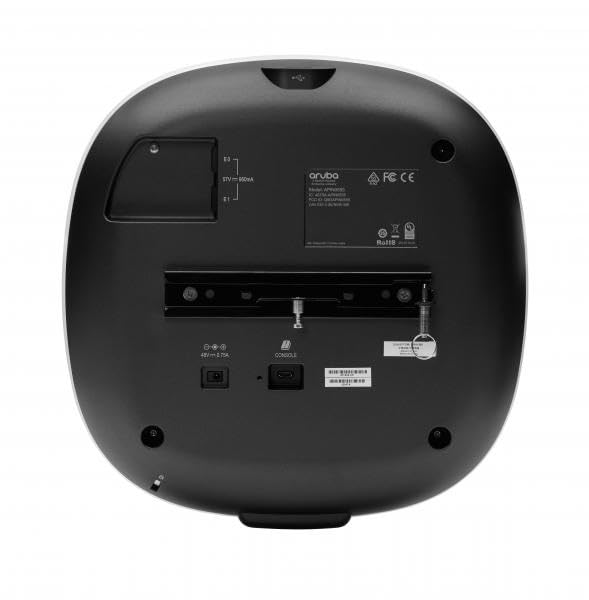
This image displays the rear panel of the Aruba AP-555 Wireless Access Point. Visible features include the mounting bracket, Ethernet ports (E0, E1), a USB port, a console port, and the power input (48V – 0.75A). Regulatory markings such as Aruba logo, FCC, CE, and RoHS are also present.
Сетуп
1. Распакивање
Carefully remove all components from the packaging. Verify that all items listed in the packing list are present and undamaged. Retain the packaging for future transport or storage.
2. Монтажа
The Aruba AP-555 can be mounted on a wall or ceiling. Use the provided mounting bracket and hardware. Ensure the mounting surface is sturdy enough to support the access point's weight (approximately 3.46 pounds).
- Монтажа на зид: Secure the bracket to the wall using appropriate screws and anchors.
- Монтажа на плафон: Attach the bracket to a ceiling tile rail or a solid ceiling structure.
3. Connecting Power and Network
Connect the power adapter to the 48V – 0.75A power input port on the rear of the access point. Connect an Ethernet cable from your network switch or router to one of the RJ-45 network ports (E0 or E1) on the AP-555. Power over Ethernet (PoE) can also be used if supported by your network infrastructure.
4. Почетна конфигурација
Upon powering on, the access point will initiate its boot sequence. Access the device's management interface via a web browser or a dedicated management software (e.g., Aruba Central, AirWave) to perform initial configuration, including setting up SSIDs, security protocols, and network parameters.
Упутство за употребу
ЛЕД индикатори
AP-555 има ЛЕД индикаторе који пружају информације о статусу:
- ЛЕД за напајање: Indicates power status (e.g., solid green for normal operation, blinking for boot-up).
- Радио ЛЕД диоде: Indicate activity on the 2.4 GHz and 5 GHz radios.
Повезивање уређаја
Once configured, wireless clients can connect to the SSIDs broadcast by the AP-555 using the specified security credentials.
Мрежна конфигурација
Further network configurations, such as VLAN tagging, QoS settings, and guest access, can be managed through the access point's web interface or centralized management platform.
Одржавање
Ажурирања фирмвера
Regularly check for and apply firmware updates from the Hewlett Packard Enterprise support webсајт. Ажурирања фирмвера често укључују побољшања перформанси, безбедносне закрпе и нове функције.
Чишћење
Clean the exterior of the access point with a soft, dry cloth. Do not use liquid cleaners or aerosols. Ensure ventilation openings are free from dust and obstructions.
Енвиронментал Цонсидератионс
Ensure the access point is operated within its specified temperature and humidity ranges. Avoid placing it near heat sources or in direct sunlight.
Решавање проблема
Но Повер
- Verify the power adapter is securely connected to the AP and a working power outlet.
- Check if the power LED is illuminated.
Нема мрежне везе
- Ensure the Ethernet cable is properly connected to a functional network port.
- Check the status of the network switch port.
- Verify network settings in the AP's configuration interface.
Споро перформансе
- Check for channel interference and adjust channel settings if necessary.
- Уверите се да је инсталиран најновији фирмвер.
- Review client density and network traffic.
Ресетовање уређаја
To perform a factory reset, locate the reset button (often recessed) and press it for a specified duration (refer to the device's quick start guide or online documentation for exact timing, typically 5-10 seconds) while the device is powered on.
Спецификације
| Феатуре | Детаљ |
|---|---|
| Број модела | ЈЗ366А |
| Димензије производа | 10.2 к 10.2 к 2.3 инча |
| Тежина артикла | 3.46 фунти |
| Произвођач | Хевлетт Пацкард Ентерприсе |
| вирелесс стандард | 802.11ак (Ви-Фи 6) |
| Aggregate Data Rate | До 5.95 Гбит/с |
| Фрекуенци Бандс | 2.40 ГХз, 5 ГХз |
| MIMO конфигурација | 8x8 MIMO (5GHz), 4x4 MIMO (2.4GHz) |
| Портс | 2 x Network (RJ-45), 1 x USB, 1 x Console |
| Повер Инпут | 48В – 0.75А |
| Опције монтаже | Wall Mountable, Ceiling Mountable |
Гаранција и подршка
For detailed warranty information, please refer to the warranty card included with your product or visit the official Hewlett Packard Enterprise support website. Technical support, drivers, and additional documentation can be found on the manufacturer's webсајту.
Произвођач Webсајт: www.hpe.com/aruba