
1. Увод
Thank you for choosing the DELUX M625BU(3050) RGB Wired Gaming Mouse. This manual provides detailed instructions for setting up, operating, and maintaining your gaming mouse to ensure optimal performance and an enhanced gaming experience. Please read this manual thoroughly before use.
2. Садржај пакета
- DELUX M625BU(3050) RGB Wired Gaming Mouse
- Упутство за употребу
3. Производ је готовview
The DELUX M625BU(3050) is an ergonomic wired gaming mouse designed for precision and customization. It features a high-performance A3050 PixArt optical sensor, 7 programmable buttons, and customizable RGB lighting.
3.1 Mouse Layout and Buttons
Familiarize yourself with the buttons and their default functions:

Image: DELUX M625BU(3050) Gaming Mouse Button Layout
- Лево дугме: Примарна функција клика.
- Десно дугме: Секундарна функција клика.
- Точак за померање: Померање горе/доле, клик средњим тастером миша.
- Дугме ДПИ: Кружи кроз подешавања DPI-ја.
- Дугме за напред: Навигација напред у web прегледачи/апликације.
- Дугме за назад: Навигација уназад web прегледачи/апликације.
- Дугме за ватру: Rapid-fire function (default).
3.2 Ергономски дизајн
The mouse features an ergonomic streamline structure and non-slip rubber sides, designed to fit comfortably in your palm for extended gaming sessions.
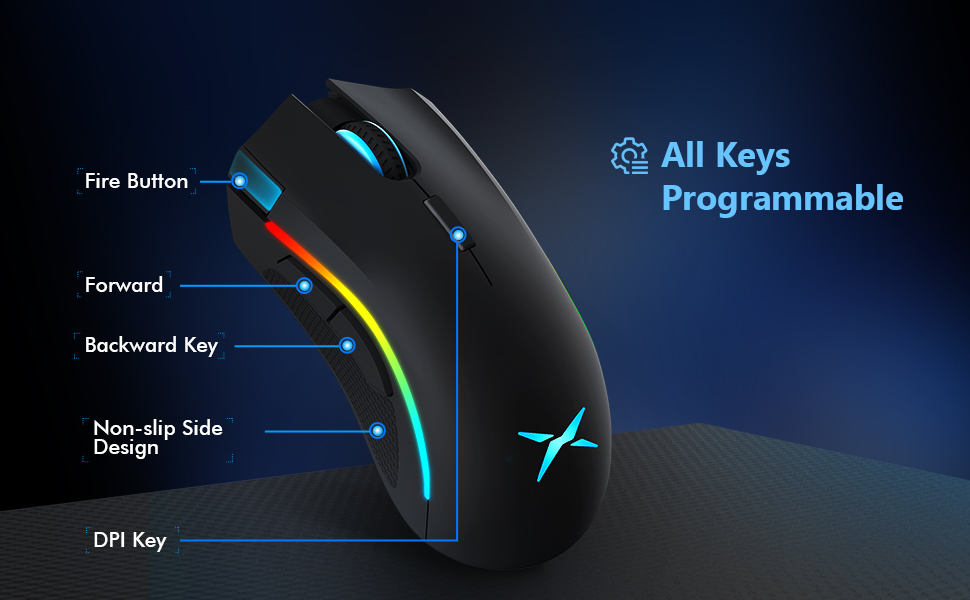
Image: Ergonomic Design Features
4. Подешавање
The DELUX M625BU(3050) mouse is a plug-and-play device, requiring no additional drivers for basic functionality.
- Повежите миш: Plug the USB connector of the mouse's 1.8m braided cable into an available USB port on your computer.
- Препознавање система: Your operating system (Windows XP, Vista, 7, 8, or 10) will automatically detect and install the necessary drivers.
- Опционална инсталација софтвера: For advanced customization of buttons, DPI, and RGB lighting, download and install the DELUX Pro Game Software from the official DELUX webсајту.

Image: Plug and Play Connectivity
5. Упутство за употребу
5.1 Подешавање DPI (тачака по инчу)
The mouse features an A3050 PixArt optical sensor with adjustable DPI settings. You can cycle through preset DPI levels by pressing the DPI button located behind the scroll wheel.

Image: DPI Adjustment Levels
- Available DPI levels: 800, 1600, 3200, 4000.
- Each press of the DPI button will switch to the next level.
- The current DPI level may be indicated by a specific LED color or pattern (refer to software for detailed customization).
5.2 РГБ светлосних ефеката
The mouse features customizable RGB lighting with various effects.
- Промена режима осветљења: Press the Left Button, Scroll Wheel, and Right Button simultaneously for 3 seconds to cycle through different lighting modes (e.g., full lighting, breathing, floating).
- Прилагођавање путем софтвера: Use the DELUX Pro Game Software to customize RGB backlight effects from 16.8 million colors, adjust lighting direction, and speed.
5.3 Програмабилни тастери и софтвер
All 7 buttons on the M625BU(3050) mouse are programmable using the DELUX Pro Game Software.
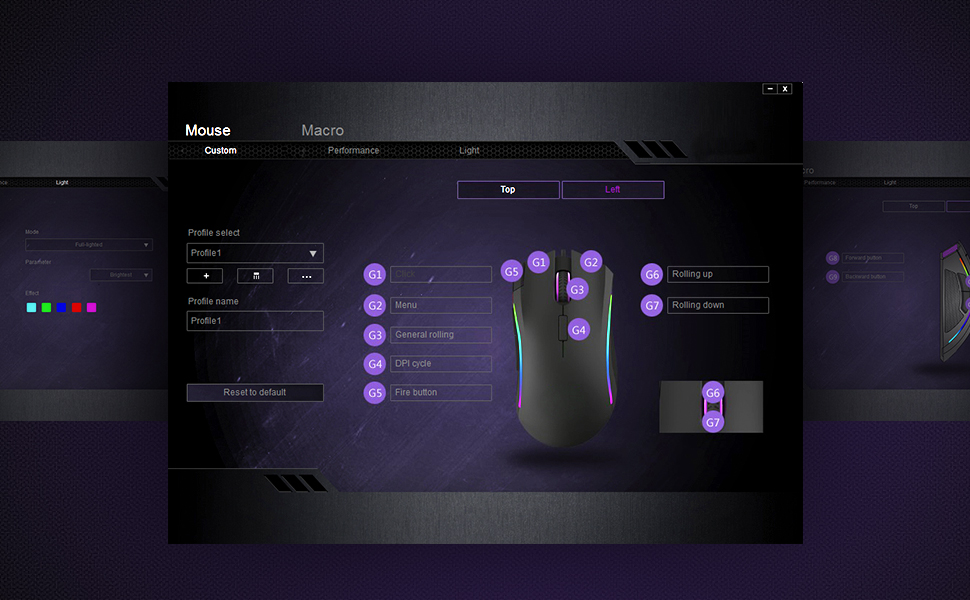
Image: Pro Game Software Interface for Customization
- Функције дугмета: Reassign any button to perform different functions, including keyboard keys, multimedia controls, or specific file извршење.
- Макрои: Create and assign complex macro sequences to buttons for automated actions.
- Sensitivity and Polling Rate: Fine-tune pointer speed, DPI sensitivity, and polling rate (125/250/500/1000Hz) for precise control.
6. Одржавање
To ensure the longevity and optimal performance of your DELUX M625BU(3050) gaming mouse, follow these maintenance guidelines:
- Чишћење: Користите меку, суву крпу да обришете површину миша. За тврдокорну прљавштину, благо дampОбришите крпу водом или благим раствором за чишћење. Избегавајте јаке хемикалије.
- Брига о сензорима: Keep the optical sensor on the underside of the mouse clean and free from dust or debris. Use a cotton swab if necessary.
- Нега каблова: Avoid sharp bends or excessive pulling on the braided cable to prevent damage.
- Складиштење: Store the mouse in a clean, dry environment when not in use.
КСНУМКС. Решавање проблема
If you encounter issues with your DELUX M625BU(3050) mouse, refer to the following common solutions:
| Проблем | Могуће решење |
|---|---|
| Миш не реагује |
|
| Покрет курсора је неправилан или непрецизан |
|
| RGB осветљење не ради или је неисправно |
|
| Programmable buttons not functioning |
|
| Scroll wheel behaves erratically (e.g., scrolls opposite direction) |
|
8. Спецификације
| Феатуре | Детаљ |
|---|---|
| Број модела | M625BU(3050) |
| Повезивање | Wired (1.8m Braided Cable) |
| Сензор | A3050 PixArt Optical Sensor |
| ДПИ подешавања | 800 / 1600 / 3200 / 4000 ДПИ |
| Поллинг Рате | 125/250/500/1000Хз |
| Дугмад | 7 Програмабилна дугмад |
| Осветљење | Customizable RGB Lighting Effects |
| Ергономија | Ergonomic Streamline Structure, Non-slip Rubber Side |
| Димензије производа | 5.14 к 2.71 к 1.67 инча |
| Тежина артикла | 3.53 унци |
| Компатибилност | Виндовс КСП, Виста, 7, 8, 10 |
9. Гаранција и подршка
All DELUX products include a 12-месечна гаранција from the date of purchase. Additionally, DELUX provides free lifetime technical support за овај производ.
For warranty claims, technical assistance, or further inquiries, please contact DELUX customer support through the official DELUX webсајту или вашем продавцу.