
1. Увод
The PONYBRO HDMI 2.0 Switch is designed to expand your display's HDMI input capabilities, allowing you to connect up to five HDMI source devices to a single HDMI display. This device supports high-resolution video up to 4K@60Hz, HDR10, and 3D, ensuring a high-quality visual experience. It features automatic switching for convenience and can also be controlled manually via a button or the included remote control.
2. Карактеристике
- 4K@60Hz Ultra HD & HDR10 Support: Delivers crystal-clear 4K Ultra HD resolution at 60Hz with HDR10, providing vibrant colors and sharp details. Compatible with HDMI 2.0/1.4 devices including PS5, Xbox Series X, 4K Blu-ray players, Roku, Apple TV, and soundbars.
- 5-Port Auto-Switching & Remote Control: Automatically detects and switches between 5 HDMI devices. Manual control is available via the device button or the included remote.
- Zero Delay & 18Gbps Bandwidth: Ensures no lag or signal loss with 18Gbps high-speed bandwidth, suitable for competitive gaming and 4K HDR content. HDMI 2.0 certified for reliable performance.
- Плуг & Плаи подешавање: No drivers or software required. Simply connect your devices to the 5 inputs and your TV to the output.
- Компактан дизајн: Saves space in various setups.
3. Садржај пакета
Молимо вас да проверите да ли су све ставке присутне у вашем пакету:
- PONYBRO HDMI 2.0 Switch (5x1)
- ИР даљински управљач
- AC Power Adapter (5V DC)
- Кориснички приручник (овај документ)

Image: The PONYBRO HDMI Switch, remote control, power adapter, and user manual are included in the package.
4. Дијаграм производа
Familiarize yourself with the ports and indicators on your HDMI switch:

Image: Front panel of the PONYBRO HDMI Switch, highlighting the IR receiver, input indicator LEDs (N1-N5), input selection button, and power button/LED.

Image: Rear panel of the PONYBRO HDMI Switch, showing the DC 5V power input, HDMI OUT port, and five HDMI IN ports (HDMI IN1 to HDMI IN5).
5. Упутства за подешавање
- Connect HDMI Source Devices: Connect up to five HDMI source devices (e.g., PS5, Xbox, PC, Fire TV, Blu-ray player) to the HDMI IN1, IN2, IN3, IN4, and IN5 ports on the PONYBRO HDMI Switch using high-quality HDMI 2.0 cables.
- Повежи се са екраном: Connect the HDMI OUT port of the PONYBRO HDMI Switch to an HDMI input port on your TV, monitor, or projector using a high-quality HDMI 2.0 cable.
- Прикључите напајање: Plug the included 5V DC power adapter into the DC 5V port on the switch, then plug the adapter into a power outlet. The power LED on the switch will illuminate.
- Уређаји за укључење: Power on your HDMI source devices and your display. The switch will typically auto-detect the active input and switch to it.

Image: Setup diagram illustrating how to connect various HDMI input devices (New Fire TV, Roku Ultra, Blu-Ray Player, Apple TV 4K, XboxOneS, PS4/PS5) to the PONYBRO HDMI Switch, which then outputs to an HD screen.
6. Упутство за употребу
The PONYBRO HDMI Switch offers multiple ways to select your desired input source:
Аутоматско пребацивање
The switch is designed to automatically detect and switch to the most recently activated HDMI source. If you power on a device connected to the switch, it should automatically switch to that input.
Manual Switching (Device Button)
Press the "Switch" button on the front panel of the HDMI switch to cycle through the available HDMI input sources (IN1, IN2, IN3, IN4, IN5). The corresponding LED indicator will light up to show the active input.
Manual Switching (Remote Control)
Use the included IR remote control to select your desired input directly. The remote has dedicated buttons for each input (1, 2, 3, 4, 5) and a power button.
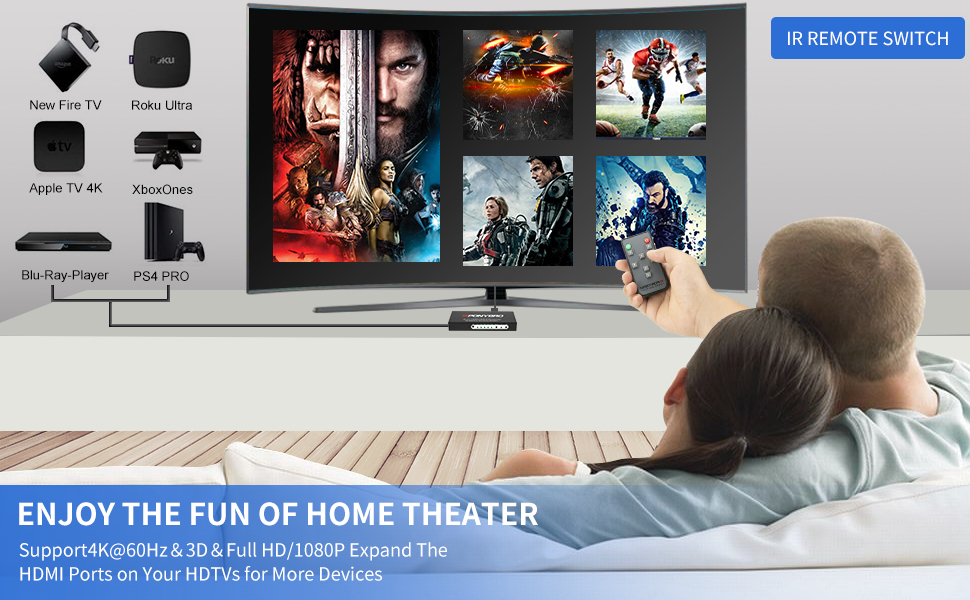
Image: The remote control for the PONYBRO HDMI Switch, showing buttons for power and direct selection of inputs 1 through 5.
Укључивање/искључивање
Press the power button on the front panel or the remote control to turn the switch on or off. The Standby Status LED indicates the power status.
Video: An official PONYBRO video demonstrating the features and operation of the 4K 60Hz HDMI 2.0 Switch 5x1 with Remote.
КСНУМКС. Решавање проблема
- Нема сигнала/Празан екран:
- Ensure the switch is powered on and the power adapter is securely connected.
- Verify all HDMI cables are securely connected to both the source devices, the switch, and the display.
- Try selecting the input manually using the button on the switch or the remote control.
- Ensure your display is set to the correct HDMI input channel where the switch is connected.
- Test with different HDMI cables, especially certified HDMI 2.0 cables for 4K@60Hz content.
- Flickering/Poor Picture Quality:
- Use high-quality, certified HDMI 2.0 cables, especially for 4K@60Hz or HDR content. Longer cables may require active HDMI cables.
- Reduce the resolution or refresh rate of the source device to see if the issue persists.
- Ensure your display supports the resolution and refresh rate being output by your source device.
- Auto-Switching Not Working:
- Auto-switching typically activates when a new device is powered on or an active device is powered off. Ensure only one source is active for reliable auto-switching.
- Some devices may not provide a strong enough signal to trigger auto-switching. In such cases, use manual switching.
- Даљински управљач не реагује:
- Ensure there are no obstructions between the remote and the IR receiver window on the switch.
- Замените батерију у даљинском управљачу.
- Point the remote directly at the IR receiver window.
8. Спецификације
| Феатуре | Детаљ |
|---|---|
| Модел | B087CTR22G |
| Бранд | ПОНИБРО |
| Боја | Мат црна |
| Тип конектора | ХДМИ |
| Број портова | 5 (Input) / 1 (Output) |
| Подржана резолуција | Up to 4K@60Hz, 1080P, 720P, 3D |
| ХДР подршка | ХДР10 |
| Бандвидтх | 18Гбпс |
| Компатибилни уређаји | PS5/Xbox/PC/Fire TV/Roku/Apple TV |
| Повер Суппли | ДЦ 5В |
| Тежина артикла | 8 унци |
9. Одржавање
- Држите уређај на хладном и сувом месту, даље од директне сунчеве светлости и извора топлоте.
- Избегавајте излагање уређаја влази или екстремним температурама.
- Очистите уређај меком, сувом крпом. Не користите течна или аеросолна средства за чишћење.
- Осигурајте одговарајућу вентилацију око уређаја како бисте спречили прегревање.
10. Гаранција и подршка
PONYBRO offers comprehensive support for its products:
- гаранција: We support a 60-day money-back guarantee unconditionally.
- Free Exchange Service: A 12-month free exchange service is provided for product quality issues.
- Служба за кориснике: For any issues or questions regarding future use, please contact PONYBRO customer service.