
FORTINET FortiGate-1100E-DC Network Security Appliance User Manual
Model: FG-1100E
1. Увод
The FORTINET FortiGate-1100E-DC is a high-performance Network Security Appliance designed for large enterprises and service providers. It delivers Next-Generation Firewall (NGFW) capabilities, offering robust protection against various cyber threats. This appliance integrates advanced security features with high-speed networking to ensure optimal network performance and security.
Key features include deep inspection for thousands of applications, protection against malware and exploits, and continuous threat intelligence from AI-powered FortiGuard Labs. The device utilizes purpose-built security processor (SPU) technology for industry-leading threat protection performance and low latency. It also supports SSL encrypted traffic inspection and offers extensive deployment flexibility through advanced networking capabilities and virtual domains (VDOMs).
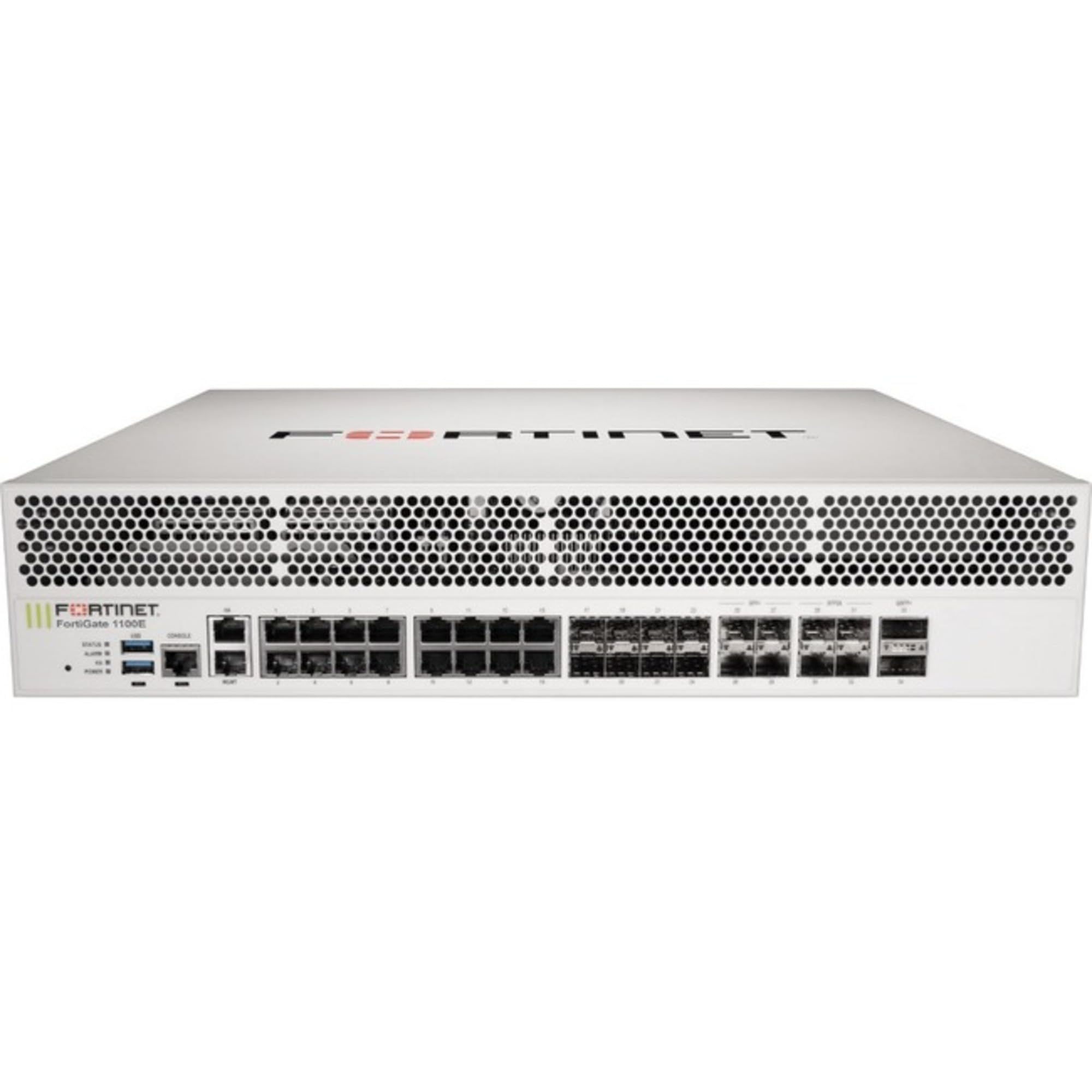
This image displays the front panel of the FortiGate-1100E-DC appliance, showing various network ports and status indicators. It provides a visual reference for physical connections.
2. Подешавање
2.1 Распакивање и преглед
- Carefully unpack the FortiGate-1100E-DC appliance from its packaging.
- Проверите да ли су присутне све компоненте наведене у паковању.
- Inspect the appliance for any physical damage that may have occurred during shipping. If damage is found, contact your vendor immediately.
2.2 Инсталација сталка
The FortiGate-1100E-DC is designed for standard 19-inch rack mounting. Use the provided rack-mount kit to secure the appliance in a server rack. Ensure adequate ventilation around the unit to prevent overheating.
2.3 Прикључак за напајање
This model is equipped with two DC power supplies for redundancy. Connect the provided DC power cables to the power inputs on the rear of the appliance and then to appropriate DC power sources. Ensure both power supplies are connected for redundant operation.
2.4 Мрежне везе
Connect your network cables to the appropriate interfaces on the FortiGate-1100E-DC. The appliance features a variety of high-speed interfaces:
- 2x 40 GE QSFP+ slots
- 4x 25 GE SFP28 slots
- 4x 10 GE SFP+ slots
- 8x GE SFP slots
- 18x GE RJ45 ports (including 16x data ports, 2x management/HA ports)
Connect the management ports to your management network for initial configuration and ongoing administration.
2.5 Почетна конфигурација
Access the management console via a web browser or command-line interface (CLI) using the IP address assigned to the management interface. Refer to the Fortinet documentation for detailed steps on initial setup, including network settings, security policies, and integration with the Fortinet Security Fabric.
3. Operating the FortiGate-1100E-DC
3.1 Укључивање и искључивање
- Укључено: After connecting the power cables, the appliance will power on automatically. Observe the status indicators on the front panel.
- Искључивање: To power off, gracefully shut down the system through the management console or CLI before disconnecting power cables.
3.2 Management Console Overview
The FortiGate management console provides a comprehensive interface for configuring and monitoring the appliance. It offers visibility into network traffic, security events, and system status. Key areas include:
- Контролна табла: Real-time system status, network activity, and security alerts.
- Мрежа: Interface configuration, routing, and VPN settings.
- Policy & Objects: Firewall policies, NAT, and security profiles (IPS, Application Control, Web Filtering).
- Security Fabric: Integration with other Fortinet products for unified security management.
- Систем: Firmware updates, administrators, and system settings.
3.3 Сигурносне карактеристике
The FortiGate-1100E-DC provides advanced security capabilities:
- Систем за спречавање упада (IPS): Detects and blocks known and unknown threats.
- SSL Inspection: Decrypts and inspects SSL/TLS encrypted traffic for hidden threats.
- Контрола апликација: Identifies and controls thousands of applications.
- Web Филтрирање: Блокира приступ злонамерним или неприкладним webсајтовима.
- Заштита од претњи: Utilizes FortiGuard Labs intelligence to protect against advanced persistent threats.
4. Одржавање
4.1 Ажурирања фирмвера
Regularly check for and apply firmware updates to ensure your appliance has the latest features, security patches, and performance enhancements. Firmware updates can be managed through the FortiGate management console.
4.2 Надгледање и евидентирање
Monitor system logs and security events regularly to identify potential issues or security incidents. The FortiGate provides extensive logging capabilities that can be viewed directly on the appliance or sent to a FortiAnalyzer for centralized logging and reporting.
4.3 Преглед хардвера
Periodically inspect the physical condition of the appliance, including power cables, network cables, and ventilation. Ensure that the operating environment remains within specified temperature and humidity ranges.
КСНУМКС. Решавање проблема
5.1 Основне провере
- Нема напајања: Verify that both DC power cables are securely connected and that the power sources are active. Check the power status indicators on the appliance.
- Проблеми са мрежном повезивањем: Check all network cable connections. Verify interface status in the management console. Ensure correct IP configurations and routing.
- Management Access Issues: Confirm the management interface IP address and subnet mask. Ensure your management workstation is on the same network or has a valid route. Try accessing via CLI if web access fails.
5.2 Уобичајена питања
- Споре перформансе: Check resource utilization (CPU, memory) in the dashboard. Review traffic logs for unusual activity or high-bandwidth applications. Optimize firewall policies.
- Blocked Traffic: Review firewall policies and security profiles to ensure legitimate traffic is not being inadvertently blocked. Check logs for denied connections.
5.3 Контактирање подршке
If you encounter issues that cannot be resolved using the basic troubleshooting steps, refer to the official Fortinet documentation or contact Fortinet Technical Support for assistance. Provide detailed information about the problem, including error messages, logs, and steps taken.
6. Спецификације
| Феатуре | Спецификација |
|---|---|
| Број модела | FG-1100E |
| Пропусност заштитног зида | 80 Гбпс |
| ИПС Тхроугхпут | 12.5 Гбпс |
| НГФВ Тхроугхпут | 9.8 Гбпс |
| Пропусност заштите од претњи | 7.1 Гбпс |
| Интерфејси | 2x 40 GE QSFP+ slots, 4x 25 GE SFP28 slots, 4x 10 GE SFP+ slots, 8x GE SFP slots, 18x GE RJ45 ports (16x data, 2x management/HA) |
| Хардверско убрзање | SPU NP6 and CP9 |
| Повер Супплиес | 2x DC power supplies (redundant) |
| Димензије производа | 18 к 17 к 4 инча |
| Произвођач | ФОРТИНЕТ |
| Фирст Аваилабле | 24. фебруара 2021. године |
7. Гаранција и подршка
7.1 Информације о гаранцији
The FORTINET FortiGate-1100E-DC Network Security Appliance typically includes a standard hardware warranty. For specific details regarding the warranty period and terms, please refer to the documentation provided with your purchase or visit the official Fortinet webсајту.
7.2 FortiCare and FortiGuard Services
This appliance is often bundled with a 1 Year 24x7 FortiCare and FortiGuard Enterprise Protection License. These services provide:
- FortiCare: 24x7 technical support, advanced hardware replacement, and firmware upgrades.
- FortiGuard: Real-time threat intelligence updates for antivirus, IPS, web filtering, and other security services.
Ensure your FortiCare and FortiGuard licenses are active to receive continuous protection and support.
7.3 Техничка подршка
For technical assistance, product documentation, and software downloads, please visit the official Fortinet Support webсајт: https://support.fortinet.com. You will need your product serial number to register your device and access support resources.