
SENTRY KX200
Sentry Industries Inc. HPXKX200 Gaming Keyboard + Mouse 2 Pack
Model: KX200 User Manual
Увод
Хвала вам на куповиниasing the Sentry Industries Inc. HPXKX200 Gaming Keyboard and Mouse 2 Pack. This combo kit is designed to enhance your gaming and computing experience with its responsive keyboard and precise mouse. The keyboard features 104 keys with RGB backlighting, while the mouse offers 7200 DPI sensitivity and RGB lighting. Both devices connect via USB for reliable performance.
This manual provides detailed instructions for setup, operation, maintenance, and troubleshooting to ensure optimal use of your new gaming peripherals.
Садржај пакета
- 1 x Sentry HPXKX200 104-Key RGB USB Gaming Keyboard
- 1 x Sentry HPXKX200 7200 DPI RGB Gaming Mouse
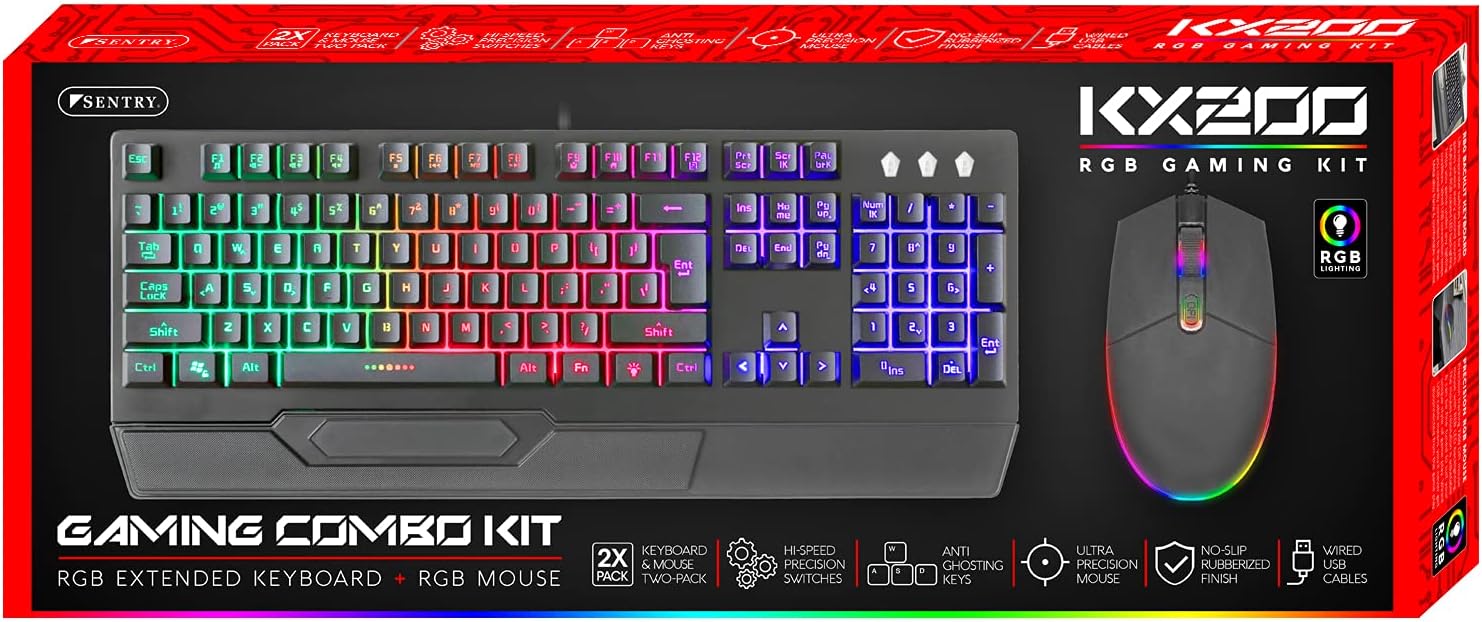
Image: The retail packaging for the Sentry HPXKX200 Gaming Keyboard and Mouse combo kit, showing both devices and key features.
Упутства за подешавање
Follow these steps to connect your Sentry HPXKX200 Gaming Keyboard and Mouse to your computer:
- Распакујте уређаје: Пажљиво извадите тастатуру и миш из њиховог паковања.
- Повежите тастатуру: Пронађите слободан USB порт на рачунару. Чврсто уметните USB конектор тастатуре у USB порт.
- Повежите миш: Locate another available USB port on your computer. Insert the USB connector of the mouse firmly into the USB port.
- Инсталација драјвера: Your operating system (e.g., Windows) should automatically detect and install the necessary drivers. This process may take a few moments.
- Потврдите везу: Once drivers are installed, the keyboard and mouse RGB lighting should illuminate, indicating they are ready for use.

Image: The Sentry HPXKX200 Gaming Keyboard, showcasing its full layout and attached USB cable for connection.

Image: The Sentry HPXKX200 Gaming Mouse, highlighting its ergonomic design and attached USB cable.

Слика: Крупни план view of a standard USB-A connector, which is used to connect both the keyboard and mouse to a computer.
Упутство за употребу
Употреба тастатуре
The 104-key layout provides a full range of standard typing and function keys. The RGB backlighting enhances visibility and aesthetics.
- куцање: Use the alphanumeric keys for standard text input.
- Функцијски тастери (F1-F12): These keys perform various functions, often in combination with the 'Fn' key, depending on your operating system and applications.
- РГБ контрола осветљења: Specific key combinations (e.g., Fn + Scroll Lock, Fn + Home/End) may cycle through different RGB lighting modes or adjust brightness. Refer to the keyboard's specific key legends for lighting controls.
Употреба миша
The 7200 DPI RGB mouse offers precise tracking and comfortable use.
- Леви клик: Примарна акција, селекција.
- Десни клик: Контекстни мени.
- Точак за померање: Прелистајте документе и web странице. Точкић за скроловање такође функционише као средњи тастер миша.
- ДПИ подешавање: The DPI button (often located near the scroll wheel) allows you to cycle through different sensitivity settings (DPI levels) to match your preference for various tasks or games. The mouse supports up to 7200 DPI.
- РГБ осветљење: The mouse features integrated RGB lighting that typically changes based on DPI settings or cycles through colors automatically.

Image: The Sentry HPXKX200 Gaming Keyboard and Mouse side-by-side, illustrating their design and illuminated RGB features.
Одржавање
Proper care will extend the life of your gaming peripherals:
- Чишћење: Користите меку, суву крпу да обришете површине тастатуре и миша. За тврдокорну прљавштину, благо обришитеampОперите крпу водом или благим, неабразивним средством за чишћење. Избегавајте прекомерну влагу.
- Уклањање прашине: Use compressed air to remove dust and debris from between the keyboard keys and from the mouse's optical sensor.
- Избегавајте течности: Do not immerse the devices in water or expose them to excessive liquids.
- Складиштење: Store the keyboard and mouse in a cool, dry place when not in use.
Решавање проблема
If you encounter issues with your Sentry HPXKX200 Gaming Keyboard and Mouse, try the following solutions:
| Проблем | Могуће решење |
|---|---|
| Тастатура/миш не реагује |
|
| РГБ осветљење не ради |
|
| Курсор миша је неправилан или се не помера |
|
| Keys not registering on keyboard |
|
Спецификације
| Феатуре | Детаљ |
|---|---|
| Бранд | СЕНТРИ |
| Број модела | ККС200 |
| Технологија повезивања | УСБ (жични) |
| Тип тастатуре | 104-Key RGB USB Keyboard |
| ДПИ миша | 7200 DPI RGB Mouse |
| Боја | Црно |
| Компатибилност оперативног система | Windows (and generally compatible with other OS supporting USB peripherals) |
| Димензије производа (тастатура) | Приближно 21.65 к 9.84 к 3.15 инча |
| Тежина артикла | Приближно 2.2 фунти (комбиновано) |
Гаранција и подршка
Sentry Industries Inc. products are manufactured to high-quality standards. For information regarding warranty coverage, technical support, or service inquiries, please refer to the warranty card included with your product or visit the official Sentry Industries Inc. webсајт. Молимо вас да сачувате доказ о куповини за потребе гаранције.