
Altec Lansing AL-5003
Altec Lansing AL-5003 Multimedia DJ Trolly Speaker User Manual
Модел: AL-5003
Увод
Хвала вам на куповиниasing the Altec Lansing AL-5003 Multimedia DJ Trolly Speaker. This speaker is designed to deliver powerful audio for various applications, including parties and surround sound systems. Featuring wireless connectivity, a built-in trolley for portability, and multiple input options, the AL-5003 offers a versatile audio experience. Please read this manual carefully to ensure proper setup, operation, and maintenance of your speaker.
Важна безбедносна упутства
- Read these instructions thoroughly before operating the speaker.
- Сачувајте ово упутство за будућу употребу.
- Do not expose the speaker to rain or moisture.
- Не блокирајте вентилационе отворе.
- Не постављајте у близини извора топлоте као што су радијатори, грејни регистри, пећи или други уређаји (укључујући ampлифиерс) који производе топлоту.
- Заштитите кабл за напајање од гажења или прикљештења, посебно на утикачима, утичницама и на месту где излазе из уређаја.
- Користите само додатке/прибор које је навео произвођач.
- Искључите овај апарат из струје током олуја са грмљавином или када га не користите дуже време.
- Све сервисирање препустите квалификованом сервисном особљу.
Садржај пакета
Молимо вас да проверите пакет за следеће ставке:
- Altec Lansing AL-5003 Multimedia DJ Trolly Speaker
- Повер Цорд
- Ремоте Цонтрол
- Упутство за употребу
- Auxiliary Cable (may vary by region)
Производ је завршенview
The AL-5003 speaker features a robust design with integrated wheels and a handle for easy transport. It includes a powerful 10-inch speaker and a 1-inch tweeter, providing clear and dynamic sound. The control panel is located on the top of the unit, offering easy access to various functions.
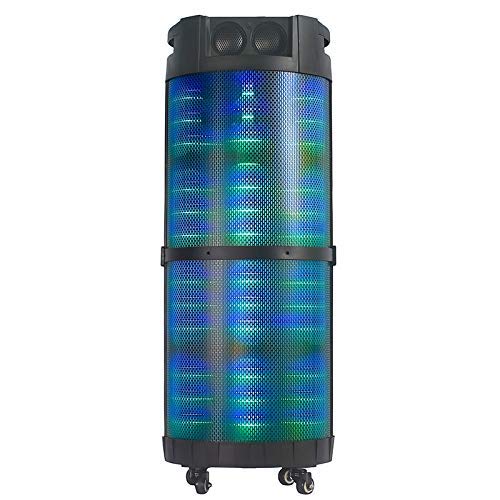
Слика 1: Фронт view of the Altec Lansing AL-5003 speaker, showcasing its cylindrical design and illuminated grille. The speaker features a sturdy build with integrated wheels at the base for portability.
Контролна табла и везе
The top panel of the speaker houses the main controls and input/output ports.
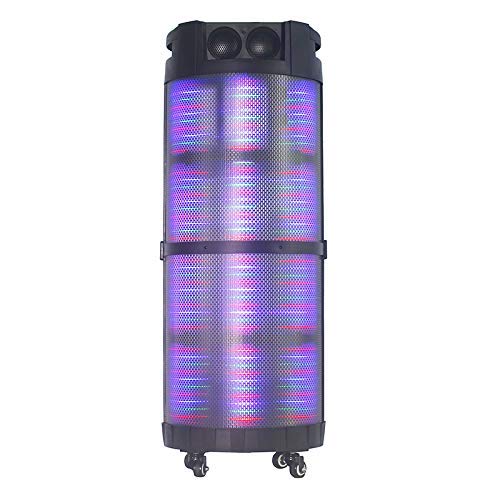
Слика 2: Одозго надоле view of the AL-5003 speaker, highlighting the control panel with various buttons and knobs, along with the top-mounted speakers. This view also shows the integrated handle for easy transport.
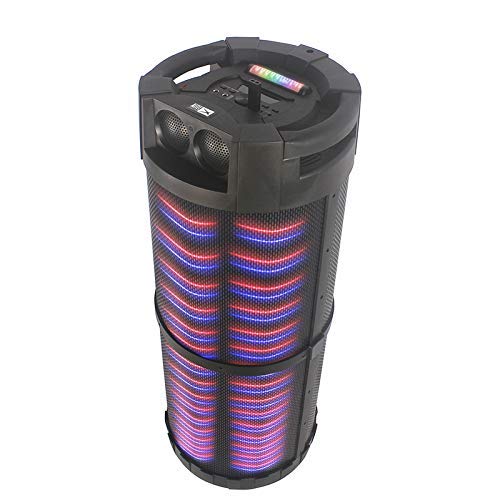
Слика 3: Англед view of the AL-5003 speaker, providing a perspective of its overall structure, including the side grille and the top control area. The dynamic lighting effects are visible through the mesh.
Common controls include Power, Volume, Mode selection, Play/Pause, Track Skip, and inputs for USB, Auxiliary, and potentially Microphone (if available on the model).
Упутства за подешавање
- Распакивање: Carefully remove the speaker and all accessories from the packaging. Retain the packaging for future transport or storage.
- Пласман: Place the speaker on a stable, flat surface. Ensure there is adequate ventilation around the unit. For optimal sound, position the speaker in a central location within the listening area.
- Прикључак за напајање: Connect the provided power cord to the AC input on the speaker and then plug it into a standard wall outlet (AC 100-240V, 50/60Hz).
- Почетна наплата (ако је применљиво): If the speaker has an internal battery (Lead Acid battery mentioned in specs), it is recommended to fully charge it before first use. The charging indicator light will typically show charging status.
- Укључено: Press the Power button on the control panel or remote control to turn on the speaker.
Упутство за употребу
1. Блуетоотх режим
- Активирајте Блуетоотх: Turn on the speaker. Press the "Mode" button on the control panel or remote until "Bluetooth" or "BT" is displayed (or indicated by a blue LED). The speaker will enter pairing mode, indicated by a flashing light or audible prompt.
- Упаривање са уређајем: On your mobile device (smartphone, tablet, laptop), go to Bluetooth settings and enable Bluetooth. Тражи available devices. You should see "AL-5003" or "Altec Lansing" in the list. Select it to pair.
- Потврда везе: Once successfully paired, the speaker will emit a confirmation sound, and the Bluetooth indicator light will become solid.
- Репродукција: Start playing audio on your connected device. Use the speaker's volume controls or your device's volume controls to adjust the sound level. Use the Play/Pause, Next, and Previous buttons on the speaker or remote to control playback.
2. Auxiliary (AUX) Mode
- Повежите АУКС кабл: Insert one end of a 3.5mm auxiliary cable into the AUX input port on the speaker. Connect the other end to the headphone jack or audio output of your external audio device (e.g., MP3 player, laptop).
- Изаберите AUX режим: Press the "Mode" button on the speaker or remote until "AUX" is displayed or indicated.
- Репродукција: Play audio from your connected device. Adjust volume using both the speaker's controls and your device's volume.
3. Режим репродукције са УСБ-а
- Уметните УСБ диск: Уметните УСБ флеш диск који садржи МП3 аудио fileу УСБ порт на звучнику.
- Изаберите USB режим: The speaker may automatically switch to USB mode. If not, press the "Mode" button until "USB" is displayed or indicated.
- Репродукција: Звучник ће аутоматски почети да репродукује звук files from the USB drive. Use the Play/Pause, Next, and Previous buttons to control playback.
4. Karaoke Function (if applicable)
If your AL-5003 model includes a microphone input, you can use it for karaoke:
- Повежите микрофон: Plug a wired microphone into the designated microphone input jack.
- Подесите јачину звука: Use the dedicated Microphone Volume knob (if present) to adjust the microphone's volume.
- Контрола еха: Some models may have an Echo knob to add an echo effect to the microphone audio.
5. Операције даљинског управљача
The included remote control provides convenient access to all major functions:
- Снага: Turn the speaker On/Off.
- Режим: Switch between Bluetooth, AUX, USB, and other available modes.
- Волуме +/-: Подесите главну јачину звука.
- Пусти/паузирај: Покрените или паузирајте репродукцију.
- Претходна Следећа: Пређите на претходну или следећу нумеру.
- ЕК: Select different equalizer presets (if available).
- Искључи звук: Mute or unmute the audio.
Одржавање
- Чишћење: Користите меку, суву крпу за чишћење спољашњости звучника. Не користите течна средства за чишћење или абразивне материјале.
- Складиштење: Када се звучник не користи дуже време, чувајте га на хладном и сувом месту, даље од директне сунчеве светлости и екстремних температура.
- Одржавање батерије: If the speaker has a built-in rechargeable battery, avoid fully discharging it frequently. For long-term storage, charge the battery to approximately 50-70% every few months to prolong its lifespan.
- вентилација: Уверите се да отвори за вентилацију нису блокирани како бисте спречили прегревање.
Решавање проблема
| Проблем | Могући узрок | Решење |
|---|---|---|
| Нема струје | Power cord not connected; Power outlet not working; Speaker is off; Battery drained. | Ensure power cord is securely connected. Try a different outlet. Press the Power button. Charge the battery. |
| Нема звука | Volume too low; Incorrect mode selected; Device not connected properly; Mute function active. | Increase volume on speaker and source device. Select the correct input mode (Bluetooth, AUX, USB). Reconnect device. Check if mute is active on remote. |
| Неуспешно Блуетоотх упаривање | Speaker not in pairing mode; Device Bluetooth off; Speaker too far from device; Interference. | Ensure speaker is in Bluetooth pairing mode. Turn on Bluetooth on your device. Move device closer to speaker. Turn off other Bluetooth devices nearby. |
| УСБ репродукција не ради | УСБ диск није правилно уметнут; Некомпатибилан file формат; УСБ диск оштећен. | Поново уметните УСБ диск. Уверите се fileДатотеке су у MP3 формату. Пробајте други USB диск. |
| Даљински управљач не ради | Batteries drained; Obstruction between remote and speaker; Remote not pointed at sensor. | Replace remote control batteries. Remove any obstructions. Point remote directly at the speaker's IR sensor. |
Спецификације
| Феатуре | Детаљ |
|---|---|
| Назив модела | Altec Lansing AL-5003 Multimedia DJ Trolly Speaker |
| Спеакер Типе | Сурроунд Соунд |
| Посебна карактеристика | Бежични |
| Препоручена употреба | For Surround Sound Systems, Party |
| Компатибилни уређаји | Gaming Console, Karaoke Machine, Laptop, MP3 Player, Smartphone, Tablet |
| Конфигурација канала сурроунд звука | 1.0 |
| Контролни метод | Ремоте |
| Бежична комуникациона технологија | Блуетоотх |
| Величина звучника | 10 инча |
| Извор напајања | Цордед Елецтриц |
| Пречник високотонца | 1 инча |
| Компатибилан са аудио улазом | Помоћни, УСБ |
| Повезивање звучника | Wired (for power), Wireless (Bluetooth) |
| Аудио Ватtage | 100 Ваттс |
| Састав батерије батерије | Оловна киселина |
| Тип монтаже | Флоор Стандинг |
Гаранција и подршка
Altec Lansing products are manufactured to the highest quality standards. For information regarding warranty coverage, technical support, or service inquiries, please refer to the warranty card included with your product or visit the official Altec Lansing website. Please have your model number (AL-5003) and purchase details ready when contacting support.
Webсајт: ввв.алтецлансинг.цом (This is a generic link, actual link might vary by region)
Ask a question about this manual
Ask about setup, troubleshooting, compatibility, parts, safety, or missing instructions. Manuals+ will review the question and use this page’s manual context to help answer it.