
1. Увод и крајview
The KYY 15.6-inch FHD 1080P Portable Monitor (Model K3) is designed to enhance your productivity and entertainment experience. Featuring an IPS panel with 1920 x 1080 resolution at 60Hz, 178° viewing angles, and a 1000:1 contrast ratio, it delivers vibrant colors and clear visuals. Its ultra-slim and lightweight design makes it ideal for travel and on-the-go use. The monitor supports HDR and Scene modes for optimized viewing across various applications, from multi-tasking to gaming.

Image 1.1: KYY 15.6-inch Portable Monitor showcasing its 1080P FHD IPS screen with key display specifications.
2. Шта је у кутији
Upon unboxing your KYY Portable Monitor, please ensure all the following items are present:
- 1 x 15.6'' Portable Monitor
- 1 к Смарт Цовер
- 1 к УСБ-Ц на УСБ-А кабл
- 1 к УСБ-Ц на УСБ-Ц кабл
- 1 к Мини-ХДМИ на ХДМИ кабл
3. Карактеристике производа
3.1. Квалитет приказа
The monitor features a 15.6-inch Full HD (1920x1080) IPS panel, offering a wide 178° viewing angle and a 60Hz refresh rate. With 300 nits brightness and a 1000:1 contrast ratio, it delivers clear and vibrant images. HDR mode is supported for enhanced visual experience.
3.2. Повезивање
Equipped with 2 USB-C ports, a Mini-HDMI port, and a 3.5mm audio input, the monitor offers versatile connectivity. It is compatible with laptops, smartphones, PCs, PS4, Xbox, and Nintendo Switch without requiring additional drivers.
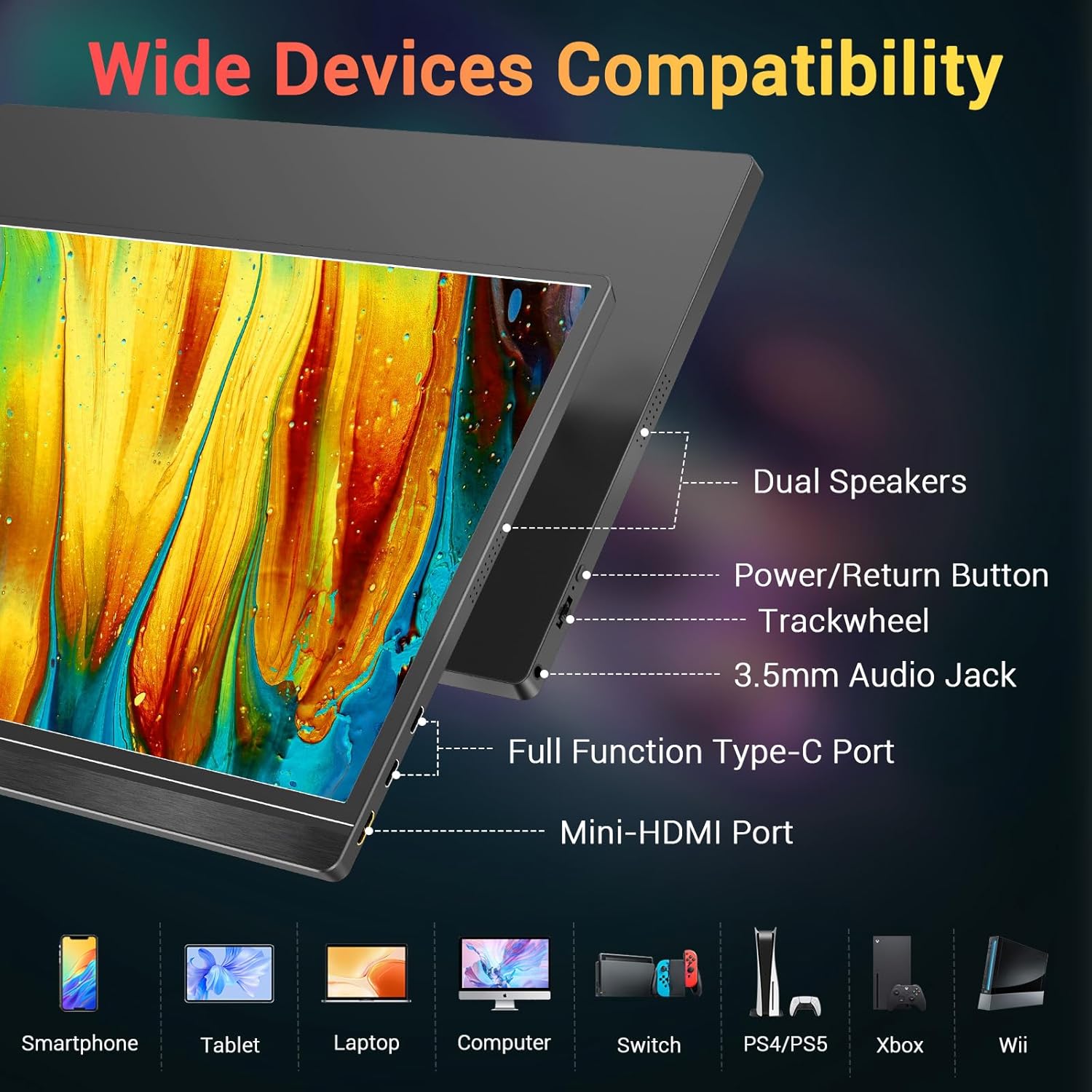
Слика 3.1: Готовоview of the monitor's ports and controls, including dual speakers, power button, trackwheel, audio jack, USB-C, and Mini-HDMI.
3.3. Portability and Design
Weighing approximately 1.7 lbs and only 0.3 inches thin, this monitor is designed for maximum portability. Its durable metal frame ensures longevity, making it an excellent travel companion.

Image 3.2: The KYY portable monitor demonstrating its lightweight and ultra-slim profile.
3.4. Smart Cover and Stand
The included smart cover is made of high-quality PU leather, offering scratch-proof protection. It doubles as a stable foldable stand, allowing for multiple viewing angles to suit your needs.

Image 3.3: The 2-in-1 magnetic smart cover functioning as a stand for the KYY portable monitor.
4. Упутства за подешавање
4.1. Почетна веза
Connect the monitor to your device (laptop, smartphone, console) using the appropriate cable (USB-C to USB-C or Mini-HDMI to HDMI). For devices with a full-function USB-C port, a single cable can provide both power and video. For other connections, ensure the monitor receives external power via the USB-C to USB-A cable and a power adapter (not included).

Image 4.1: Illustrates a single USB-C cable connection for power and video from a smartphone to the KYY portable monitor.
4.2. Using the Smart Cover as a Stand
Fold the smart cover into a triangular shape to create a stable stand. The magnetic design allows for easy adjustment to various viewing angles. Ensure the monitor is securely placed in the grooves of the cover base.
4.3. Driver Installation (If Needed)
The monitor is generally plug-and-play. However, if your operating system does not automatically recognize the monitor, refer to your device's display settings or the KYY support website for potential driver downloads.
4.4. Video Demonstration: Setup and Connectivity
Video 4.1: A seller-provided video demonstrating the physical setup and various connectivity options of the KYY portable monitor with a laptop, including USB-C and HDMI connections.
5. Упутство за употребу
5.1. Укључивање/искључивање
Press and hold the power button located on the side of the monitor to turn it on or off. A brief press may activate the On-Screen Display (OSD) menu.
5.2. Навигација кроз мени на екрану (OSD)
Use the trackwheel/buttons on the side of the monitor to navigate the OSD menu. This menu allows you to adjust settings such as brightness, contrast, color temperature, HDR mode, and input source.
5.3. Режими приказа
Монитор подржава различите режиме приказа када је повезан са рачунаром:
- Режим огледала: Duplicates your primary screen's content.
- Проширени режим: Extends your desktop space, allowing for multi-tasking.
- Режим другог екрана: Uses the portable monitor as the sole display.
You can also switch between landscape and portrait orientation based on your preference and device settings.

Image 5.1: Visual representation of Mirror, Extended, and Second Screen display modes.
5.4. Аудио излаз
The monitor includes built-in stereo speakers. For private listening, connect headphones or external speakers to the 3.5mm audio jack.
5.5. Video Demonstration: Portability and Usage
Video 5.2: A seller-provided video highlighting the monitor's portability, ease of setup, and usage in various scenarios, including its integrated stand and single-cable connectivity.
6. Спецификације
| Феатуре | Спецификација |
|---|---|
| Број модела | K3 |
| Величина екрана | 15.6 инча |
| Резолуција | 1920 x 1080 пиксела (FHD 1080p) |
| Панел Типе | ИПС |
| Аспецт Ратио | 16:9 |
| Осветљеност слике | 300 Цандела |
| Однос контраста | 1000:1 |
| Viewинг Англес | 178° |
| Укупно УСБ портова | 2 (УСБ-Ц) |
| Видео улаз | USB-C, Mini-HDMI |
| Аудио излаз | 3.5mm Audio Jack, Built-in Speakers |
| Тежина артикла | 4.13 фунти |
| Волtage | 5 Волтс |
| Површина екрана | Мат |
7. Одржавање
To ensure the longevity and optimal performance of your KYY Portable Monitor, follow these maintenance guidelines:
- Чишћење: Use a soft, lint-free cloth to gently wipe the screen. For stubborn smudges, lightly dampОбришите крпу водом или средством за чишћење екрана. Избегавајте јаке хемикалије или абразивне материјале.
- Складиштење: When not in use, store the monitor in its smart cover to protect the screen from scratches and dust.
- Руковање: Handle the monitor with care to prevent drops or impacts, which can damage the screen or internal components.
- Управљање кабловима: Avoid excessive bending or tugging on cables to prevent damage to the connectors and ports.
КСНУМКС. Решавање проблема
If you encounter issues with your KYY Portable Monitor, try the following basic troubleshooting steps:
- Нема дисплеја/сигнала:
- Ensure all cables (USB-C, HDMI) are securely connected to both the monitor and your device.
- Verify that the monitor is receiving power. If using a single USB-C cable for power and video, confirm your device's USB-C port supports full-function output. Otherwise, connect the external power supply.
- Check your device's display settings to ensure the external monitor is detected and configured correctly (e.g., extended, duplicate).
- Try a different cable or port if available.
- Треперећи екран:
- Подесите брзину освежавања у подешавањима екрана вашег уређаја.
- Ensure the monitor is receiving stable power.
- Нема звука:
- Проверите подешавања јачине звука и на монитору и на повезаном уређају.
- Уверите се да је на рачунару изабран исправан аудио излазни уређај.
- If using external speakers or headphones, ensure they are properly connected to the 3.5mm audio jack.
- Buttons/Trackwheel Unresponsive:
- Restart the monitor by powering it off and on.
For persistent issues, please contact KYY customer support.
9. Гаранција и подршка
For warranty information, technical support, or service inquiries, please refer to the documentation included with your product or visit the official KYY webсајт. Сачувајте рачун као доказ о куповини за потребе гаранције.