
Увод
The Forty4 Wireless Gaming Controller is designed to provide a versatile and immersive gaming experience across multiple platforms. Featuring 2.4GHz wireless technology, dual vibration motors, and programmable M buttons, this gamepad offers precise control and enhanced realism for your gaming sessions. It supports both wireless and wired modes, ensuring uninterrupted gameplay.
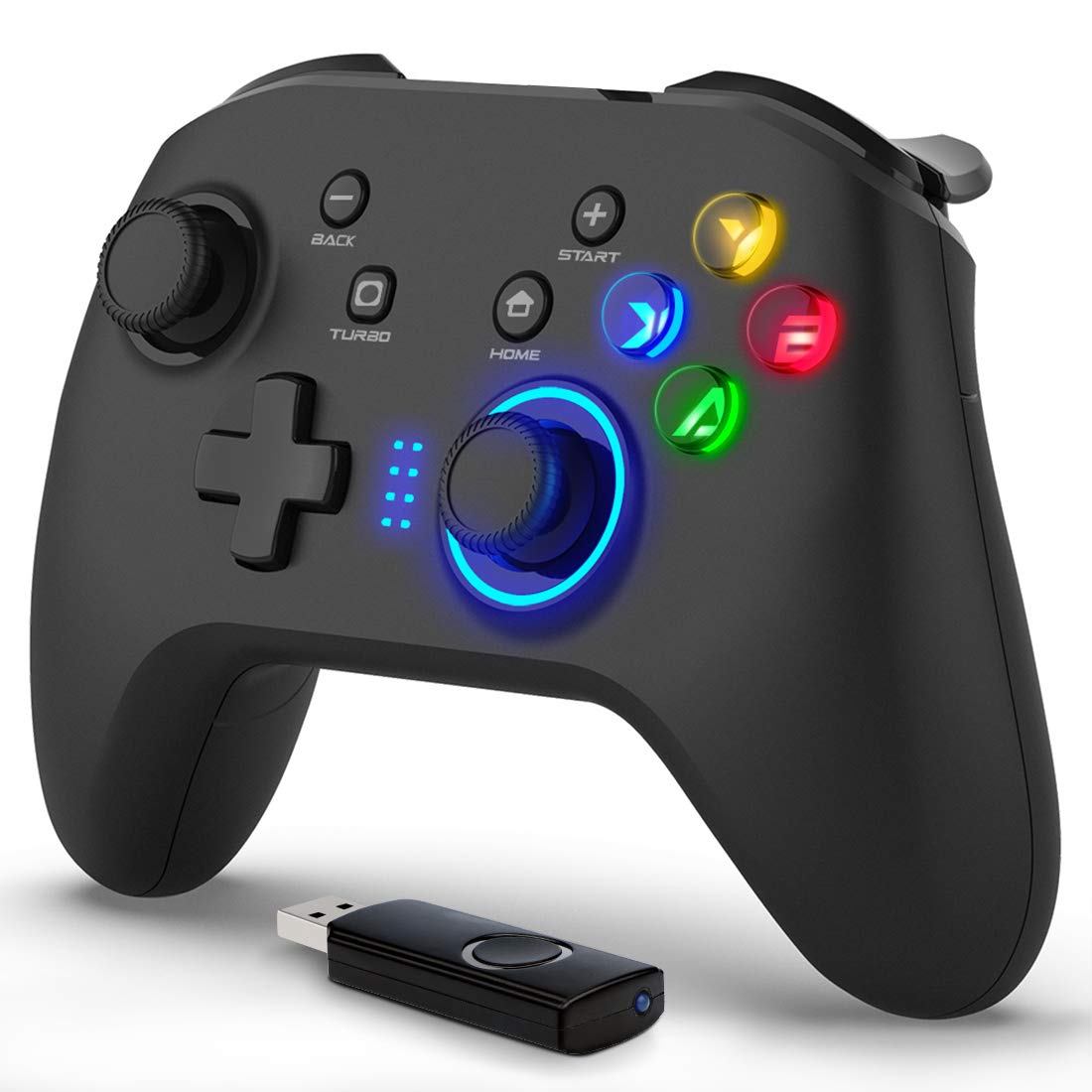
Слика: Фронт view of the Forty4 Wireless Gaming Controller, showcasinњегов ергономски дизајн и распоред дугмади.
Кључне карактеристике
- 2.4ГХз бежична технологија: Offers a long transmission distance, bidirectional transmission, and substantial anti-interference for a reliable connection.
- Широка компатибилност: Compatible with Windows (Xinput and Dinput), PS3, and Switch. (Not compatible with Xbox 360, Xbox One, Mac, iOS, PlayStation 4, Amazon Fire TV, Amazon Fire Stick).
- M Buttons: Features programmable M buttons (M1, M2) on the back, allowing users to assign complex operations for enhanced control. Combination keys include A, B, X, Y, LB, RB, L3, LT, RT, R3, and directional keys (up, down, left, right).
- Двострука вибрација: Asymmetrical and linear vibrating motors provide distinct feedback during gameplay, increasing the realism of game scenarios and immersion.
- Wireless & Wired Mode: Seamlessly switch between wireless and wired modes. If the battery runs low, simply connect the USB cable to continue playing while charging.

Image: Illustration of the dual vibration motors within the controller, highlighting the immersive gaming experience.
Садржај пакета
Приликом отварања пакета, молимо вас да се уверите да су присутни сви следећи елементи:
- Forty4 Wireless Gaming Controller (Model: GC201)
- 2.4GHz USB Receiver (Wireless Dongle)
- УСБ-Ц кабл за пуњење
- Кориснички приручник (овај документ)
Video: Unboxing the Forty4 Wireless Gaming Controller, showing the controller, USB receiver, and charging cable.
Упутства за подешавање
1. Бежична веза
- Insert the 2.4GHz USB receiver into an available USB port on your PC, PS3, or Switch dock.
- Press the "Home" button on the controller to power it on. The indicator lights will illuminate.
- The controller should automatically pair with the USB receiver. If not, hold the "Home" button for a few seconds to cycle through connection modes until it connects (often indicated by a steady light). For Windows, ensure the controller is in X-input mode for optimal compatibility.

Image: The Forty4 controller and its USB receiver, demonstrating how to connect wirelessly to a computer.
2. Жична веза
- Connect one end of the provided USB-C charging cable to the USB-C port on the top of the controller.
- Connect the other end of the USB-C charging cable to an available USB port on your PC, PS3, or Switch dock.
- The controller will automatically switch to wired mode and begin charging if needed.

Image: A visual representation of both wireless and wired connection methods for the Forty4 controller.
Упутство за употребу
Распоред и функције дугмади
The Forty4 controller features a standard button layout for intuitive gameplay:
- Леви/десни аналогни штапићи: За прецизно кретање од 360 степени и контролу камере.
- Д-Пад: За усмерени унос.
- Дугмад за акције (A, B, X, Y): Стандардни уноси акција.
- Дугмад за раме (LB, RB): Горња дугмад за разне радње у игри.
- Triggers (LT, RT): Analog triggers for nuanced control, especially in racing or shooting games.
- Дугме НАЗАД/ИЗАБЕРИ: Обично се користи за навигацију кроз мени или секундарне функције.
- Старт дугме: Typically used for pausing games or accessing menus.
- Дугме ХОМЕ: Powers the controller on/off and can be used to switch controller modes (e.g., X-input/D-input).
- ТУРБО дугме: Активира турбо функцију за брзо притискање дугмади.
- M Buttons (M1, M2): Programmable back buttons for custom macros or remapping. Refer to the detailed manual for programming instructions.

Image: Close-up of the back of the controller, highlighting the M1 and M2 programmable buttons for advanced customization.
Дуал Вибратион Феедбацк
The controller's dual vibration motors provide tactile feedback during gameplay, enhancing immersion. You will feel vibrations for in-game events such as explosions, impacts, or specific actions, making the experience more realistic.
Controller in Action
Video: Demonstration of the Forty4 Wireless Gaming Controller's features and responsiveness during gameplay.
Пуњење контролера
To charge the controller, connect it to a USB power source (e.g., computer USB port, USB wall adapter) using the provided USB-C cable. The indicator lights may show charging status and turn off or change color when fully charged.
Одржавање
- Чишћење: Користите меку, суву крпу за чишћење контролера. Избегавајте употребу јаких хемикалија или абразивних материјала.
- Складиштење: Чувајте контролер на хладном и сувом месту, даље од директне сунчеве светлости и екстремних температура.
- Одржавање батерије: Да бисте продужили век трајања батерије, избегавајте често потпуно пражњење контролера. Редовно га пуните, чак и ако га не користите стално.
Решавање проблема
Controller Not Connecting/Responding
- Проверите УСБ пријемник: Ensure the 2.4GHz USB receiver is securely plugged into a working USB port on your device.
- Укључено: Make sure the controller is powered on by pressing the "Home" button.
- Промени режим: Hold the "Home" button to cycle through different connection modes (e.g., X-input, D-input) until the controller is recognized by your system. For PC, X-input mode is generally recommended.
- Поново упарите: If issues persist, try unplugging and replugging the USB receiver, then re-powering the controller to re-establish the connection.
- Ниво батерије: Ensure the controller has sufficient battery charge. Connect it via the USB-C cable to check if it functions in wired mode.
Input Delay in Wireless Mode
- If you experience noticeable input delay in wireless mode, try switching to wired mode using the provided USB-C cable for a more direct connection.
Stick Drift or Unresponsive Buttons
- While designed for durability, prolonged heavy use can sometimes lead to wear. If you experience stick drift or unresponsive buttons, try recalibrating the controller through your device's settings. If the issue persists, please contact customer support.
Спецификације
| Феатуре | Детаљ |
|---|---|
| Број модела | ГЦ201 |
| Повезивање | 2.4GHz Wireless, Wired (USB-C) |
| Компатибилност | PC (Windows 7/8/10/11 - Xinput & Dinput), PS3, Switch |
| Вибрације | Двоструки вибрациони мотори |
| Посебне карактеристике | Programmable M Buttons, Colorful Backlight |
| Извор напајања | 1 литијум-јонска батерија (укључена) |
| Тежина артикла | 11.6 унци |
| Димензије пакета | 6.38 к 4.69 к 2.8 инча |
| Произвођач | Четрдесет4 |
| Датум првог доступног | 25. маја 2020. године |
Гаранција и подршка
The Forty4 Wireless Gaming Controller comes with a Једногодишња гаранција. For any troubleshooting assistance, warranty claims, or product inquiries, please contact Forty4 customer service.
For additional information, you may refer to the official User Manual PDF: Упутство за употребу (ПДФ)