
1. Увод
This manual provides instructions for the CAIWEI WiFi Bluetooth Mini Projector, Model US2-C180AB-01F. This device is a portable LCD projector designed for displaying video, images, and other media. It features wireless connectivity options including WiFi for screen mirroring and Bluetooth for audio and peripheral device connections. The projector operates on an Android 6.0 system, allowing for direct application installation and internet browsing.
2. Садржај пакета
Проверите да ли су све ставке наведене у наставку укључене у ваш пакет. Ако неке ставке недостају или су оштећене, обратите се корисничкој подршци.
- CAIWEI Mini Projector
- Ремоте Цонтрол
- Кабл за напајање наизменичном струјом
- АВ кабл
- ХДМИ кабл
- Упутство за употребу

Figure 2.1: Projector and Included Accessories. This image displays the projector along with its standard accessories: a remote control, AC power cable, AV cable, HDMI cable, and the user manual. The physical dimensions of the projector (204mm length, 150mm width, 88mm height) are also indicated.
3. Производ је готовview
3.1 Projector Components and Controls
Familiarize yourself with the various ports and control buttons on the projector.

Figure 3.1: Projector Controls and Ports. This diagram illustrates the top panel controls including keystone adjustment, focus wheel, power key, menu, directional keys, return, and source selection. The side panel shows ports for Audio Out, AV, USB, HDMI, VGA, and the speaker grille, along with a vent.
3.2 Кључне карактеристике
- Бежична повезаност: Integrated Android 6.0 operating system with WiFi and Bluetooth 4.0 for direct app installation, internet browsing, and wireless screen mirroring from smartphones (Airplay/Miracast/DLNA).
- Екран високе дефиниције: Native resolution of 1280x720 pixels, supporting up to 1920x1080. Features 3800 LED lumens brightness and a 4000:1 contrast ratio.
- Long-Life LED Lamp: The LED light source has an expected lifespan of approximately 50,000 hours.
- Мултимедијална компатибилност: Подржава разне file formats including TXT, JPEG, BMP, PNG, MP3, WMA, ASF, OGG, AAC, WAV, 3GP, AVI, MKV, FLV, MOV, MP4, MPG, VOB, and RMVB.

Figure 3.2: Android OS and Wireless Connection. This image highlights the projector's Android 6.0 operating system interface, demonstrating its ability to run applications. It also illustrates the wireless connection feature, allowing screen mirroring from smartphones, tablets, and laptops without physical cables.
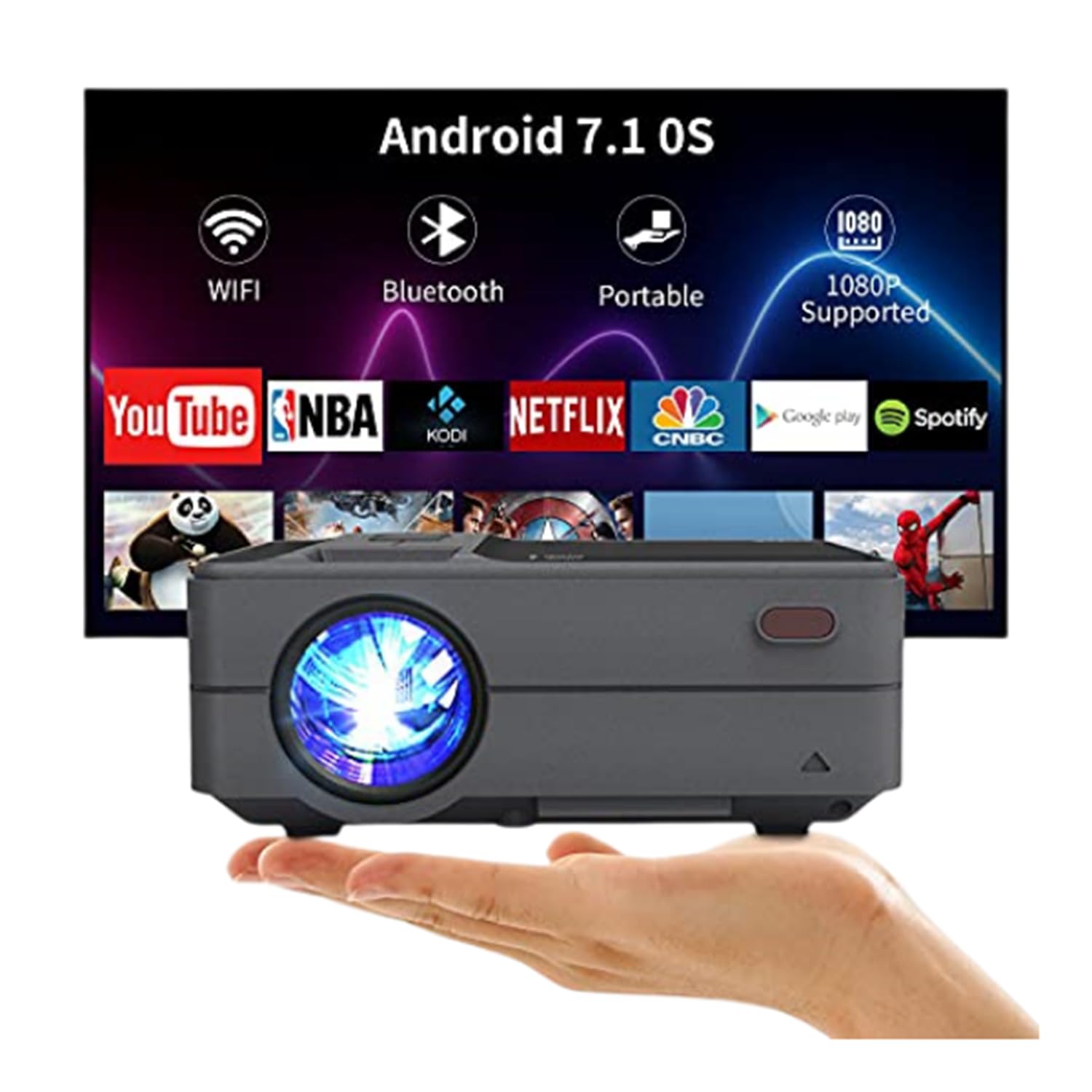
Figure 3.3: Bluetooth 4.0 Connectivity. This image demonstrates the projector's Bluetooth 4.0 capabilities, showing its compatibility with various Bluetooth devices such as external speakers, gamepads, keyboards, and mice for enhanced user interaction and audio output.
4. Подешавање
4.1 Прикључак за напајање
- Connect the AC power cable to the projector's power input port.
- Plug the other end of the AC power cable into a power outlet.
4.2 Почетно укључивање
- Притисните дугме за напајање на пројектору или даљинском управљачу да бисте укључили уређај.
- Allow a few moments for the projector to boot up and display the main interface.
4.3 Подешавање фокуса и трапезоидног искривљења
- Фокус: Rotate the focus ring located on the top of the projector until the projected image appears clear and sharp.
- Кеистоне Цоррецтион: Use the keystone adjustment control to correct trapezoidal distortion if the projector is not perfectly perpendicular to the screen. The projector supports manual ±15° keystone correction.
5. Упутство за употребу
5.1 Избор извора
Да бисте изабрали извор улаза:
- Press the 'Source' button on the projector or remote control.
- Navigate through the available input options (HDMI, USB, AV, VGA) using the directional keys.
- Press 'OK' or 'Enter' to confirm your selection.
5.2 Бежично пресликавање екрана (Wi-Fi)
The projector supports wireless screen casting for smartphones and tablets.
- For iOS Devices (Airplay): Ensure both the projector and your iOS device are connected to the same WiFi network. On your iOS device, open Control Center and select 'Screen Mirroring', then choose the projector from the list of available devices.
- For Android Devices (Miracast/DLNA): Ensure both the projector and your Android device are connected to the same WiFi network. On your Android device, enable 'Wireless Display', 'Screen Cast', or 'Smart View' (names may vary by device) and select the projector.
5.3 Блуетоотх веза
Да бисте повезали Блуетоотх уређаје:
- Go to the projector's settings menu and navigate to the Bluetooth section.
- Омогућите Блуетоотх на пројектору.
- Put your Bluetooth device (e.g., speaker, gamepad, keyboard, mouse) into pairing mode.
- Select your device from the list of available devices on the projector's screen to pair.
5.4 Media Playback from USB
Insert a USB flash drive into the USB port. The projector's media player will typically detect the drive automatically. Navigate through the files and select the desired media for playback.
6. Placement and Image Adjustment
6.1 Projection Distance and Size
The projector can produce an image size ranging from 24 to 200 inches, with an optimal projection distance between 3.41 and 19.84 feet. Refer to the table below for recommended distances for common screen sizes.
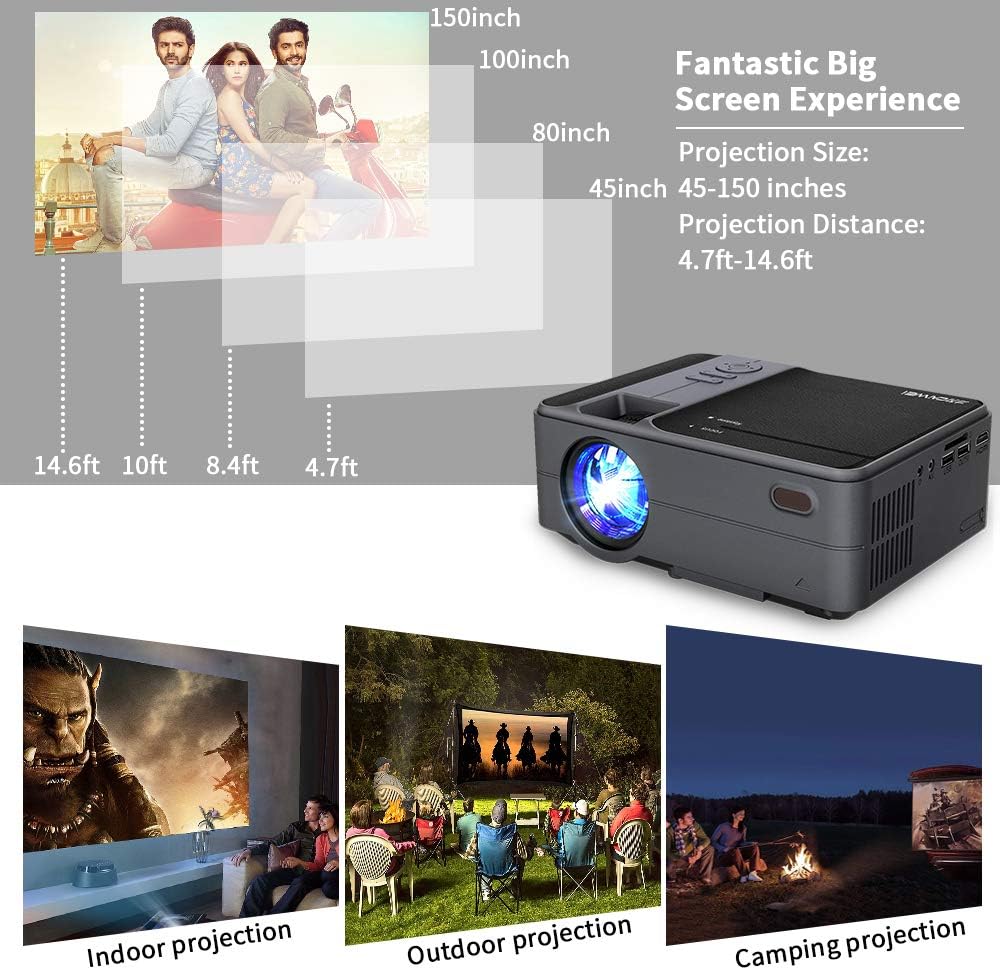
Figure 6.1: Projection Distance Guide. This chart provides recommended projection distances for achieving specific screen sizes, ranging from 45 inches at 4.7 feet to 150 inches at 14.6 feet.
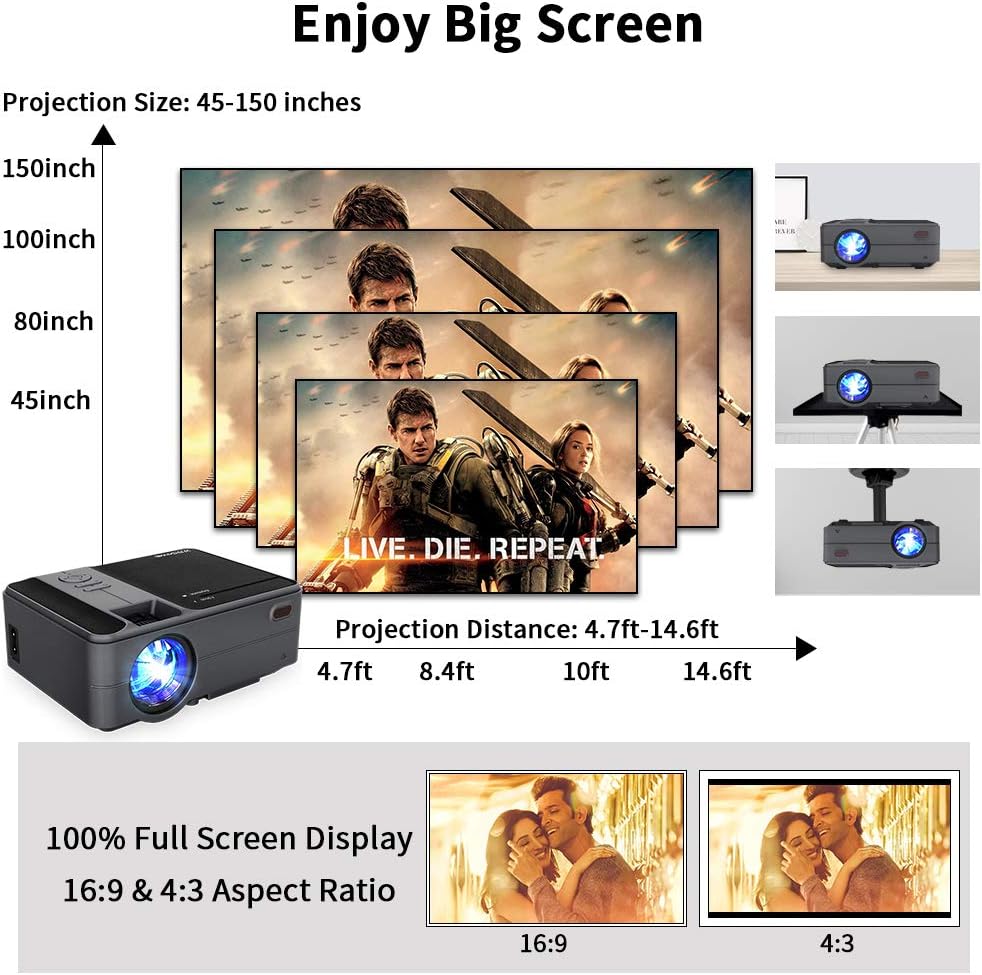
Figure 6.2: Projection Size Examples. This image visually represents various projection sizes (45, 80, 100, and 150 inches) and their respective projection distances, illustrating the scalability of the projected image.
6.2 Подешавања слике
The projector offers several options for adjusting the image to suit your viewинг окружење.
- Дигитални зум: The projector supports a 25% digital zoom function, allowing you to adjust the image size without physically moving the projector.
- Кеистоне Цоррецтион: Manual ±15° keystone correction is available to correct image distortion.
- Преокрет слике: A 360-degree image flip function allows for flexible mounting options, including front, rear, and ceiling projection.

Figure 6.3: Image Adjustment Features. This image illustrates the projector's capabilities for 25% digital zoom, manual ±15° keystone correction, and 360-degree image flip, providing flexibility for various projection setups.
7. Одржавање
Редовно одржавање помаже у обезбеђивању оптималних перформанси и продужава век трајања вашег пројектора.
- Чишћење сочива: Use a soft, lint-free cloth specifically designed for optical lenses to gently clean the projector lens. Avoid abrasive materials or harsh chemicals.
- Чишћење ваздушних отвора: Periodically clean the air vents to prevent dust buildup, which can obstruct airflow and lead to overheating. Use a soft brush or compressed air.
- Складиштење: When not in use for extended periods, store the projector in a cool, dry, and dust-free environment.
КСНУМКС. Решавање проблема
Ако наиђете на проблеме са пројектором, погледајте следеће уобичајене проблеме и решења:
| Проблем | Могући узрок | Решење |
|---|---|---|
| Но Повер | Кабл за напајање није повезан; утичница је неисправна | Ensure power cable is securely connected. Test power outlet with another device. |
| Нема слике | Incorrect input source; Cable connection loose; Device not powered on | Select the correct input source. Check all cable connections. Ensure connected device is powered on. |
| Мутна слика | Фокус није подешен; Трапезасти квар није подешен | Adjust the focus ring. Use keystone correction to square the image. |
| Нема звука | Volume too low; Mute enabled; External audio device not connected/selected | Increase volume. Disable mute. Ensure external audio device is properly connected and selected. |
| Даљински управљач не ради | Batteries low/dead; Obstruction between remote and projector | Замените батерије. Обезбедите јасну линију вида са ИР пријемником пројектора. |
| Проблеми са бежичном везом | Incorrect WiFi password; Devices not on same network; Signal interference | Verify WiFi password. Ensure projector and device are on the same network. Reduce interference. |
9. Спецификације
| Феатуре | Спецификација |
|---|---|
| Модел | US2-C180AB-01F |
| Тип мотора | ЛЦД |
| Извор светлости | ЛЕД |
| Осветљеност | 3800 лумена |
| Однос контраста | 4000:1 |
| Нативе Ресолутион | 1280 к 720 |
| Максимална подржана резолуција | 1920 к 1080 |
| Величина слике | 24 - 200 инча |
| Удаљеност пројекције | 3.41 - 19.84 стопа |
| Аспецт Ратио | 16:9 / 4:3 |
| Улазно/излазни портови | HDMI, USB, VGA, AV, SD, 3.5mm Audio Out |
| Оперативни систем | Андроид 6.0 |
| ЦПУ | ARM Cortec-A53 Quad-Core 1.7GHz |
| РАМ | 1ГБ ДДР3 |
| РОМ | 8ГБ ЕММЦ |
| Бежично повезивање | WiFi, Bluetooth 4.0 |
| Потрошња енергије | 40 вати |
| Димензије (Д к Ш к В) | 204 к 148 к 80 мм |
| Тежина | 1 кг (2.2 фунти) |
10. Гаранција и подршка
The CAIWEI Mini Projector comes with a 12-month warranty for free replacement parts. Lifetime technical support is also provided. For assistance or inquiries, please refer to the contact information provided with your purchase documentation.