
1. Увод
This manual provides detailed instructions for the setup, operation, and maintenance of your BMW Multi-Function Clock, Alarm, and Weather Station. This device combines a digital clock, an alarm with a snooze function, and a weather station that displays temperature. Please read this manual carefully before use to ensure proper functionality and to maximize your experience with the product.
2. Садржај пакета
Молимо вас да проверите садржај пакета након распакивања. Ако неке ставке недостају или су оштећене, обратите се продавцу.
- BMW Multi-Function Clock, Alarm, and Weather Station Unit
- Кориснички приручник (овај документ)
3. Подешавање
3.1. Инсталација батерије
Уређај захтева 2 ААА батерије (not included) for operation. Follow these steps to install the batteries:
- Пронађите поклопац одељка за батерије на задњој страни уређаја.
- Пажљиво померите или подигните поклопац да бисте отворили одељак.
- Уметните две ААА батерије, водећи рачуна о исправном поларитету (+ и -) као што је назначено унутар одељка.
- Вратите поклопац одељка за батерије безбедно.
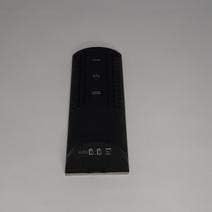
Слика 3.1: Назад view of the device, illustrating the battery compartment and control buttons for setup.
3.2. Прво укључивање
After battery installation, the device display will illuminate, and it will typically show a default time or begin searching for a signal (if applicable for weather functions). Proceed to the operating instructions to set the time and other functions.
4. Упутство за употребу
4.1. Подешавање времена и датума
To set the current time and date:
- Притисните и држите МОДЕ button (usually located on the back or side) for a few seconds until the time display starts flashing.
- Користите UP or ДОВН buttons (often labeled '+' or '-') to adjust the hour.
- Притисните МОДЕ again to confirm the hour and move to the minutes.
- Подесите минуте помоћу UP or ДОВН дугмад.
- Наставите да притискате МОДЕ and adjusting with ГОРЕ/ДОЉЕ for year, month, and day settings.
- Притисните МОДЕ још једном да бисте изашли из режима подешавања.
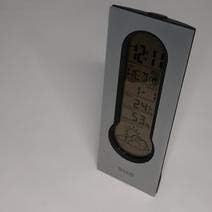
Слика 4.1: Front display of the device, showing the digital clock, temperature, and weather forecast icons.
4.2. Подешавање аларма
Да бисте подесили време аларма:
- У режиму нормалног приказа времена, притисните АЛАРМ дугме (или МОДЕ repeatedly until 'AL' or an alarm icon appears).
- Притисните и држите АЛАРМ дугме док време аларма не почне да трепери.
- Користите UP or ДОВН дугмад да бисте подесили жељени сат аларма.
- Притисните АЛАРМ again to confirm the hour and move to the minutes.
- Подесите минуте помоћу UP or ДОВН дугмад.
- Притисните АЛАРМ one last time to save the alarm setting. An alarm icon will typically appear on the display to indicate the alarm is active.
4.3. Using Snooze Function
Када се огласи аларм, притисните СНООЗЕ button (usually a large button on the top of the unit) to temporarily silence the alarm. The alarm will sound again after a few minutes (typically 5-10 minutes, depending on the model). To turn off the alarm completely, press any other button or let it ring until it automatically stops.

Слика 4.2: Врх view of the device, highlighting the prominent SNOOZE button.
4.4. Приказ температуре
The device continuously displays the ambient temperature. The temperature unit (Celsius or Fahrenheit) can usually be switched by pressing a dedicated button (e.g., 'C/F' or 'TEMP') or by holding down one of the adjustment buttons during time setting.
4.5. Weather Station Function
The integrated weather station provides a basic weather forecast using graphical icons (e.g., sun, clouds, rain). This forecast is based on internal barometric pressure changes and is an estimation for the local area. It is not connected to external weather services.
5. Одржавање
5.1. Чишћење
To clean the device, use a soft, dry cloth. Do not use abrasive cleaners, solvents, or chemical sprays, as these can damage the surface and electronic components. Avoid getting moisture into the device.
5.2. Замена батерије
When the display dims or functions become erratic, it is time to replace the batteries. Follow the battery installation steps in Section 3.1. Always replace both batteries at the same time with new AAA batteries.
КСНУМКС. Решавање проблема
If you encounter issues with your device, please refer to the following common problems and solutions:
- Екран је празан или замагљен:
Check if batteries are installed correctly. Replace with fresh AAA batteries. - Време или датум су нетачни:
Refer to Section 4.1 to reset the time and date. Ensure you confirm each setting step. - Аларм се не оглашава:
Verify that the alarm is set and activated (look for an alarm icon on the display). Ensure the volume is not set to zero if adjustable. - Очитавање температуре делује нетачно:
Ensure the device is not placed in direct sunlight, near heat sources, or in drafts, which can affect readings. Allow some time for the sensor to stabilize after placement. - Weather forecast icons are not changing:
The weather forecast is based on local barometric pressure changes and may take time to update. It provides a general trend, not a precise forecast.
7. Спецификације
| Феатуре | Детаљ |
|---|---|
| Бранд | БМВ |
| Број модела | 06017443015007 |
| Посебне карактеристике | Alarm, Snooze, Temperature Display |
| Извор напајања | Батерија |
| Тип батерије | 2 к ААА батерије (нису укључене) |
| ASIN | B089QGJ9VR |
8. Гаранција и подршка
This product is covered by a standard manufacturer's warranty. For specific warranty terms and conditions, please refer to the documentation provided at the time of purchase or contact your retailer. For technical support or service inquiries, please reach out to the point of purchase or the manufacturer's customer service department.