
WisFox RH204RH
WisFox 2.4G Wireless Mouse User Manual
Model: RH204RH
Увод
Thank you for choosing the WisFox 2.4G Wireless Mouse. This manual provides detailed instructions for the setup, operation, and maintenance of your new device to ensure optimal performance and a comfortable user experience. Please read this manual thoroughly before using the mouse.

Image: The WisFox 2.4G Wireless Mouse, shown with its USB-A and USB-C receivers.
Садржај пакета
- 1 x WisFox 2.4G Wireless Mouse
- 1 x USB-A Receiver (stored in the mouse battery compartment)
- 1 x USB-C адаптер
- 1 к Упутство за употребу
Производ је завршенview
Familiarize yourself with the various components and buttons of your WisFox wireless mouse:
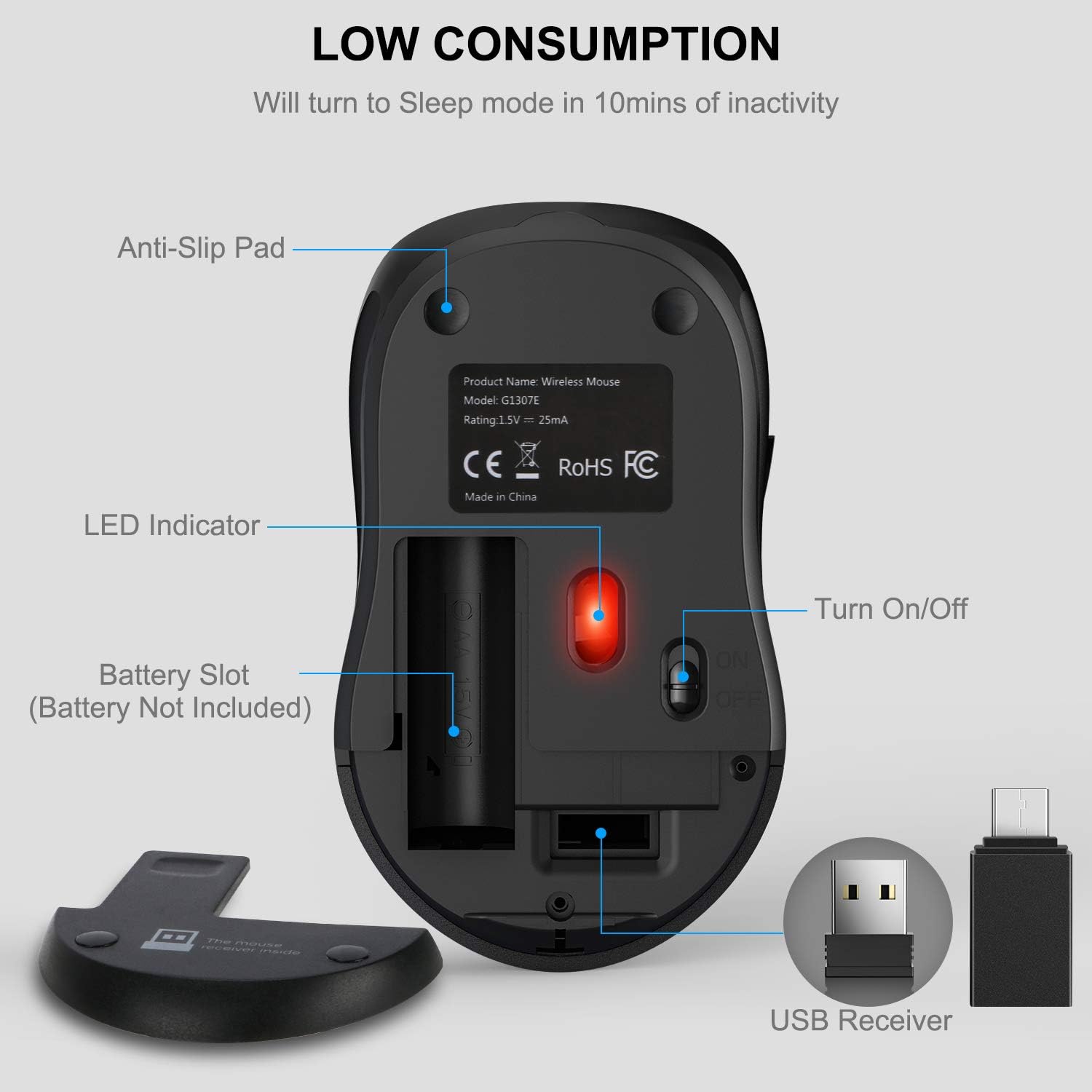
Image: A diagram illustrating the six buttons on the WisFox wireless mouse: Left Button, Right Button, Scroll Wheel, DPI Switch Button, Page Up Button, and Page Down Button.
- Лево дугме: Стандардна функција клика.
- Десно дугме: Стандардна функција десног клика.
- Точак за померање: For vertical scrolling and middle-click function.
- Дугме за прекидач DPI-ја: Подешава осетљивост курсора (нивое DPI).
- Дугме за горе: Navigates to the previous page in web прегледачи или документи.
- Дугме за доле странице: Navigates to the next page in web прегледачи или документи.

Image: The underside of the WisFox wireless mouse, highlighting the battery slot (for 1 AA battery, not included), the storage compartment for the USB receiver, the LED indicator, and the On/Off switch.
Упутства за подешавање
- Инсталирајте батерију: Open the battery compartment cover on the bottom of the mouse. Insert one AA battery (not included), ensuring correct polarity (+/-). Close the cover.
- Retrieve Receiver: The USB-A receiver is stored inside the battery compartment for convenience. Remove it carefully.
- Повежите пријемник:
- For devices with a standard USB-A port: Plug the USB-A receiver directly into an available USB-A port on your computer.
- For devices with a USB-C port: Attach the provided USB-C adapter to the USB-A receiver, then plug the combined unit into an available USB-C port on your computer.
- Укључено: Slide the On/Off switch located on the bottom of the mouse to the "ON" position.
- Аутоматско повезивање: The mouse will automatically connect to your computer. No additional drivers are required for installation.

Image: The WisFox wireless mouse connected to a laptop via its 2.4G receiver, illustrating its wireless capability and effective range of 33 feet.
Упутство за употребу
Подешавање ДПИ (брзине курсора)
The WisFox wireless mouse features three adjustable DPI levels, allowing you to customize the cursor sensitivity to your preference. Press the DPI Switch Button (located behind the scroll wheel) to cycle through the settings:
- 800 ДПИ: Спорије кретање курсора, идеално за прецизне задатке.
- 1200 ДПИ: Standard cursor movement (default setting).
- 1600 ДПИ: Faster cursor movement, suitable for quick navigation.

Image: A visual representation of the three adjustable DPI settings (800, 1200, 1600) available on the mouse, with 1200 DPI indicated as the default.
Ауто Слееп Моде
To conserve battery life, the mouse is designed with an automatic power-saving feature:
- The mouse will enter auto power-saving mode after 1 minute of inactivity.
- It will enter deep sleep mode after 8 minutes of inactivity.
- To wake the mouse, simply double-click any button.
Компатибилност
The WisFox 2.4G Wireless Mouse offers broad compatibility with various operating systems and devices:

Image: The WisFox mouse in an office environment, with logos indicating compatibility with Windows, Mac OS, and Linux operating systems.
- Оперативни системи: Windows 7/8/10/XP, Vista 7/8, Linux, Mac OS (V10.4 or higher).
- Уређаји: Laptops, Desktop PCs, MacBooks, and other devices with a compatible USB-A or USB-C port.
Одржавање
- Чишћење: Користите меку, суву крпу за чишћење миша. За тврдокорну прљавштину, благо обришитеampОбришите крпу водом или благим раствором за чишћење. Избегавајте јаке хемикалије.
- Замена батерије: When the mouse performance degrades or it stops responding, replace the AA battery. Ensure the On/Off switch is in the "OFF" position before replacing the battery.
- Складиштење: When not in use for extended periods, turn off the mouse and store the USB receiver in its designated slot within the battery compartment to prevent loss.
Решавање проблема
| Проблем | Решење |
|---|---|
| Миш не реагује |
|
| Cursor lagging or erratic movement |
|
| Side buttons (Page Up/Down) not working |
|
Спецификације
- Модел: RH204RH
- Повезивање: 2.4GHz Wireless (Radio Frequency)
- Радни опсег: До 33 стопе (10 метара)
- Нивои ДПИ: 800 / 1200 (подразумевано) / 1600
- Дугмад: 6 (Left, Right, Scroll Wheel, DPI Switch, Page Up, Page Down)
- Детекција покрета: Оптицал
- Извор напајања: 1 к АА батерија (није укључена)
- Аутоматско спавање: After 1 minute (power-saving), after 8 minutes (deep sleep)
- Трајност: Тест притиска на 5 милиона тастера
- Димензије производа: 4.09 к 2.4 к 1.57 инча (10.39 к 6.1 к 3.99 цм)
- Тежина артикла: 2.4 унце (68 грама)
Гаранција и подршка
WisFox provides a Гаранција 24 месеци for this product, along with a Политика враћања без питања у року од 90 дана. Our customer service team is available 24/7 to assist you with any questions or concerns.
For support, please contact WisFox customer service through the platform where you purchased the product or visit the official WisFox webсајт за контакт информације.
Ask a question about this manual
Ask about setup, troubleshooting, compatibility, parts, safety, or missing instructions. Manuals+ will review the question and use this page’s manual context to help answer it.