
1. Увод
This manual provides detailed instructions for the safe and effective use of the Walfront PM6508 Digital Temperature Humidity Meter. This device is designed for high-precision measurement of ambient temperature and relative humidity, offering features such as data hold, backlight display, and wet bulb/dew point temperature calculations. It is suitable for various applications including home, office, industrial settings, and environmental monitoring.
2. Безбедносне информације
Please read and understand all safety warnings and operating instructions before using this instrument. Failure to follow these instructions may result in electric shock, fire, or injury.
- Do not operate the meter if it appears damaged or if the battery cover is not properly closed.
- Avoid exposing the meter to extreme temperatures, direct sunlight, or high humidity for prolonged periods.
- Do not attempt to repair or modify the meter. Refer all servicing to qualified personnel.
- Remove batteries if the meter is not used for an extended period to prevent leakage.
- Keep the sensor area clean and free from obstructions to ensure accurate readings.
3. Производ је готовview
The Walfront PM6508 is a compact and portable digital meter designed for accurate environmental measurements. It features an easy-to-read LCD display with backlight and intuitive button controls.

Слика 3.1: Фронт view of the Walfront PM6508 meter with key components labeled. This includes the temperature and humidity sensor at the top, the HD display, various control buttons (Power, Max/Min, Data Hold, Data Storage, Unit Switch, Backlight), and an anti-fall protective sleeve.
3.1 Кључне карактеристике
- Сензор високе прецизности: Provides accurate temperature and humidity readings.
- LCD Display with Backlight: Обезбеђује јасну читљивост у различитим условима осветљења.
- Функција задржавања података: Замрзава тренутно очитавање на екрану.
- Складиштење података: Stores up to 100 groups of measurement data.
- Wet Bulb & Dew Point Temperature: Calculates and displays these critical environmental parameters.
- Промена јединица: Лако пребацујте између Целзијуса (°C) и Фаренхајта (°F).
- Аутоматско искључивање: Штеди трајање батерије.
- Индикатор мале снаге: Упозорава када је потребно заменити батерије.
3.2 Садржај пакета

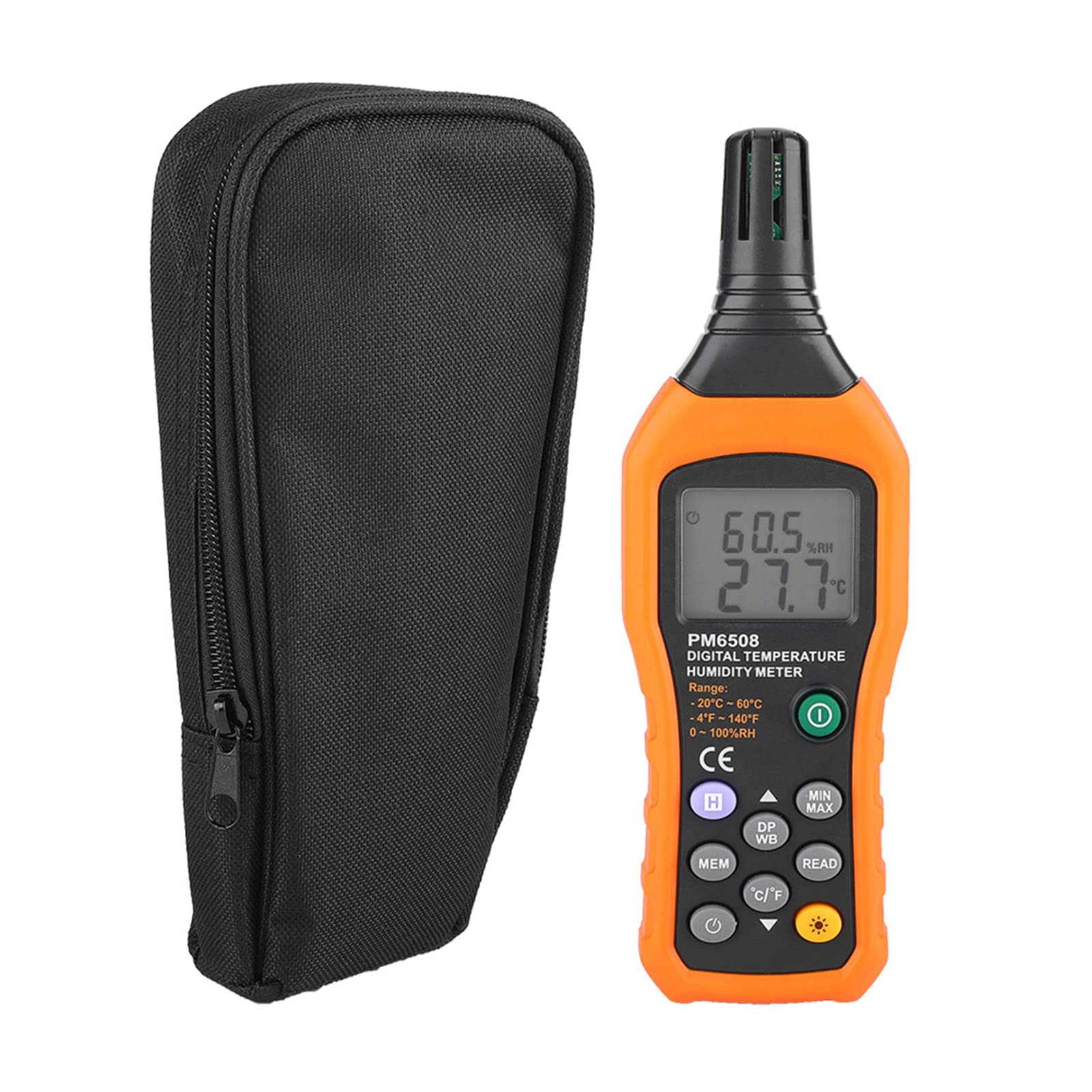
Слика 3.2: The Walfront PM6508 meter shown alongside its portable storage bag, indicating typical package contents.
- Walfront PM6508 Digital Temperature Humidity Meter
- Преносива торба за складиштење
- Упутство за употребу
4. Подешавање
4.1 Инсталација батерије
The PM6508 meter requires 4 x 1.5V AAA batteries (not included) for operation.
- Пронађите поклопац одељка за батерије на задњој страни мерача.
- Померите поклопац батерије надоле да бисте га отворили.
- Уметните четири ААА батерије, водећи рачуна о исправном поларитету (+ и -) као што је назначено унутар одељка.
- Вратите поклопац батерије тако што ћете га вратити на место док не кликне чврсто.
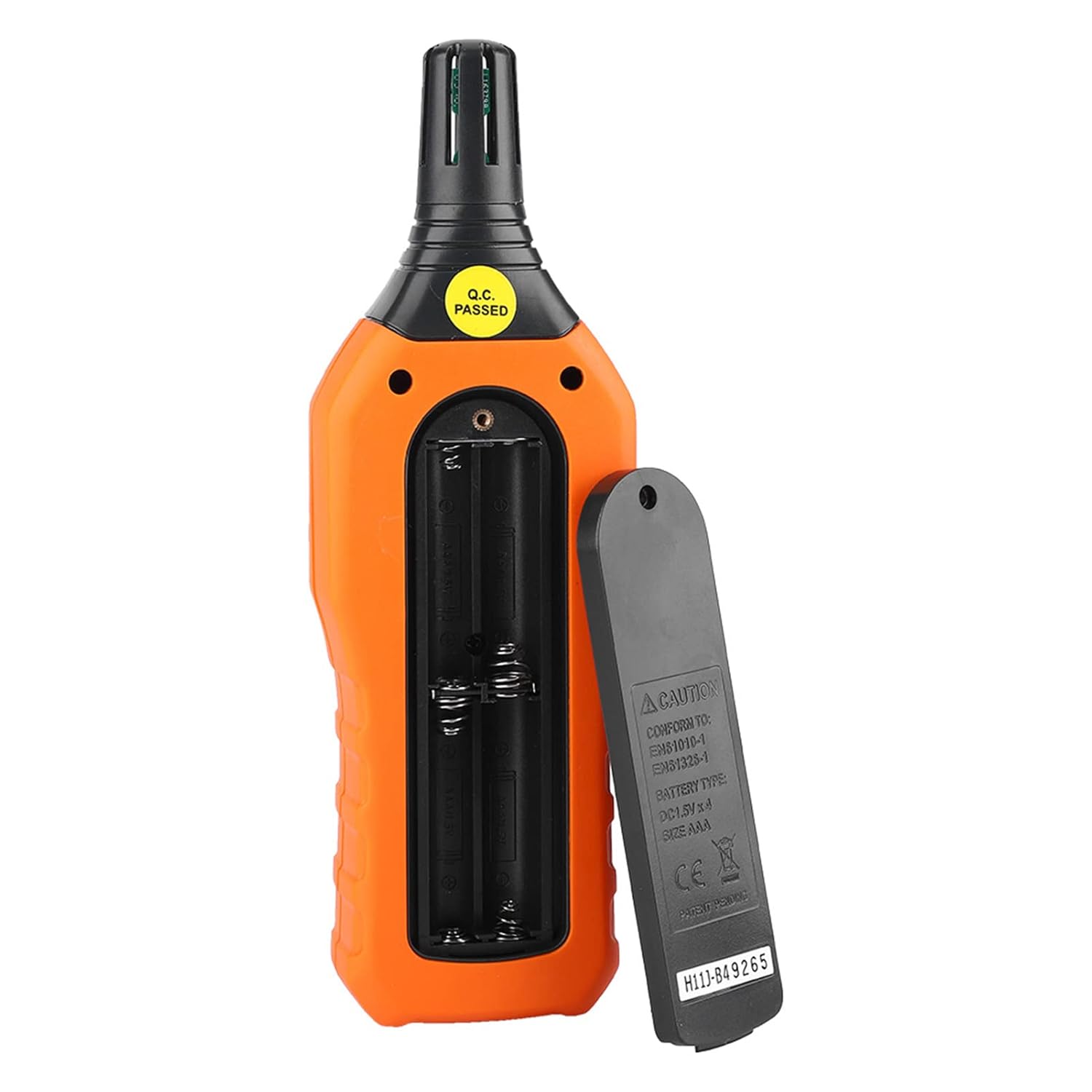
Слика 4.1: Позади view of the meter showing the open battery compartment for AAA battery installation.
5. Упутство за употребу
5.1 Укључивање/искључивање
- Притисните тастер green power button (
 ) to turn the meter on.
 - Притисните и држите gray power button () for approximately 2 seconds to turn the meter off. The meter also features an automatic shut-down function to conserve battery life.
5.2 Мерења
Once powered on, the meter will immediately begin displaying real-time temperature and humidity readings on the LCD screen. Ensure the sensor at the top of the device is exposed to the environment you wish to measure.

Слика 5.1: The meter in use, displaying temperature and humidity readings on its LCD screen.
5.3 Пребацивање јединица (°C/°F)
To switch between Celsius (°C) and Fahrenheit (°F) temperature units:
- Притисните тастер Дугме °Ц/°Ф () located on the keypad. The display will update to show readings in the selected unit.
5.4 Функција позадинског осветљења
To activate or deactivate the display backlight:
- Притисните тастер дугме за позадинско осветљење () to toggle the backlight on or off. This is useful for reading in low-light conditions.
5.5 Data Hold (H)
To freeze the current readings on the display:
- Притисните тастер Х дугме (). The "H" icon will appear on the display, indicating that the data is held.
- Притисните тастер Х дугме again to release the data hold and resume real-time measurements.
5.6 Maximum/Minimum (MIN/MAX) Measurement
То view the maximum or minimum recorded values:
- Притисните тастер Дугме МИН/МАКС () once to display the maximum temperature and humidity recorded since the meter was powered on or the function was reset.
- Притисните тастер Дугме МИН/МАКС again to display the minimum temperature and humidity.
- Притисните тастер Дугме МИН/МАКС a third time to exit the MIN/MAX mode and return to real-time readings.
5.7 Data Storage (MEM) and Retrieval (READ)
The meter can store up to 100 groups of measurement data.
- To Store Data: Притисните тастер Дугме МЕМ () to save the current temperature and humidity readings. The display will briefly show a memory location number.
- To Retrieve Data: Притисните тастер дугме ПРОЧИТАЈ () to enter data retrieval mode. Use the Дугме МЕМ to scroll through stored data records.
- To Exit Retrieval: Притисните тастер дугме ПРОЧИТАЈ again to exit data retrieval mode.
5.8 Wet Bulb (WB) and Dew Point (DP) Temperature
To display Wet Bulb or Dew Point temperatures:
- Притисните тастер DP/WB button () once to display the Dew Point temperature.
- Притисните тастер DP/WB button again to display the Wet Bulb temperature.
- Притисните тастер DP/WB button a third time to return to standard temperature and humidity display.
6. Одржавање
6.1 Чишћење
- Обришите ц бројилаasinг са меким, дamp тканина. Немојте користити абразивна средства за чишћење или раствараче.
- Keep the sensor area clean and free from dust or debris to ensure accurate readings. Do not insert any objects into the sensor opening.
6.2 Складиштење
- When not in use for extended periods, remove the batteries to prevent leakage and damage to the device.
- Чувајте мерач на хладном и сувом месту, даље од директне сунчеве светлости и екстремних температура.
- Utilize the provided portable storage bag for protection during storage and transport.
КСНУМКС. Решавање проблема
| Проблем | Могући узрок | Решење |
|---|---|---|
| Мерач се не укључује. |
|
|
| Нетачна очитавања. |
|
|
| Екран је слаб или трепери. |
|
|
| Cannot store or retrieve data. |
|
|
8. Спецификације
The following table outlines the technical specifications for the Walfront PM6508 Digital Temperature Humidity Meter.


Слика 8.1: Detailed technical specifications including ranges, resolution, and precision for temperature, humidity, wet bulb, and dew point measurements, along with general parameters.
| Параметар | Валуе |
|---|---|
| Модел | ПМ6508 |
| Распон температуре околине | -20 до 60 °Ц (-4 до 140 °Ф) |
| Ambient Temperature Precision | ±1.5 °C (-20 to 0 °C, 45 to 60 °C), ±0.5 °C (0 to 45 °C) |
| Опсег релативне влажности | 0% - 100% релативне влажности |
| Relative Humidity Precision | ±4.0% (0-20%, 80-100%), ±3.0% (20-80%) |
| Опсег температуре влажног термометра | -20 до 60 °Ц (4 до 140 °Ф) |
| Wet Bulb Temperature Precision | ±1.5 °C (-20 to 0 °C, 45 to 60 °C), ±0.5 °C (0 to 45 °C) |
| Температурни опсег тачке росе | -50 до 60 °Ц (-58 до 140 °Ф) |
| Dew Point Temperature Precision | ±1.5 °C (-50 to 0 °C, 45 to 60 °C), ±0.5 °C (0 to 45 °C) |
| Резолуција | 0.1 °C / °F / %RH |
| Складиштење података | 100 група |
| Повер Суппли | 4 x 1.5 V AAA батерије (нису укључене) |
| Димензије (Д к Ш к В) | 180 к 60 к 29 мм (7.1 к 2.4 к 1.1 инча) |
| Тежина | 254 г (9 оз) |
| Радна влажност | 0% - 100% (без кондензације) |
9. Пријаве
The Walfront PM6508 is suitable for a wide range of applications requiring accurate temperature and humidity monitoring.

Слика 9.1: Examples of environments where the PM6508 meter can be effectively used for temperature and humidity monitoring.
- Residential and Office Environments: Monitoring indoor climate for comfort and health.
- Industrial Production: Ensuring optimal conditions for manufacturing processes.
- Warehousing and Storage: Protecting goods sensitive to temperature and humidity, such as in wine cellars or general storage.
- пољопривреда: Monitoring conditions in planting sheds, greenhouses, and aquaculture.
- Research and Development Laboratories: Maintaining precise environmental controls for experiments.
- ХВАЦ системи: Assisting in the evaluation and maintenance of heating, ventilation, and air conditioning systems.
10. Гаранција и подршка
Walfront products are designed for reliability and performance. For warranty information, technical support, or service inquiries, please refer to the contact information provided with your purchase or visit the official Walfront webсајт. Молимо вас да сачувате доказ о куповини за потребе гаранције.