
1. Увод
Welcome to your new qunyiCO Y10 Android Tablet. This manual provides essential information for setting up, operating, and maintaining your device. Please read it thoroughly to ensure optimal performance and longevity.
Безбедносне информације
- Do not expose the tablet to extreme temperatures or direct sunlight.
- Избегавајте испуштање или излагање таблета јаким ударцима.
- Користите само испоручени пуњач и додатну опрему.
- Држите таблету даље од воде и других течности.
- Не покушавајте сами да растављате или поправљате таблет.
2. Производ је готовview
Физичке компоненте
The qunyiCO Y10 tablet features a sleek design with essential ports and buttons for ease of use.
Фронт View

This image shows the front of the qunyiCO Y10 tablet, highlighting its 10.1-inch IPS HD display.
Позади View

This image displays the back of the qunyiCO Y10 tablet, featuring the rear camera and the qunyiCO logo.
Дугмад и портови
Familiarize yourself with the location of key controls and connections.
An illustrative diagram highlighting key features such as Android 10.0, Quad-core CPU, 5000mAh battery, 10.1-inch display, 2.4GHz Wi-Fi, Dual Camera, 2GB RAM + 32GB ROM, and 1280x800 IPS HD.
- Power/Volume Buttons: Located on the side for power on/off and volume control.
- Слушалице: Стандардни 3.5 мм аудио излаз.
- Слот за СД картицу: За прошириву меморију до 128 ГБ.
- Порт за пуњење: Микро УСБ порт за пуњење.
- камере: 2MP front camera and 8MP rear camera.
3. Подешавање
Почетно пуњење
Before first use, fully charge your tablet using the provided power adapter.
Укључивање/искључивање
- Укључено: Press and hold the Power button until the qunyiCO logo appears.
- Искључивање: Притисните и држите дугме за напајање, а затим изаберите „Искључивање“ из понуђених опција.
- Поново покрени: Притисните и држите дугме за напајање, а затим изаберите „Рестарт“ из опција.
Прво постављање
Пратите упутства на екрану да бисте завршили почетно подешавање, укључујући избор језика, Wi-Fi везу и пријаву на Google налог.
4. Упутство за употребу
Основна навигација
Your tablet runs on Android 11, offering an intuitive user interface.
- Покрети додиром: Додирните да бисте изабрали, превуците прстом да бисте се померали, уштипните да бисте зумирали.
- Почетни екран: Приступите својим апликацијама и виџетима.
- Обавештења: Swipe down from the top to view обавештења и брза подешавања.
Ви-Фи веза
Повежите се на Ви-Фи мрежу да бисте приступили интернету.
- Иди на Подешавања > Мрежа и интернет > Ви-Фи.
- Укључи/искључи Wi-Fi On.
- Изаберите жељену мрежу са листе и унесите лозинку ако се то од вас затражи.
Управљање апликацијама
Преузмите и управљајте апликацијама из Google Play продавнице.
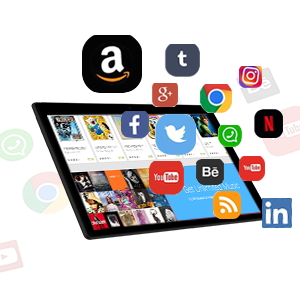
This image illustrates the tablet's screen with various popular application icons, demonstrating its compatibility with a wide range of apps.
- Отворите Плаи продавница апп.
- Тражи апликације и игре.
- Додирните Инсталирај за преузимање.
Употреба камере
Capture photos and videos using the built-in cameras.

A visual comparison demonstrating the clarity and quality of images captured by the tablet's 2MP front and 8MP rear cameras.
- Отворите Камера апп.
- Пребацујте се између предње и задње камере по потреби.
- Додирните дугме затварача да бисте снимили фотографију или покренули/зауставили снимање видеа.
5. Управљање складиштем
Интерна меморија
The tablet comes with 32GB of internal storage for your apps and files.
Екпандабле Стораге
You can expand the storage up to 128GB using a microSD card.
This image visually represents the tablet's storage capabilities, indicating 32GB of internal ROM and the option to expand up to 128GB, suitable for storing various media and applications.
- Уметните мицроСД картицу у предвиђени слот.
- Follow on-screen prompts to format the card if necessary.
- Note: While expandable up to 128GB, 32GB is recommended for optimal performance. Larger cards may slow down the system.
6. Информације о батерији
Трајање батерије
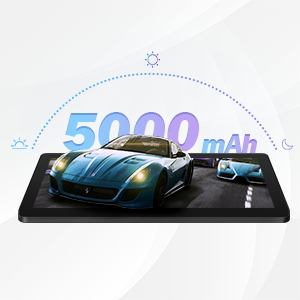
The qunyiCO Y10 is equipped with a 5000mAh battery, providing up to 8 hours of usage on a single charge, depending on usage patterns.

An image highlighting the 5000mAh battery, with icons indicating approximate usage times for video playback (6H), gaming (6H), and browsing (12H), showcasing its long-lasting capability.
Пуњење
Use the provided charger to ensure proper charging and battery health.
- Connect the charger to the tablet's charging port and a power outlet.
- Икона батерије на екрану ће показати статус пуњења.
7. Повезивање
Ви-Фи
Supports 2.4G Wi-Fi for stable internet connection.
Блуетоотх
Connect to Bluetooth devices such as headphones or speakers.
- Иди на Подешавања > Повезани уређаји > Блуетоотх.
- Укључите Блуетоотх On.
- Select the device you wish to pair with from the list.
8. Мултимедија
Ењоиинг Цонтент
The 1280x800 IPS HD display provides clear visuals for various media.
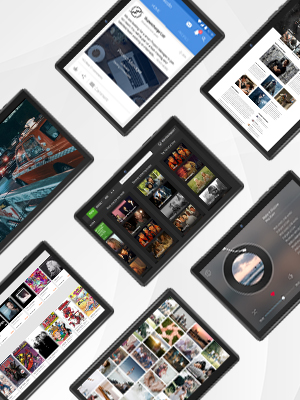
This image presents a collage of tablet screens, each showing different forms of digital content such as social media feeds, news articles, movie interfaces, and music players, emphasizing the tablet's versatility for media consumption.
You can enjoy movies, music, photos, and e-books.
Званични видео производа
Погледајте овај званични видео за визуелни прегледview of the qunyiCO Y10 Tablet's features and capabilities.
This video, titled "qunyiCO Y10 Tablet 10 inch Android 10.0", provides a comprehensive look at the tablet's design, performance, and user experience.
КСНУМКС. Решавање проблема
Уобичајени проблеми и решења
| Иссуе | Потенцијални узрок | Решење |
|---|---|---|
| Tablet keeps shutting off / rebooting | Software glitch, low battery, faulty charger/port, overheating. | Ensure full charge. Perform a factory reset if software related. Check charger and port for damage. Avoid heavy usage in hot environments. |
| Екран на додир не реагује | Software freeze, screen protector interference, physical damage. | Restart the tablet. Remove any screen protectors. If problem persists, contact support. |
| Won't charge | Damaged charging cable/adapter, dirty charging port, battery issue. | Try a different compatible charger. Clean the charging port gently. If still no charge, battery may need service. |
| Проблеми са Ви-Фи везом | Incorrect password, router issues, tablet software glitch. | Double-check password. Restart router and tablet. Forget and reconnect to the network. |
| Apps flip/rotate incorrectly | Auto-rotate setting, app compatibility, sensor issue. | Check auto-rotate settings in quick panel/settings. Some apps may not support all orientations. If persistent, sensor may be faulty. |
10. Спецификације
Тецхницал Детаилс
| Феатуре | Детаљ |
|---|---|
| Модел | И10 |
| Оперативни систем | Андроид 11 |
| Процесор | 1.6 GHz четворојезгарни (Allwinner) |
| РАМ | 2 ГБ ДДР4 СДРАМ |
| Интерна меморија | 32 ГБ |
| Екпандабле Стораге | До 128 ГБ (МицроСД) |
| Величина екрана | 10.1 инча |
| Резолуција екрана | 1280x800 IPS HD |
| Задња камера | 8 МП |
| Предња камера | 2 МП |
| Батерија | 5000мАх литијум-јонски |
| Повезивање | Wi-Fi (2.4G), Bluetooth |
| Димензије (ДкШкВ) | 9.62 к 6.83 к 0.39 инча |
| Тежина артикла | 1.08 фунти |
11. Одржавање
Чишћење и њега
- Користите меку крпу која не оставља влакна да бисте очистили екран и кућиште таблета.
- Немојте користити абразивна средства за чишћење или раствараче.
- Keep the tablet in a protective case to prevent scratches and damage.
Ажурирања софтвера
Редовно проверавајте системска ажурирања како бисте осигурали оптималне перформансе и безбедност.
- Иди на Подешавања > Систем > Ажурирање система.
- Пратите упутства на екрану да бисте преузели и инсталирали све доступне надоградње.
12. Гаранција и подршка
Информације о гаранцији
Your qunyiCO Y10 tablet comes with a standard manufacturer's warranty. Please refer to the warranty card included in your product packaging for specific terms and conditions.
Корисничка подршка
For technical assistance, troubleshooting beyond this manual, or warranty claims, please contact qunyiCO customer support through their official webсајт или контакт информације наведене у документацији вашег производа.
You can also visit the official qunyiCO store on Amazon for more information: qunyiCO Store.