
1. Увод
This manual provides comprehensive instructions for the proper use, setup, and maintenance of your SMARTEK SW-832 Smartwatch. Please read this manual thoroughly before operating the device to ensure optimal performance and longevity.
The SMARTEK SW-832 is a versatile smartwatch designed to integrate with your mobile communication and activity tracking needs. It features Bluetooth connectivity, a touchscreen interface, and the capability to function as a standalone mobile device with a Micro-SIM card.
2. Садржај пакета
Проверите да ли су све ставке присутне у паковању вашег производа:
- SMARTEK SW-832 Smartwatch
- Кабл за пуњење
- Кориснички приручник (овај документ)
- 32GB Micro SD Card (if included in your specific package)
3. Девице Оверview
Familiarize yourself with the physical components of your SMARTEK SW-832 Smartwatch.
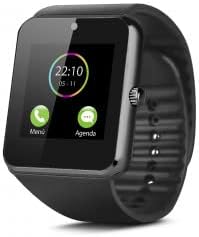
This image displays the SMARTEK SW-832 Smartwatch from the front. The square touchscreen shows a digital clock (22:10) and two icons labeled 'Menú' (Menu) and 'Agenda' (Calendar). A circular physical button is visible on the right side of the watch casing. The watch features a black silicone strap.
- Екран осетљив на додир: Главни интерфејс за интеракцију.
- Power Button/Home Button: Typically located on the side, used for powering on/off and returning to the home screen.
- микрофон: За позиве и гласовни унос.
- говорник: For call audio and notifications.
- Порт за пуњење: За повезивање кабла за пуњење.
- Слот за СИМ картицу: For inserting a Micro-SIM card.
- Утор за микро СД картицу: За проширење складишног простора.
- камера: Integrated camera for capturing images.
4. Подешавање
4.1 Пуњење уређаја
- Connect the charging cable to the smartwatch's charging port.
- Connect the other end of the cable to a compatible USB power adapter or a computer's USB port.
- Allow the device to charge fully before first use. A full charge typically takes approximately 2-3 hours. The battery indicator on the screen will show charging status.
4.2 Inserting SIM Card (Optional)
To use the smartwatch as a standalone phone, insert a Micro-SIM card.
- Ensure the smartwatch is powered off.
- Locate the SIM card slot, usually on the side or under the back cover. Refer to the device diagram for exact location.
- Пажљиво отворите поклопац слота за СИМ картицу.
- Insert a Micro-SIM card with the gold contacts facing down and the notched corner aligned correctly.
- Пажљиво притисните СИМ картицу док не кликне на своје место.
- Чврсто затворите поклопац слота за СИМ картицу.
4.3 Inserting Micro SD Card (Optional)
To expand storage for photos, music, and other files, insert a Micro SD card (up to 32GB supported).
- Ensure the smartwatch is powered off.
- Locate the Micro SD card slot, often adjacent to the SIM card slot.
- Carefully open the Micro SD card slot cover.
- Insert the Micro SD card with the gold contacts facing down.
- Лагано гурните картицу док не кликне на своје место.
- Close the Micro SD card slot cover securely.
4.4 Укључивање/искључивање
- За укључивање: Притисните и држите дугме за напајање док се екран не осветли.
- За искључивање: Press and hold the Power button until a power-off menu appears. Select "Power Off" or similar option on the screen.
4.5 Pairing with Smartphone (Bluetooth)
To extend functionality and receive notifications from your smartphone, pair the smartwatch via Bluetooth.
- Ensure Bluetooth is enabled on both your smartwatch and your smartphone.
- On your smartwatch, navigate to the Bluetooth settings menu.
- На паметном телефону потражите доступне Bluetooth уређаје.
- Select "SW-832" or a similar device name from the list on your smartphone.
- Потврдите захтев за упаривање на оба уређаја ако се то од вас затражи.
- For full functionality, you may need to install a companion application on your smartphone. Refer to the smartwatch's on-screen instructions or packaging for app details.
5. Управљање паметним сатом
5.1 Основна навигација
- екран осетљив на додир: Tap to select items, swipe left/right/up/down to navigate through menus and screens.
- Power/Home Button: Press once to return to the home screen.
5.2 Упућивање и примање позива
- With SIM Card: Access the Dialer application to make calls directly from the smartwatch.
- Via Bluetooth (Paired with Smartphone): When paired, you can answer incoming calls or initiate calls through the smartwatch, which will route audio through its speaker and microphone.
5.3 Слање и примање порука
- With SIM Card: Use the Messaging application to send and receive SMS messages.
- Via Bluetooth (Paired with Smartphone): Receive notifications for incoming messages from your smartphone. Some functionality may allow for quick replies or viewing full messages.
Функционалност камере за 5.4 степени
Access the Camera application from the main menu. Tap the screen to take a photo. Images are saved to the internal memory or the inserted Micro SD card.
5.5 Контрола музике
When paired with your smartphone, the smartwatch can control music playback (play, pause, skip tracks) on your phone. If a Micro SD card with music files is inserted, the smartwatch can play music directly.
5.6 Праћење активности
The smartwatch includes an activity tracker to monitor steps, distance, and calories. Access the dedicated application to view your daily activity data.
5.7 Обавештења
When paired with your smartphone, the smartwatch will display notifications for calls, messages, and other applications. Manage notification settings through the companion app on your smartphone.
5.8 Internet Browsing (with SIM)
If a SIM card with data connectivity is inserted, you can access basic internet browsing functionality through the built-in browser application.
6. Одржавање
6.1 Чишћење
- Wipe the screen and body of the smartwatch with a soft, lint-free cloth.
- Избегавајте употребу јаких хемикалија, абразивних средстава за чишћење или аеросолних спрејева.
- Не потапајте уређај у воду.
6.2 Одржавање батерије
- Избегавајте екстремне температуре, јер могу утицати на век трајања батерије.
- Редовно пуните батерију, али избегавајте да је остављате потпуно празну током дужег периода.
- Use only the provided charging cable or a certified compatible charger.
6.3 Складиштење
When storing the smartwatch for an extended period, ensure it is partially charged (around 50%) and stored in a cool, dry place.
КСНУМКС. Решавање проблема
| Проблем | Могуће решење |
|---|---|
| Уређај се не укључује. | Уверите се да је батерија напуњена. Прикључите пуњач и покушајте поново. |
| Не може се упарити са паметним телефоном. |
|
| СИМ картица није откривена. |
|
| Екран не реагује. | Perform a soft reset by pressing and holding the Power button until the device restarts. If unresponsive, allow the battery to fully discharge and then recharge. |
| Лош век трајања батерије. |
|
8. Спецификације
| Феатуре | Детаљ |
|---|---|
| Модел | SMARTEK SW-832 |
| Процесор | МТК626111Д |
| Дисплаи | 1.54 inch IPS LCD, 240 x 240 pixels |
| ГСМ Бандс | 850/900/1800/1900 МХз |
| Блуетоотх верзија | 4.0 |
| Батерија | 380 mAh 3.7V Lithium-Polymer |
| Време употребе | Up to 72 hours (normal use) |
| РАМ | 64 МБ |
| Интерна меморија (РОМ) | 64 МБ |
| Екпандабле Стораге | До 32 ГБ преко Мицро СД картице |
| Тип СИМ картице | Мицро-СИМ |
| Камера | 1.3 мегапиксела |
| Тежина | 65 грама |
| Димензије (Д к Ш к В) | 46 к 42 к 11.5 мм |
| Оперативни систем | Proprietary OS with smartphone connectivity features |
| Компатибилни уређаји | Smartphones, Tablets (Android/iOS via Bluetooth) |
9. Гаранција и подршка
For warranty information, please refer to the warranty card included with your purchase or visit the official SMARTEK website. Support contact details are typically provided with your product documentation or on the manufacturer's webсајту.
Сачувајте доказ о куповини за гаранцијске захтеве.