
1. Увод
Хвала вам на куповиниasing the TOPTRO X2 Mini Projector. This manual provides detailed instructions for setting up, operating, and maintaining your projector. Please read this manual thoroughly before use to ensure proper operation and to extend the lifespan of your device. Keep this manual for future reference.
Безбедносне информације
- Не гледајте директно у сочиво пројектора када је укљученоamp је укључен.
- Осигурајте одговарајућу вентилацију око пројектора како бисте спречили прегревање.
- Не излажите пројектор киши или влази.
- Користите само адаптер за напајање који се испоручује са пројектором.
- Do not attempt to repair the projector yourself. Contact qualified service personnel for assistance.
- Keep the projector away from heat sources and direct sunlight.
2. Садржај пакета
Проверите да ли су све ставке присутне у вашем пакету:
- TOPTRO X2 Mini Projector
- Ремоте Цонтрол
- Повер Цабле
- ХДМИ кабл
- АВ кабл
- Упутство за употребу
- Поклопац објектива

Image: The TOPTRO X2 Mini Projector shown with its carrying case and a smartphone displaying projected content. This image illustrates the compact size and portability of the projector, along with its primary function of displaying media.
3. Производ је готовview
Projector Layout
Слика: Предња и бочна страна view of the TOPTRO X2 Mini Projector, highlighting the lens, focus ring, and ventilation grilles. This provides a visual guide to the projector's external components.
Улазно/излазни портови
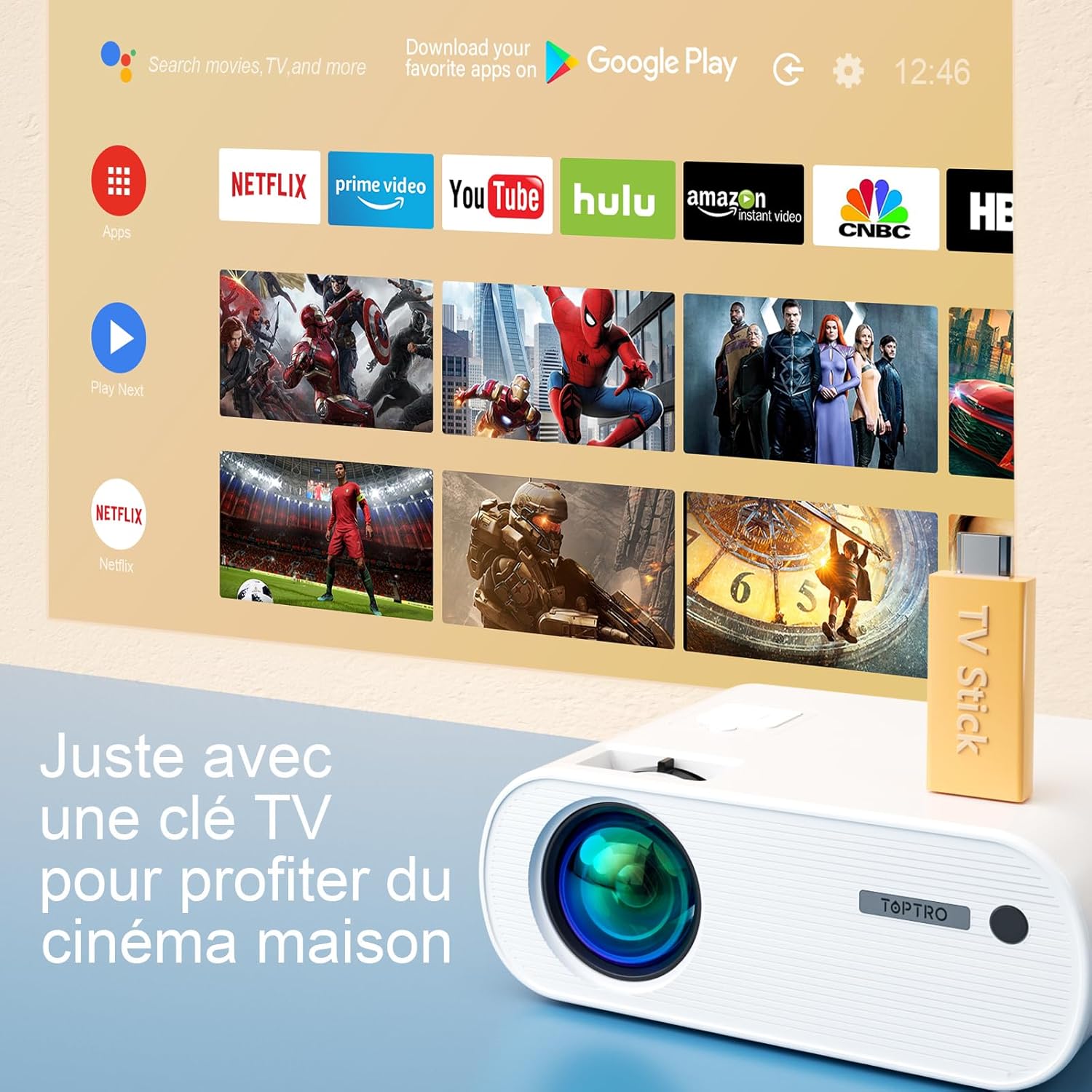
Image: Close-up of the rear panel of the TOPTRO X2 Mini Projector, showing various input/output ports including HDMI, USB, AV, and power input. This helps users identify where to connect their devices.
- Повер Инпут
- ХДМИ порт
- УСБ порт
- АВ Порт
- Аудио излаз (3.5 мм)
- ВГА порт
- Слот за СД картицу
Цонтрол Панел

Слика: Одозго надоле view of the TOPTRO X2 Mini Projector's control panel, showing navigation buttons and the power button. This image assists users in understanding the on-device controls.
The projector can be controlled using the onboard buttons or the included remote control.
4. Почетно подешавање
4.1 Укључивање
- Прикључите кабл за напајање на улаз за напајање пројектора, а затим на утичницу.
- Притисните дугме за напајање на пројектору или даљинском управљачу да бисте укључили уређај.
4.2 Подешавање фокуса
Rotate the focus ring on the projector lens until the projected image is clear and sharp.

Image: A hand adjusting the focus ring on the TOPTRO X2 Mini Projector, with a blurred image on the left and a sharp image on the right, demonstrating the effect of focus adjustment. This visual aid helps users understand how to achieve a clear picture.
4.3 Корекција Кеистоне
The TOPTRO X2 features 4D Keystone Correction (±40° vertical and horizontal) and a 100% X/Y zoom function, adjustable via the remote control. This allows for a rectangular image even if the projector is not perfectly aligned with the screen.

Image: Diagram illustrating the effect of keystone correction, showing a distorted image being corrected into a perfect rectangle. This helps users visualize the function of keystone adjustment.
Да бисте прилагодили:
- Navigate to the "Keystone Correction" menu using the remote control.
- Adjust the vertical and horizontal parameters until the image is rectangular.
- Use the zoom function (100% X/Y) to adjust the image size without moving the projector.
4.4 Опције пласмана
The projector can be placed on a table or mounted to the ceiling.

Image: An image showing the TOPTRO X2 Mini Projector in two different setups: on a table and ceiling-mounted. This demonstrates the versatility of installation options for the projector.
5. Упутство за употребу
5.1 Избор улазног извора
Press the "Source" button on the remote control or projector to select the desired input source (HDMI, USB, AV, VGA, Screen Mirroring).
5.2 Повезивање уређаја
5.2.1 ХДМИ веза
Connect your device (e.g., laptop, game console, TV Stick) to the projector's HDMI port using an HDMI cable.

Image: The TOPTRO X2 Mini Projector connected to a TV Stick, displaying various streaming service icons on a projected screen. This illustrates how to connect and use a TV stick for media consumption.
5.2.2 УСБ веза
Уметните УСБ диск у УСБ порт да бисте репродуковали медије files directly. The projector supports various video, audio, and image formats.
5.2.3 АВ веза
Use the provided AV cable to connect devices with AV output (e.g., DVD player).
5.2.4 ВГА веза
Connect a computer to the VGA port using a VGA cable.
5.2.5 Wireless Connection (WiFi Screen Mirroring)
The TOPTRO X2 supports wireless screen mirroring for Android and iOS devices.

Image: The TOPTRO X2 Mini Projector wirelessly connected to multiple devices (smartphone, tablet, laptop), projecting a scenic image. This demonstrates the projector's WiFi screen mirroring capability for various devices.
- Select "Screen Mirroring" as the input source.
- Follow the on-screen instructions to connect your smartphone or tablet to the projector's WiFi network, then enable screen mirroring on your device.
5.2.6 Bluetooth аудио веза
Connect external Bluetooth speakers or headphones for enhanced audio experience.

Image: The TOPTRO X2 Mini Projector wirelessly connected via Bluetooth to external speakers and headphones, with sound waves emanating from the projector. This illustrates the projector's Bluetooth audio output feature.
- Уверите се да је ваш Bluetooth аудио уређај у режиму упаривања.
- На пројектору идите до менија подешавања Bluetooth-а.
- Изаберите свој уређај са листе за упаривање.
5.3 Навигација кроз мени
Use the arrow keys and "OK" button on the remote control or projector to navigate through the on-screen menus for settings such as picture mode, sound mode, and system settings.
6. Одржавање
6.1 Чишћење сочива
Use a soft, lint-free cloth or lens cleaning paper to gently wipe the projector lens. Avoid using abrasive cleaners.
6.2 Cleaning the Dust Filter
The TOPTRO X2 features a removable dust filter to prevent dust accumulation and black spots on the projection. Regularly clean the filter to maintain optimal performance.
- Locate the removable dust filter cover on the side of the projector.
- Gently remove the cover and the filter.
- Clean the filter using a soft brush or compressed air.
- Вратите филтер на место и чврсто затворите поклопац.
6.3 Вентилација
Ensure that the projector's ventilation openings are not blocked to allow for proper airflow and prevent overheating. The projector is equipped with a circulation cooling system and three independent smart fans to manage temperature.
КСНУМКС. Решавање проблема
| Проблем | Могући узрок | Решење |
|---|---|---|
| Нема слике на екрану | Напајање није повезано; Неисправан улазни извор; Поклопац објектива је на месту | Проверите везу за напајање; Изаберите исправан улазни извор; Скините поклопац објектива |
| Замућена слика | Focus not adjusted; Incorrect projection distance | Adjust focus ring; Adjust projector distance or use zoom function |
| Distorted image (trapezoid shape) | Пројектор није нормалан у односу на платно | Користите функцију корекције трапезоидног изобличења |
| Нема звука | Volume too low; Muted; Incorrect audio output selected | Increase volume; Unmute; Check audio settings and connections |
| Даљински управљач не ради | Batteries dead; Obstruction between remote and projector | Replace batteries; Ensure clear line of sight |
| Упозорење о прегревању | Блокирана вентилација; Дуготрајна употреба | Уверите се да су отвори за вентилацију чисти; Оставите пројектор да се охлади |
8. Спецификације
| Феатуре | Детаљ |
|---|---|
| Бранд | ТОПТРО |
| Модел | X2 |
| Нативе Ресолутион | 1920 x 1080p (Full HD) |
| Подржана резолуција | Up to 4K Ultra HD |
| Осветљеност | 6800 Lumens (Note: Marketing claims may vary, e.g., 7000 or 12000 lumens) |
| Однос контраста | 8000:1 |
| Величина пројекције | До 300 инча |
| Удаљеност пројекције | Recommended 3.5m, Max 7m |
| Кеистоне Цоррецтион | 4D (±40° Vertical & Horizontal) |
| Функција зумирања | 100% X/Y |
| Lamp Живот | 90,000 сати (ЛЕД) |
| Звучници | Built-in 10W Dual Subwoofer with SRS Sound |
| Повезивање | HDMI, USB, AV, VGA, WiFi, Bluetooth |
| Боја | Греи |
9. Гаранција и подршка
Информације о гаранцији
Please refer to the warranty card included in your package for detailed warranty terms and conditions. The warranty typically covers manufacturing defects for a specified period from the date of purchase.
Корисничка подршка
If you encounter any issues or have questions regarding your TOPTRO X2 Mini Projector, please contact TOPTRO customer support. Contact information can usually be found on the official TOPTRO webсајту или на гарантном листу.
When contacting support, please have your model number (X2) and purchase details ready.