
Цекотек 4254
CECOTEC Surface Precision ECOPOWER 10200 Smart Healthy White дигитална купатилска вага - упутство за употребу
Модел: 4254
Бренд: Цецотец
1. Увод
Thank you for choosing the CECOTEC Surface Precision ECOPOWER 10200 Smart Healthy White Digital Bathroom Scale. This advanced scale is designed to provide accurate weight measurements and bio-impedance analysis for comprehensive body development tracking. Featuring an innovative EcoPower push button for battery-free operation, Bluetooth connectivity, and a sleek tempered glass design, this scale offers convenience and precision for your health monitoring needs. Please read this manual thoroughly before use to ensure proper operation and maintenance.

Image: The CECOTEC Surface Precision ECOPOWER 10200 Smart Healthy White Digital Bathroom Scale, showcasinњегов елегантан дизајн и пратећи интерфејс апликације за паметне телефоне.
2. Безбедносне информације
Please observe the following safety precautions to ensure safe and optimal use of your scale:
- Do not use this scale if you have a pacemaker or other internal medical device.
- Do not use this scale if you are pregnant.
- Увек постављајте вагу на тврду, равну површину. Коришћење на меким површинама попут тепиха може утицати на тачност.
- The scale surface is made of tempered glass. It can be slippery when wet. Ensure the surface is dry before stepping on it.
- Не скачите на вагу и не испуштајте тешке предмете на њу, јер то може оштетити стакло или унутрашње компоненте.
- Keep the scale away from water and high humidity.
- This scale is intended for household use only and not for medical or commercial purposes.
- Чувати ван домашаја деце.
- Не покушавајте сами да расклапате или поправљате вагу. За помоћ контактирајте квалификовано сервисно особље.
3. Шта је у кутији
Upon unpacking, please ensure all the following items are present and in good condition:
- CECOTEC Surface Precision ECOPOWER 10200 Digital Bathroom Scale
- Кориснички приручник (овај документ)
- Note: The product description mentions "cable or connector." For this EcoPower model, no charging cable is typically required for operation. If a cable is included, it may be for specific data transfer or a different product variant.
4. Производ је готовview
Familiarize yourself with the main components of your CECOTEC Surface Precision ECOPOWER 10200 scale.
- Платформа од каљеног стакла: The main weighing surface.
- ЛЦД екран: Shows weight measurements and other indicators.
- EcoPower Push Button: Generates power for the scale's operation.
- Electrodes (Metal Strips): Used for bio-impedance analysis. Ensure bare feet are in contact with these for full body composition data.
- Sensors (Underneath): High-precision sensors for accurate measurements.
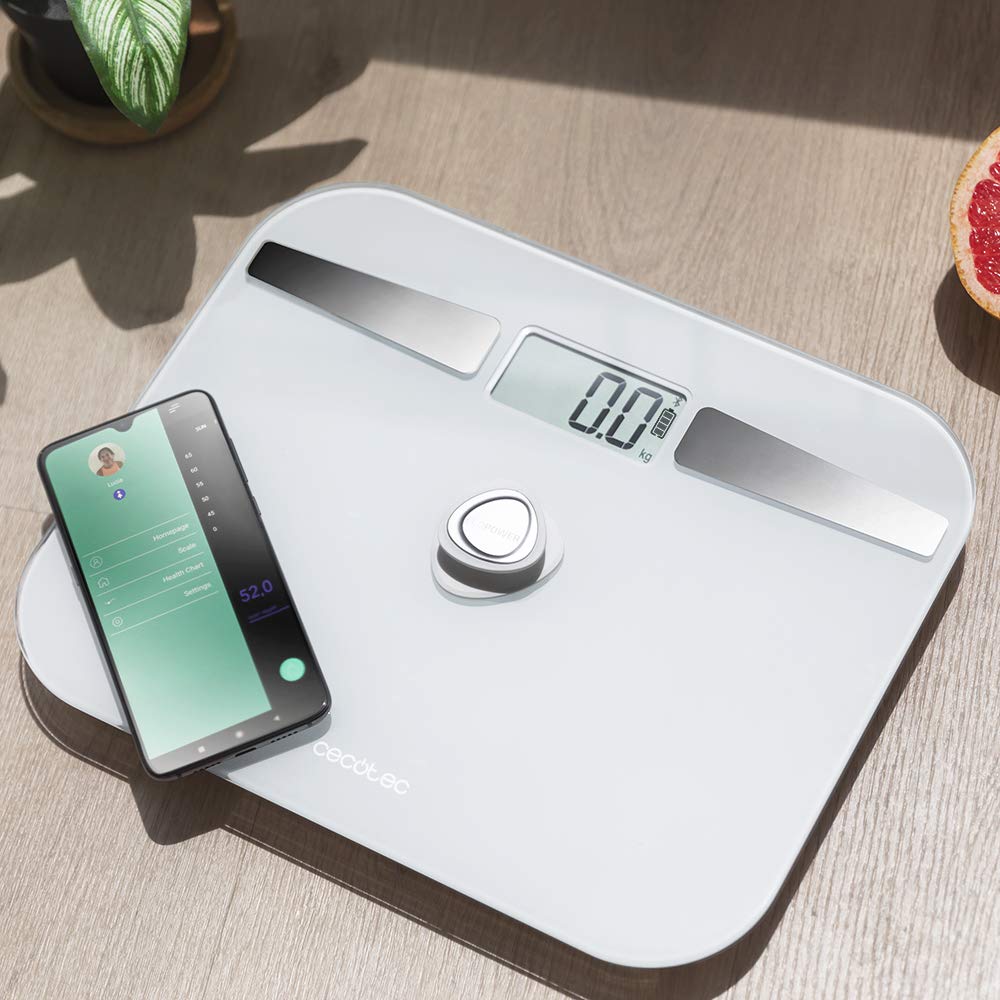
Слика: Изнад главе view of the scale, highlighting its display, EcoPower button, and the metal electrodes, with a smartphone showing the connected app.
5. Подешавање
5.1 Почетно смештање
Поставите вагу на тврду, равну и стабилну површину. Избегавајте тепихе, простирке или неравне подове, јер то може утицати на тачност мерења.

Image: The scale positioned on a hard floor surface, demonstrating ideal placement for accurate readings.
5.2 Powering On (EcoPower)
The CECOTEC Surface Precision ECOPOWER 10200 scale utilizes an innovative EcoPower system, eliminating the need for traditional batteries. To power on the scale:
- Locate the EcoPower push button, typically in the center of the scale.
- Press the EcoPower button firmly with your foot or hand. This action generates the necessary power for the scale to operate.
- The LCD display will light up, indicating the scale is ready for use.
Note: While the product specifications mention "1 AA batteries required," the primary power mechanism for this specific model, as indicated by its name and description, is the EcoPower push button. No external battery installation is typically needed for its core function.
5.3 Connecting to the App (Bluetooth)
To utilize the smart features and bio-impedance analysis, download the official CECOTEC health app on your smartphone and connect via Bluetooth.
- Преузмите апликацију: Тражи the official "Cecotec" or "Cecotec Healthy" app in your smartphone's app store (Google Play Store for Android, Apple App Store for iOS).
- Омогући Блуетоотх: Уверите се да је Блуетоотх омогућен на вашем паметном телефону.
- Отворите апликацију: Launch the downloaded app and follow the on-screen instructions to create a user profile.
- Упарите вагу:
- Press the EcoPower button on the scale to activate it.
- Within the app, navigate to the "Device Management" or "Add Device" section.
- The app should detect the "CECOTEC ECOPOWER 10200" scale. Select it to pair.
- Once paired, the app will confirm the connection.
- Регистрација корисника: The scale supports 4 user registrations. Set up individual profiles within the app for each user to track their data separately.
6. Руковање вагом
6.1 Мерење тежине
- Уверите се да је вага на тврдој, равној површини.
- Press the EcoPower button to activate the scale. Wait for the display to show "0.0 kg" or "0.0 lb".
- Step onto the scale with bare feet, ensuring your feet are centered and in contact with the metal electrodes for bio-impedance analysis. Stand still.
- Your weight will be displayed on the LCD screen. If connected to the app, the data will automatically sync to your profile.
- Step off the scale. The scale will automatically shut down after a few seconds of inactivity.

Image: A user stepping onto the scale, demonstrating the correct posture for measurement.
6.2 Bio-impedance Measurement and App Usage
For detailed body composition analysis (body fat, muscle mass, water percentage, etc.), ensure you are connected to the app and step on the scale with bare feet.
- Open the Cecotec health app on your smartphone.
- Activate the scale by pressing the EcoPower button.
- Step onto the scale with bare feet, ensuring good contact with the metal electrodes.
- The scale will measure your weight, and the app will simultaneously collect bio-impedance data.
- View your comprehensive body composition data, historical trends, and progress reports directly within the app.

Image: A close-up of the smartphone app interface, showing various body composition metrics like weight, body fat, muscle mass, and water percentage.
7. Одржавање
7.1 Чишћење
- Обришите површину ваге меком крпомamp тканина.
- Do not use abrasive cleaners or chemical solvents, as these may damage the glass or electronic components.
- Уверите се да је вага потпуно сува пре складиштења или следеће употребе.
7.2 Складиштење
- Чувајте вагу на хладном и сувом месту.
- Avoid storing it vertically or placing heavy objects on top of it.
КСНУМКС. Решавање проблема
| Проблем | Могући узрок | Решење |
|---|---|---|
| Вага се не укључује. | EcoPower button not pressed firmly enough. | Press the EcoPower button firmly and completely. |
| Нетачна очитавања. | Scale on uneven or soft surface; user not standing still; scale not calibrated. | Place scale on a hard, flat surface. Stand still and centered. Step off and on again to re-calibrate to "0.0". |
| Блуетоотх веза није успела. | Bluetooth not enabled on phone; app not open; scale not active; interference. | Ensure phone Bluetooth is on. Open the app. Press EcoPower button to activate scale. Move closer to the scale. Restart phone/app. |
| Нема података о саставу тела у апликацији. | Not standing with bare feet on electrodes; poor contact; app not connected. | Ensure bare feet are making full contact with the metal electrodes. Check app connection. Ensure user profile is set up correctly. |
| Приказано је „Lo“ или „Err“. | Low power (for models with backup battery, if applicable); overload. | Press EcoPower button again. If "Err" for overload, ensure weight is within specified range (max 180 kg). |
9. Спецификације
| Феатуре | Детаљ |
|---|---|
| Број модела | 4254 |
| Бранд | Цецотец |
| Меасуринг Ранге | 8 kg to 180 kg (100 g grade) |
| Извор напајања | EcoPower push button (self-generating) |
| Повезивање | Блуетоотх |
| Сензори | 4 сензора високе прецизности |
| Регистрација корисника | До 4 корисника |
| Дизајн | Extra flat, 5mm thick high-security tempered glass |
| Дисплаи Типе | ЛЦД |
| Димензије | 10.31 к 12.6 к 0.79 инча |
| Тежина | 3.31 фунти |
| Посебне карактеристике | Automatic shutdown, instant on, overcharge indicator, auto reset |
| Препоручена употреба | Одрасли |
10. Гаранција и подршка
10.1 Информације о гаранцији
This CECOTEC product comes with a Три године гаранције against manufacturing defects. Please retain your proof of purchase for warranty claims. The warranty does not cover damage caused by misuse, accidents, unauthorized modifications, or normal wear and tear.
10.2 Корисничка подршка
For technical assistance, troubleshooting, or warranty inquiries, please contact Cecotec customer support.
- Webсајт: Visit the official Cecotec webсајт за ресурсе подршке, честа питања и контакт информације.
- Имејл/Телефон: Refer to the Cecotec webсајт или паковање производа за конкретне контакт податке у вашем региону.
Када контактирате подршку, припремите број модела вашег производа (4254) и доказ о куповини.
Ask a question about this manual
Ask about setup, troubleshooting, compatibility, parts, safety, or missing instructions. Manuals+ will review the question and use this page’s manual context to help answer it.