
Цекотек 4254
CECOTEC Surface Precision ECOPOWER 10200 Smart Healthy White Digital Bathroom Scale
Модел: 4254
Увод
Thank you for choosing the CECOTEC Surface Precision ECOPOWER 10200 Smart Healthy White Digital Bathroom Scale. This scale is designed to provide accurate weight measurements and advanced body composition analysis through its Bluetooth connectivity and bio-impedance technology. Featuring an innovative EcoPower push-button for battery-free operation, a wide measuring range, and an extra-flat tempered glass design, it offers a convenient and reliable way to monitor your body's development. Please read this manual carefully before use to ensure proper operation and maintenance.
Безбедносне информације
- Do not use this device for medical diagnosis or treatment. Consult a healthcare professional for medical advice.
- Поставите вагу на тврду, равну површину ради прецизних мерења. Избегавајте тепихе или неравне подове.
- Do not use the scale on wet or slippery surfaces to prevent falls.
- Keep the scale dry. Do not immerse it in water or use abrasive cleaners.
- The scale is made of tempered glass; handle with care to avoid breakage.
- Чувати ван домашаја деце.
- Не преоптерећујте вагу преко њеног максималног капацитета од 180 кг.
Садржај пакета
Your CECOTEC Surface Precision ECOPOWER 10200 scale package should include:
- CECOTEC Surface Precision ECOPOWER 10200 Digital Bathroom Scale
- Упутство за употребу
- Cable or connector (if applicable for EcoPower charging)
Производ је завршенview
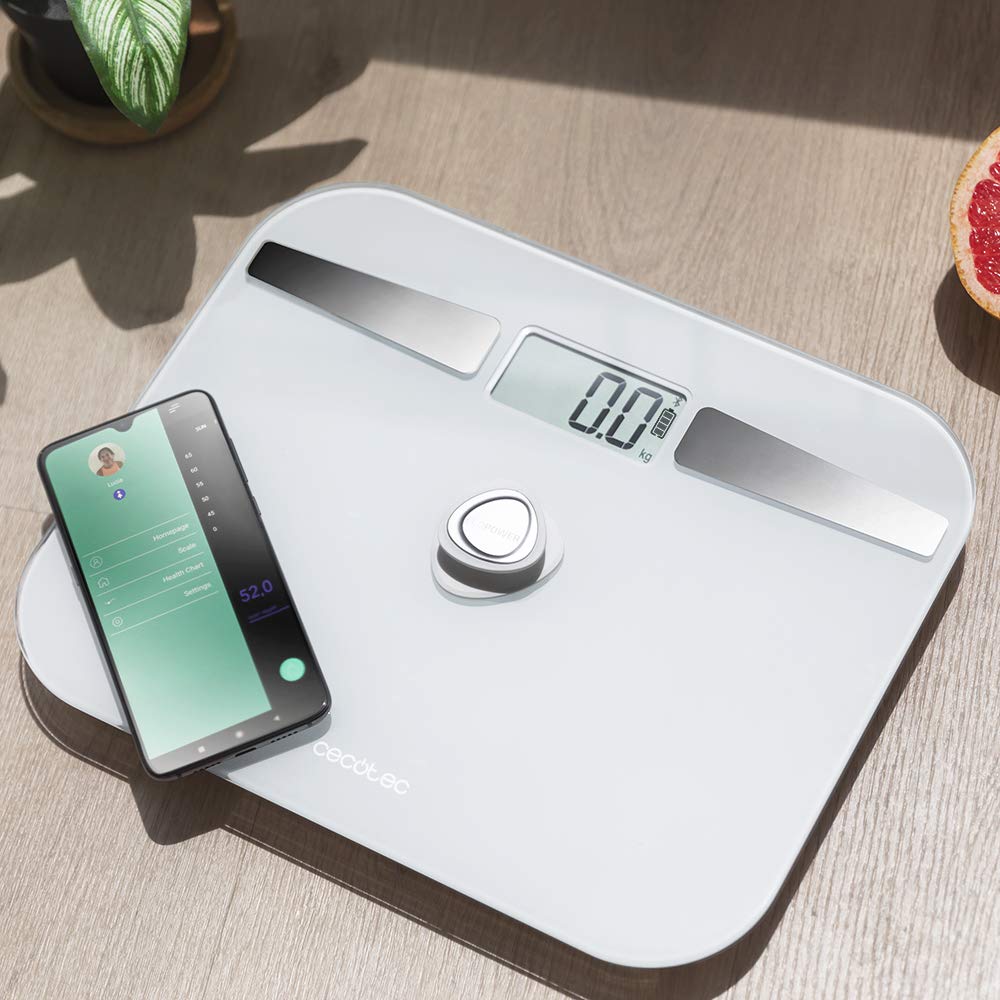
The CECOTEC Surface Precision ECOPOWER 10200 scale features a sleek design with key functional components:
- Платформа од каљеног стакла: The main weighing surface.
- ЛЦД екран: Shows weight measurements and other indicators.
- EcoPower Push Button: Located centrally, this button generates power for the scale, eliminating the need for batteries.
- Електроде: Four high-precision sensors integrated into the glass surface for bio-impedance measurements.

Сетуп
1. Почетно смештање
Unpack the scale and place it on a hard, flat, and stable surface. Avoid soft surfaces like carpets, which can affect accuracy.

2. Activating EcoPower
The scale operates without traditional batteries. To power it on, simply press the central EcoPower button firmly with your foot or hand. The display will light up, indicating it's ready for use.
3. Преузимање и упаривање апликације
To utilize the smart features and bio-impedance measurements, download the official CECOTEC health application from your smartphone's app store. Тражи "Cecotec" or refer to the QR code in the physical manual if available.
- Омогућите Блуетоотх на свом паметном телефону.
- Open the CECOTEC app.
- Press the EcoPower button on the scale to activate it.
- Follow the in-app instructions to pair your scale. The app should detect the scale automatically.
Note: Some users have reported challenges with Bluetooth connectivity. Ensure your app is updated and try restarting both your phone's Bluetooth and the scale if issues persist.
4. Усер Проfile Сетуп
Within the app, create your user profile by entering necessary details such as age, gender, height, and activity level. This information is crucial for accurate bio-impedance calculations.
Упутство за употребу
1. Мерење
- Уверите се да је вага на тврдој, равној површини.
- Press the EcoPower button to turn on the scale. Wait for the display to show "0.0 kg" or "0.0 lb".
- Step onto the scale barefoot, ensuring your feet are in contact with the four electrode areas. Stand still until your weight is displayed and stabilizes.
- If connected to the app, your weight and body composition data will automatically sync to your profile.

2. Разумевање очитавања на екрану
The LCD display will primarily show your weight. When connected to the app, the scale transmits more detailed data, including:
- Тежина (кг/лб)
- Проценат телесне мастиtage
- Мусцле Масс
- Боди Ватер Перценtage
- Коштана маса
- БМИ (индекс телесне масе)
- БМР (базни метаболизам)

3. Automatic Shutdown
The scale features an automatic shutdown function to conserve power. It will turn off after a short period of inactivity.
Одржавање
- Чишћење: Обришите површину ваге огласомamp крпу и благи детерџент. Не користите абразивна средства за чишћење нити потапајте вагу у воду.
- Складиштење: Чувајте вагу на хладном и сувом месту. Избегавајте екстремне температуре или директну сунчеву светлост.
- калибрација: If you move the scale, it is recommended to recalibrate it by stepping on it briefly, letting it turn off, and then taking your measurement.
Решавање проблема
| Проблем | Могући узрок | Решење |
|---|---|---|
| Inaccurate readings / Different weights at the same time | Scale on uneven surface; Scale not calibrated; Movement during measurement. | Place on a hard, flat surface. Step on briefly to turn on, then step off and wait for "0.0" before taking measurement. Stand still. |
| Bluetooth not connecting / App issues | Bluetooth off on phone; App not updated; Pairing issue; Incompatible app version. | Ensure phone Bluetooth is on. Update the app. Restart phone and scale. Re-attempt pairing. Verify you have the correct CECOTEC app. |
| Scale does not turn on (EcoPower) | Insufficient press on EcoPower button; Button malfunction. | Press the EcoPower button firmly and completely. If issue persists, contact customer support. |
| "Error 2" displayed | General error, possibly related to connectivity or internal malfunction. | Try restarting the scale by pressing EcoPower. Ensure app is closed and reopened. If persistent, contact customer support. |
| Нема података о саставу тела у апликацији | Not standing barefoot; Feet not touching electrodes; App not connected. | Ensure you are barefoot and your feet are fully on the metal electrode areas. Confirm Bluetooth connection to the app. |
Спецификације
| Феатуре | Детаљ |
|---|---|
| Број модела | 4254 |
| Бранд | Цецотец |
| Меасуринг Ранге | 8 kg to 180 kg (100 g grade) |
| Повезивање | Блуетоотх |
| Сензори | 4 high precision sensors for bio-impedance |
| Извор напајања | EcoPower push button (battery-free) |
| Материјал | 5mm thick high security tempered glass |
| Дисплаи Типе | ЛЦД |
| Димензије | 10.31 к 12.6 к 0.79 инча |
| Тежина | 3.31 фунти |
| Посебне карактеристике | Automatic shutdown, instant on, overcharge indicator, auto reset, 4 user registration |
Гаранција и подршка
This CECOTEC product comes with a three-year warranty against manufacturing defects. For technical support, warranty claims, or further assistance, please refer to the contact information provided in your product packaging or visit the official Cecotec website. Ensure you have your proof of purchase and product model number (4254) ready when contacting support.
Ask a question about this manual
Ask about setup, troubleshooting, compatibility, parts, safety, or missing instructions. Manuals+ will review the question and use this page’s manual context to help answer it.