
1. Увод
This manual provides essential information for setting up, operating, maintaining, and troubleshooting your AVITA Essential NE14A2INC433-MB laptop. Please read this manual thoroughly before using your device to ensure proper functionality and longevity.
2. Производ је готовview
The AVITA Essential NE14A2INC433-MB is a thin and light 14-inch laptop designed for everyday use. It features an aluminum body and a unique cloth design on the palm rest.

Figure 2.1: AVITA Essential Laptop (Matt Black) with screen and keyboard visible.
2.1 Карактеристике екрана
The laptop is equipped with a 14-inch Full HD (1920x1080) anti-glare IPS display. The ultra-narrow bezels provide an immersive viewинг искуство.

Figure 2.2: Close-up of the AVITA Essential display, showcasing the FHD IPS Anti-Glare Panel and 4mm Narrow Bezels.
2.2 Портови и повезивање
The AVITA Essential laptop offers various ports for connectivity, including two USB 3.0 Type A ports, one full-size HDMI port, and a Micro SD card reader.
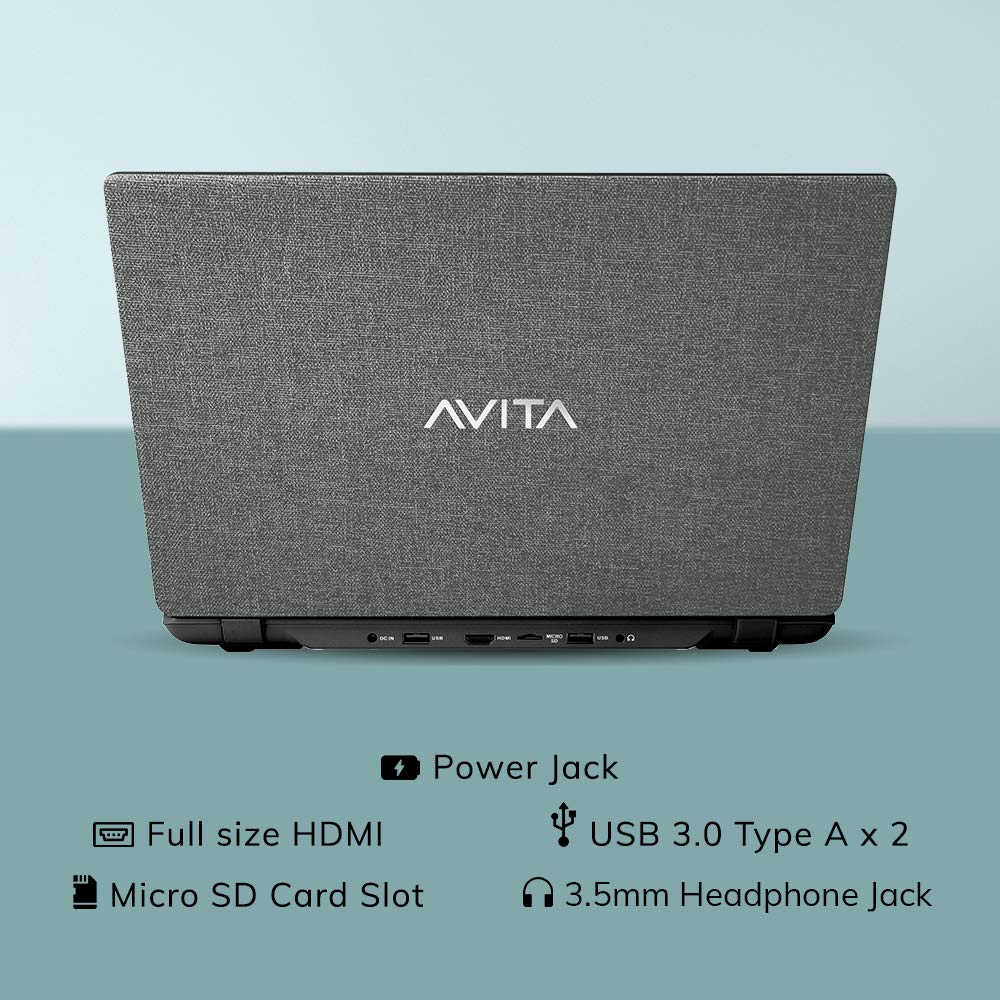
Слика 2.3: Задња страна view of the laptop detailing the available ports for external devices and power.
2.3 Keyboard and Webцам
The laptop features a full-size island-style keyboard for comfortable typing and an integrated webкамера за видео конференције.

Слика 2.4: Одозго надоле view of the laptop's island-style keyboard and integrated webцам.
КСНУМКС Дизајн
The AVITA Essential boasts a unique cloth design, contributing to its aesthetic appeal.

Figure 2.5: The laptop in a closed position, highlighting its distinctive cloth design.
3. Подешавање
- Распакивање: Carefully remove the laptop and all accessories from the packaging. Ensure all items listed in the "What's in the Box" section are present.
- Почетна наплата: Connect the AC adapter to the laptop's power jack and then to a power outlet. Allow the laptop to charge for at least 30 minutes before the first use, or until the battery indicator shows a sufficient charge.
- Укључено: Open the laptop lid and press the power button. The laptop will begin the initial boot process.
- Windows 10 Home in S Mode Setup: Follow the on-screen instructions to complete the Windows 10 Home in S Mode setup. This includes selecting your region, language, connecting to a Wi-Fi network, and creating a user account.
- Ажурирања софтвера: After initial setup, connect to the internet and allow Windows to download and install any available updates. This ensures optimal performance and security.
4. Упутство за употребу
4.1 Windows 10 Home у S режиму
Your AVITA Essential laptop comes with Windows 10 Home in S Mode, which is designed for security and performance. In S Mode, you can only install apps from the Microsoft Store and must use Microsoft Edge for safe browsing. You can switch out of S Mode to regular Windows 10 Home at any time, but you cannot switch back.
The laptop is eligible for a free upgrade to Windows 11 when available. The upgrade rollout plan is scheduled to begin late in 2021 and continue into 2022, with specific timing varying by device.
4.2 Перформансе и складиштење
Powered by an Intel Celeron N4000 processor and 4GB DDR4 RAM, combined with a 128GB SSD, the laptop offers responsive performance for daily tasks. The Solid State Drive (SSD) ensures faster boot times and quicker application loading compared to traditional hard disk drives.
Video 4.1: This video highlights key features of the AVITA Essential laptop, including its FHD IPS display, narrow bezels, island-style keyboard, integrated webcam, and fast SSD storage. It demonstrates the laptop's sleek design and quick performance for everyday computing tasks.
Video 4.2: This video illustrates the benefits of a modern PC with Windows 10 and an SSD, emphasizing thin and light design, faster startups, improved efficiency, longer battery life, and enhanced durability and security due to fewer moving parts.
5. Одржавање
- Чишћење: Користите меку крпу која не оставља влакна за чишћење екрана и спољашњости. За тврдокорне мрље, благо обришитеampОбришите крпу водом или средством за чишћење екрана. Избегавајте јаке хемикалије.
- Одржавање батерије: To maximize battery life, avoid fully discharging the battery frequently. It is recommended to keep the battery charged between 20% and 80%. Store the laptop in a cool, dry place when not in use for extended periods.
- Ажурирања софтвера: Редовно проверавајте и инсталирајте ажурирања оперативног система и управљачких програма како бисте осигурали оптималне перформансе и безбедност.
- Управљање складиштем: Периодично реview и обришите непотребне fileда бисте ослободили простор за складиштење на SSD-у од 128 GB. Размислите о коришћењу екстерног складишта или услуга у облаку за велике files.
- вентилација: Ensure the laptop's vents are not obstructed to prevent overheating. Use the laptop on a hard, flat surface rather than soft furnishings.
КСНУМКС. Решавање проблема
6.1 Уобичајена питања и решења
- Лаптоп се не укључује:
- Уверите се да је АЦ адаптер безбедно повезан и са лаптопом и са исправном утичницом.
- Проверите да ли је утичница функционална тако што ћете укључити други уређај.
- If the battery is completely drained, allow it to charge for some time before attempting to power on.
- Споре перформансе:
- Затворите непотребне апликације које раде у позадини.
- Проверите и инсталирајте све чекајуће надоградње за Windows.
- Обезбедите довољно слободног простора на SSD-у.
- Покрените скенирање система за злонамерни софтвер или вирусе.
- Проблеми са Ви-Фи везом:
- Поново покрените свој Ви-Фи рутер и лаптоп.
- Проверите да ли је Wi-Fi омогућен у подешавањима система Windows.
- Update Wi-Fi drivers from the AVITA support webсајту.
- Windows 10 S Mode App Restrictions:
- Remember that in S Mode, only apps from the Microsoft Store can be installed.
- If you need to install apps from other sources, you must switch out of S Mode. This is a one-way process.
7. Спецификације
| Феатуре | Детаљ |
|---|---|
| Бранд | АВИТА |
| Назив модела | Ессентиал |
| Број модела | NE14A2INC433-MB |
| Величина екрана | 14 инча (35 цм) |
| Резолуција екрана | 1920 к 1080 (Фулл ХД) |
| Дисплаи Типе | FHD Anti-Glare IPS LED |
| Процесор | Intel Celeron N4000 (1.10 GHz base, 2.60 GHz Max) |
| РАМ меморија | 4 ГБ ДДР4 |
| Складиштење | 128 ГБ ССД |
| Оперативни систем | Виндовс 10 Хоме у С режиму |
| Графика | Интел интегрисана УХД графика 600 |
| Трајање батерије | Up to 6 Hours (as per MobileMark) |
| Тежина | 1.37 кг |
| Портс | 2x USB 3.0 Type A, 1x Full Size HDMI, Micro SD Card Reader |
| Бежично повезивање | 802.11 b/g/n/ac Wi-Fi, Bluetooth 4.0 |
| Webцам | Integrated Front Camera |
8. Гаранција и подршка
8.1 Информације о гаранцији
Your AVITA Essential laptop comes with an 18+6 months onsite domestic warranty from AVITA. This warranty covers manufacturing defects and does not cover physical damage. For detailed terms and conditions, please refer to the warranty section provided with your product or visit the official AVITA support webсајту.
8.2 Шта је у кутији
Након распакивања, требало би да пронађете следеће ставке:
- AVITA Essential Laptop
- АЦ адаптер
- Упутство за употребу
- Приручници


