
1. Увод
This manual provides detailed instructions for the installation, operation, and maintenance of your EZoneTronics Android 10.1 2DIN Car Stereo. This unit features a 9-inch capacitive touchscreen, Android 10.1 operating system, GPS navigation, Bluetooth 4.0, Wi-Fi, AM/FM/RDS radio, and support for Mirror Link, Apple CarPlay, and Android Auto. Please read this manual thoroughly before using the product to ensure proper function and safety.
2. Компатибилност возила
This car stereo is designed for specific Mercedes-Benz models:
- Mercedes-Benz ML-W164 / ML300 / ML350 / ML450 / ML500 / ML320 / ML63 AMG (2005-2012)
- Mercedes-Benz GL-X164 / GL320 / GL350 / GL420 / GL450 / GL500 (2005-2012)
Важна напомена: If your vehicle is equipped with a Harman, Kardon, or BOSE amplification system, an additional fiber optic decoder box (e.g., ASIN B08K49SQSM) may be required for proper audio functionality. Consult a professional installer if you are unsure.
3. Садржај пакета
Проверите да ли су све ставке наведене у наставку укључене у ваш пакет:
- 1 x EZoneTronics Android Car Stereo Unit
- 1 к ГПС антена
- 1 x Појас за напајање
- 1 x RCA Output Cable
- 2 USB адаптера
- 1 x Кабл за улаз камере
- 1 x Упутство за употребу (овај документ)
- 1 x Canbus kutija
4. Подешавање и инсталација
Installation of this car stereo requires technical knowledge and experience with automotive electrical systems. Professional installation is highly recommended to prevent damage to the unit or your vehicle.
4.1 Провера пре инсталације
- Уверите се да је паљење возила искључено и да је акумулатор искључен пре почетка инсталације.
- Потврдите да је сав садржај пакета присутан.
- Review your vehicle's wiring diagram for specific connections.
4.2 Кораци инсталације (опште)
- Carefully remove the original car stereo unit from your dashboard.
- Connect the provided power harness to the vehicle's wiring. Ensure all connections are secure.
- Повежите ГПС антену и усмерите је на локацију са јасним view неба (нпр. угао контролне табле).
- Connect the USB adapters and route them to an accessible location (e.g., glove compartment).
- If installing a rear camera, connect the camera input cable and route it to the camera location.
- Connect the RCA output cable for external amplifiers or subwoofers, if applicable.
- Connect the Canbus box as per the wiring diagram to enable steering wheel controls and other vehicle-specific functions.
- Carefully slide the new EZoneTronics unit into the dashboard opening.
- Обезбедите јединицу на месту.
- Reconnect the vehicle battery and test the unit's functionality.

Слика 4.1: Comparison of the car dashboard before and after the EZoneTronics car stereo installation. The top image shows the new unit installed, while the bottom images show the original radio (left) and the new unit (right) for direct comparison.
5. Упутство за употребу
5.1 Основни рад
- Укључивање/искључивање: Press and hold the power button (usually on the front panel) to turn the unit on or off. A short press typically mutes/unmutes audio.
- екран осетљив на додир: The 9-inch capacitive touchscreen responds to touch gestures similar to a smartphone. Tap to select, swipe to scroll.
- Почетни екран: The main interface provides access to various functions like Radio, Music, Navigation, Bluetooth, and Apps.
5.2 Radio (AM/FM/RDS)
The unit features a built-in AM/FM/RDS radio tuner for clear signal reception.
- Приступ радију: Tap the 'Radio' icon on the home screen.
- Скенирање: Use the 'Scan' or 'Seek' buttons on the screen to automatically search for available stations.
- Чување унапред подешених вредности: Once a station is tuned, press and hold a preset number button on the screen to save it.
- RDS Function: Radio Data System (RDS) displays station information like song title or program type where available.

Слика 5.2: The FM/AM/RDS Radio interface on the EZoneTronics car stereo, showing frequency display and preset buttons for easy station selection.
5.3 Блуетоотх 4.0
Повежите свој паметни телефон путем Bluetooth-а за позивање без употребе руку и стримовање звука.
- Упаривање: Go to the 'Bluetooth' menu on the stereo. Enable Bluetooth on your phone and search for available devices. Select 'EZoneTronics' (or similar name) and confirm the pairing code.
- Хандс-фрее позивање: Once paired, you can make and receive calls directly from the stereo screen. Your phone's contact list may sync automatically.
- Аудио стримовање (A2DP): Play music from your phone through the car stereo speakers. Control playback (play/pause, skip) from the stereo.

Слика 5.3: The Bluetooth 4.0 interface showing music playback controls and icons for phone video, dial-up, hang-up, and phone music functions.
5.4 ГПС навигација
The unit includes an integrated GPS receiver and comes with Google Maps pre-installed. Other navigation apps can be downloaded from the Google Play Store.
- Онлајн навигација: Connect to Wi-Fi to use online maps and real-time traffic information.
- Офлајн навигација: Download offline map data for specific regions via Wi-Fi for navigation without an internet connection.
- Using Navigation Apps: Tap the 'Navigation' icon to launch the default map application. Follow on-screen prompts to enter destinations and start routes.
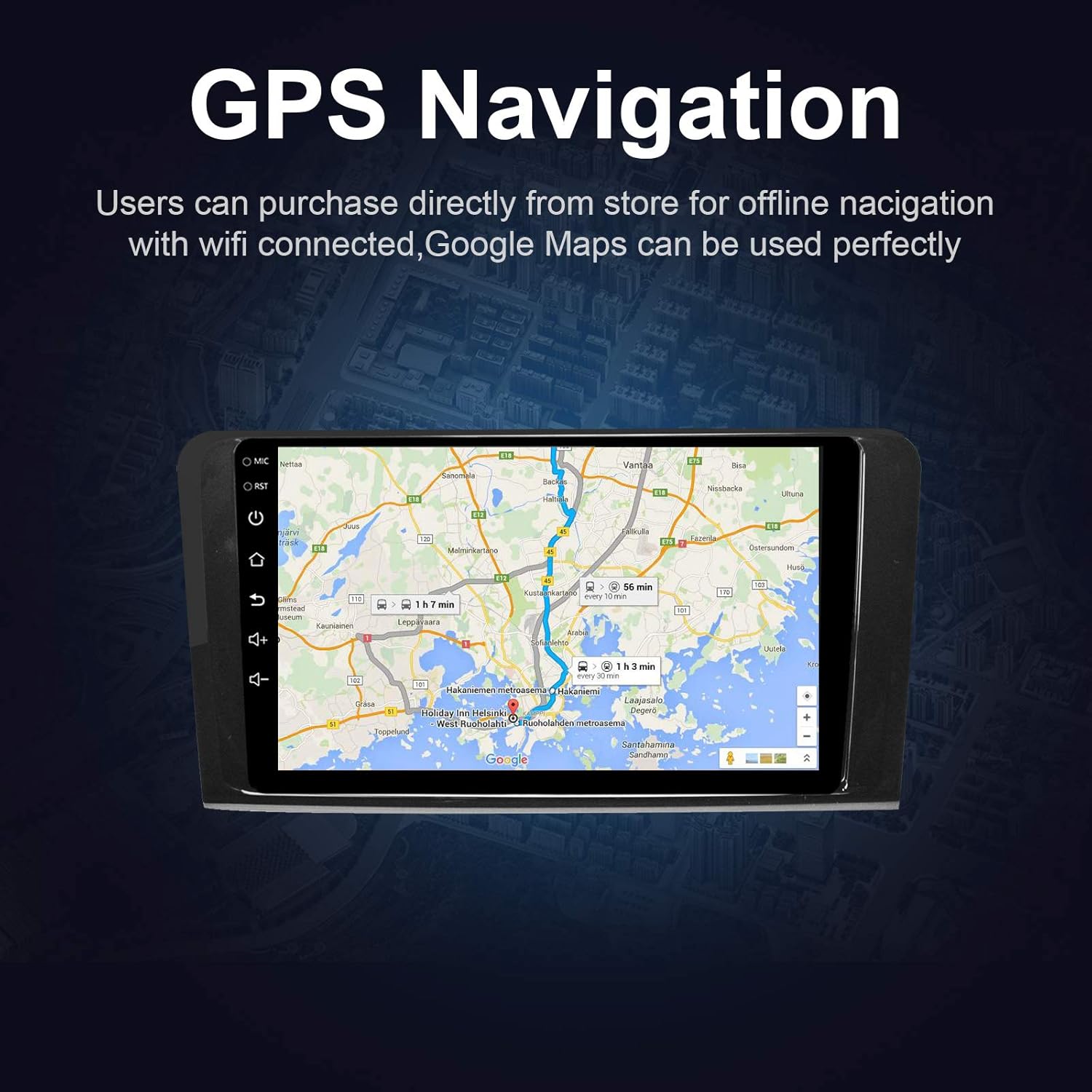
Слика 5.4: The GPS Navigation screen showing a map with a highlighted route and estimated travel time.
5.5 Apple CarPlay и Android Auto
The unit supports both wireless Apple CarPlay and wired Android Auto, allowing seamless integration with your smartphone.
- Apple CarPlay (Wireless): Connect your iPhone via Bluetooth and Wi-Fi. Follow the on-screen prompts to enable CarPlay.
- Android Auto (Wired): Повежите свој Андроид телефон помоћу УСБ кабла. Уверите се да је Андроид Ауто инсталиран на вашем телефону.
- Карактеристике: Access phone calls, messages, music, and navigation apps directly from the car stereo interface, optimized for driving.
5.6 Огледалска веза
Mirror Link вам омогућава да прикажете екран свог паметног телефона директно на стерео уређају у аутомобилу.
- За иОС уређаје: Supports AirPlay mirroring wirelessly.
- За Андроид уређаје: Connect via a USB cable.
- Активација: Select the 'Mirror Link' app on the stereo and follow the instructions for your specific phone model.

Слика 5.6: The Mirror Link function showing a smartphone screen mirrored onto the car stereo display.
5.7 Функција подељеног екрана
The Android 10.1 system supports multitasking, allowing you to run two applications simultaneously on the screen.
- Активација: While one app is open, press and hold the recent apps button (or swipe up from the bottom and hold, depending on the Android version) and drag another compatible app to the other half of the screen.
- Употреба: Фор екample, you can use navigation on one side and play music or radio on the other.

Слика 5.7: The Split Screen function in action, showing a navigation map on one side and a music player on the other, enabling multitasking.
5.8 Digital Sound Processor (DSP) / Equalizer
Customize your audio experience with the built-in 14-band equalizer and sound processor.
- Accessing EQ: Tap the 'Equalizer' or 'Sound Settings' icon from the home screen or audio playback interface.
- Подешавања: Adjust individual frequency bands (bass, treble, mid-range) to your preference.
- Пресетс: Select from various pre-defined sound modes (e.g., Pop, Rock, Classic, Jazz) or create custom profiles.
- Volume/Fader/Balance: Control overall volume, and adjust audio distribution between front/rear and left/right speakers.

Слика 5.8: The Digital Sound Processor (DSP) system interface, showing a 14-band equalizer for precise audio adjustments.
5.9 Multimedia Playback (USB)
Репродукујте аудио и видео fileс са УСБ уређаја за складиштење.
- Connecting USB: Insert a USB drive into one of the provided USB ports.
- Приступ Files: The unit will automatically detect the USB device. Navigate to the 'Music' or 'Video' app to browse and play files.
- Подржани формати: The unit supports various audio and video formats, including high-definition 1080P video.

Слика 5.9: The car stereo displaying high-definition 1080P video content, demonstrating its multimedia playback capabilities.
6. Одржавање
Правилно одржавање осигурава дуготрајност и оптималне перформансе вашег ауто стерео уређаја.
- Чишћење екрана: Користите меку крпу која не оставља длачицеampened with water or a screen cleaner specifically designed for electronics. Do not use abrasive cleaners or solvents.
- Генерално чишћење: Wipe the unit's exterior with a soft, dry cloth. Avoid getting liquids into openings.
- Ажурирања софтвера: Periodically check for available software updates through the unit's settings menu (requires Wi-Fi connection) to ensure optimal performance and access to new features.
- Избегавајте екстремне температуре: Не излажите уређај екстремној топлоти или хладноћи током дужег периода, јер то може утицати на перформансе и век трајања.
КСНУМКС. Решавање проблема
If you encounter issues with your EZoneTronics car stereo, refer to the following common problems and solutions:
| Проблем | Могући узрок | Решење |
|---|---|---|
| Јединица се не укључује. | Неисправно ожичење, прегорели осигурач, искључен акумулатор возила. | Check power connections and fuses. Ensure battery is connected. Consult a professional installer. |
| Нема звука. | Volume too low, mute activated, incorrect speaker wiring, fiber optic box needed. | Increase volume, check mute status. Verify speaker connections. If your car has a premium sound system, ensure a fiber optic decoder box is installed. |
| ГПС сигнал је слаб или га уопште нема. | GPS антена није правилно инсталирана или је заклоњена. | Уверите се да је GPS антена постављена на место са јасним view неба и је сигурно повезан. |
| Проблеми са Bluetooth везом. | Phone not in pairing mode, incorrect pairing code, interference. | Ensure Bluetooth is enabled on both devices and in pairing mode. Re-pair the devices. Restart both the stereo and phone. |
| Контроле на волану не раде. | Canbus box not connected or configured correctly. | Verify the Canbus box connection and ensure it is properly configured in the unit's settings. Refer to installation instructions. |
| Екран осетљив на додир не реагује или је спор. | Temporary software glitch, excessive background apps. | Restart the unit. Close unnecessary background applications. If the issue persists, perform a factory reset (note: this will erase all user data). |
8. Спецификације
Key technical specifications of the EZoneTronics Android Car Stereo:
| Феатуре | Спецификација |
|---|---|
| Број модела | RMCT-BENZ-ML05-2G16-IP |
| Оперативни систем | Андроид 10.1 |
| Величина екрана | 9 инча ЛЦД |
| Тип екрана | Екран осетљив на додир |
| Резолуција | 1024 к 600 пиксела |
| Процесор | Quad Core 1.3G |
| РАМ | 2ГБ ДДР3 |
| Интерна меморија | 32 ГБ флеш меморије |
| Повезивање | Bluetooth 4.0 (A2DP, Hands-free), Wi-Fi, USB (2 rear inputs) |
| ГПС пријемник | Built-in, compatible with Waze, Google Maps, etc. |
| Радио тјунер | АМ/ФМ/РДС |
| Аудио излаз | 4 x 45W Power Output, 2.1 Channel RCA/Sub Output |
| Видео улаз | 1 Channel (for rear camera) |
| Аудио улаз | 2 Цханнел |
| Посебне карактеристике | Steering Wheel Control, Mirror Link, CarPlay, Android Auto, Multi-EQ Presets, Spotify, Digital Sound Processor |
| Димензије производа (Д к Ш к В) | 32 к 26 к 13 цм |
| Тежина | 1.38 кг |
9. Гаранција и подршка
9.1 Гаранција на производ
This EZoneTronics car stereo comes with a Двогодишња гаранција произвођача from the date of purchase. This warranty covers defects in materials and workmanship under normal use. It does not cover damage caused by improper installation, misuse, accidents, or unauthorized modifications.
9.2 Техничка подршка
За техничку помоћ, решавање проблема изван овог упутства или за рекламације, обратите се нашем тиму за подршку:
- Емаил: sales2@rhythmhk.com
When contacting support, please provide your product model number (RMCT-BENZ-ML05-2G16-IP) and a detailed description of the issue.