
1. Производ је готовview
The Cello C2220FSDE is a compact 22-inch Full HD LED television designed for versatile use. It features an integrated DVD player and a triple tuner (DVBT2/S2) for comprehensive signal reception. Its sleek design makes it suitable for various environments, including guest rooms, motorhomes, caravans, trucks, or boats.
Key features include HDMI and USB inputs for connecting external devices like game consoles and hard drives. The USB functionality also supports recording live television and playing stored media. This TV can also function as a monitor for laptops or desktop computers.

Слика 1.1: The integrated DVD player allows for direct playback of DVDs without additional devices.

Слика 1.2: Experience clear and detailed images with Full HD 1080p resolution.
2. Подешавање и инсталација
2.1 Распакивање и садржај
Пажљиво извадите све компоненте из паковања. Уверите се да су присутне следеће ставке:
- 1 x Cello 22-inch LED TV
- Повер Цорд
- Ремоте Цонтрол
- Водич за брзи почетак
- 2 к ААА батерије
- ТВ комода
2.2 Причвршћивање постоља
Place the TV screen face down on a soft, clean surface to prevent scratches. Align the stand with the mounting holes on the bottom of the TV and secure it using the provided screws.
2.3 Connecting Power and Antenna
- Прикључите кабл за напајање на улаз за напајање телевизора, а затим на зидну утичницу.
- Connect your TV aerial cable to the 'TV Aerial' input on the back of the TV.
- For satellite reception, connect a satellite dish cable (not supplied) to the 'DVB-S2' input.

Слика 2.1: Позади view of the TV showing power, antenna, and other connectivity ports.
2.4 Повезивање спољних уређаја
Телевизор нуди разне портове за повезивање екстерних уређаја:
- ДВИ: Connect high-definition devices such as Blu-ray players, game consoles, or set-top boxes.
- УСБ: Connect USB storage devices for media playback or recording.
- ВГА: Повежите рачунар да бисте га користили као монитор.
- 3.5 мм аудио излаз: Повежите екстерне слушалице или звучнике.

Слика 2.2: Illustration of HDMI and USB ports for connecting various devices.

Слика 2.3: The integrated satellite tuner allows connection to a satellite dish for satellite TV reception.
3. Упутство за употребу
3.1 Почетно укључивање и скенирање канала
- Уметните ААА батерије у даљински управљач.
- Притисните дугме за напајање на даљинском управљачу или на ТВ-у да бисте га укључили.
- Follow the on-screen instructions for initial setup, including language selection and automatic channel scanning for DVB-T2 (terrestrial) and DVB-S2 (satellite) signals.
3.2 Основне функције телевизора
- Избор канала: Use the 'CH+' / 'CH-' buttons or the numeric keypad on the remote control.
- Контрола јачине звука: Use the 'VOL+' / 'VOL-' buttons.
- Избор извора: Press the 'SOURCE' button to switch between inputs (TV, HDMI, USB, DVD).
- Навигација у менију: Use the 'MENU' button to access settings and navigation arrows to browse.
3.3 Integrated DVD Player Operation
- Ensure the TV is powered on and the input source is set to 'DVD'.
- Gently insert a DVD disc into the slot on the side of the TV, label side facing the mirror side (as indicated on the slot).
- The DVD should load automatically. Use the remote control for playback functions (Play, Pause, Stop, Skip).
3.4 USB Recording and Media Playback
- Репродукција медија: Insert a USB storage device into the USB port. Select 'USB' as the input source. Navigate through your files (photos, music, videos) using the remote control.
- USB Recording (PVR): While watching live TV, insert a USB storage device. Press the 'RECORD' button on the remote to start recording. You can also use the 'PAUSE' function for time-shifting live TV.
Видео 3.1: This video demonstrates the physical controls on the TV and the various input/output ports available on the back and side of the unit, including the DVD slot, USB, HDMI, and antenna connections.
4. Одржавање
4.1 Чишћење телевизора
- Увек искључите телевизор из утичнице пре чишћења.
- Користите меку, суву крпу за брисање екрана и кућишта. За тврдокорне мрље, лагано дрхтајтеampОбришите крпу водом или благим, неабразивним средством за чишћење екрана.
- Do not use alcohol, benzene, thinners, or other volatile substances, as they may damage the screen or finish.
4.2 Одржавање DVD плејера
- Држите DVD слот чистим од прашине и прљавштине.
- Only insert clean, undamaged discs.
КСНУМКС. Решавање проблема
If you encounter issues with your Cello TV, refer to the following common problems and solutions:
| Проблем | Могући узрок | Решење |
|---|---|---|
| Нема струје | Power cord not connected; power outlet faulty | Проверите везу кабла за напајање; покушајте са другом утичницом |
| Нема слике, али је звук присутан | Incorrect input source selected; faulty cable connection | Press 'SOURCE' to select correct input; check HDMI/VGA cable connections |
| Нема звука, али је слика присутна | Volume too low or muted; external audio device issue | Increase volume; check mute status; ensure external audio devices are connected correctly |
| Poor picture quality (TV channels) | Weak antenna signal; incorrect antenna connection | Adjust antenna position; check antenna cable connection; perform a channel rescan |
| ДВД се не репродукује | Disc inserted incorrectly; dirty or damaged disc; incorrect source selected | Re-insert disc correctly; clean or replace disc; select 'DVD' source |
| Даљински управљач не ради | Batteries depleted or inserted incorrectly; obstruction between remote and TV | Replace batteries; ensure correct polarity; remove obstructions; point remote directly at TV sensor |
For further assistance, please refer to the support section or the full instruction manual available online.
6. Спецификације
Below are the detailed technical specifications for the Cello C2220FSDE 22-inch Full HD LED TV:
| Феатуре | Спецификација |
|---|---|
| Величина екрана | 22 инча (54.6 цм дијагонала) |
| Бранд | Целло |
| Дисплаи Тецхнологи | ЛЕД |
| Резолуција | 1080p (Full HD, 1920 x 1080 пиксела) |
| Рефресх Рате | 60 Хз |
| Посебна карактеристика | Integrated DVD Player |
| Технологија повезивања | HDMI, USB, VGA |
| Аспецт Ратио | 16:9 |
| Димензије производа (Д x Ш x В) | 5П к 50.4Ш к 34.2В цм |
| Тежина артикла | 2.55 килограма |
| Однос контраста | 600:1 |
| Макимум Бригхтнесс | 180 NIT Coating |
| ХДР подршка | ХДР10 |
| Време одговора | 10 милисекунди |
| Тип тјунера | ДВБ-Ц, ДВБ-С2, ДВБ-Т2 |
| Режим аудио излаза | Стерео |
| Опис звучника | 2 x 3 W Pitch Perfect Sound |
| Потрошња енергије | 21 кВх |
| Волtage | 230 Volts (100-240 V AC 50-60 Hz) |
| VESA стандард за монтирање | 100 к 100 мм |
| Модел Иеар | 2023 |
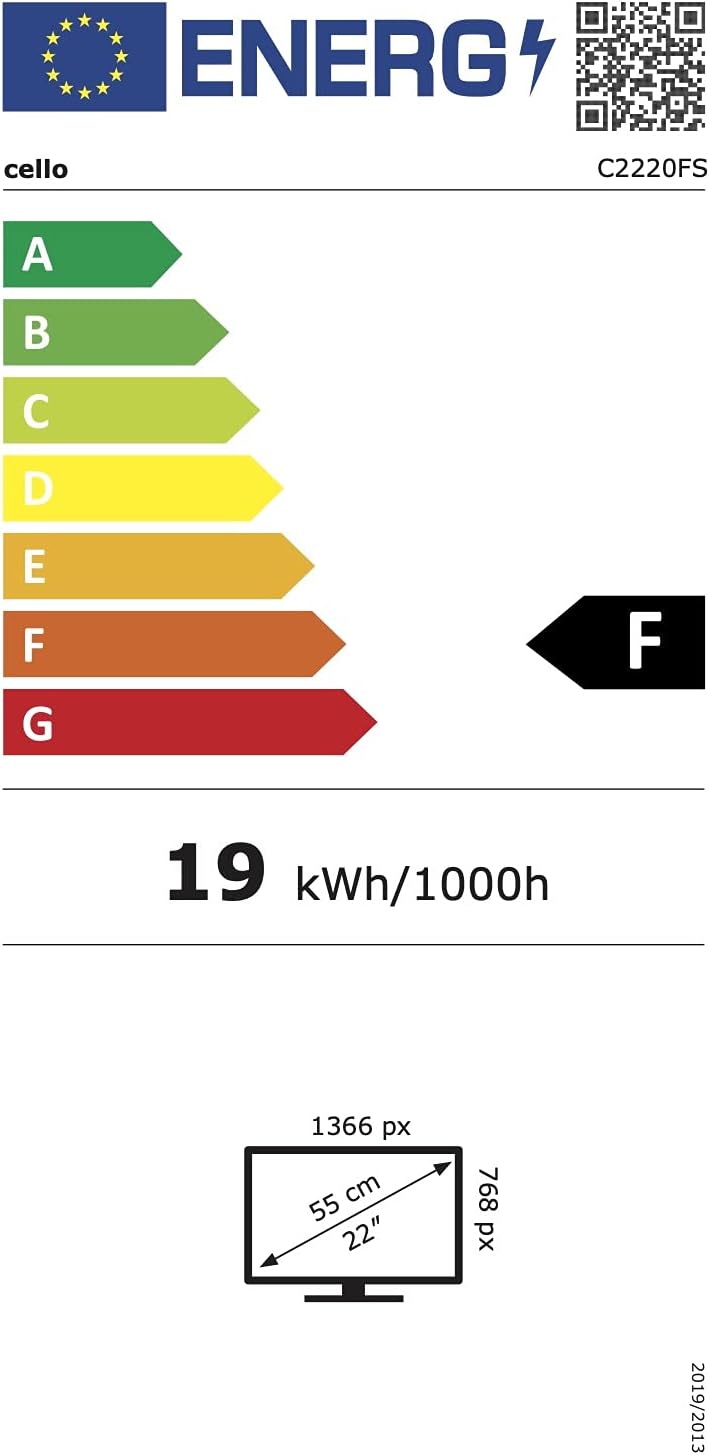
Слика 6.1: Energy efficiency label for the Cello C2220FSDE TV. For more details, visit ЕПРЕЛ Датабасе.

Слика 6.2: Detailed product information sheet. For more details, visit ЕПРЕЛ Датабасе.
7. Гаранција и подршка
7.1 Информације о гаранцији
This Cello TV comes with a 1-годишња ограничена гаранцијаМолимо вас да сачувате доказ о куповини за потребе гаранције.
7.2 Корисничка подршка
For technical support or customer service, please contact Cello Electronics:
- Webсајт: www.celloelectronics.de
- Емаил: consumersupport@celloelectronics.com
- Телефон: 03334330312
- Адреса: Dovecot Hills, Bishop Auckland, DL14 6XW Durham, United Kingdom
You can also download the full instruction manual for your device in your preferred language from the official Cello webсајт: https://celloelectronics.de/instruction-books/.