
1. Увод
Хвала вам на куповиниasing the Shark EVOPOWER SYSTEM CS200J Cordless Stick Vacuum Cleaner. This innovative cleaning system is designed to provide powerful and convenient cleaning for your home. Its unique flooring head ensures thorough dirt removal, and the versatile design allows for easy conversion between stick and handheld modes. Please read this manual carefully before using your new vacuum cleaner to ensure safe and optimal performance.
2. Важна безбедносна упутства
Приликом коришћења електричног уређаја, увек треба поштовати основне мере предострожности, укључујући следеће:
- Прочитајте сва упутства пре употребе овог усисивача.
- Не користите на отвореном или на мокрим површинама.
- Не дозволити да се користи као играчка. Посебна пажња је неопходна када се користи од стране деце или у близини.
- Користите само онако како је описано у овом упутству. Користите само додатке које препоручује произвођач.
- Не рукујте утикачем или усисивачем мокрим рукама.
- Не стављајте никакве предмете у отворе. Не користите са блокираним отвором; чувајте прашину, длачице, косу и све што може смањити проток ваздуха.
- Држите косу, широку одећу, прсте и све делове тела даље од отвора и покретних делова.
- Искључите све контроле пре искључивања.
- Будите посебно пажљиви када чистите на степеницама.
- Немојте користити за усисавање запаљивих или запаљивих течности, као што је бензин, нити користити у областима где оне могу бити присутне.
- Не узимајте ништа што гори или дими, као што су цигарете, шибице или врући пепео.
- Не користите без посуде за прашину и/или филтера на месту.
3. Садржај пакета
Your Shark EVOPOWER SYSTEM CS200J package includes the following components:
- Main Vacuum Unit (Stick and Handheld)
- Литијум-јонска батерија
- Charging Dock with Accessory Stand
- Crevice Tool with Brush
- Мулти-Тоол
- Тапетарски алат

Image: The Shark EVOPOWER SYSTEM CS200J vacuum cleaner standing on its charging dock, with various accessories neatly stored on the integrated accessory stand.
4. Подешавање
4.1 Скупштина
- Отпакујте све компоненте из паковања.
- Insert the handheld vacuum into the wand until it clicks securely into place.
- Attach the floor nozzle to the bottom of the wand until it clicks securely.
- Place the assembled vacuum onto the charging dock.
4.2 Пуњење батерије
Before first use, fully charge the battery. The battery can be charged while attached to the vacuum on the charging dock, or separately if removed.
- Connect the charging adapter to the charging dock and plug it into a wall outlet.
- Place the vacuum onto the charging dock. The indicator lights on the handheld unit will illuminate to show charging status.
- Потпуно пуњење обично траје отприлике 3.5 сата.
5. Упутство за употребу
5.1 Коришћење као штапног усисивача
The EVOPOWER SYSTEM CS200J is designed for effortless cleaning of various floor types, especially hard floors, with its specialized flooring head.

Image: A person operating the Shark EVOPOWER SYSTEM CS200J in stick vacuum mode on a polished wooden floor, demonstrating its ease of use.
- To start, press the power button located on the handle.
- The lightweight design and swivel steering allow for smooth maneuverability around furniture and into tight spaces.
- For increased suction on stubborn dirt, press the Boost button on the handle.
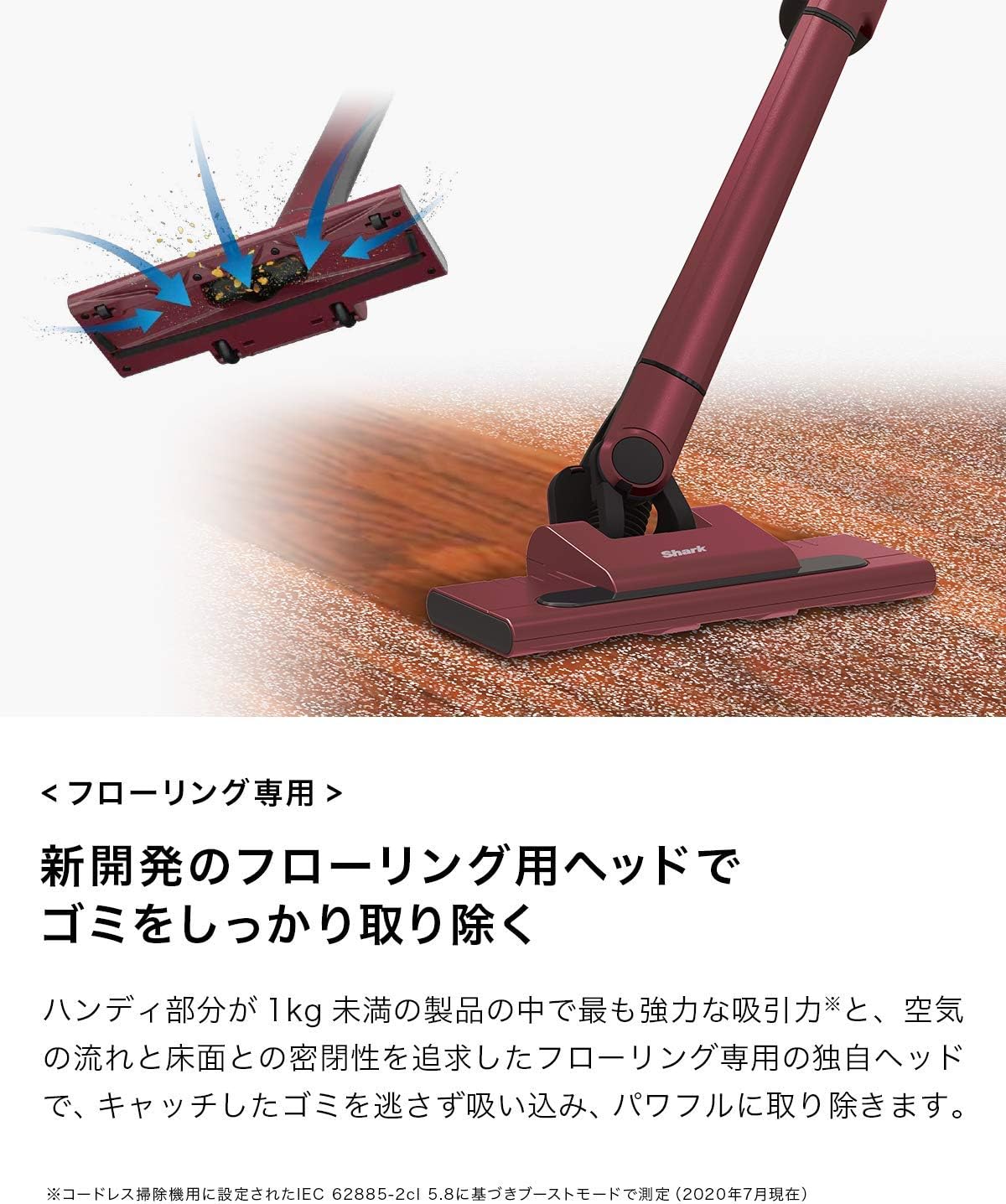
Слика: Детаљна view of the vacuum's flooring head, illustrating the powerful suction and tight seal with the floor that effectively captures debris.
5.2 Прелазак на ручни усисивач
For quick clean-ups and reaching elevated surfaces, the vacuum easily converts to a powerful handheld unit.

Image: A hand pressing the release button to detach the handheld vacuum unit from the main stick, ready for versatile cleaning.
- Press the release button on the handheld unit to detach it from the wand.
- Attach your desired accessory directly to the handheld unit.
- Притисните дугме за напајање да бисте започели чишћење.
5.3 Коришћење прилога
The included accessories enhance the versatility of your vacuum, allowing you to clean various surfaces and hard-to-reach areas.

Image: A collage of three images demonstrating the handheld vacuum's versatility: cleaning a narrow crevice, dusting curtains, and vacuuming a sofa with different attachments.
- Crevice Tool with Brush: Ideal for cleaning tight spaces, corners, and along edges. The integrated brush helps dislodge stubborn dirt.
- Вишенаменски алат: A versatile tool for cleaning upholstery, car interiors, and other delicate surfaces.
- Тапетарски алат: Specifically designed for removing pet hair and debris from fabric surfaces like sofas and mattresses.
6. Одржавање
Regular maintenance ensures your Shark EVOPOWER SYSTEM CS200J continues to perform at its best.
6.1 Пражњење посуде за прашину
The one-touch dust disposal system allows for hygienic emptying without touching the dirt.

Image: A handheld vacuum unit being held over a trash can, with dust and debris being released from the dust cup by pressing a button.
- Уверите се да је усисивач искључен.
- Hold the handheld unit over a trash bin.
- Press the dust cup release button to open the bottom flap and empty the contents.
- Close the dust cup flap securely until it clicks.
6.2 Cleaning the Dust Cup and Filter
The dust cup and filter are washable, allowing you to keep your vacuum clean and maintain optimal suction.

Image: A hand rinsing the detached dust cup and filter components under running water from a faucet, illustrating the washable design.
- Remove the dust cup from the handheld unit.
- Извадите филтер из посуде за прашину.
- Rinse both the dust cup and filter with cold water. Do not use soap.
- Allow both components to air dry completely for at least 24 hours before reassembling. Do not use a hairdryer or other heating methods.
- Reinsert the dry filter into the dust cup, then reattach the dust cup to the handheld unit.
6.3 Чишћење ваљкасте четке
The EVOPOWER SYSTEM CS200J features a brushless power fin, which significantly reduces hair tangling and simplifies brush roll maintenance.
- Ensure the vacuum is turned off and disconnected from the charging dock.
- Inspect the brush roll for any debris or hair that may have accumulated.
- If necessary, use scissors to carefully cut away any tangled hair or fibers.
- Wipe the brush roll and nozzle opening with a dry cloth.
КСНУМКС. Решавање проблема
If you encounter any issues with your vacuum cleaner, refer to the following troubleshooting guide:
| Проблем | Могући узрок | Решење |
|---|---|---|
| Вакум се не укључује | Батерија није напуњена Батерија није правилно уметнута | У потпуности напуните батерију Уверите се да је батерија добро закачена |
| Мала усисна снага | Чаша за прашину је пуна Филтер је прљав Nozzle or wand is blocked | Испразните посуду за прашину Clean or wash the filter Проверите и уклоните блокаде |
| Ваљак четке се не окреће | Obstruction in brush roll Млазница није правилно причвршћена | Remove any hair or debris from brush roll Ensure floor nozzle is securely attached to the wand |
| Батерија се не пуни | Пуњач није повезан Неисправан излаз Battery or charger issue | Ensure charger is securely plugged in Пробајте другу електричну утичницу Контактирајте корисничку подршку |
8. Спецификације
| Феатуре | Детаљ |
|---|---|
| Бранд | Схарк |
| Број модела | CS200J |
| Боја | Руби Ред |
| Извор напајања | На батерије |
| Бежични | Да |
| Тип филтера | Цартридге |
| Препоручена површина | Подови |
| Посебне карактеристике | Лагана |
| Тежина артикла | 5.06 кг |
| Димензије производа (Д к Ш к В) | 26.7 цм к 12.4 цм к 99.5 цм |
| УПЦ | 622356238656 |
9. Гаранција и подршка
9.1 Гаранција произвођача
The manufacturer's warranty is valid only for products purchased from SharkNinja or its authorized retailers. Product registration is required to activate your warranty. Please register your product after arrival. The warranty period may vary by product; please refer to the specific warranty information provided with your product or on the official Shark webсајту.
9.2 Корисничка подршка
For technical assistance, replacement parts, or warranty inquiries, please contact Shark customer support. Refer to the contact information provided in your product packaging or visit the official Shark webсајт за детаље.