
1. Увод и крајview
The GOBOOST Cell Phone Signal Booster is designed to enhance cellular signal coverage within homes and offices, supporting GSM, 3G, 4G LTE, and 5G networks across Band 2 (1900MHz), Band 4 (1700/2100MHz), and Band 5 (850MHz). This system is compatible with major U.S. carriers such as AT&T, Verizon, T-Mobile, and US Cellular. It effectively boosts weak indoor signals from 1-2 bars to 3-5 bars, eliminating signal dead zones and providing stable reception for fewer dropped calls, improved voice quality, and faster data upload/download speeds.

Figure 1.1: Benefits of the GOBOOST Cell Phone Signal Booster, including reduced dropped calls, stronger communication, clearer and faster data, and boosted 4G LTE voice quality.

Figure 1.2: The mobile signal amplifier expands coverage up to 5000 sq.ft., resolving poor mobile network signals.
2. Садржај пакета
Before beginning installation, please verify that all components are included in your package:
- Јаги спољна антена
- Унутрашња панел антена
- Signal Booster Unit (Mobile Repeater)
- Коаксијални кабл
- Повер Адаптер
- Упутство за употребу (овај документ)

Figure 2.1: Complete GOBOOST Cell Phone Signal Booster kit, including the booster unit, Yagi outdoor antenna, indoor panel antenna, and cables.
3. Подешавање и инсталација
Follow these steps for optimal performance. Proper installation is crucial for the booster's effectiveness.
3.1. Pre-Installation Check: Test Your Signal Band
Before installation, confirm your cell phone's working band to ensure compatibility with the booster (Band 2/4/5). This step helps avoid issues with incorrect band usage.
- За иОС: Dial *3001#12345#*, press call button, click 'Serving Cell Info', then check 'Freq Band Indicator'.
- За Андроид: Download 'Network Cell Info Lite' app, disconnect Wi-Fi, turn on data network, then check 'GAUGE' to see the signal band.

Figure 3.1: Instructions for checking your phone's signal band on both iOS and Android devices to ensure compatibility with the booster.
3.2. Outdoor Antenna Installation
The outdoor Yagi antenna captures signals from the cell tower. It must be placed in an area with a strong, unobstructed signal (stronger than -80dB or at least 3 bars). Point the antenna directly towards the nearest cell tower for best results.

Figure 3.2: The 13dBi wide-band Yagi outdoor antenna, designed to capture signals effectively from the signal tower. Ensure it is pointed towards a cell tower.
Video 3.1: This video demonstrates the process of installing the outdoor Yagi antenna, including mounting and connecting the coaxial cable. It highlights the importance of finding a good signal location.
Video 3.2: A detailed guide on the installation of the Tri-Band Signal Booster, focusing on the outdoor antenna placement and connection for optimal signal reception.
3.3. Indoor Antenna Installation
The indoor panel antenna broadcasts the amplified signal throughout your desired coverage area. Mount it on a wall or ceiling within the area where you need improved signal. Ensure there is sufficient separation between the outdoor and indoor antennas (at least 33 feet horizontally and 20 feet vertically) to prevent oscillation.
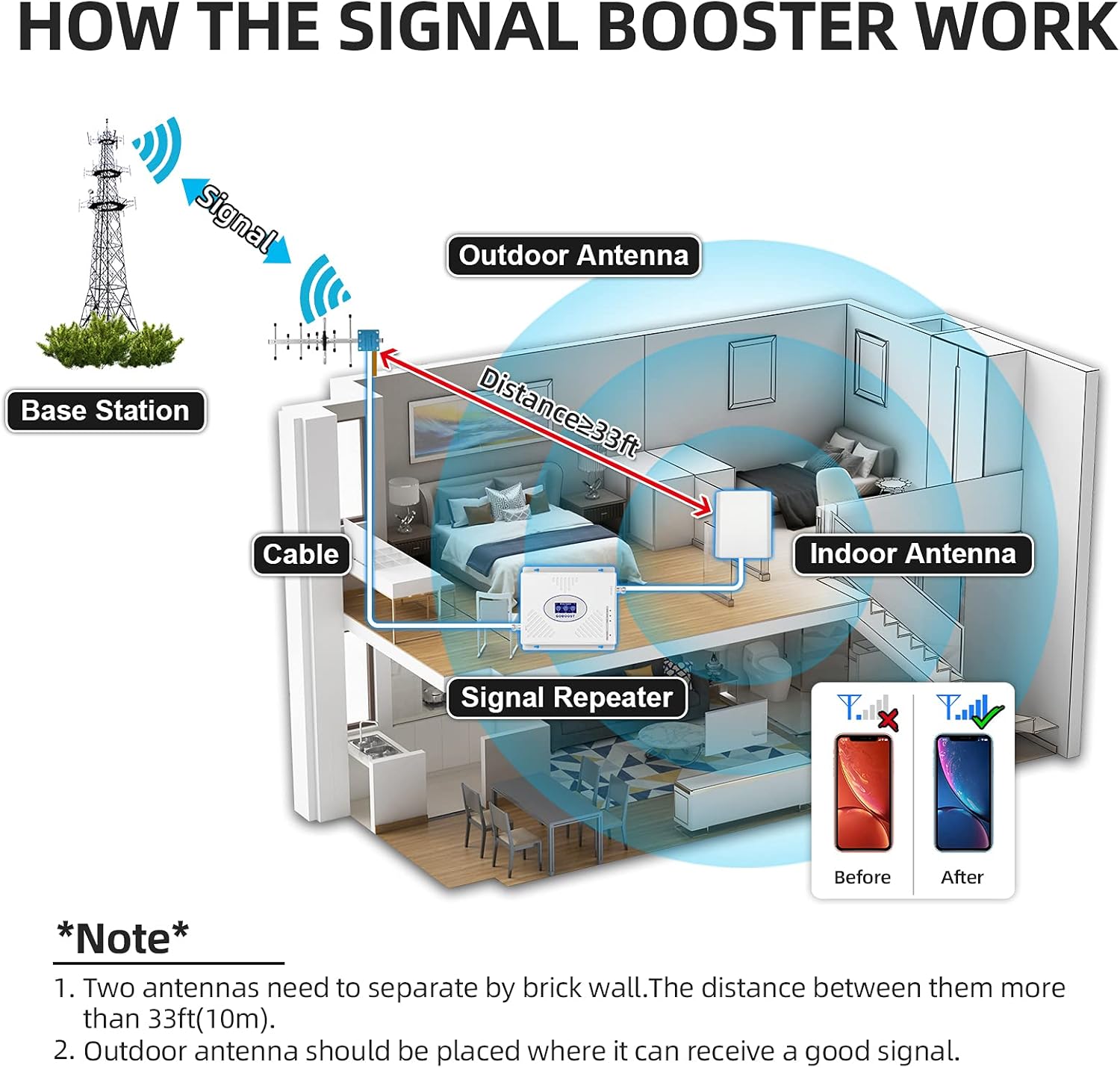
Figure 3.3: This diagram illustrates the signal flow: the outdoor antenna receives signal, sends it to the booster, which amplifies it, and the indoor antenna broadcasts the boosted signal. Note the recommended distance between antennas.
3.4. Signal Booster Unit Placement and Connection
Place the signal booster unit in a central location, away from direct sunlight and moisture. Connect the coaxial cable from the outdoor antenna to the "BTS" port (Base Transceiver Station) on the booster. Connect the indoor antenna cable to the "MOBILE" port on the booster. Finally, plug in the power adapter.

Figure 3.4: The intelligent LCD display on the booster provides accurate readings of outdoor signal strength and voltage conditions, aiding in proper antenna adjustment.
Видео 3.3: Овај видео пружа прегледview of the GOBOOST Band 2/4/5 Cell Phone Signal Booster, demonstrating its components and basic setup for improved signal.
4. Упутство за употребу
Once all components are connected and the power supply is plugged in, the booster will automatically begin to amplify the signal. The LCD display will show the signal strength for each band (Band 2, Band 4, Band 5), allowing you to monitor its performance. Green indicator lights confirm proper operation. The booster works with all mobile devices and users simultaneously, providing improved voice and data services.

Figure 4.1: The GOBOOST signal booster is suitable for various environments including homes, offices, hotels, villas, and basements, providing universal compatibility.
КСНУМКС. Решавање проблема
If you experience issues with your signal booster, refer to the following common problems and solutions:
| Проблем | Могући узрок | Решење |
|---|---|---|
| No Signal Boost / Weak Signal |
|
|
| Oscillation (Feedback Loop) |
|
|
| Искључено светло |
|
|
6. Спецификације
| Феатуре | Детаљ |
|---|---|
| Модел | Tri Band Booster Yagi/ Panel |
| Класа фреквенцијског опсега | Tri-Band (Band 2/4/5) |
| Мак Гаин | 70 дБ |
| Област покривености | До 5000 ск.фт. |
| Посебне карактеристике | Tri-band and LCD display |
| Оутдоор Антенна | 13dBi Wide-Band Yagi Antenna |
| Индоор Антенна | Панелна антена |
| Тип конектора | РЈ45 |
| Тежина артикла | 5.64 фунти |
| Димензије пакета | 18.8 к 8.9 к 6.7 инча |
7. Гаранција и подршка
GOBOOST offers a performance guarantee with FCC approval and free maintenance for life. For any signal problems or technical assistance, please feel free to contact GOBOOST professional technical support. We are committed to resolving your issues.
For further assistance, please visit the official GOBOOST store: GOBOOST Store