
Увод
Thank you for choosing the MEGATEK T8 Bluetooth Portable Speaker. This manual provides essential information for the proper setup, operation, and maintenance of your new speakers. The MEGATEK T8 speakers feature True Wireless Stereo (TWS) technology for an immersive audio experience, vibrant LED lighting, and a durable, waterproof design, making them ideal for various environments.
Садржај пакета
Молимо вас да проверите пакет за следеће ставке:
- 2 x MEGATEK T8 Bluetooth Portable Speakers
- 1 x USB Charging Cable (designed to charge both speakers simultaneously)
- 1 к Упутство за употребу
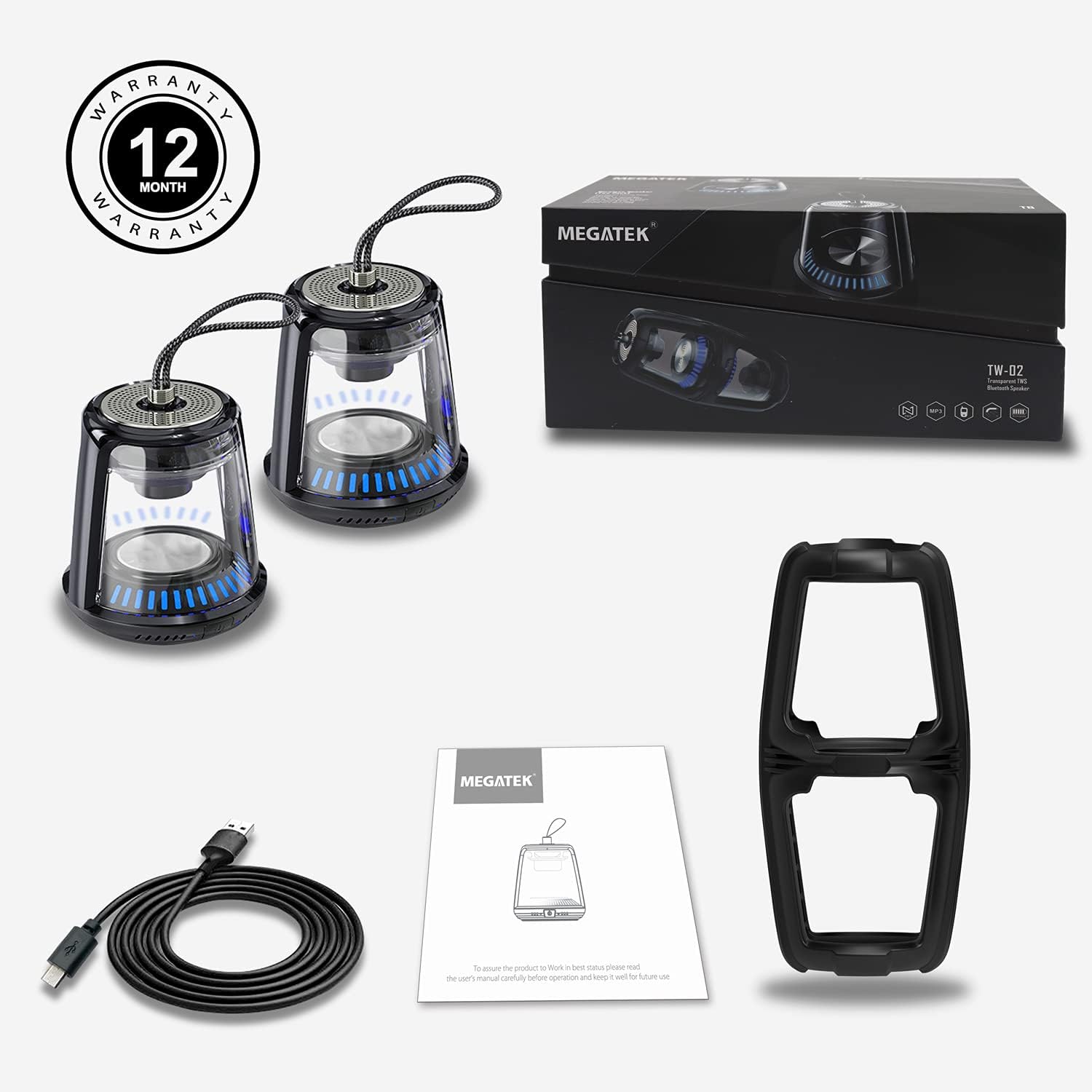
The package includes two MEGATEK T8 speakers, a USB charging cable for simultaneous charging, and this instruction manual.
Карактеристике производа
- Блуетоотх повезивање: Беспрекорна бежична веза са вашим уређајима.
- Прави бежични стерео (ТВС): Pair two speakers for a synchronized stereo sound experience.
- Режими ЛЕД светла: Dynamic LED lighting to enhance ambiance.
- Уграђени микрофон: Подржава позивање без употребе руку.
- ИПКС5 водоотпорна оцена: Protected against water splashes and light rain.
- Магнетна база: Allows for convenient attachment to metal surfaces.
- Компактан и преносив дизајн: Easy to carry and place anywhere.
- Пуњива батерија: Provides portable power for on-the-go use.
Сетуп
1. Charging the Speakers
Before initial use, fully charge both speakers. Connect the provided USB charging cable to the charging port on each speaker and then to a USB power adapter (not included) or a computer's USB port. The LED indicator will show charging status and turn off when fully charged.
2. Укључивање/искључивање
To power on the speaker, press and hold the power button for approximately 3 seconds until you hear an audible prompt and the LED lights illuminate. To power off, press and hold the power button again for 3 seconds until you hear a power-off prompt and the LED lights turn off.
3. Bluetooth Pairing (Single Speaker)
- Уверите се да је звучник напуњен и укључен.
- Активирајте Блуетоотх на паметном телефону, таблету или другом уређају који подржава Блуетоотх.
- Тражи available devices and select "MEGATEK T8" from the list.
- Када се повежете, чућете звук потврде из звучника.

The speaker connects easily to your device via Bluetooth for wireless music streaming.
4. True Wireless Stereo (TWS) Pairing (Two Speakers)
To enjoy true stereo sound, you can pair two MEGATEK T8 speakers together:
- Ensure both speakers are fully charged and powered off.
- Укључите оба звучника истовремено.
- On један of the speakers (this will become the primary speaker), quickly double-press the power button. The speakers will begin searching for each other.
- Once successfully paired, you will hear a confirmation sound, and the LED indicators on both speakers will synchronize.
- Now, connect your Bluetooth device to the primary speaker (the one you double-pressed the button on) as described in the "Bluetooth Pairing (Single Speaker)" section.

This image illustrates the True Wireless Stereo (TWS) functionality, allowing two speakers to connect for an enhanced stereo sound experience.
Оперативни
1. Puštanje muzike
After successful Bluetooth pairing, you can play music from your connected device. Control playback (play/pause, next/previous track, volume) directly from your device.
2. Хандс-фрее позивање
When connected to a smartphone, the built-in microphone allows for hands-free calling. Press the power button once to answer an incoming call, and press it again to end the call. Press and hold the power button to reject an incoming call.
3. Режими ЛЕД светла
The speakers feature integrated LED lights. To cycle through different light modes or turn them off, short press the LED light button (if available, otherwise refer to the power button for multi-functionality). The lights can create a dynamic visual experience.

The speaker features multiple LED light modes to enhance your listening experience with visual effects.
4. Magnetic Mounting
The base of the speaker is magnetic, allowing it to be securely attached to compatible metal surfaces. This provides versatile placement options.

The magnetic base allows for convenient placement on metal surfaces, such as a refrigerator.
Одржавање
1. Чишћење
Обришите звучнике меком, сувом крпом. Не користите абразивна средства за чишћење, алкохол или хемијске раствараче, јер могу оштетити површину или унутрашње компоненте.
2. Отпорност на воду (IPX5)
The MEGATEK T8 speakers are IPX5 waterproof, meaning they are protected against low-pressure water jets from any direction. They are suitable for use in environments where they might encounter splashes, such as by a pool or in a bathroom. Не потапајте звучнике у воду. Ensure the charging port cover is securely closed to maintain water resistance.

With an IPX5 waterproof rating, the speakers are protected against splashes, making them suitable for poolside or bathroom use.
3. Складиштење
When not in use for extended periods, store the speakers in a cool, dry place away from direct sunlight and extreme temperatures. It is recommended to charge the speakers periodically to maintain battery health.
Решавање проблема
- Speaker will not turn on: Ensure the battery is charged. Connect the speaker to the charging cable and allow it to charge for at least 30 minutes before attempting to power on again.
- Не могу да упарим преко Bluetooth-а:
- Уверите се да је Блуетоотх омогућен на вашем уређају.
- Make sure the speaker is in pairing mode (LED indicator blinking).
- Ensure your device is within the Bluetooth range (approximately 33 feet or 10 meters).
- Покушајте да раскинете упаривање и поново упарите звучник из подешавања Bluetooth-а на уређају.
- Нема звука или је јачина звука ниска:
- Проверите ниво јачине звука и на звучнику и на повезаном уређају.
- Уверите се да је звучник правилно повезан путем Блутут-а.
- Упаривање TWS-а не успева:
- Ensure both speakers are powered off before initiating TWS pairing.
- Make sure both speakers are within close proximity to each other (within a few feet).
- Пажљиво поновите кораке упаривања TWS-а.
Спецификације
| Број модела | T8 |
| Унит Цоунт | 2 звучника |
| Боја | Црно |
| Димензије производа | 4"Д к 4.7"Ш к 8.7"В |
| Тежина артикла | 0.6 фунти (по звучнику) |
| Ниво отпорности на воду | ИПКС5 водоотпоран |
| Технологија повезивања | Блуетоотх, УСБ |
| Режим аудио излаза | Стерео, сурроунд звук |
| Тип монтаже | Freestanding, Magnetic |
| Посебне карактеристике | Stereo Pairing (TWS), Auto EQ, Auto Speaker Setup, LED Light |
| Произвођач | Megatek Electronics |
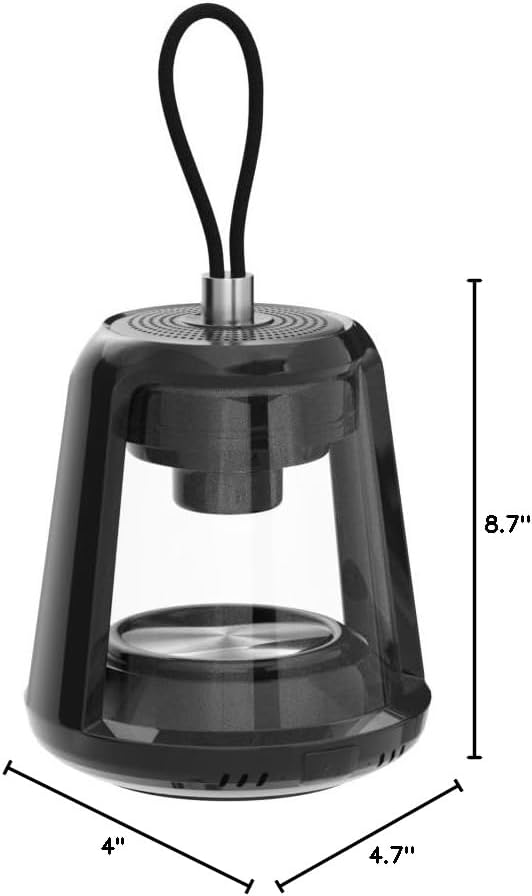
This image provides the physical dimensions of the MEGATEK T8 speaker: 4"D x 4.7"W x 8.7"H.
Гаранција и подршка
1. Информације о гаранцији
The MEGATEK T8 Bluetooth Portable Speakers come with a 12-месечна гаранција од датума куповине. Ова гаранција покрива производне недостатке и гарантује да је производ без недостатака у материјалу и изради при нормалној употреби.
2. Корисничка подршка
For any questions, technical assistance, or warranty claims, please contact MEGATEK customer support through the retailer where you purchased the product or visit the official MEGATEK website for contact information. Please have your purchase receipt and product model number (T8) ready when contacting support.