
1. Увод
Welcome to the world of automated cleaning with your new iRobot Roomba 697 Robot Vacuum Cleaner. Designed for convenience and efficiency, the Roomba 697 learns your cleaning habits to provide personalized schedules, ensuring your floors are consistently free from dirt, dust, and debris. Its advanced 3-stage cleaning system, coupled with Dirt Detect sensors, ensures a thorough clean across various floor types.
This manual will guide you through the setup, operation, and maintenance of your Roomba 697, helping you maximize its performance and longevity.
2. Безбедносне информације
Please read all safety instructions carefully before using your Roomba 697. Failure to follow these instructions may result in electric shock, fire, or serious injury.
- Општа безбедност: Овај уређај могу да користе деца узраста од 8 година и више и особе са смањеним физичким, сензорним или менталним способностима или недостатком искуства и знања ако су под надзором или инструкције у вези са употребом уређаја на безбедан начин и разумеју опасности које су укључене. .
- Напајање и пуњење: Use only the supplied charging station and power cord. Do not use with a damaged cord or plug.
- Окружење: Do not operate the robot in areas with exposed electrical outlets, standing water, or highly flammable materials.
- Препреке: Clear the cleaning area of loose power cords, small objects, and delicate items before operation to prevent entanglement or damage.
- Одржавање: Always turn off the robot and unplug it from the charging station before performing any maintenance or cleaning.
3. Шта је у кутији
Проверите да ли су све компоненте присутне у вашем пакету:
- iRobot Roomba 697 Robot Vacuum Cleaner
- Станица за пуњење кућне базе
- Лине Цорд
- Dual Mode Virtual Wall Barrier (optional, may be sold separately)
- Ектра Филтер
- Ектра Сиде Брусх

Image: The iRobot Roomba 697 robot vacuum cleaner from a top-down perspective.
4. Подешавање
4.1 Пуњење робота
- Place the Home Base charging station on a hard, level surface against a wall, ensuring there are no obstacles for at least 0.5 meters (1.5 feet) on either side and 1.2 meters (4 feet) in front.
- Plug the line cord into the Home Base and then into a wall outlet.
- Place your Roomba onto the Home Base, ensuring the metal charging contacts on the robot align with those on the Home Base. The light ring around the CLEAN button will pulse to indicate charging.
- Allow Roomba to charge for at least 3 hours before its first use. A solid green light indicates a full charge.
4.2 Connecting to Wi-Fi and the iRobot HOME App
For full control and smart features, download the iRobot HOME App.
- Download the iRobot HOME App from the App Store (iOS) or Google Play Store (Android).
- Open the app and follow the on-screen instructions to create an account and connect your Roomba to your home Wi-Fi network.
- The app will guide you through naming your robot and setting up initial cleaning preferences.

Image: The Roomba 697 from an angled perspective, highlighting its compact form.
5. Operating Your Roomba 697
5.1 Покретање циклуса чишћења
- Од робота: Press the large CLEAN button on top of the robot. Roomba will begin cleaning and automatically return to its Home Base when finished or when its battery is low.
- From the iRobot HOME App: Open the app and tap the 'CLEAN' button. You can also schedule cleaning times, customize cleaning preferences, and view историја чишћења.
- Гласовни асистент: If connected to a compatible voice assistant (e.g., Amazon Alexa, Google Assistant), simply say commands like "Alexa, ask Roomba to start cleaning."
5.2 Технологија детекције прљавштине
The Roomba 697 is equipped with patented Dirt Detect sensors that recognize concentrated areas of dirt, such as high-traffic zones. When Roomba encounters a dirtier area, it will perform a focused back-and-forth cleaning pattern to ensure thorough removal of debris.
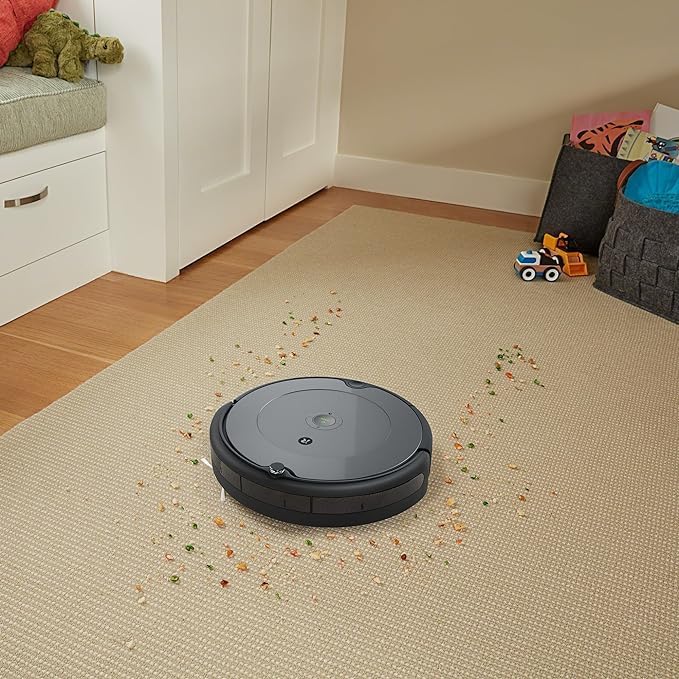
Image: The Roomba 697 actively cleaning a carpet, showing its effectiveness on scattered debris.
6. Одржавање
Regular maintenance is crucial for optimal performance of your Roomba 697. Always turn off the robot and unplug it from the Home Base before performing maintenance.
6.1 Пражњење канте за прашину
- Press the bin release tab and pull the bin straight out.
- Open the bin door and empty all debris into a trash can.
- Куцните кантом о канту за смеће да бисте уклонили преостали отпад.
- Вратите канту у робота док не кликне на место.
6.2 Чишћење четкица
The Roomba 697 features dual multi-surface brushes and a side brush.
- Четке за више површина: Pinch the yellow tabs on the brush frame, lift the frame, and remove the brushes. Remove any hair or debris wrapped around the brushes and their yellow caps. Reinstall the brushes.
- Бочна четка: Use a coin or small screwdriver to remove the screw holding the side brush. Remove any hair or debris from the brush and its post. Reinstall the brush.
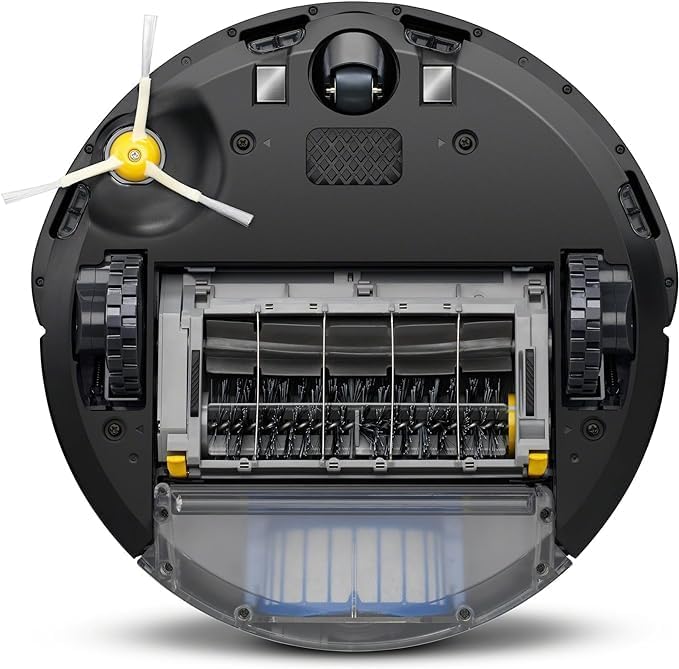
Image: The bottom of the Roomba 697, illustrating the brush system and dust bin.
6.3 Cleaning the Sensors
Wipe the following sensors with a clean, dry cloth:
- Cliff Sensors (located on the underside of the robot)
- Charging Contacts (on the robot and Home Base)
- Front Caster Wheel (remove and clean any hair or debris)
КСНУМКС. Решавање проблема
If your Roomba encounters an issue, it will play an audible alert and the CLEAN button light ring will flash. Consult the iRobot HOME App for more detailed information and troubleshooting steps.
| Проблем | Могући узрок | Решење |
|---|---|---|
| Roomba not charging | Контакти за пуњење су прљави или погрешно поравнати. | Wipe charging contacts on both robot and Home Base. Ensure robot is properly seated. |
| Roomba gets stuck frequently | Loose cables, rugs with tassels, or cluttered areas. | Clear the cleaning area of obstacles. Use Virtual Wall barriers if needed. |
| Лоше перформансе чишћења | Full dust bin, dirty brushes, or clogged filter. | Empty dust bin, clean brushes, and replace filter if necessary. |
| Robot not connecting to Wi-Fi | Нетачна лозинка за Wi-Fi, проблеми са рутером или је робот предалеко од рутера. | Verify Wi-Fi password, restart router, move robot closer to router, or try re-pairing via app. |
8. Спецификације
| Феатуре | Детаљ |
|---|---|
| Бранд | иРобот |
| Назив модела | Роомба 697 |
| Посебна карактеристика | Continuous Suction |
| Боја | Светло сива |
| Димензије производа | 33Д к 33Ш к 7В цм |
| Повезивање | Ви-Фи |
| Систем за чишћење | 3-Сtagе Систем за чишћење |
| Навигација | Advanced Sensors, Dirt Detect Technology |
9. Гаранција и подршка
Your iRobot Roomba 697 comes with a limited warranty. Please refer to the warranty card included in your product packaging or visit the official iRobot webсајт за детаљне услове гаранције специфичне за ваш регион.
For technical support, troubleshooting assistance, or to purchase replacement parts, please visit the iRobot support website or contact their customer service. You can find contact information and FAQs at ввв.иробот.цом.