
Увод
Хвала вам на куповиниasing the Azpen Dockall D115. This device combines a 15W fast wireless charger, dual Bluetooth speakers, a built-in microphone for hands-free calls, and additional USB charging ports into a single, convenient unit. This manual provides detailed instructions for setup, operation, maintenance, and troubleshooting to ensure optimal performance and longevity of your device.
Безбедносне информације
- Не излажите уређај екстремним температурама, директној сунчевој светлости или високој влажности.
- Избегавајте испуштање или излагање уређаја јаким ударима.
- Не растављајте, не поправљајте или не модификујте уређај сами. По потреби контактирајте квалификовано сервисно особље.
- Држите уређај даље од воде или других течности.
- Ensure proper ventilation when using the device, especially during charging.
- Користите само приложени адаптер за напајање да бисте спречили оштећења.
Садржај пакета
Проверите да ли су све ставке присутне у пакету:
- Azpen Dockall D115 Unit
- Повер Адаптер
- Упутство за употребу
Производ је завршенview
Familiarize yourself with the components of your Azpen Dockall D115.

Figure 1: Azpen Dockall D115 with a smartphone wirelessly charging, another phone connected via USB, and a smartwatch charging via USB.
Контроле на предњој плочи:
- Дугмад за јачину звука (VO-) / јачину звука (VO+): Подесите јачину звучника.
- Previous / Next Track Buttons: Navigate music playback.
- Дугме за репродукцију/паузу: Control music playback and answer/end calls.
- МИЦ: Уграђен микрофон за хандс-фрее позиве.
- Тастер за позив: Initiate or end phone calls.

Слика 2: Врх view of the Dockall D115, showing the Qi wireless charging symbol and control buttons.
Портови на задњој плочи:

Слика 3: Задња страна view of the Dockall D115, indicating the locations of USB1A, USB2A, DC power input, and power switch.
- USB1A Port: Standard USB charging output.
- USB2A Port: Standard USB charging output.
- ДЦ улаз: Повежите адаптер за напајање овде.
- Прекидач: Укључите/искључите уређај.
Сетуп
1. Прикључак за напајање
- Connect the provided power adapter to the DC input port on the rear of the Dockall D115.
- Укључите адаптер за напајање у зидну утичницу.
- Flip the Power Switch on the rear of the unit to the 'ON' position. The device will announce "Power on, Bluetooth mode."
2. Почетно упаривање путем Bluetooth-а
- Ensure the Dockall D115 is powered on and in Bluetooth pairing mode (indicated by the voice prompt).
- On your smartphone or Bluetooth-enabled device, go to 'Settings' and enable Bluetooth.
- Scan for available devices. You should see 'DOCK ALL' or 'Azpen Dockall' listed.
- Select 'DOCK ALL' to connect. A chime will sound, indicating a successful connection.
Video 1: This video demonstrates the process of connecting a smartphone to the Azpen Dockall D115 via Bluetooth, including powering on the device and selecting it from the phone's Bluetooth settings.
Упутство за употребу
1. Бежично пуњење
The Dockall D115 features 3 vertical charging coils, allowing for flexible placement of your device.
- Place your Qi-compatible smartphone or tablet on the charging pad in either vertical or horizontal orientation.
- Ensure the device is centered on the charging area for optimal charging.
- The charger supports 15W fast wireless charging for compatible devices.
- The Dockall D115 is case-friendly and can charge through most plastic phone cases up to 5mm thick. Metal cases or cases with metal components may interfere with charging.
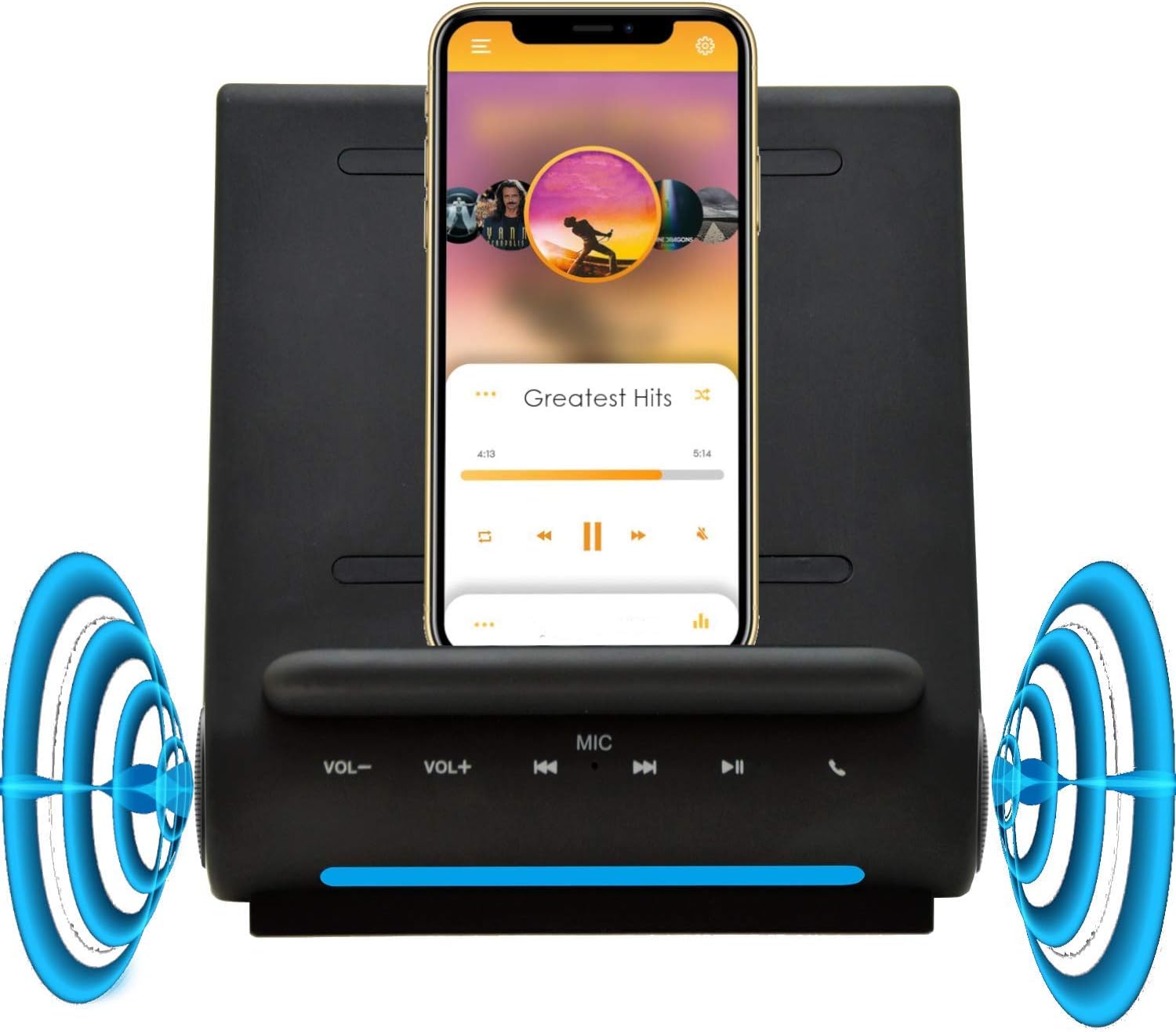
Figure 4: A smartphone wirelessly charging on the Dockall D115, demonstrating its upright viewing angle and integrated speakers.

Figure 5: A tablet positioned on the Dockall D115, showcasing its ability to hold larger devices for viewинг током пуњења.
2. Using Bluetooth Speakers
- Once your device is paired via Bluetooth, audio will automatically stream through the Dockall D115's dual 5W speakers.
- Use the VOL- / VOL+ buttons on the front panel or your connected device to adjust the volume.
- Use the Previous / Next Track and Play/Pause buttons to control music playback.
3. Позивање без употребе руку
The built-in microphone allows for clear hands-free communication.
- When a call comes in, press the Call button on the front panel to answer.
- Speak towards the MIC on the front panel.
- Press the Call button again to end the call.
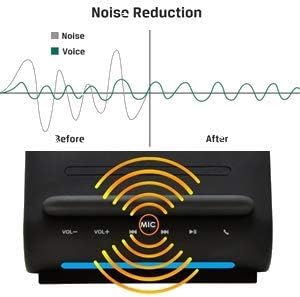
Figure 6: A graphic demonstrating the noise reduction capabilities of the Dockall D115's built-in microphone, enhancing call clarity.
4. Коришћење USB портова за пуњење
In addition to wireless charging, the Dockall D115 provides two USB ports for wired charging.
- Connect your device's USB charging cable to either the USB1A or USB2A port on the rear of the Dockall D115.
- You can charge up to three devices simultaneously (one wirelessly, two via USB).
5. Reconnecting Bluetooth
If your smartphone disconnects from the Dockall D115, you can easily reconnect it.
- Long-press the Play/Pause button on the front panel of the Dockall D115.
- The device will indicate that it is reconnected with a chime.
Video 2: This video demonstrates how to reconnect a previously paired Bluetooth device to the Azpen Dockall D115 by long-pressing the Play/Pause button.
Одржавање
- Очистите уређај меком, сувом крпом. Не користите абразивна средства за чишћење или раствараче.
- Keep the charging surface free of dust and debris to ensure efficient wireless charging.
- Чувајте уређај на хладном и сувом месту када се не користи дуже време.
Решавање проблема
| Проблем | Могући узрок | Решење |
|---|---|---|
| Уређај се не укључује. | Power adapter not connected or faulty; Power switch is OFF. | Ensure power adapter is securely connected and plugged into a working outlet. Flip the Power switch to ON. |
| Бежично пуњење не ради. | Device not Qi-compatible; Misaligned on charging pad; Phone case too thick or metallic; Foreign object on pad. | Verify device supports Qi wireless charging. Reposition device on the pad. Remove phone case. Remove any foreign objects. |
| Bluetooth not connecting/pairing. | Dockall D115 not in pairing mode; Bluetooth disabled on phone; Device too far from Dockall. | Ensure Dockall is powered on and in pairing mode. Enable Bluetooth on your phone. Move phone closer to the Dockall. Try long-pressing the Play/Pause button to force reconnection. |
| Poor audio quality or no sound. | Volume too low; Device not properly connected; Audio source issue. | Increase volume on both Dockall and connected device. Re-pair Bluetooth. Check audio source on your device. |
| Phone overheating during wireless charging. | Improper alignment; Phone case interfering; Environmental factors. | Ensure phone is correctly aligned. Remove phone case. Avoid charging in direct sunlight or hot environments. If issue persists, discontinue use and contact support. |
Спецификације
| Феатуре | Детаљ |
|---|---|
| Бранд | Azpen |
| Број модела | Д115 |
| Излаз бежичног пуњења | 15В |
| Блуетоотх звучници | Дуал 5В |
| УСБ портови за пуњење | 2 (USB1A, USB2A) |
| Улазни волtage | 20 Волтс |
| Тежина артикла | 1.6 фунти |
| Компатибилни уређаји | Qi-enabled smartphones (e.g., iPhone 11-17, Samsung Galaxy S20-S25) |
Информације о гаранцији
The Azpen Dockall D115 comes with an 18-month warranty from the date of purchase. This warranty covers manufacturing defects and malfunctions under normal use. It does not cover damage caused by misuse, accidents, unauthorized modifications, or natural disasters. Please retain your proof of purchase for warranty claims.
Подршка
For technical support, warranty claims, or further assistance, please contact Azpen customer service:
- Webсајт: ввв.азпенпц.цом
- Емаил: support@azpenpc.com (exampле)
- Телефон: 1-800-XXX-XXXX (нпр.ampле)