
Увод
This manual provides comprehensive instructions for setting up, operating, and maintaining your Macally Bluetooth Keyboard. Designed for multi-device compatibility, this wireless keyboard features a built-in stand, a rechargeable battery, and 78 keys for efficient typing across various devices including tablets, smartphones, and computers.

Image: The Macally Bluetooth Keyboard in white, with a tablet securely docked in its integrated stand, showcasing its compact design and functionality.
Шта је у кутији
Upon unboxing your Macally Bluetooth Keyboard, please ensure all the following items are present:
- Macally Bluetooth Keyboard
- УСБ кабл за пуњење
- Кориснички приручник (овај документ)
If any items are missing or damaged, please contact Macally customer support.
Карактеристике производа
The Macally Bluetooth Keyboard is designed for versatility and convenience, offering several key features:
- Повезивање са више уређаја: Seamlessly switch between up to 3 Bluetooth-enabled devices (e.g., tablet, smartphone, computer).
- Интегрисано постоље за уређај: Features a built-in 10.5-inch slot to securely hold your smartphone or tablet.
- Компактан и преносив: Small enough to fit into most bags, making it ideal for on-the-go use.
- Пуњива батерија: Опремљен пуњивом батеријом од 280 mAh за продужену употребу.
- Efficient Layout: Includes 78 quiet scissor-switch keys and 13 convenient shortcut/media keys for enhanced productivity.

Image: The keyboard demonstrating seamless Bluetooth connectivity with a 30ft wireless range, compatible with Apple, Windows, iOS, and Android operating systems.

Image: A visual representation of the keyboard's multi-device capability, showing it paired with a laptop, a desktop computer, and a smartphone simultaneously.

Image: The keyboard positioned on a desk, with both a tablet and a smartphone docked in its integrated 10.5-inch stand, highlighting its "setup anywhere" convenience.
Сетуп
Пуњење тастатуре
Before first use, fully charge your Macally Bluetooth Keyboard. Connect the provided USB charging cable to the keyboard's charging port and the other end to a USB power source (e.g., computer USB port, USB wall adapter). The charging indicator light will show the charging status.

Image: The keyboard with its charging cable connected, illustrating the rechargeable 280mAh battery and the included charging cable.
Блуетоотх упаривање
Follow these steps to pair your keyboard with a device:
- Ensure the keyboard is charged and powered on. The power switch is located on the top right of the keyboard.
- На свом уређају (таблету, паметном телефону, рачунару) омогућите Блутут.
- Притисните и држите Fn тастер и један од тастера за Bluetooth канал (B1, B2, или B3) simultaneously for a few seconds until the corresponding Bluetooth indicator light starts blinking rapidly. This indicates the keyboard is in pairing mode.
- On your device, search for "Macally Keyboard" or a similar name in the Bluetooth device list and select it to connect.
- Once connected, the indicator light will stop blinking and remain solid for a moment before turning off, indicating successful pairing.
To pair additional devices, repeat steps 3-5 using a different Bluetooth channel key (B1, B2, or B3).
Упутство за употребу
Пребацивање између уређаја
To switch between paired devices, simply press the Fn тастер заједно са одговарајућим тастером Bluetooth канала (B1, B2, или B3) for the desired device. The keyboard will quickly connect to the selected device.
Коришћење пречица на тастатури
The keyboard features 13 dedicated shortcut/media keys for quick access to common functions. These keys are typically located on the top row (F1-F12 and an additional key). Functions may vary slightly depending on the operating system of your connected device.
Common shortcut functions include:
- Контроле за репродукцију медија (репродукција/пауза, следећа/претходна нумера)
- Volume control (mute, volume up/down)
- Подешавање осветљености екрана
- Home screen/desktop access
- Функција претраге
Refer to your device's operating system documentation for specific compatibility and functionality of these keys.

Слика: Детаљна view of the keyboard's layout, emphasizing its 78 quiet scissor-switch keys and the 13 dedicated shortcut/media keys for efficient use.
Одржавање
To ensure the longevity and optimal performance of your Macally Bluetooth Keyboard, follow these maintenance guidelines:
- Чишћење: Користите меку, суву крпу која не оставља влакна за чишћење површине тастатуре. За тврдокорну прљавштину, благо обришитеampОперите крпу водом или благим, неабразивним средством за чишћење. Избегавајте прекомерну влагу.
- Складиштење: Када се тастатура не користи дуже време, чувајте је на хладном и сувом месту, даље од директне сунчеве светлости и екстремних температура.
- Одржавање батерије: To preserve battery life, avoid fully discharging the keyboard frequently. Recharge it when the low battery indicator appears. If storing for a long time, charge it to about 50% every few months.
- Избегавајте изливање: Keep liquids away from the keyboard to prevent internal damage.
Решавање проблема
If you encounter issues with your Macally Bluetooth Keyboard, try the following solutions:
| Проблем | Могуће решење |
|---|---|
| Тастатура се не укључује. | Уверите се да је тастатура напуњена. Повежите је са извором напајања помоћу USB кабла. |
| Unable to pair the keyboard. |
|
| Тастатура се често искључује. |
|
| Кључеви не реагују. |
|
If these solutions do not resolve the issue, please contact Macally customer support for further assistance.
Спецификације
| Феатуре | Детаљ |
|---|---|
| Број модела | БТТАБКЕИБАТ |
| Технологија повезивања | Блуетоотх |
| Број кључева | 78 |
| Тип батерије | 1 литијум-јонска батерија (укључена) |
| Тежина артикла | 1.92 фунти |
| Димензије пакета | 13.98 к 7.91 к 2.48 инча |
| Произвођач | Mace Group Inc / Macally Peripherals |
| Компатибилни уређаји | PC, Tablet, Apple devices, Windows Desktop/Laptop, Surface, Chromebook, Smartphones, TVs (any device with Bluetooth) |
| Препоручена употреба | Office, School, Everyday Use, Personal, Education, Business |
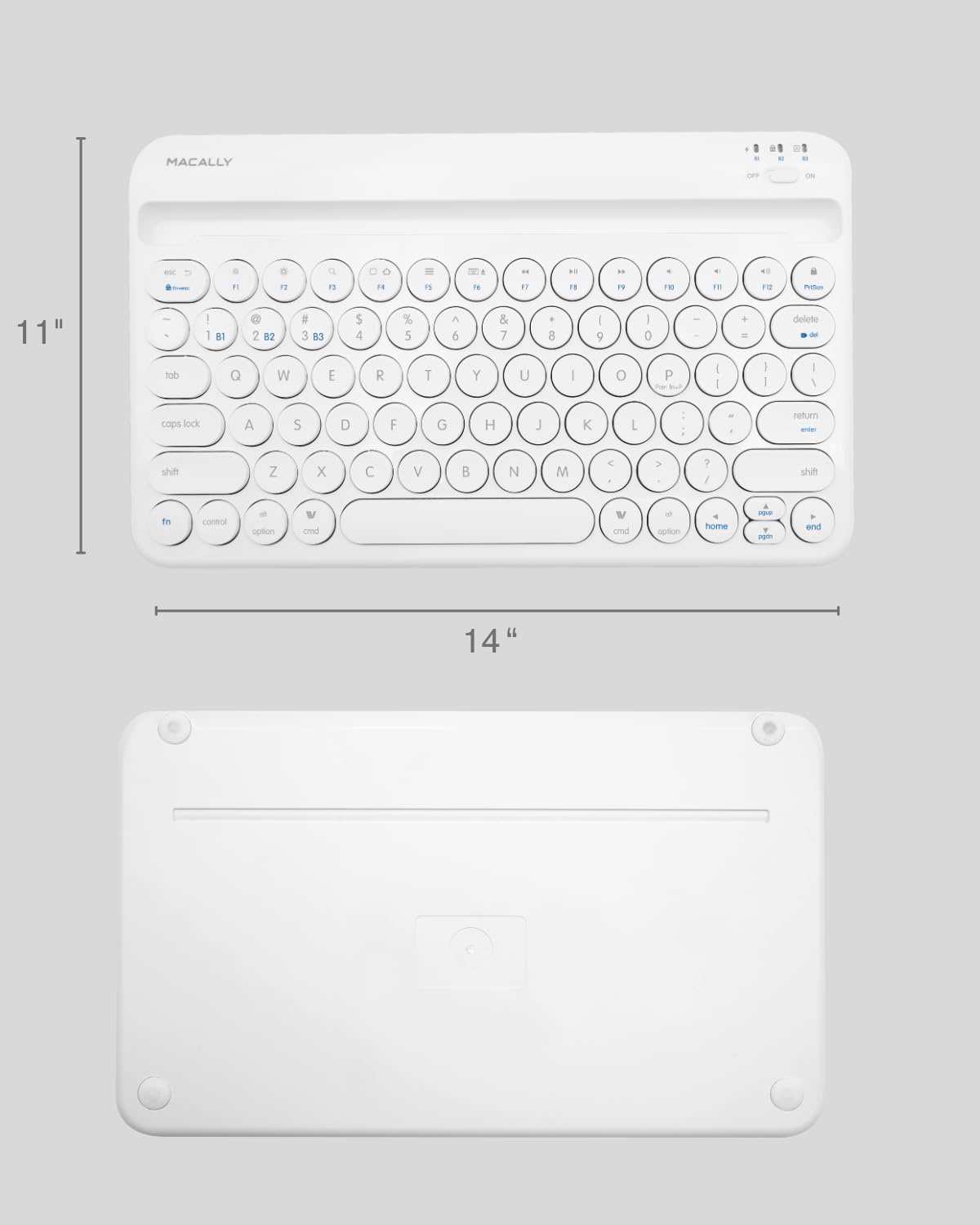
Image: The physical dimensions of the keyboard, measuring approximately 11 inches in width and 14 inches in length.

Image: The keyboard fitting easily into a backpack, demonstrating its compact size and suitability for travel and on-the-go use.
Гаранција и подршка
Macally products are designed for quality and reliability. For information regarding product warranty, technical support, or service, please visit the official Macally webсајт или контактирајте њихову службу за кориснике. Сачувајте рачун као доказ о куповини за потребе гаранције.
Више информација и подршке можете пронаћи на Macally Store on Amazon.