
1. Увод
The BLUEAIR DustMagnet 5210i is an advanced air purifier designed to improve indoor air quality by effectively removing airborne particles such as dust, pet dander, smoke, mold, pollen, bacteria, and viruses. Featuring HEPASilent™ dual filtration technology and smart capabilities, this unit provides efficient and quiet air purification for small to medium-sized rooms.
This manual provides essential information for the safe and effective use of your DustMagnet 5210i air purifier, including setup, operation, maintenance, and troubleshooting.
2. Безбедносне информације
Please read all safety instructions carefully before operating the appliance to reduce the risk of fire, electric shock, or injury.
- Always unplug the air purifier before moving, cleaning, or performing maintenance.
- Немојте користити уређај са оштећеним каблом или утикачем.
- Држите кабл за напајање даље од загрејаних површина.
- Немојте користити пречистач ваздуха у влажном или дamp environments, such as bathrooms.
- Обезбедите одговарајућу вентилацију око уређаја; не блокирајте улазе или излазе за ваздух.
- Овај уређај није намењен за употребу од стране особа са смањеним физичким, сензорним или менталним способностима, осим ако нису под надзором или им нису дате инструкције од стране одговорне особе.
- Only use original BLUEAIR replacement filters.
3. Производ је готовview
The DustMagnet 5210i features a sleek design with a convenient tabletop surface. It utilizes HEPASilent™ dual filtration technology for maximum filtration with minimum noise. Key components include the control panel, air inlets, air outlets, and dual filters.

Figure 3.1: BLUEAIR DustMagnet 5210i Air Purifier. This image shows the complete air purifier unit, highlighting its compact and modern design suitable for various room settings.
3.1 Контролна табла
The top of the unit features an intuitive control panel with touch buttons and LED indicators for easy operation.

Figure 3.2: Control Panel. This image details the control panel buttons and LED indicators, including On/Off, WiFi, Filter Replacement Warning, Fan Speed, Auto Mode, and Night Mode.
- Дугме за укључивање/искључивање: Укључује или искључује јединицу.
- ВиФи индикатор: Shows connection status to the Blueair app.
- Filter Replacement Warning: Illuminates when it's time to replace filters.
- Дугме за брзину вентилатора: Cycles through fan speeds (1, 2, 3).
- Дугме за аутоматски начин рада: Activates automatic fan speed adjustment based on air quality.
- Дугме за ноћни режим: Lowers fan speed and dims LED lights for quiet operation.
3.2 HEPASilent™ Dual Filtration Technology
This technology combines mechanical filtration with electrostatic charging to capture 99.97% of airborne particles down to 0.1 micron, including smoke, dust, viruses, and pet dander. The integrated carbon filter also traps light household odors.

Figure 3.3: HEPASilent™ Dual Filtration Technology. This image illustrates the concept of HEPASilent technology, showing how it achieves maximum filtration with minimum noise compared to traditional HEPA.
4. Подешавање
4.1 Распакивање и постављање
- Пажљиво извадите пречистач ваздуха из паковања.
- Place the unit on a flat, stable surface. Ensure there is at least 4 inches (10 cm) of clear space around the unit for optimal airflow.
- The DustMagnet 5210i is designed for rooms up to 212 sq. ft. for optimal performance.
4.2 Инсталација филтера
The unit comes with two combo-filters. Ensure they are correctly installed before first use.
- Искључите јединицу из електричне утичнице.
- Open the filter compartments (refer to product diagram for location).
- Insert the filters. For the top filter, ensure the white accordion folds face upwards. For the bottom filter, ensure the black charcoal side faces upwards. While filter direction does not affect efficiency, this orientation is recommended for consistency.
- Чврсто затворите одељке филтера.
4.3 Прикључак за напајање
Укључите кабл за напајање у уземљену електричну утичницу.
4.4 Connecting to the Blueair App
For advanced features and remote control, download the Blueair app from your smartphone's app store. Follow the in-app instructions to connect your DustMagnet 5210i to your home Wi-Fi network.

Figure 4.1: Blueair App Interface. This image displays the Blueair app interface, showing smart sensor tracking, Clean Air ETA, Welcome Home function, Night Mode, and Voice Control integration with Alexa and Google Home.
Апликација вам омогућава да:
- Track real-time air quality.
- Даљински подесите брзину вентилатора и режиме рада.
- Set schedules and activate features like 'Welcome Home'.
- Monitor filter life and receive replacement reminders.
- Интегришите се са Amazon Alexa и Google Home за гласовну контролу.
5. Упутство за употребу
5.1 Укључивање/искључивање
Притисните тастер Он/Офф дугме на контролној табли да бисте укључили или искључили уређај.
5.2 Подешавање брзине вентилатора
Притисните тастер Брзина вентилатора button to cycle through three fan speeds (1, 2, 3). The corresponding LED indicator will light up.
5.3 Аутоматски режим
Притисните тастер Ауто Моде button to activate. In Auto Mode, the air purifier automatically adjusts its fan speed based on the detected air quality, optimizing performance and energy consumption.
5.4 Ноћни режим
Притисните тастер Ноћни режим button. This mode lowers the fan speed to its quietest setting (23 dB) and dims the LED lights for an undisturbed sleep environment.
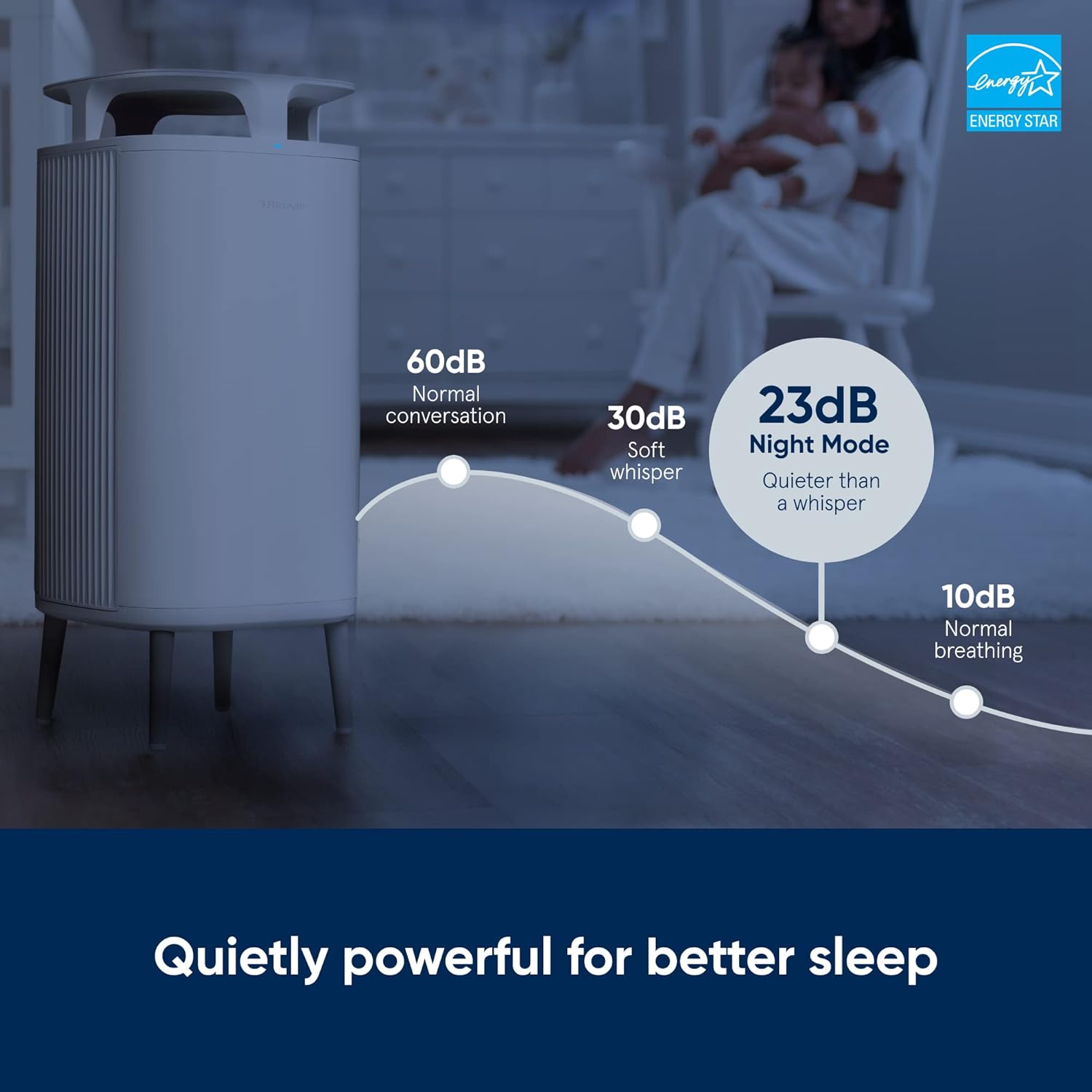
Figure 5.1: Night Mode Sound Levels. This image illustrates the low noise level of the air purifier in Night Mode (23 dB), comparable to a whisper, ensuring quiet operation for better sleep.
5.5 Брава за децу
To prevent unintended changes to settings, activate the Child Lock feature via the Blueair app. This deactivates the control buttons on the unit itself, allowing control only through the app.
5.6 Индикатор квалитета ваздуха
The unit features a 5-color LED indicator that provides real-time feedback on your indoor air quality. Refer to the Blueair app for detailed information on pollutant levels.
5.7 Званични видео производа
Видео 5.1: Производ је преостаоviewОвај видео пружа општи прегледview of the BLUEAIR DustMagnet 5210i Air Purifier, demonstrating its features and operation.
6. Одржавање
6.1 Замена филтера
The filter replacement warning indicator on the control panel will illuminate when it's time to replace the filters. For optimal performance, filters should be replaced approximately every 6 months, depending on usage and air quality.
- Искључите пречистач ваздуха из електричне утичнице.
- Open the filter compartments.
- Remove the old filters and dispose of them responsibly.
- Install new original BLUEAIR combo-filters, ensuring correct orientation as described in Section 4.2.
- Чврсто затворите одељке филтера.
- Plug the unit back in. The filter warning light should reset automatically. If not, consult the troubleshooting section or the Blueair app.
6.2 Чишћење јединице
Regular cleaning helps maintain the efficiency and appearance of your air purifier.
- Екстеријер: Обришите спољашње површине меком, дamp тканина. Немојте користити абразивна средства за чишћење или раствараче.
- Предфилтери: The stainless steel pre-filters can be gently wiped clean to remove accumulated dust.
- Do not immerse the unit in water or allow water to enter the air outlets.
КСНУМКС. Решавање проблема
If you experience issues with your DustMagnet 5210i, refer to the table below for common problems and solutions. For more detailed troubleshooting, consult the Blueair app or the official Blueair support webсајту.
| Проблем | Могући узрок | Решење |
|---|---|---|
| Јединица се не укључује. | No power, power cord loose. | Проверите прикључак за напајање, уверите се да је утичница функционална. |
| Airflow is weak or air quality not improving. | Clogged filters, unit in low fan speed. | Check filter replacement indicator; replace filters if needed. Increase fan speed or activate Auto Mode. |
| Filter replacement indicator remains on after changing filters. | Sensor not reset, filter not installed correctly. | Ensure filters are seated properly. Consult the Blueair app for manual reset instructions if necessary. |
| Cannot connect to Wi-Fi or Blueair app. | Incorrect Wi-Fi password, router issues, unit too far from router. | Verify Wi-Fi password. Restart router and air purifier. Move unit closer to router. Ensure 2.4GHz network is used. |
| Необична бука из јединице. | Obstruction in fan, loose component. | Unplug the unit and check for any foreign objects. If noise persists, contact customer support. |
8. Спецификације
| Феатуре | Детаљ |
|---|---|
| Број модела | 5210и |
| Бранд | BLUEAIR |
| Димензије производа (Д x Ш x В) | 9.1" x 9.1" x 20.5" (23.1 цм x 23.1 цм x 52.1 цм) |
| Тежина артикла | 6.03 фунте (2.74 кг) |
| Покривеност пода | 212 Square Feet (optimal) |
| Ниво буке | 23 dB (Night Mode) - 31 dB (Low) |
| Ватtage | 22 вати (макс.) |
| Величина задржавања честица | 0.1 микрона |
| Тип контролера | Touch Panel, Blueair App, Amazon Alexa, Google Home |
| Спецификација Мет | AHAM Certified, ENERGY STAR rated |
| УПЦ | 689122015200 |

Figure 8.1: Air Changes Per Hour (ACH) and Time to Clean Air. This table illustrates the performance of the air purifier across different room sizes, showing the time required to achieve clean air and the corresponding ACH rating.
9. Гаранција и подршка
9.1 Информације о гаранцији
BLUEAIR products are manufactured to the highest quality standards. For detailed warranty terms and conditions, please refer to the warranty card included with your product or visit the official BLUEAIR webсајт. Сачувајте доказ о куповини за потребе гаранције.
9.2 Корисничка подршка
For technical assistance, replacement parts, or general inquiries, please contact BLUEAIR customer support. You can find contact information on the official BLUEAIR website or through the Blueair app.
Онлине ресурси: