
1. Увод
The rockspace AC2100 Dual Band WiFi Range Extender is designed to expand your existing WiFi network coverage, eliminate dead zones, and provide a stable, high-speed internet connection throughout your home or office. This device supports both 2.4 GHz and 5 GHz bands, offering versatile connectivity options for various devices.
Шта је у кутији:
- 1 x rockspace AC2100 WiFi Extender
- 1 к Водич за брзи почетак

Figure 1: rockspace AC2100 WiFi Range Extender
2. Упутства за подешавање
The rockspace AC2100 WiFi Range Extender offers two primary methods for setup: WPS (Wi-Fi Protected Setup) and Web Подешавање прегледача.
2.1. WPS подешавање (препоручује се за брзо подешавање)
- Прикључак: Plug the extender into an electrical outlet in the same room as your WiFi router.
- Wait for Power LED: Wait until the Power LED on the extender turns solid blue.
- Притисните WPS на рутеру: Press the WPS button on your main WiFi router.
- Притисните WPS на екстендеру: Within 2 minutes, press the WPS button on the rockspace extender.
- Observe Signal LED: The Signal LED on the extender will start blinking. Once it turns solid blue, the connection is successful.
- Премести екстендер: Unplug the extender and move it to a location halfway between your router and the WiFi dead zone. Ensure the Signal LED remains solid blue for optimal performance.

Figure 2: Easy setup using the WPS button
2.2. Web Подешавање претраживача
- Прикључак: Plug the extender into an electrical outlet in the same room as your WiFi router.
- Connect to Extender's WiFi: On your computer or mobile device, connect to the WiFi network named "rockspace_EXT" or "rockspace_EXT_5G". Do not enter any password.
- Отвори Web Прегледач: Отвори а web прегледач (нпр. Chrome, Firefox) и откуцајте re.rockspace.local or 192.168.0.254 у траку за адресу.
- Пријава: Креирајте нову лозинку за пријаву када се то од вас затражи.
- Изаберите режим: Choose "Repeater Mode" or "Access Point Mode" based on your needs.
- Изаберите мрежу: Select your existing WiFi network (SSID) from the list and enter its password.
- Потврдите подешавања: Follow the on-screen instructions to complete the setup. The extender's WiFi name will typically be your original network name with "_EXT" appended.
- Премести екстендер: Unplug the extender and move it to a suitable location. Ensure the Signal LED is solid blue for a good connection.
3. Радни режими
The rockspace AC2100 WiFi Range Extender supports two main operating modes:
3.1. Repeater Mode (Default)
In Repeater Mode, the extender wirelessly connects to your existing router and amplifies its signal, extending coverage to areas with weak or no signal. This is ideal for eliminating WiFi dead zones.
3.2. Режим приступне тачке (АП)
In AP Mode, the extender connects to your router via an Ethernet cable and broadcasts a new wireless network. This is ideal for converting a wired network into a wireless one or for providing a dedicated wireless access point in a specific area.

Figure 3: Extender operating in Repeater and Access Point modes
4. Кључне карактеристике
- Двопојасна повезаност: Supports both 2.4 GHz (up to 300 Mbps) and 5 GHz (up to 1734 Mbps) bands for a combined speed of up to 2100 Mbps, optimizing WiFi network transmission.
- Проширена покривеност: Boosts WiFi signal to wider coverage areas, up to 1292 sq.ft, effectively eliminating WiFi dead zones.
- Smart Signal Switch (4T4R MU-MIMO): Equipped with high-quality PCB dual-band antennas and 4T4R MU-MIMO technology, the repeater automatically selects the high-quality channel for stable, reliable, and fast internet. It switches to networks with stronger signals to keep devices connected even when moving.
- Јако продирање кроз зид: Works effectively with optical routers for strong signal penetration on the 5 GHz band, suitable for multi-storey houses or large bungalows.
- Гигабитни Етхернет порт: Features a full Gigabit port for high-speed wired connections, allowing you to connect devices like smart TVs, gaming consoles, or Blu-ray players directly for enhanced speeds. Supports IPv6 protocol for smooth HD streaming and gaming.
- Универзална компатибилност: Compatible with any wireless WiFi Router, Gateway, or Access Point. Extends WiFi signal to various devices including mobile phones, PCs, and smart home devices.
- Visual Signal Lights: Blue indicates a good connection, while red indicates a weak connection, guiding you to find the perfect location for installation.
- Подесиве антене: The upper antennas can rotate by 270 degrees, and the lower ones by 180 degrees, allowing for optimized signal direction.
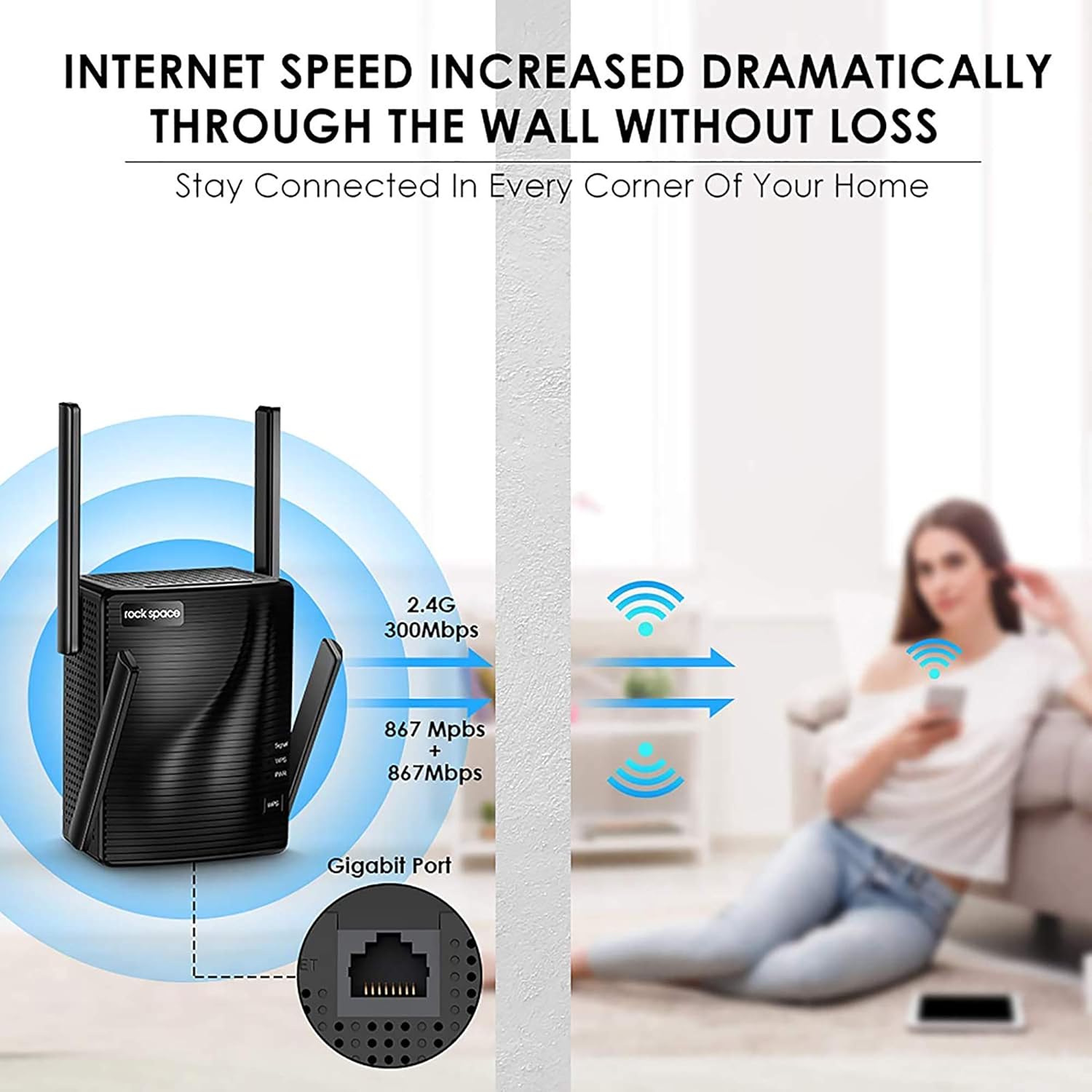
Figure 4: Enhanced internet speed and wall penetration

Figure 5: 4T4R MU-MIMO technology for ultimate Wi-Fi signal
5. Одржавање
- Оптимално постављање: For best performance, place the extender in an open area, away from obstructions like large metal objects, thick walls, or other electronic devices that may cause interference.
- Редовно чишћење: Keep the device clean and free from dust to ensure proper ventilation and prevent overheating.
- Ажурирања фирмвера: Periodically check the rockspace official webсајт за сва доступна ажурирања фирмвера како би се осигурале оптималне перформансе и безбедност.
- Resetting the Extender: If you experience persistent issues or wish to reconfigure the extender, you can perform a factory reset. Locate the Reset button (usually a small pinhole) on the device. Use a paperclip or a thin object to press and hold the button for about 8-10 seconds until the LEDs flash. The extender will then reboot with factory default settings.
КСНУМКС. Решавање проблема
- Нема приступа интернету након подешавања:
- Check the Signal LED: If it's red, the extender is too far from the router. Relocate it closer.
- Verify Router Password: Ensure you entered the correct WiFi password during setup.
- Restart Devices: Restart your router, extender, and connected devices.
- Слаб сигнал или честа прекидања везе:
- Relocate Extender: Move the extender closer to your router or to a more central location.
- Adjust Antennas: Orient the external antennas for better signal reception.
- Check for Interference: Avoid placing the extender near large electronic appliances (microwaves, refrigerators) or metal objects.
- Не могу приступити Web Страница управљања:
- Verify Connection: Ensure your device is connected to the extender's WiFi network (e.g., "rockspace_EXT").
- Clear Browser Cache: Clear your web кеш меморију и колачиће прегледача или покушајте са другим прегледачем.
- Reset Extender: Perform a factory reset if the issue persists.
7. Спецификације
| Феатуре | Детаљ |
|---|---|
| Бранд | роцкспаце |
| Број модела | РСД0617 |
| Вирелесс Типе | 802.11а/б/г/н |
| Брзина преноса података | 2100 мегабита у секунди |
| Класа фреквенцијског опсега | Двопојасни (2.4 GHz и 5 GHz) |
| Област покривености | До 1292 ск.фт |
| Етхернет порт | Гигабитни Етхернет порт |
| Антене | 4 High Performance External Antennas |
| Димензије (ДкШкВ) | 4.6 к 4.25 к 5.8 инча |
| Тежина | 13.1 унци |
8. Важне информације
8.1. Безбедносне информације
Please be careful when using electricity. Always ensure the device is plugged into a suitable power outlet and avoid overloading circuits.
8.2. Правно одрицање одговорности
Please note that the Wi-Fi extender only extends the Wi-Fi coverage; it cannot boost the speed of your original router or maintain the exact same speed as the original router.
9. Гаранција и подршка
For warranty information, technical support, or further assistance, please refer to the contact details provided in your product packaging or visit the official rockspace webсајту. Сачувајте рачун о куповини за гаранције.
Телефон техничке подршке: +1-833-816-6558 (EST: 9:00-17:00 / PDT: 06:00-14:00 Monday to Friday)
Емаил: тецхсуппорт@роцкспаце.цц
Webсајт: ввв.роцкспаце.цц