
Увод
This manual provides comprehensive instructions for the Lexmark MS431dw Monochrome Laser Printer. It covers setup, operation, maintenance, and troubleshooting to ensure optimal performance and longevity of your device. The Lexmark MS431dw is designed for efficient monochrome printing, offering speeds up to 40 pages per minute and automatic duplex printing.

Слика: Напред десно view of the Lexmark MS431dw Monochrome Laser Printer.
Сетуп
1. Распакивање штампача
Carefully remove the printer from its packaging. Ensure all packing materials, tapes, and protective films are removed from the exterior and interior of the printer. Retain the packaging for future transport if needed.
2. Инсталирање кертриџа са тонером
- Отворите предњи поклопац штампача.
- Извадите нови кертриџ са тонером из паковања и нежно га протресите да бисте распоредили тонер.
- Уметните кертриџ са тонером у предвиђени отвор док не кликне на своје место.
- Затворите предњи поклопац.
3. Убацивање папира
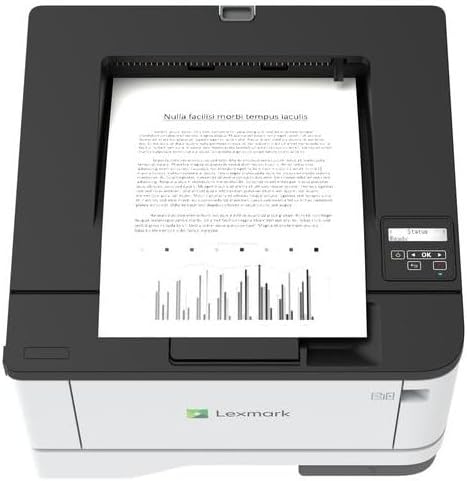
Слика: Врх view of the Lexmark MS431dw with paper loaded in the input tray.
Open the paper tray and adjust the paper guides to fit the size of your paper. Load the paper stack into the tray, ensuring it is flat and below the maximum fill line. Close the paper tray. The printer supports various media types, including card stock.
4. Повезивање напајања
Прикључите кабл за напајање на улаз за напајање штампача, а затим на уземљену електричну утичницу.
5. Connecting to a Network/Computer
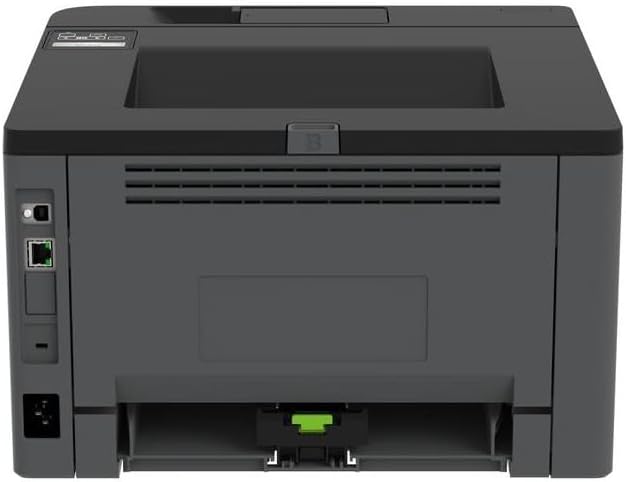
Слика: Позади view of the Lexmark MS431dw, highlighting the Ethernet and power connection ports.
The Lexmark MS431dw supports Ethernet connectivity. Connect an Ethernet cable from your network router or switch to the Ethernet port on the back of the printer. For direct connection to a computer, use a USB cable (not included) if available, or configure network printing.
6. Инсталација драјвера
Turn on the printer. Insert the driver CD (if provided) into your computer, or download the latest drivers from the official Lexmark support webсајт. Пратите упутства на екрану да бисте завршили инсталацију драјвера.
Упутство за употребу
1. Цонтрол Панел Оверview

Слика: Врх view of the Lexmark MS431dw, showing the printer's control panel with display and buttons.
The control panel features a display screen and navigation buttons (Up, Down, OK, Back) to access printer settings, status, and functions. Refer to the on-screen menus for specific options.
2. Основно штампање
- Уверите се да је штампач укључен и повезан са рачунаром или мрежом.
- Отворите документ који желите да одштампате на рачунару.
- Изаберите Принт из менија апликације (нпр. File > Штампа).
- Choose the Lexmark MS431dw from the list of available printers.
- Adjust print settings as desired (e.g., number of copies, paper size).
- Кликните Принт.
3. Аутоматско двострано штампање
The MS431dw supports automatic two-sided (duplex) printing. To enable this feature:
- In the print dialog box on your computer, navigate to the printer properties or preferences.
- Look for an option related to "Two-sided printing" or "Duplex printing."
- Изаберите жељену опцију двостраног штампања (нпр. повезивање по дугој ивици, повезивање по краткој ивици).
- Confirm your selection and proceed with printing.
Одржавање
1. Замена кертриџа са тонером
When the toner level is low, the printer's display will indicate a warning. To replace the cartridge:
- Уверите се да је штампач укључен.
- Отворите предњи поклопац.
- Извадите стари кертриџ са тонером тако што ћете га извући.
- Unpack a new Lexmark-compatible toner cartridge and gently shake it.
- Insert the new cartridge until it locks into place.
- Затворите предњи поклопац.
2. Чишћење штампача
Regular cleaning helps maintain print quality and extends printer life.
- Екстеријер: Обришите спољашње површине меком, дamp, крпа која не оставља влакна. Не користите абразивна средства за чишћење или раствараче.
- Ентеријер: Periodically open the front cover and gently remove any dust or paper debris from accessible areas using a dry, lint-free cloth. Avoid touching the fuser unit.
Решавање проблема
This section addresses common issues you might encounter. For more detailed troubleshooting, refer to the Lexmark support webсајту.
1. Заглављивање папира
- If a paper jam occurs, the printer display will show an error message indicating the location of the jam.
- Carefully open the indicated covers or trays.
- Пажљиво повуците заглављени папир у смеру путање папира. Избегавајте цепање папира.
- Close all covers and trays. The printer should resume printing.
2. Лош квалитет штампе
- Избледели отисци: The toner cartridge may be low. Replace it if necessary.
- Streaks or Spots: Clean the printer's interior as described in the Maintenance section. Ensure the toner cartridge is properly seated.
- Празне странице: Verify the toner cartridge is installed correctly and has toner. Check printer drivers and print settings.
3. Проблеми са повезивањем
- Printer Not Found: Ensure the Ethernet cable is securely connected to both the printer and the network. Verify network settings on the printer and computer.
- Офлајн статус: Check the printer's power and network connection. Restart both the printer and your computer.
Спецификације
| Феатуре | Детаљ |
|---|---|
| Број модела | 29С0110 |
| Технологија штампе | Ласер |
| Излаз штампача | Моноцхроме |
| Максимална брзина штампања (монохроматско) | До 40 стр./мин (страница у минути) |
| Технологија повезивања | Етхернет |
| Посебна карактеристика | Auto-Duplex (Automatic Two-sided Printing) |
| Максимални капацитет улазног листа | 900 листова |
| Print Media Support | Card stock, Plain paper |
| Тежина артикла | 9300 грама (приближно 20.5 фунте) |
| Ватtage | 570 вати |
| УПЦ | 734646695558 |
Напомена: Спецификације се могу променити без најаве.
Гаранција и подршка
Информације о гаранцији
Your Lexmark MS431dw printer is covered by a standard manufacturer's warranty. For specific terms, conditions, and duration of your warranty, please refer to the documentation included with your product or visit the official Lexmark webсајт. Сачувајте доказ о куповини за потребе гаранције.
Корисничка подршка
For technical assistance, driver downloads, or further support, please visit the official Lexmark support portal.
Visit the Lexmark Store for Support