
1. Увод
Thank you for choosing the KZ Zax 16-Unit Hybrid In-Ear Monitors. These high-fidelity earphones are engineered for musicians, audiophiles, and anyone seeking precise audio reproduction and comfortable wear. Featuring a sophisticated hybrid driver configuration and a detachable cable system, the KZ Zax delivers exceptional sound quality and versatility.

Слика 1: Свеукупно view of KZ Zax In-Ear Monitors.
2. Подешавање
2.1 Connecting the Detachable Cable
- Identify the left (L) and right (R) earpieces and cable connectors. The connectors are typically marked.
- Align the 0.75mm 2PIN connector on the cable with the corresponding port on the earpiece. Ensure correct orientation to avoid damage.
- Gently push the connector firmly into the earpiece port until it clicks into place. Do not force the connection.
- Поновите за другу слушалицу.
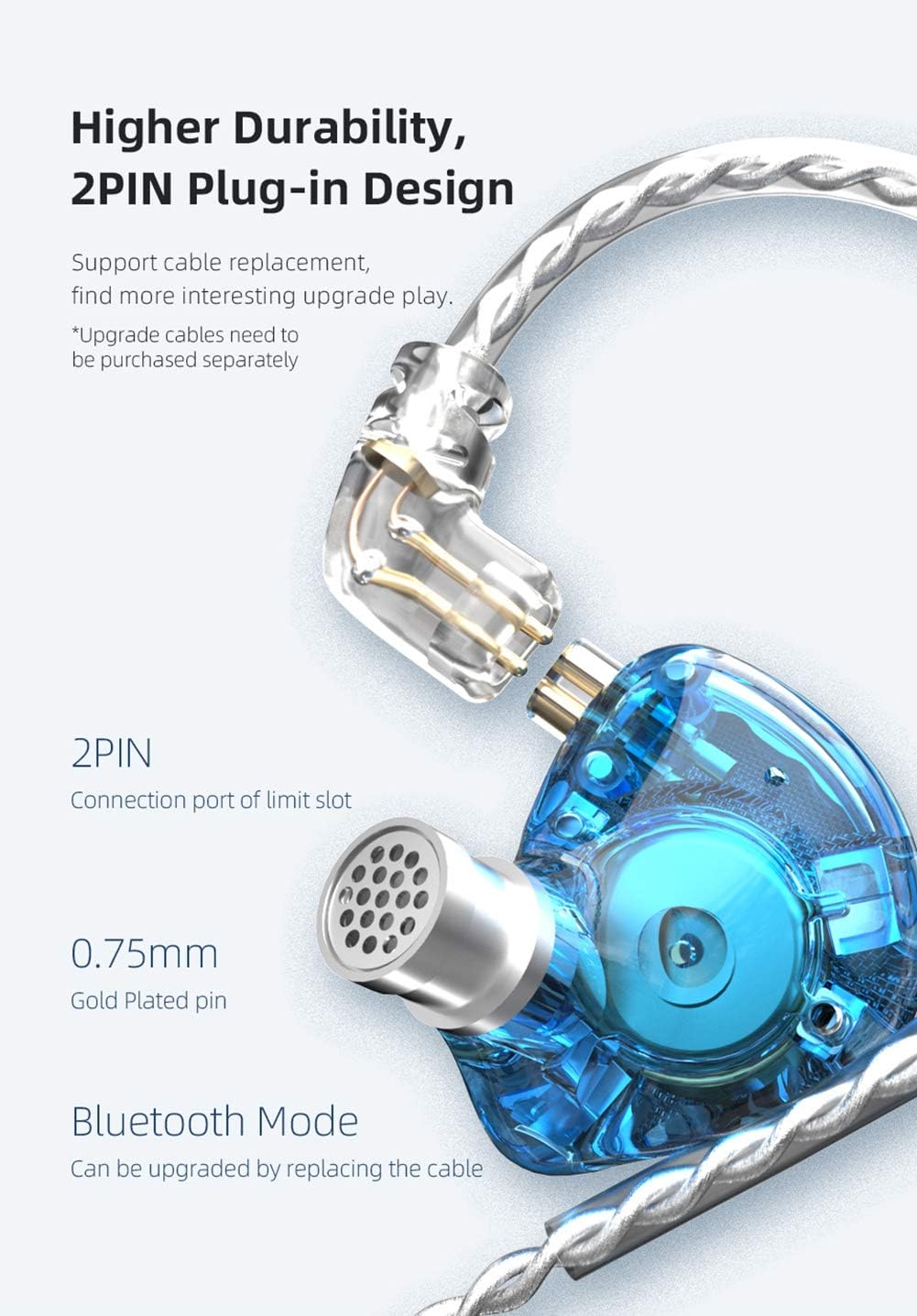
Слика 2: Детаљно view of the 2PIN detachable cable connection.
2.2 Choosing Ear Tips
The KZ Zax comes with various ear tip sizes to ensure optimal comfort and sound isolation. Experiment with different sizes to find the best fit for your ears. A proper seal is crucial for achieving the intended sound quality and bass response.
2.3 Proper Wearing
The KZ Zax features an ear-hook design for secure and comfortable wear. Gently loop the cable over your ear, positioning the earpiece snugly into your ear canal. The pre-formed ear hooks help keep the earphones in place during movement, reducing microphonics and ensuring a stable fit.

Figure 3: Proper wearing of the KZ Zax In-Ear Monitors.
3. Упутство за употребу
3.1 Аудио репродукција
Connect the 3.5mm plug of the cable to your audio source (e.g., smartphone, digital audio player, computer). Ensure the volume is set to a low level before playing audio to prevent sudden loud sounds.
3.2 Media Control (for versions with inline microphone/controls)
Note: This specific product variant is without a microphone. The following instructions apply to KZ Zax models equipped with an inline microphone and media controls.
- Пусти/паузирај: Short press the control button once.
- Следећа песма: Двапут кликните на контролно дугме.
- Претходна песма: Triple-click the control button.
- Одговори/прекини позив: Short press the control button once during an incoming call or active call.
- Одбиј позив: Long press the control button during an incoming call.

Figure 4: Inline microphone and control button (if applicable).
3.3 Bluetooth Upgrade (Optional)
The detachable cable system allows for an optional upgrade to a Bluetooth module (sold separately). This enables wireless connectivity, offering greater freedom of movement. Refer to the Bluetooth module's specific instructions for pairing and operation.
4. Одржавање
4.1 Чишћење
- Редовно чистите врхове ушију меком,amp cloth to remove earwax and debris. Ensure ear tips are completely dry before reattaching.
- Wipe the earpiece shells and cable with a dry, soft cloth. Avoid using harsh chemicals or abrasive materials.
- Ensure the nozzle of the earpiece is clear of any obstructions.
4.2 Складиштење
When not in use, store your KZ Zax monitors in a clean, dry place, preferably in a protective case, to prevent tangling and damage.
КСНУМКС. Решавање проблема
- Нема звука:
- Check if the 3.5mm plug is fully inserted into the audio source.
- Ensure the detachable cables are securely connected to the earpieces.
- Verify the audio source's volume is turned up and not muted.
- Тестирајте са другим аудио извором или каблом да бисте изоловали проблем.
- Poor Sound Quality / Lack of Bass:
- Ensure the ear tips create a proper seal in your ear canal. Try different sized ear tips.
- Check for any obstructions in the earpiece nozzles.
- Проверите звук file квалитета.
- Испрекидан звук:
- Check for loose connections at both the earpiece and audio source ends.
- Прегледајте кабл за видљива оштећења.
6. Спецификације
| Феатуре | Спецификација |
|---|---|
| Бранд | KZ (erjigo) |
| Модел | ZAX |
| Погон | 7 Balanced Armature (BA) + 1 Dynamic Driver (DD) |
| Динамички возач | 10mm PEK Spring Diaphragm |
| Повезивање | Wired (Detachable 0.75mm 2PIN cable) |
| Плуг Типе | 3.5мм |
| Осетљивост | 113дБ/мВ |
| Импеданса | 24Ω |
| Фреквенцијски опсег | 10Хз-40кХз |
| Тежина | 27±3g (0.95 oz) |
| Цабле Ленгтх | 125±5cm (49.2±2 inches) |
| Микрофон | Optional (This variant is Without Mic) |
| Материјал | Бакар, Метал |
| Контрола буке | Звучна изолација |
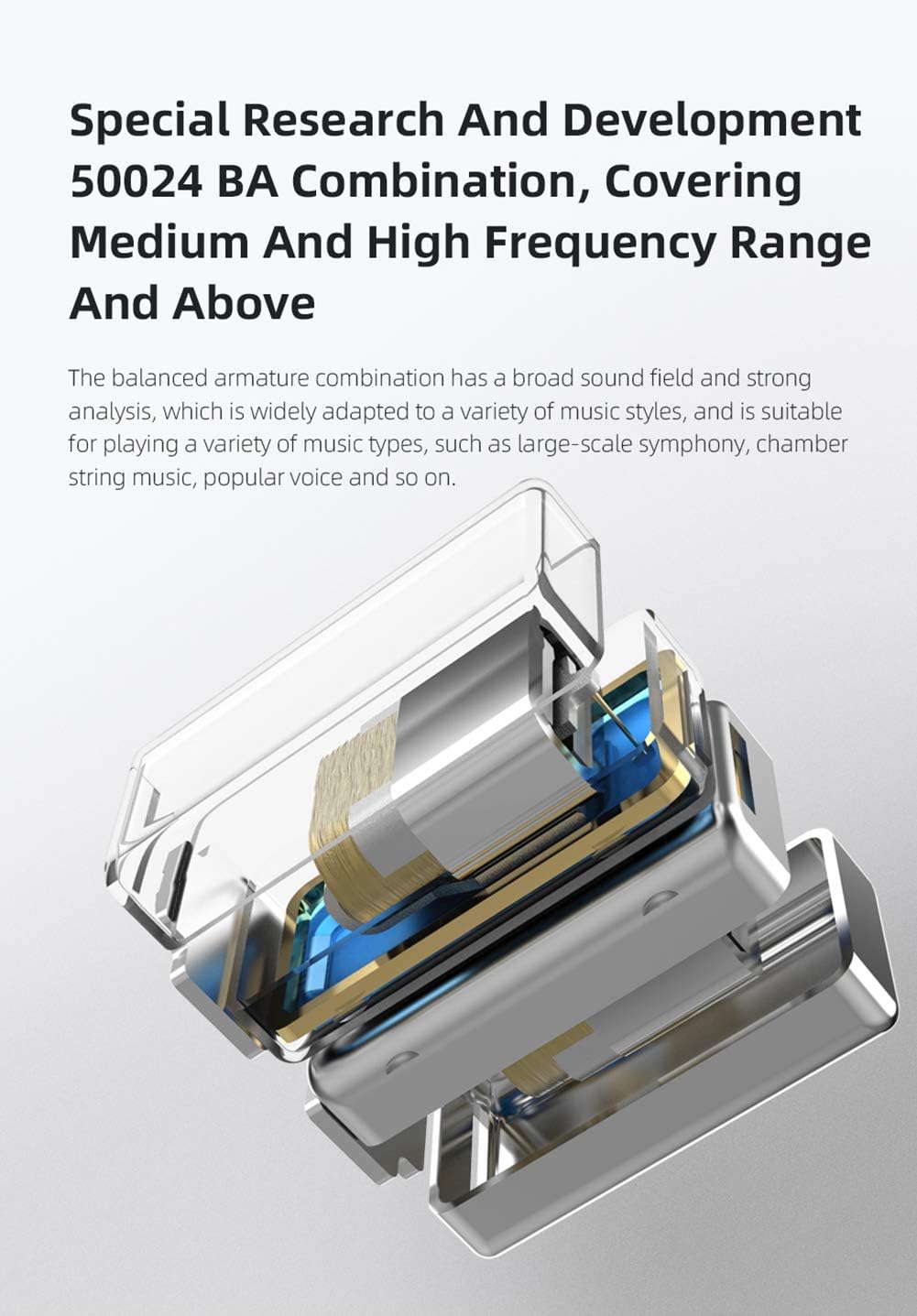
Figure 5: Internal structure showcasing the 7BA+1DD hybrid drivers.
7. Званични видео снимци производа
KZ Zax In-Ear Monitors Earphones - Overview
Овај видео пружа општи прегледview of the KZ Zax In-Ear Monitors, highlighting their design and key features.
KZ Zax In-Ear Monitors Earphones - Features
This video details the specific features and benefits of the KZ Zax In-Ear Monitors, including their hybrid driver configuration and detachable cable system.
8. Гаранција и подршка
The KZ Zax In-Ear Monitors come with a 1-year manufacturer's warranty. For any issues or support inquiries, please contact the seller or manufacturer directly. Keep your purchase receipt as proof of purchase for warranty claims.