
Увод
Хвала вам на куповиниasing the Hori Fighting Stick Mini for Nintendo Switch. This compact arcade stick is designed to enhance your gaming experience for arcade classics and fighting games on the Nintendo Switch. Please read this manual thoroughly to ensure proper setup and operation.
Садржај пакета
- Hori Fighting Stick Mini (NSW-149A)
- Упутство за употребу (овај документ)
Please ensure all items are present before proceeding with setup. If any items are missing or damaged, please contact your retailer.
Карактеристике производа
- Compatible with Arcade and Fighting Games
- Компактан, лаган и преносив дизајн
- Classic button layout for authentic arcade feel
- Includes Home, Capture, and Plus/Minus buttons for full Nintendo Switch functionality
Упутства за подешавање
Повезивање са Нинтендо Свитчем
- Уверите се да је ваша Nintendo Switch конзола укључена и ажурирана на најновији системски софтвер.
- Locate an available USB port on your Nintendo Switch dock. If playing in handheld mode, you may need a USB-C to USB-A adapter (not included) to connect directly to the console's USB-C port.
- Plug the USB cable from the Hori Fighting Stick Mini into the USB port on the Nintendo Switch dock or console.
- The Fighting Stick Mini should be automatically recognized by your Nintendo Switch. You may need to navigate to the "Controllers" menu on your Switch to confirm it is connected.
- Once connected, you can begin playing compatible games.
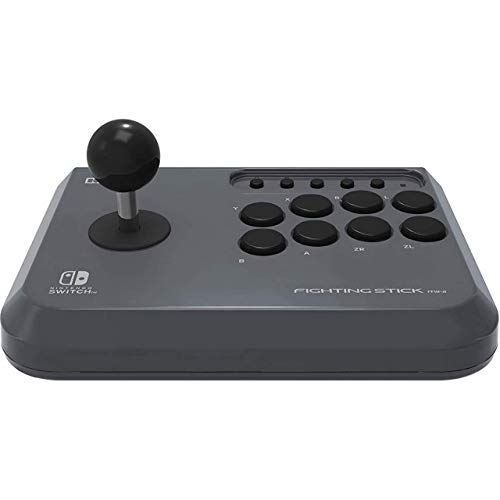
Image: The Hori Fighting Stick Mini NSW-149A shown in its retail packaging. The device features a joystick on the left and multiple action buttons on the right, designed for arcade-style gameplay on the Nintendo Switch.
Упутство за употребу
Основне контроле
- Јоистицк: Use the joystick for directional input in games.
- Акциона дугмад: The array of buttons on the right corresponds to various in-game actions (e.g., attack, jump, special moves). Refer to your game's control settings for specific assignments.
- Хоме дугме: Press to return to the Nintendo Switch HOME Menu.
- Дугме за снимање: Press to take a screenshot of your current game screen. Hold to record video clips (if supported by the game).
- Дугмад Плус (+) / Минус (-): These function as the Start/Pause and Select buttons, respectively, in many games.
Компатибилност игара
The Hori Fighting Stick Mini is designed for games that benefit from arcade-style controls, particularly fighting games and classic arcade titles. Compatibility may vary by game. Ensure the game supports Pro Controller input for optimal performance with this device.
Одржавање и њега
- Чишћење: Use a soft, dry cloth to wipe the surface of the Fighting Stick Mini. Do not use liquid cleaners, solvents, or abrasive materials, as these can damage the finish or internal components.
- Складиштење: Уређај чувајте на хладном и сувом месту, даље од директне сунчеве светлости и екстремних температура.
- Руковање: Avoid dropping the device or subjecting it to strong impacts. Do not pull on the USB cable forcefully.
Решавање проблема
- Problem: The Fighting Stick Mini is not recognized by the Nintendo Switch.
- решење:
- Ensure the USB cable is securely plugged into both the Fighting Stick Mini and the Nintendo Switch dock/console.
- Try plugging the Fighting Stick Mini into a different USB port on the dock.
- Поново покрените конзолу Нинтендо Свитч.
- Ensure your Nintendo Switch system software is up to date.
- Problem: Buttons or joystick are unresponsive.
- решење:
- Verify the device is properly connected as described in the Setup section.
- Test the Fighting Stick Mini with a different compatible game to rule out game-specific issues.
- Ensure no debris is obstructing the buttons or joystick.
- Problem: The device feels loose or makes unusual noises.
- решење:
Discontinue use immediately and contact customer support. Do not attempt to open or repair the device yourself, as this may void any applicable warranty.
Спецификације
| Назив модела | Фигхтинг Стицк Мини |
| Број модела | NSW-149A |
| Бранд | Хори |
| Компатибилни уређаји | Нинтендо Свитцх |
| Технологија повезивања | УСБ (жични) |
| Тип контролера | Јоистицк |
| Хардверска платформа | Нинтендо Свитцх |
| Димензије артикла (Д к Ш к В) | 23 к 18 к 10 цм |
| Тежина артикла | 2.78 килограма |
| Боја | Црно |
Напомена: Спецификације се могу променити без најаве.
Корисничка подршка
For further assistance, technical support, or inquiries regarding warranty information, please contact your retailer or visit the official Hori website for your region. Do not attempt to repair the device yourself.
Политика враћања: Please refer to the returns policy of your purchase retailer for details regarding product returns or exchanges.