
1. Увод
Thank you for choosing Senso Wireless Earbuds. These True Wireless Stereo (TWS) earphones are designed for an active lifestyle, featuring a secure fit, high-quality audio, and sweatproof construction. This manual will guide you through the setup, operation, and maintenance of your new earbuds.
2. Шта је у кутији
- Senso Wireless Earbuds (Left and Right)
- Преносива торбица за пуњење
- УСБ кабл за пуњење
- Упутство за употребу
- Више величина врхова за уши
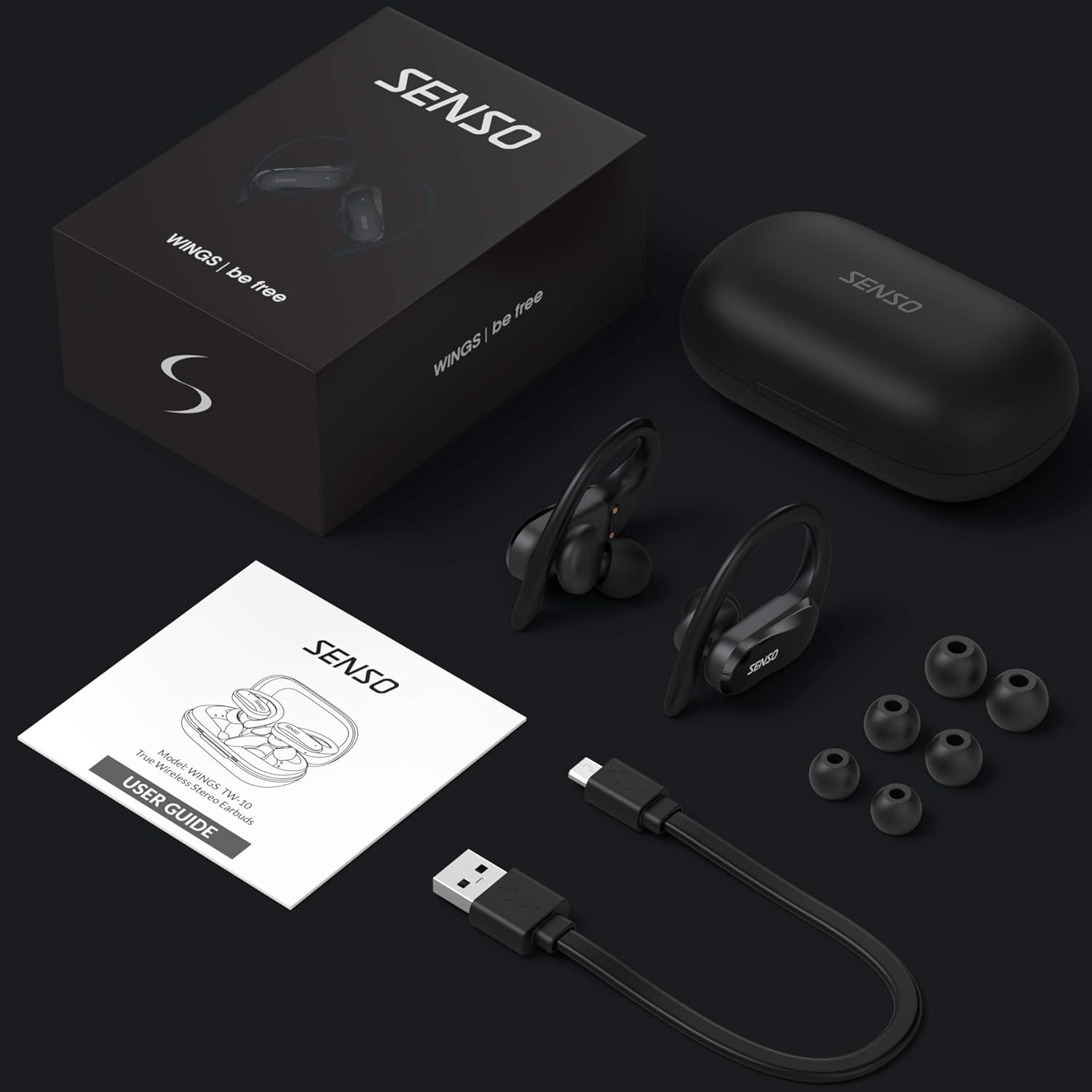
Image: The Senso Wireless Earbuds packaging, displaying the earbuds, charging case, user guide, USB charging cable, and various ear tip sizes.
3. Производ је готовview
The Senso Wings TW10 earbuds are designed for comfort and performance, featuring advanced audio technology and a durable build.

Слика: Експлодирана view of the earbud, illustrating the 13mm dynamic driver responsible for delivering premium sound quality with intense bass and dynamic range.

Слика: Детаљна view of the earbud's internal circuitry, emphasizing the Bluetooth 5.0 chipset and CVC 8.0 Noise Cancellation Technology for stable connection and clear audio.

Image: Two scenarios demonstrating the earbuds' versatility: one earbud in use for mono mode (e.g., driving) and both earbuds for dual mode (e.g., binaural calls).

Image: The earbuds are shown resisting water splashes, indicating their IPX6 waterproof rating, suitable for sweat, water, and rain.
4. Подешавање
4.1 Пуњење слушалица и футроле
Before first use, fully charge the earbuds and the charging case. Place the earbuds into the charging case. Connect the USB charging cable to the case and a power source. The indicator lights on the case will show the charging status.
4.2 Почетно упаривање
- Уверите се да су вам слушалице напуњене.
- Отворите кућиште за пуњење. Слушалице ће се аутоматски укључити и ући у режим упаривања.
- На свом уређају (паметном телефону, таблету итд.) омогућите Блутут.
- Тражи available Bluetooth devices and select "SENSO Wings TW10" from the list.
- Када се повежете, чућете звучни сигнал, а индикаторска светла слушалица ће се променити.

Image: The earbuds are shown connecting to a smartphone, demonstrating the simple and fast pairing process upon removal from the charging case.
Video: An official product video demonstrating the features and setup of the Senso WINGS Ultra Durable Premium Audio Wireless Earbuds.
5. Упутство за употребу
5.1 Ношење слушалица
Place the earbuds in your ears and adjust the ear hooks for a secure and comfortable fit. The 60-degree twist lock system ensures they stay in place during physical activity.

Image: A user demonstrating the secure fit of the earbuds with the 60-degree twist lock system, ideal for sports and exercise.
5.2 Основне контроле
The earbuds feature touch-sensitive controls for media playback and call management. Refer to the detailed user guide included in the box for specific touch commands for functions such as play/pause, skip track, answer/end call, and voice assistant activation.
5.3 Mono or Dual Mode
You can use either earbud independently (mono mode) or both together (dual mode) for a stereo audio experience. This flexibility allows for awareness of your surroundings when needed.
5.4 Функције позива
Each earbud is equipped with a microphone, enabling binaural calls for clear communication. Use the touch controls to answer, end, or reject calls.
6. Одржавање
6.1 Чишћење
- Редовно чистите слушалице и кућиште за пуњење меком, сувом крпом која не оставља влакна.
- Уклоните врхове за уши и очистите их благим сапуном и водом, а затим их добро осушите пре него што их поново ставите.
- Избегавајте употребу абразивних средстава за чишћење или растварача.
6.2 Складиштење
- Чувајте слушалице у футроли за пуњење када се не користе да бисте их заштитили и одржали напуњеним.
- Keep the device in a cool, dry place, away from extreme temperatures and direct sunlight.
КСНУМКС. Решавање проблема
7.1 Проблеми са упаривањем
- Уверите се да су обе слушалице потпуно напуњене.
- Искључите Блутут на уређају, а затим га поново укључите.
- Заборавите уређај са ваше Bluetooth листе и покушајте поново да га упарите.
- If only one earbud connects, try resetting the earbuds (refer to the full user guide for specific reset instructions).
7.2 Нема звука или је јачина звука ниска
- Проверите нивое јачине звука и на уређају и на слушалицама.
- Уверите се да су слушалице правилно постављене у ушима.
- Очистите све остатке са звучника и врхова слушалица.
7.3 Проблеми са пуњењем
- Проверите да ли је кабл за пуњење безбедно повезан и са кућиштем и са извором напајања.
- Уверите се да су контакти за пуњење на слушалицама и унутар кућишта чисти и без зачепљења.
- Пробајте други кабл за пуњење или адаптер за напајање.
8. Спецификације
| Феатуре | Детаљ |
|---|---|
| Назив модела | Wings TW10 |
| Технологија повезивања | Блутут 5.0, бежични |
| Бежична комуникациона технологија | Блуетоотх |
| Контрола буке | Активно поништавање буке |
| Ниво отпорности на воду | Водоотпоран (ИПКС6) |
| Трајање батерије (слушалице) | 8 сата |
| Укупно време репродукције (са футролом) | До 30 сати |
| Величина аудио драјвера | 10 милиметара |
| Импеданса | 32 Охмс |
| Тип контроле | Контрола медија |
| Контролни метод | Ремоте |
| Постављање уха | Ин Еар |
| Форм Фацтор | Ин Еар |
| Материјал | Силицоне |
| Тежина артикла | 7 унци |

Image: The earbuds and charging case illustrating the extended playtime: 6 hours for the earbuds and up to 30 hours total with the portable charging case.
9. Гаранција и подршка
Senso offers a standard warranty for its products. Additionally, you may be eligible for an extended warranty.
9.1 Продужена гаранција
To convert to a two-year extended warranty, visit www.sensoshop.com/warranty. This must be claimed within 7 days of receiving your product.
9.2 Корисничка подршка
For any product-related issues or inquiries, please contact Senso customer support. Details can be found on the warranty card included in your product packaging or on the official Senso webсајту.