
1. Увод
Thank you for choosing the LOXJIE D30 Audio DAC and Headphone Amplifier. This device is designed to deliver high-fidelity audio performance, featuring an ES9068AS DAC chip, XMOS for advanced digital audio processing, and support for PCM up to 32bit/768kHz, MQA, and DSD512. It also includes Bluetooth 5.0 with APT-X for wireless connectivity and is JAS Hi-Res certified. This manual provides essential information for setting up, operating, and maintaining your D30 unit.
2. Безбедносна упутства
- Do not disassemble or modify the unit. Unauthorized modifications may result in electric shock or product malfunction.
- Do not expose the unit to water, moisture, or excessive humidity.
- Avoid placing the unit near heat sources, direct sunlight, or in poorly ventilated areas.
- Use only the specified power adapter and cables provided with the unit.
- Осигурајте одговарајућу вентилацију око јединице како бисте спречили прегревање.
- Држите уређај даље од јаких магнетних поља.
- Unplug the power cord during lightning storms or when unused for extended periods.
3. Садржај пакета
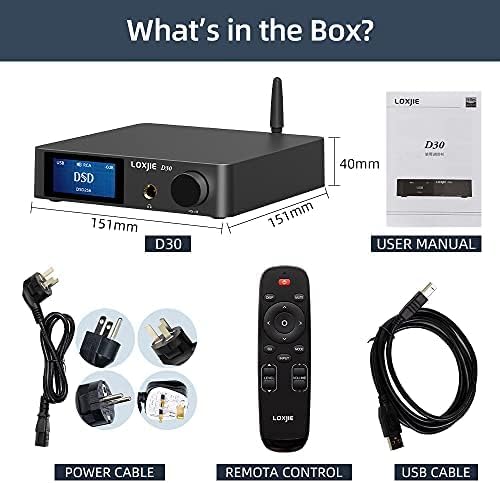
Опис слике: Над главом view of the LOXJIE D30 Audio DAC and Headphone Amplifier package contents. It shows the D30 unit, a user manual, a remote control, a power cable with various international plug adapters, and a USB cable.
- LOXJIE D30 Unit
- Ремоте Цонтрол
- Power Cable with Adapters
- УСБ кабл
- Упутство за употребу
4. Производ је готовview
4.1 Предња плоча

Опис слике: Предњи угао view of the LOXJIE D30 Audio DAC and Headphone Amplifier. The front panel features a digital display showing "USB DSD DSD256", a 6.35mm headphone jack, and a multi-function knob labeled "VOL/MENU". An antenna is visible on the top right.
- Екран: Приказује тренутни улаз, sample rate, volume level, and menu options.
- 6.35 мм излаз за слушалице: За повезивање слушалица.
- Multi-function Knob (VOL/MENU):
- Окрените за подешавање јачине звука.
- Press to enter/exit menu.
- Rotate in menu to navigate options.
- Притисните да потврдите избор.
4.2 Задња плоча
Опис слике: A rear-angle view of the LOXJIE D30 Audio DAC and Headphone Amplifier. The rear panel features various input and output ports including RCA (L/R) inputs, Coaxial input, Optical input, USB input, SW OUT (subwoofer output), RCA (L/R) line outputs, speaker terminals (Right/Left), and a power input with a switch. A Bluetooth antenna is also visible.
- RCA (L/R) Inputs: За аналогне аудио изворе.
- Коаксијални улаз: За дигиталне аудио изворе.
- Оптички улаз: За дигиталне аудио изворе.
- УСБ улаз: For connecting to a computer (PCM 32bit/768kHz, DSD512).
- СВ ОУТ: Subwoofer output.
- RCA (L/R) Line Outputs: За повезивање са екстерним ampлифери или звучници са напајањем.
- Speaker Terminals (Right/Left): За повезивање пасивних звучника.
- Блуетоотх антена: For wireless Bluetooth 5.0 connectivity.
- Power Input & Switch: For connecting the power cable and turning the unit on/off.
5. Подешавање
- Прикључак за напајање: Connect the provided power cable to the D30's power input and then to a wall outlet. Ensure the power switch is in the OFF position before connecting.
- Инсталација антене: Screw the Bluetooth antenna firmly into its connector on the rear panel.
- Веза извора звука:
- УСБ: Connect a USB cable from your computer to the D30's USB input. Install necessary drivers if prompted by your operating system.
- Оптички/коаксијални: Connect your digital audio source (e.g., CD player, TV) to the corresponding Optical or Coaxial input.
- Блуетоотх: Ensure the antenna is connected. Select Bluetooth input on the D30, then pair with your device (see Operating Instructions).
- РЦА улаз: Connect analog audio sources using RCA cables.
- Излазна веза:
- Слушалице: Plug your 6.35mm headphones into the front panel jack.
- Звучници/Ampдизалица: Connect passive speakers to the speaker terminals or an external amplifier/powered speakers to the RCA Line Outputs.
- Субвоофер: Connect a subwoofer to the SW OUT port.
- Укључено: Flip the power switch on the rear panel to the ON position. The display will light up.
6. Упутство за употребу
- Избор улаза: Press the multi-function knob or use the remote control to cycle through available inputs (USB, Optical, Coaxial, Bluetooth, RCA).
- Контрола јачине звука: Rotate the multi-function knob or use the volume buttons on the remote control to adjust the output volume. The volume for headphone and line outputs are independent and will switch automatically when changing output modes.
- Output Mode Switching: The D30 automatically switches between headphone output and line output when headphones are plugged in or removed.
- Блуетоотх упаривање:
- Select Bluetooth input on the D30.
- On your source device (e.g., smartphone), search for Bluetooth devices and select "LOXJIE D30".
- Once paired, the display will show "BT Connected".
- To clear Bluetooth pairing history, navigate to the setup menu and select "BT Clear".
- Menu Navigation (EQ, Treble, Bass, Color):
- Press the multi-function knob to enter the setup menu.
- Rotate the knob to navigate through options like "Output", "EQ", "Treble", "Bass", "Color", etc.
- Press the knob to select an option. Rotate again to adjust the value or setting.
- Press and hold the knob to exit the menu.
- MQA/DSD Playback: The D30 supports MQA full decoding and DSD512 playback via compatible inputs (e.g., USB). Ensure your source software is configured for MQA/DSD output.
7. Одржавање
- Очистите уређај меком, сувом крпом. Не користите абразивна средства за чишћење или раствараче.
- Држите уређај без прашине и прљавштине.
- Уверите се да су сви спојеви сигурни и без корозије.
КСНУМКС. Решавање проблема
| Проблем | Могући узрок | Решење |
|---|---|---|
| Нема струје | Power cable not connected; Power switch off | Check power cable connection; Turn on power switch |
| Нема излаза звука | Incorrect input selected; Volume too low; Output device not connected or faulty | Select correct input; Increase volume; Check connections to headphones/speakers |
| Проблеми са Блуетоотх везом | Device not paired; Out of range; Interference | Ensure D30 is in Bluetooth mode and discoverable; Re-pair device; Move closer to D30; Clear BT history |
| Изобличен звук | Source audio quality; Incorrect sample rate; Cable issues | Check source audio; Verify sample rate settings; Replace cables if necessary |
9. Спецификације
| Феатуре | Детаљ |
|---|---|
| ДАЦ Цхип | ESS ES9068AS |
| УСБ компатибилност | ПЦМ 32бит/768кХз, ДСД512 |
| Подршка за MQA | Full MQA decoding (Optical and Coaxial inputs) |
| Блуетоотх верзија | 5.0 with APT-X HD (up to 24bit/48kHz) |
| Излази | 6.35mm Headphone Jack, RCA Line Out, SW Out, Speaker Terminals |
| ТХД+Н | As low as 0.0001% (-120dB) |
| Тежина артикла | 1.03 килограма (2.26 фунте) |
| Димензије | 10.71 x 9.29 x 3.03 инча (паковање) |
| Извор напајања | AC Power (via adapter) |
| Оутпут Ватtage | 165 Watts (for speaker output) |
10. Гаранција и подршка
LOXJIE products are designed and manufactured to the highest quality standards. For warranty information, technical support, or service inquiries, please refer to the warranty card included in your package or visit the official LOXJIE webсајт. Сачувајте рачун као доказ о куповини.