
1. Увод
This user manual provides comprehensive instructions for the UNIWA E1801 Senior Mobile Phone. Designed with large buttons and a clear display, this phone is ideal for users seeking simplicity and essential communication features. Please read this manual carefully before using your device to ensure proper operation and longevity.
2. Садржај пакета
Након отварања пакета, молимо вас да проверите да ли су укључене све следеће ставке:
- 1 x UNIWA E1801 Mobile Phone
- 1 x BL-5C 800 mAh Battery
- 1 к пуњач
- 1 x Упутство за употребу (овај документ)
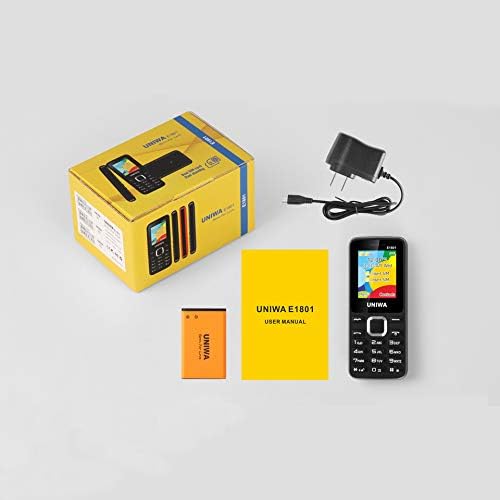
Image: Contents of the UNIWA E1801 package, including the phone, battery, charger, and user manual.
3. Девице Оверview
The UNIWA E1801 features a user-friendly design with large, easy-to-press buttons and a non-slip frame for comfortable handling. It includes an ergonomic keypad with plating navigation keys for intuitive operation.
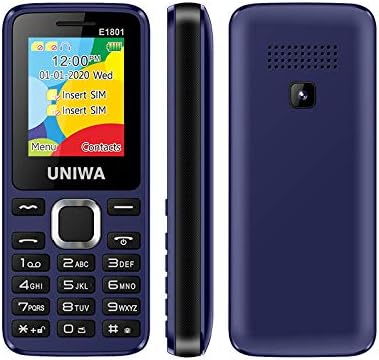
Слика: Предња, бочна и задња страна views of the UNIWA E1801 phone, highlighting its compact design.

Image: Detail showing the non-slip frame of the UNIWA E1801, designed for secure grip.

Image: Close-up of the ergonomic keypad and plating navigation keys on the UNIWA E1801.
4. Подешавање
4.1. Инсталација батерије
- Скините задњу маску телефона тако што ћете је нежно померити из зареза.
- Align the gold contacts of the BL-5C 800 mAh battery with the contacts in the battery compartment.
- Gently press the battery down until it clicks into place.
- Replace the back cover, ensuring it snaps securely.
4.2. Инсталација СИМ картице
The UNIWA E1801 supports Dual SIM cards, allowing for two active phone numbers simultaneously.
- With the back cover removed and battery out (if necessary), locate the SIM card slots.
- Insert your SIM card(s) into the designated slot(s) with the gold contacts facing down and the cut corner aligned correctly.
- Gently push the SIM card until it is fully seated.
- Поново инсталирајте батерију и задњи поклопац.

Image: The dual SIM card slots of the UNIWA E1801, illustrating how SIM cards are inserted.
4.3. Пуњење уређаја
Пре прве употребе, потпуно напуните батерију телефона.
- Connect the charger cable to the charging port on the phone.
- Укључите пуњач у стандардну зидну утичницу.
- Индикатор батерије на екрану ће приказивати статус пуњења.
- Када се потпуно напуни, искључите пуњач.
5. Упутство за употребу
5.1. Укључивање/искључивање
- За укључивање: Press and hold the Power/End Call button until the screen lights up.
- За искључивање: Press and hold the Power/End Call button until the power-off options appear, then confirm.
5.2. Позивање
- Са екрана у стању мировања, унесите број телефона помоћу тастатуре.
- Притисните дугме за позив (обично зелено) да бисте започели позив.
- Да бисте завршили позив, притисните дугме Заврши позив (обично црвено).
5.3. Слање порука
- Navigate to the 'Messages' menu from the main screen.
- Select 'Write Message' or 'New SMS'.
- Унесите своју поруку помоћу тастатуре.
- Унесите број примаоца или га изаберите из контаката.
- Пошаљите поруку.
5.4. Контакти
The phonebook can store up to 300 contacts.
- Додавање контакта: Go to 'Contacts' > 'Add New Contact', then enter the name and number.
- Searching for a Contact: From the 'Contacts' menu, use the navigation keys to scroll or search by name.
5.5. ФМ радио
The UNIWA E1801 features a wireless FM radio, allowing you to listen to your favorite stations without needing headphones as an antenna.
- Идите до апликације „FM радио“ из главног менија.
- Use the navigation keys to scan for available stations or manually tune to a frequency.
- Adjust the volume using the side keys (if available) or navigation keys.

Image: The UNIWA E1801 showcasing its wireless FM radio feature.
5.6. Multimedia (MP3/MP4)
The phone supports MP3 audio and MP4 video playback.
- Ensure you have a TF card (up to 16GB) inserted with your media files.
- Navigate to the 'Multimedia' or 'File Manager' menu.
- Select 'MP3 Player' or 'Video Player' to browse and play your files.

Image: Illustration of the 2030 Box Speaker on the UNIWA E1801, indicating its audio capabilities.
5.7. Камера
The phone is equipped with a 0.08 MP rear camera.
- Из главног менија изаберите „Камера“.
- Кадрирајте снимак користећи екран као viewфиндер
- Press the designated button (usually the center navigation key) to take a photo.
5.8. Лампица
The built-in flashlight can be useful in low-light conditions.
- Refer to your phone's specific shortcut key or menu option to activate/deactivate the flashlight. This is often a long press on a specific number key or a dedicated button.

Image: The UNIWA E1801 demonstrating its integrated flashlight function.
5.9. Остале функције
The UNIWA E1801 includes several utility functions:
- игре: Simple pre-installed games.
- Календар: To keep track of dates and events.
- Будилник: Подесите више аларма.
- Калкулатор: Основне аритметичке функције.
- Свет сат: View time in different time zones.
- Е-књига: Basic text file читалац.
- WAP: Basic internet browsing (requires GPRS data plan).
- Снимач: Voice recording function.
6. Одржавање
- Чишћење: Користите меку, суву крпу за чишћење површине телефона. Избегавајте течна средства за чишћење или абразивне материјале.
- Одржавање батерије: To prolong battery life, avoid extreme temperatures. Do not leave the phone charging for excessively long periods after it is full.
- Складиштење: Ако телефон складиштите дуже време, уверите се да је батерија делимично напуњена (око 50%) и чувајте је на хладном и сувом месту.
КСНУМКС. Решавање проблема
| Проблем | Могући узрок / решење |
|---|---|
| Телефон се не укључује. | Battery is depleted. Charge the phone for at least 30 minutes. Ensure battery is correctly installed. |
| Не могу да упућујем или примам позиве. | No network signal. Move to an area with better reception. SIM card not properly inserted. Reinsert SIM card. |
| Батерија се брзо празни. | Background applications running. Close unused applications. Battery may be old and require replacement. |
| Не чујем позиваоца / Позивалац не чује мене. | Volume too low. Adjust call volume. Microphone/speaker blocked. Ensure no obstructions. |
Ако проблем и даље постоји након што сте испробали ова решења, обратите се корисничкој подршци.
8. Спецификације
| Феатуре | Детаљ |
|---|---|
| Број модела | ECON E1801 |
| Димензије | 108 к 45 к 14 мм |
| Тежина | 68 г |
| ЦПУ | СЦ6531Е |
| Нетворк Банд | 2G: GSM850/900/1800/1900 MHz, GPRS |
| СИМ картица | Dual-SIM, Dual-Standby |
| Капацитет именика | 300 броја |
| Рингтоне | 64 chords, supports MP3, Midi ringtones |
| Спеакер | 2030 Спеакер |
| ФМ Радио | Бежични ФМ радио |
| Екран | 1.77 inch QQVGA Display, 160 x 128 pixels |
| Камера | 0.08 MP Rear Camera, 640 x 480 pixels |
| Мултимедија | МП3, МП4 |
| Меморија | Supports TF cards up to 16 GB max |
| Блуетоотх | В2.1 |
| Вибратор | Да |
| Талк Тиме | До 240 минута |
| Време приправности | До 200 сати |
| Језици | English, Russian, Hebrew, Arabic, French, Spanish, Polish, German, Italian, Portuguese, Chinese |
9. Гаранција и подршка
For warranty information and technical support, please refer to the warranty card included with your product or contact the retailer where you purchased the UNIWA E1801. You may also visit the official UNIWA webсајт за додатну помоћ и ажуриране информације о подршци.