
UNIWA E1801
UNIWA E1801 Senior Mobile Phone User Manual
Модел: Е1801
1. Увод
The UNIWA E1801 is a user-friendly mobile phone designed with large buttons and a clear display, making it ideal for seniors. It features essential functions such as calling, messaging, FM radio, MP3/MP4 playback, and a built-in flashlight. This manual provides comprehensive instructions for setting up, operating, and maintaining your device.
2. Безбедносне информације
- Немојте растављати или модификовати уређај.
- Use only original or approved batteries and chargers.
- Избегавајте излагање телефона екстремним температурама, директној сунчевој светлости или влази.
- Keep the phone away from medical devices to prevent interference.
- Одложите телефон и батерију одговорно у складу са локалним прописима.
3. Садржај пакета
Молимо вас да проверите садржај пакета након распакивања. Ако неке ставке недостају или су оштећене, обратите се продавцу.
- UNIWA E1801 Mobile Phone
- BL-5C 800mAh Battery
- пуњач
- Кориснички приручник (овај документ)
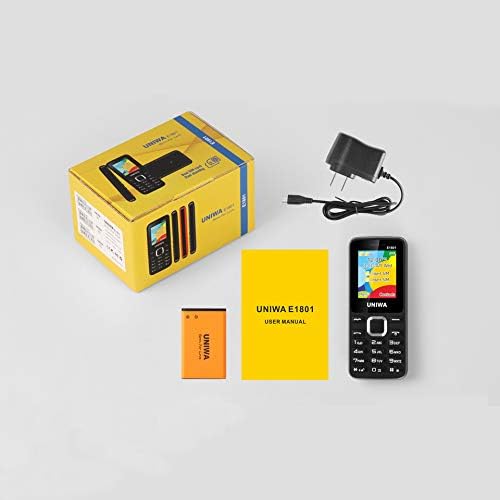
Image: Contents of the UNIWA E1801 package, showing the phone, battery, charger, and user manual neatly arranged next to the product box.
4. Производ је готовview
Familiarize yourself with the physical components of your UNIWA E1801 phone.

Image: The UNIWA E1801 mobile phone held in a hand, showcasing its compact size, large keypad, and clear color display with the UNIWA logo.
- Приказ: 1.77-inch QQVGA screen (160 x 128 pixels) for clear visibility.
- Тастатура: Large, ergonomic buttons with clear numbering for easy dialing and navigation.
- Тастери за навигацију: Plated navigation keys for intuitive menu control.
- Задња камера: 0.08 MP camera for basic photo capture.
- говорник: Integrated 2030 box speaker for loud and clear audio.
- Лампа: Built-in LED flashlight for convenience.
- Non-slip Frame: Textured frame design for a secure grip.

Слика: Крупни план view of the UNIWA E1801's keypad, highlighting the ergonomic design and the metallic finish of the central navigation keys.

Image: The UNIWA E1801 phone with an inset showing the detailed texture of its non-slip frame, designed for a secure grip.

Image: The rear of the UNIWA E1801 phone, with an overlay illustrating the powerful 2030 box speaker and its sound projection.
5. Подешавање
5.1. Installing SIM Cards
The UNIWA E1801 supports dual SIM cards, allowing you to use two different numbers simultaneously.
- Уклоните задњу маску телефона.
- Пронађите слотове за СИМ картице.
- Carefully insert your SIM cards into the designated slots with the gold contacts facing down.
- Ensure the SIM cards are securely seated.

Image: The back of the UNIWA E1801 phone with the cover removed, clearly showing the two SIM card slots and an illustration of two SIM cards.
5.2. Инсталирање батерије
- After inserting the SIM cards, place the BL-5C 800mAh battery into the battery compartment, aligning the gold contacts.
- Gently press down until the battery is securely in place.
- Вратите задњи поклопац, водећи рачуна да кликне на место.
5.3. Пуњење телефона
Пре прве употребе, потпуно напуните батерију телефона.
- Connect the charger to the charging port on the phone.
- Укључите пуњач у утичницу.
- Индикатор батерије на екрану ће приказивати статус пуњења.
- Када се потпуно напуни, искључите пуњач.
6. Упутство за употребу
6.1. Укључивање/искључивање
- За укључивање: Press and hold the Power/End Call button until the screen lights up.
- За искључивање: Press and hold the Power/End Call button until the power off options appear, then select "Power off".
6.2. Позивање
- Са екрана у стању мировања, унесите број телефона помоћу тастатуре.
- Притисните зелено дугме за позив да бисте започели позив.
- Да бисте завршили позив, притисните црвено дугме за прекид позива.
6.3. Слање порука
- Идите на „Мени“ > „Поруке“ > „Напиши поруку“.
- Унесите своју поруку помоћу тастатуре.
- Унесите број телефона примаоца или га изаберите из контаката.
- Притисните „Пошаљи“.
6.4. Коришћење FM радија
The phone features a wireless FM radio.
- Идите на „Мени“ > „ФМ радио“.
- Select "Auto search" to find available stations.
- Користите тастере за навигацију да бисте се пребацивали између станица.

Image: The UNIWA E1801 phone displaying its FM radio interface, showing a frequency of 142.2 MHz, with musical notes and a classic radio in the background, indicating its wireless FM capability.
6.5. Коришћење лампе
The built-in flashlight can be easily activated.
- Typically, a dedicated button or a long press on a specific key (refer to your phone's quick guide) activates the flashlight.
- Alternatively, access it via "Menu" > "Tools" > "Flashlight".

Image: The UNIWA E1801 phone with a bright beam of light emanating from its top, illustrating the built-in flashlight function.
6.6. Остале карактеристике
- MP3/MP4 Playback: Supports multimedia playback. Transfer files to a TF card (up to 16GB, not included) and access them via the "Multimedia" menu.
- Телефонски именик: Store up to 300 contacts.
- Алати: Includes games, calendar, alarm clock, calculator, world clock, and recorder.
7. Одржавање
- Чишћење: Користите меку, суву крпу за чишћење површине телефона. Не користите течна средства за чишћење или аеросоле.
- Складиштење: Чувајте телефон на хладном и сувом месту, даље од директне сунчеве светлости и екстремних температура.
- Одржавање батерије: Avoid fully discharging the battery frequently. Charge it regularly to prolong its lifespan.
КСНУМКС. Решавање проблема
| Проблем | Могући узрок | Решење |
|---|---|---|
| Телефон се не укључује. | Батерија је празна или није правилно постављена. | Напуните батерију. Уверите се да је батерија правилно уметнута. |
| Не могу да упућујем или примам позиве. | Нема СИМ картице, СИМ картица није правилно уметнута или нема мрежног сигнала. | Ensure SIM card is inserted. Check network signal strength. Contact your service provider. |
| Лош квалитет звука. | Low volume, poor network signal, or speaker/microphone obstruction. | Adjust volume. Move to an area with better signal. Clean speaker/microphone openings. |
| Батерија се брзо празни. | Честа употреба, апликације у позадини или стара батерија. | Смањите осветљеност екрана. Затворите апликације које не користите. Размислите о замени батерије ако је стара. |
9. Спецификације
| Феатуре | Детаљ |
|---|---|
| Број модела | Е1801 |
| Димензије | 108 к 45 к 14 мм |
| Тежина | 68 г |
| ЦПУ | СЦ6531Е |
| Нетворк Банд | 2G: GSM850/900/1800/1900 MHz, GPRS |
| СИМ картица | Dual SIM, Dual Standby |
| Капацитет именика | 300 уноса |
| Дисплаи | 1.77 inch QQVGA, 160 x 128 pixels |
| Камера | 0.08 MP Rear Camera, 640 x 480 pixels |
| Мултимедија | МП3, МП4 |
| Меморија | Supports TF card up to 16 GB (max) |
| Блуетоотх | В2.1 |
| Батерија | БЛ-5Ц 800мАх |
| Талк Тиме | До 240 минута |
| Време приправности | До 200 сати |
| Језици | English, Russian, Hebrew, Arabic, French, Spanish, Polish, German, Italian, Portuguese, Chinese |
| Карактеристике | Games, Calendar, Alarm Clock, Calculator, World Clock, Flashlight, E-book, WAP, Recorder |
10. Гаранција и подршка
Your UNIWA E1801 mobile phone comes with a standard manufacturer's warranty. Please refer to the warranty card included in your package for specific terms and conditions.
For technical support, troubleshooting assistance, or warranty claims, please contact your point of purchase or the official UNIWA customer service. Keep your purchase receipt as proof of purchase.
For more information, visit the official UNIWA webсајт или контактирајте њихове канале за подршку.
Ask a question about this manual
Ask about setup, troubleshooting, compatibility, parts, safety, or missing instructions. Manuals+ will review the question and use this page’s manual context to help answer it.