
Увод
The UMAX Air Mouse M1 is a versatile wireless controller designed to enhance your interaction with various devices. Featuring a built-in gyroscope for precise air mouse functionality, a full QWERTY keyboard for easy text input, and voice control capabilities, it offers a comprehensive solution for navigation and command. Its ergonomic design ensures comfortable handling, and the integrated Li-Ion battery provides extended usage time. This manual will guide you through the setup, operation, and maintenance of your Air Mouse M1.

Слика 1: Предња страна view of the UMAX Air Mouse M1, showing the directional pad, OK button, volume controls, and voice button.
Садржај пакета
Молимо вас да се уверите да су све ставке присутне у пакету:
- UMAX Air Mouse M1
- УСБ пријемник
- Кабл за пуњење
- Кориснички приручник (овај документ)
Сетуп
1. Пуњење уређаја
The UMAX Air Mouse M1 comes with a built-in Li-Ion battery. Before first use, it is recommended to fully charge the device. Connect the charging cable to the charging port on the Air Mouse and the other end to a standard USB power source (e.g., computer USB port, USB wall adapter).
2. Повезивање USB пријемника
The Air Mouse M1 connects wirelessly via a USB receiver. Locate the USB receiver, typically stored within the battery compartment or a dedicated slot on the device itself. Insert the USB receiver into an available USB port on your target device (e.g., Smart TV, PC, Android TV Box).
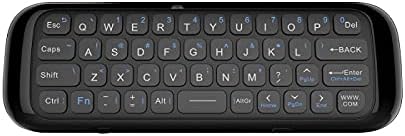
Слика 2: Позади view of the UMAX Air Mouse M1, showing the full QWERTY keyboard.
3. Почетно упаривање (аутоматско)
Once the USB receiver is plugged in, the Air Mouse M1 should automatically pair with your device. No manual pairing steps are typically required. The device should be ready for use within a few seconds.
Упутство за употребу
1. Функција ваздушног миша
The Air Mouse M1 utilizes a gyroscope for cursor control. Hold the remote in your hand and move your wrist to control the on-screen cursor. The cursor will follow your hand movements. Press the OK button to click.
2. Keyboard Input
Flip the Air Mouse M1 over to access the full QWERTY keyboard. Use the keys to type text as you would on a standard keyboard.
3. Управљање гласом
Притисните и држите наменско Глас button (often indicated by a microphone icon) to activate voice input. Speak clearly into the microphone located on the device. Release the button when you have finished speaking. This feature requires compatible software or operating system support on your connected device.
4. Функције дугмета
- Дугме за напајање: Turns the device on/off or puts it into sleep mode.
- Дугме ОК: Confirms selection, acts as left-click.
- Тастер за смер: Навигација кроз меније и изборе.
- Volume Buttons (V+/V-): Подешава јачину звука.
- Хоме дугме: Враћа се на почетни екран повезаног уређаја.
- Дугме за назад: Navigates back in menus or applications.
- Дугме менија: Отвара контекстуалне меније.
Одржавање
1. Брига о батерији
The UMAX Air Mouse M1 is equipped with a rechargeable Li-Ion battery. To prolong battery life:
- Избегавајте често потпуно пражњење батерије.
- Charge the device when the low battery indicator appears.
- Уређај чувајте на хладном и сувом месту ако се не користи дуже време.
2. Чишћење
За чишћење уређаја користите меку, суву крпу. За тврдокорну прљавштину, благоamp cloth can be used, but ensure no moisture enters the device's ports or openings. Do not use harsh chemicals or abrasive cleaners.
Решавање проблема
| Проблем | Могући узрок | Решење |
|---|---|---|
| Уређај не реагује | Low battery; USB receiver not connected; Device not paired. | Charge the device; Ensure USB receiver is securely plugged in; Re-insert USB receiver to re-establish connection. |
| Курсор је неправилан или се не креће глатко | Interference; Low battery. | Move closer to the USB receiver; Ensure no strong electromagnetic interference; Charge the device. |
| Тастатура не куца | Device in air mouse mode; Low battery. | Ensure the device is flipped to the keyboard side; Charge the device. |
| Гласовна контрола не ради | Microphone blocked; No internet connection on host device; Host device does not support voice input. | Ensure microphone is clear; Check host device's internet connection; Verify host device's compatibility with voice input. |
Спецификације
- Модел: UMAX Air Mouse M1 (laishutin)
- Технологија детекције покрета: Жироскопска стабилизација
- Повезивање: Бежични (УСБ пријемник)
- батерија: 1 литијум-јонска батерија (укључена)
- Боја: Оранге (Note: Product images show a black device, but specifications list 'Orange'.)
- Тежина артикла: 7 унци (0.2 килограма)
- Димензије пакета: 7.09 к 3.94 к 0.79 инча
- Компатибилни оперативни системи: Android, Windows, Linux
Подршка и гаранција
For technical support or inquiries regarding your UMAX Air Mouse M1, please refer to the official UMAX website or contact their customer service. Specific warranty details may vary by region and retailer. Please retain your proof of purchase for warranty claims.
За више информација посетите: UMAX Official Webсајту